testsprite-cli: exit 1 means a test failed, exit 14 means upgrade
Official TestSprite CLI — AI-powered automated testing from your terminal
At a glance
- What is it?
- The TestSprite CLI is a client for a hosted testing platform, aimed at coding agents rather than humans: you describe a behaviour in plain language, the tool drives your live application, and a failure comes back as one bundle an agent can act on. What the readme does unusually well is publish its own exit codes, its network behaviour and the staleness of its own examples.
- Who is it for?
- testsprite-cli fits a team shipping an application through a coding agent and wanting that agent to prove its own work against something real rather than a mock. Two things to weigh first.
- Can I use it commercially?
- Yes. Apache-2.0 is a permissive licence: you can use, modify and sell software built on it, as long as you keep its copyright and licence notices.
- Is it still maintained?
- Yes. The repository last received commits 4 days ago.
- What is it written in?
- Mainly TypeScript, according to GitHub's language statistics.
Answers come from the project's GitHub data, last synced on November 15, 2026, and from our analysis. They are not legal advice.
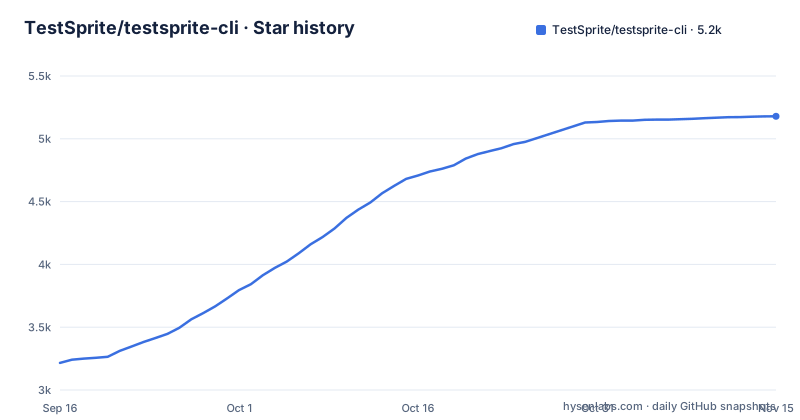
Star history
- TestSprite/testsprite-cli5,179 ★ · +1,963
| Repository | 2026-09-16 | 2026-11-15 |
|---|---|---|
| TestSprite/testsprite-cli | 3.2k | 5.2k |
1,963 Stars in the last 60 days, measured from the daily GitHub snapshot. Compare with other projects
Editorial analysis
The pitch is verification, not more tests
The positioning line is the whole argument: this is the verification layer for the era of agents that write code.
The mechanism is described in the second sentence. The tool opens your live application, uses it the way a person would, and shows the coding agent exactly what broke, so the agent can fix its own work before a bug reaches you. The readme's framing is that generating code got fast and verifying it did not, and this is the missing half.
Then the section that defines the scope. The platform is described as a hosted service used by a large number of teams to test software, front ends and back ends, in the cloud, against the live product rather than mocks. This repository is its official command line client.
That last sentence matters for what follows. The CLI is not the engine; it is a client for a hosted service, and it requires an API key from that service's dashboard. What is open here is the client, the skill it installs, and the schema its plan files validate against.
The other design choice worth naming is that a failure comes back as one self-consistent bundle, and the readme is explicit about the alternative it rejects: scraping a dashboard. That constraint is what makes the output something an agent can read without a browser.
The exit codes are the contract a pipeline reads
There is a three-command loop in the readme, and each command's exit status is written next to it.
The whole loop is three commands:
# 1 — describe the behavior you want to guarantee, run it, wait
testsprite test create --project proj_8f0f6 --type frontend \
  --plan-from ./checkout-flow.plan.json --run --wait --output json
#   → exits 1: the run failed

# 2 — pull ONE self-consistent failure bundle
testsprite test failure get test_3a9f21c7 --out ./.testsprite/failure

# 3 — the agent reads the bundle, fixes the code, then replays
testsprite test run test_3a9f21c7 --wait --output json
#   → exits 0: passed. The test now lives in your durable suite.
The first command describes the behaviour you want guaranteed, creates the test from a plan file, runs it and waits for the result, and the comment beside it says it exits 1 when the run failed.
The second command pulls a single failure bundle for that test into a directory in your project.
The third command reruns the test after the agent has read the bundle and fixed the code, and it exits 0 when it passes. The comment adds the sentence that explains why the loop is worth running twice: the test now lives in your durable suite.
So there are two documented failure modes in the loop itself. A failing test is exit 1, which is the ordinary signal a pipeline already knows how to read. And then, in the privacy note further up, a third: a client older than the minimum version the backend advertises prints a one-line upgrade advisory on standard error and may be rejected outright with exit 14, and that exit code is given a name.
A named exit code for a too-old client is a small thing that says a lot. It means the service can change its floor under you without turning into an unexplained failure.
The plan file is plain language, and the readme warns about its own age
A test is described in a JSON file written in prose, and no browser automation code is required to write one.
The example has a schema reference, a project identifier, a type, a name written as a sentence about the behaviour, and a list of steps. Each step is either an action or an assertion, and both carry a description in plain language: navigate to a login page and submit the form with an empty password, then verify an inline error says the password is required.
Two things protect you from drift. The skeleton is produced by a template command, and the readme tells you to run that command rather than copying the snippet, precisely because a copied snippet can drift from the version you have installed. The command's output is byte-identical to what is documented, and it is also embedded in the help text of the create command, so you can get it either way.
And then there is a note that is worth more than most projects publish. The schema reference in the documented example is pinned to the version that generated the document, which is v0.4.0, while the current release is v0.16.0, while the live template always pins to your installed version, which is the one that actually resolves. It says so in as many words, and tells you that if you are reading a later release you should run the command rather than trust the snippet.
That is a documentation practice worth copying: warn the reader that your own example is old, and say which command is authoritative.
setup installs a skill for up to eight agents and shows you the list
One command wires an agent into this loop, and the logic behind it is specified rather than guessed.
The setup command prompts for your API key, verifies it, and installs what the readme calls the verification-loop skill into the coding agents it recognises. It supports eight named targets, and the readme lists them: one agent, a second agent, and six more including a command-line coding assistant and a codex target.
Because each agent keeps its configuration in a different place, setup has to work out which one you are using. It uses two signals: an agent that identifies itself when it calls the command, plus every agent whose configuration is already present in the project. Then it installs for all of the ones it found and prints what it found.
In a terminal it shows you that list before writing anything, so you can accept it or narrow it. If nothing identifies an agent at all, it falls back to installing for one specific agent and says so, and that is the case the readme tells you to override with an explicit target flag.
There is also a status command for checking the result later. For a tool that writes files into other tools' configuration directories, printing the list first and providing a status check is the difference between a convenience and a surprise.
It checks the package registry once a day, and says so
There is a privacy note in the quickstart, and it is specific enough to be useful.
Interactive runs check the npm registry at most once every twenty-four hours, in order to offer a new-version notice. What is sent is the package name. The note says never your key and never your data, and it gives an environment variable that disables the check entirely.
The same note describes the other direction of the connection. The backend advertises the minimum CLI version it supports. A client below that floor prints a one-line upgrade advisory on standard error, and one that is too old may be refused with a specific exit code, and the readme links to a section of its own documentation file for the details.
Both halves of that are worth noting. The first is a tool telling you its own outbound network behaviour in terms precise enough to verify. The second is a client telling you it may be turned off, which is what makes an update floor a courtesy rather than a dependency.
For an agent-driven tool that holds an API key and talks to a hosted service, publishing this in the quickstart rather than in a security page is the right place for it.
Three runtime dependencies, and the agent skill ships inside the package
The manifest is short, and two things in it are more interesting than the dependency list itself.
There are four runtime dependencies. One is a command line parser, one is an HTTP client, and one is a schema validation library, which is what a tool like this would use to check a plan file against its own schema before sending it anywhere. A fourth entry is pinned to an exact early version of a multiplexing library, which is a different kind of dependency decision from the other three.
The first interesting thing is the files list. The published package contains the build output, the agent skill directory and the schema directory, and it explicitly excludes source maps from the build output. So the skill an agent needs and the schema an editor validates against are both shipped inside the npm package rather than fetched from the repository and keeps the two in step with the version you installed.
The second is the version. There is a script that generates the version, and it is wired to run before every build. The manifest itself still declares version 0.16.0, and the binary entry point is the same file as the module's main.
Two test configurations, two lint configurations, and a lint step that checks tickets
The tooling section has a few arrangements that are worth copying.
There are two test configurations. The ordinary one runs the unit tests, with a watch mode and a coverage mode. The second exists for end-to-end tests and it runs the build first, which is the arrangement you want when the thing under test is the artefact rather than the sources.
There are two lint configurations as well. One is the general one, and the second is a security-focused configuration, so security rules can be applied with different thresholds or different ignores than style rules. Splitting them is what makes it possible to be strict about one without making the other unbearable.
And the lint command does something slightly unusual: after the linter runs, it runs a second script, from the workflows directory, that checks ticket references. So a commit or a pull request that does not reference an issue fails the same command that catches a formatting problem.
That is a small governance decision with a large effect on a tool built for coding agents. If the agent is the author, the check that the work is tied to a ticket is the check that stops unreviewed drift.
The rest is conventional: a formatter, a type check, a clean, and a coverage provider pinned to a specific major.
The proof is a leaderboard, and the readme asks for stars
Two passages are worth reading for what they reveal about how the project argues.
The first is a claim about models rather than about tests. The readme says that with this client in the loop, the cheapest model available shipped the most correct application on an open leaderboard, at a specific score, at half the cost of the most expensive one. The headline is that verification beats model size, and the leaderboard is linked.
That is a testable claim with a public artefact behind it, which is a stronger position than a benchmark table with no way to reproduce it. It is also an argument aimed at people choosing models, which tells you who the tool is for.
The second passage is a request for repository stars, and it gives the reasons twice: it helps other builders and their agents find the project, and stars notify you about new releases. That second reason is the interesting one, because it means the star is not vanity; it is the subscription mechanism for a tool that does not want to add its own notification channel.
Set against that, the boundary is clear. The client is open source under the Apache licence, the platform it drives is hosted, and setup asks for an API key. Anyone deciding whether to try it should know which half they are installing.
Editorial conclusion
testsprite-cli fits a team shipping an application through a coding agent and wanting that agent to prove its own work against something real rather than a mock. Two things to weigh first. The tool is a client: it needs an account, an API key and a hosted service on the other end, so the value is the loop rather than the binary, and the offline story is limited to what the skill and the schema files in the package can do. Second, the failure bundle is the product. The design pushes everything toward one self-consistent result an agent can read, and the exit codes are the contract a pipeline depends on, so it is worth knowing that a client below the server's floor gets an upgrade advisory and a too-old one may be refused with exit 14 rather than silently degraded. The open parts are genuinely open: four runtime dependencies, an Apache licence, and the agent skill shipped inside the package.
Frequently asked questions
What does the TestSprite CLI do?
It is the official command line client for a hosted AI testing platform. It runs tests against the live product rather than mocks, and returns a failure to a coding agent as one self-consistent bundle instead of a dashboard to scrape, while a person can drive the same surface from a terminal or from CI.
What does testsprite setup do?
It prompts for your API key, verifies it, and installs the verification skill for the coding agents it detects in your project, printing the detected list first so you can accept or narrow it. With nothing detected it installs for one specific agent and says so, and an explicit target flag overrides that. A separate status command reports the result later.
What do the TestSprite CLI exit codes mean?
A failing test run exits 1 and a passing rerun exits 0. A client older than the minimum version the backend advertises prints a one-line upgrade advisory on standard error and may be rejected with exit 14, which the readme gives a name.
Is TestSprite free to use?
The quickstart does not state pricing. It states that the command line client is open source under the Apache licence, that the platform it talks to is a hosted service testing against the live product in the cloud, and that setup requires an API key taken from that service's dashboard.
Official sources
Add this badge to your README
If you maintain this project, the badge below links readers to this analysis and shows its maintenance status from the daily GitHub snapshot. Paste the markdown into your README; add ?metric=license or ?metric=stars to the image URL for a different field.

[](https://hysenlabs.com/projects/testsprite-testsprite-cli)Star history chart for your README
[](https://hysenlabs.com/projects/testsprite-testsprite-cli)Was this useful?