TexText keeps LaTeX equations editable inside an Inkscape drawing
Re-editable LaTeX/ typst graphics for Inkscape
At a glance
- What is it?
- TexText is an Inkscape extension that compiles LaTeX or typst source to SVG and stores the source with the drawing, so an equation can be re-edited later instead of being a frozen vector path. It supports several TeX engines, Windows, Linux and macOS, and it is one of the older pieces of the Inkscape extension ecosystem.
- Who is it for?
- Adopt TexText if you draw diagrams in Inkscape and want equations that stay editable rather than becoming flat vector paths, since keeping the source is the whole point and the plugin handles the round trip. Do not adopt it if you only need a static export, because a single compile with your own LaTeX toolchain does that too.
- Can I use it commercially?
- Yes. BSD-3-Clause is a permissive licence: you can use, modify and sell software built on it, as long as you keep its copyright and licence notices.
- Is it still maintained?
- Yes. The repository last received commits 11 days ago.
- What is it written in?
- Mainly Python, according to GitHub's language statistics.
Answers come from the project's GitHub data, last synced on November 7, 2026, and from our analysis. They are not legal advice.
Star history
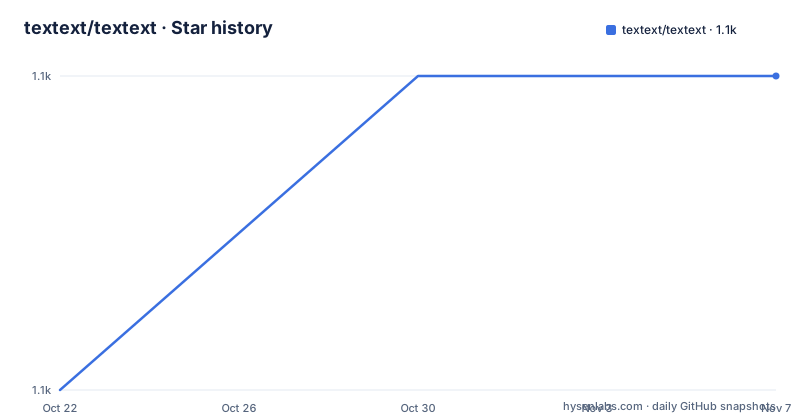
- textext/textext1,106 ★ · +1
| Repository | 2026-10-22 | 2026-11-07 |
|---|---|---|
| textext/textext | 1.1k | 1.1k |
1 Stars in the last 16 days, measured from the daily GitHub snapshot. Compare with other projects
Editorial analysis
The problem is that a compiled equation is a dead vector
TexText is a Python plugin for the vector graphics editor Inkscape that provides the possibility to add and re-edit LaTeX and typst generated SVG elements to a drawing, with an installed LaTeX and/or typst distribution required. The reason this is worth a plugin is the round trip. If you compile a formula with a LaTeX toolchain and drop the SVG into Inkscape, what you get is a set of vector paths with no memory of the expression that produced them. Change a superscript later and you have to recompile and redo the placement. TexText keeps the source, so the element can be brought back into an editor and re-edited. The feature list puts this first, that LaTeX and typst generated SVG elements can be re-edited later, and the whole design follows from that requirement.
Four compilers and an alignment anchor
The compilation side supports PdfLaTeX, XeLaTeX, LuaLaTeX or typst, so you are not restricted to one engine, which matters if your document needs a font setup that only one of them handles. The other half of the feature list is about the result fitting properly into the drawing. There is interoperable scaling in TexText and in Inkscape, so the same element can be scaled in either tool without the two disagreeing, and a font size match with Inkscape text, so an equation sits next to a text label at a consistent size rather than looking pasted on. There is an alignment anchor of the produced output, which decides which point of the rendered box is treated as the reference when you place it, and preview images so you can check the result without leaving the dialog.
Colour has to survive the round trip
One of the harder problems in this kind of plugin is colour. The feature list says colourization via TeX and typst commands, and that the Inkscape colour is kept after re-editing. That last clause is the interesting one. The natural approach is to compile the source, take the resulting SVG, and hope the colours match what the user set in the editor. Instead, the plugin tracks the colourisation in the source itself, so the colour the user chose in the dialog is written into the LaTeX or typst commands and the compiled result comes back with the same colour. The practical effect is that changing a colour in Inkscape and then re-editing the source does not silently revert it to the default. There is also a customisable TeX preamble for additional packages, parskip and parindent, so the plugin can compile with your own document setup rather than a fixed one.
The Inkscape version dictates the TexText version
The compatibility chart is a hard constraint and it is worth reading before anything else. For Inkscape 1.4.3 and above you need TexText 1.13.0 or later. For Inkscape 1.4.0 to 1.4.2 the matching release is TexText 1.12.0. For Inkscape 1.3.x it is TexText 1.10.2. For Inkscape 1.2.x, 1.1.x and 1.0.x it is TexText 1.8.2. And for the 0.92.x series it is TexText 0.11. There is no overlap between the rows, so an Inkscape upgrade and a TexText upgrade have to happen together, and the downloads for every one of those versions are on the releases page. The last release is 1.13.0 from 2026-01-06, before that 1.12.0 from July 2025 and 1.11.1 from March 2025, and the last push to the master branch was on 2026-08-06.
A multi-line editor with syntax highlighting
The editor itself is described as a multi-line editor with syntax highlighting, and the documentation links out to a dialog overview page for the details. The multi-line part matters for the target use case, because a real formula is rarely one line, and a single-line input box would push people to write their equations in an external file and paste them in, which defeats the re-editing model. The screenshot in the README shows the TexText dialog inside Inkscape. The feature list also notes compatibility with TexText down to version 0.4.x, which is about the on-disk format of the stored source rather than the plugin version, and it is what makes an old drawing still openable in a current Inkscape.
The packaging is a Python extension with an Inkscape-specific installer
The repository layout is a Python package with a source directory, a `setup.py` and a separate `tests/` and `pytests/` pair. The `setup.py` shows a few things about the constraints. It imports from `textext.requirements_check`, which holds the checker that verifies the LaTeX and typst installations are present and the logging setup, and from `textext.utility` for the settings and cache. It also contains a Windows hotfix that sets `GI_TYPELIB_PATH` to a shipped directory on Windows, because the HarfBuzz typelib is missing from the Inkscape 1.0.1 Python subsystem on that platform, with a to-do to remove the hotfix when Inkscape 1.0.2 is released and to mark 1.0.1 as incompatible with TexText. The build also ships an NSIS installer script for Windows, `build_windows_installer.nsi`, a `setup_win.bat`, and `build_packages.py` for the release artefacts, with `build_docs.sh` and `publish_docs.sh` for the documentation. The licence is the 3-Clause BSD, and the code carries a 2006 to 2025 TexText developers copyright.
A project that has outlived its original home
The history section explains the lineage, and it is a good sign of longevity. The repository continues the development of the plugin which took place at a Bitbucket repository until January 2018, and originally TexText had been developed by Pauli Virtanen based on the plugin InkLaTeX written by Toru Araki. So the code descends from a 2006 Inkscape extension, moved to Bitbucket, and then to GitHub, with the current version continuing that line. The documentation is hosted separately at textext.github.io/textext, with installation and usage sections, and the project supports Windows, Linux and macOS. The documentation site is where the usage detail lives, with separate pages for the dialog overview, the TeX compilers, the scaling of the output, the explicit setting of font size, the preamble file, the colorization, the alignment and the preview button.
Editorial conclusion
Adopt TexText if you draw diagrams in Inkscape and want equations that stay editable rather than becoming flat vector paths, since keeping the source is the whole point and the plugin handles the round trip. Do not adopt it if you only need a static export, because a single compile with your own LaTeX toolchain does that too. Verify first that your Inkscape version matches the compatibility chart, because older Inkscape releases need older TexText releases, and note that a LaTeX or typst distribution has to be installed on the machine.
Frequently asked questions
What does TexText do in Inkscape?
It adds LaTeX and typst generated SVG elements to a drawing and keeps the source, so the elements can be re-edited later rather than being flat vector paths. A LaTeX and/or typst distribution must be installed.
Which TeX compilers does TexText support?
PdfLaTeX, XeLaTeX, LuaLaTeX and typst, so you are not tied to one engine.
Which version of TexText do I need for my Inkscape?
The compatibility chart pairs them: Inkscape 1.4.3 and above needs TexText 1.13.0 or later, Inkscape 1.4.0 to 1.4.2 needs 1.12.0, Inkscape 1.3.x needs 1.10.2, Inkscape 1.2.x to 1.0.x needs 1.8.2, and Inkscape 0.92.x needs 0.11. The two upgrades have to happen together.
How does TexText keep the colours after re-editing?
Colourization is applied through the TeX or typst commands themselves, so the colour chosen in the dialog is written into the source and the compiled result comes back with it rather than reverting to the default.
What licence is TexText released under?
The 3-Clause BSD licence, with the licence text in the LICENSE.txt file at the repository root. The current release is 1.13.0 from 2026-01-06, and the last push to the master branch was on 2026-08-06.
Official sources
Add this badge to your README
If you maintain this project, the badge below links readers to this analysis and shows its maintenance status from the daily GitHub snapshot. Paste the markdown into your README; add ?metric=license or ?metric=stars to the image URL for a different field.

[](https://hysenlabs.com/projects/textext-textext)Star history chart for your README
[](https://hysenlabs.com/projects/textext-textext)Was this useful?