textlint ships zero rules, and its own CLI help stops mid-word at Outputs d
textlint is the pluggable linter for natural language text.
At a glance
- What is it?
- textlint is an MIT-licensed linter for prose that separates the engine from the rule catalogue the way ESLint does. What the shipped files show is an empty default rule set, a global-install trap, a config generator that copies whatever you already installed, an option list whose last line is unfinished, and a release script that stages the entire working tree before it commits.
- Who is it for?
- Use textlint if you want the ESLint model applied to prose and you are willing to assemble and pin the rule catalogue yourself, because that catalogue is the whole value of the project and the engine is only the runner. Do not expect a fresh install to find anything.
- Can I use it commercially?
- Yes. MIT is a permissive licence: you can use, modify and sell software built on it, as long as you keep its copyright and licence notices.
- Is it still maintained?
- Yes. The repository received new commits within the last day.
- What is it written in?
- Mainly TypeScript, according to GitHub's language statistics.
Answers come from the project's GitHub data, last synced on November 14, 2026, and from our analysis. They are not legal advice.
Star history
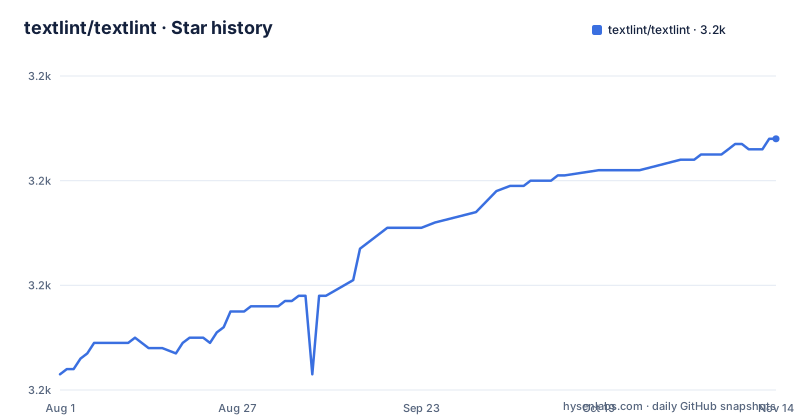
- textlint/textlint3,208 ★ · +45
| Repository | 2026-08-01 | 2026-11-14 |
|---|---|---|
| textlint/textlint | 3.2k | 3.2k |
45 Stars in the last 105 days, measured from the daily GitHub snapshot. Compare with other projects
Editorial analysis
A clean install produces a linter with nothing to complain about
The install line pulls in the engine, and the engine arrives empty.
$ npm install textlint --save-devNode.js 20 or newer is the only stated requirement, and `node -v` is what you run to see which one you have. What lands in node_modules is a runner with an empty rule set. The feature list opens by saying there are no bundled rules, and any check you want has to arrive as its own npm package named `textlint-rule-xxx`.
So a fresh textlint over a fresh set of documents has nothing to say about them. That is the design rather than an oversight. The README puts textlint next to ESLint for exactly this reason, because ESLint also separates the engine from the rule catalogue, and the word pluggable in the project's own tagline is about that seam. What you configure is the entire value of the tool.
A global install needs every rule installed globally too
The install instructions carry a warning block, and the warning is about scope.
# Install textlint and rules into local directory
npm install --save-dev textlint textlint-rule-no-todo
If textlint itself sits in the global prefix, each rule it loads has to sit there as well, and the same holds in reverse: rules installed globally are not visible to a textlint installed locally. The instruction is to install textlint locally.
The mechanism behind that advice is config lookup. Running `npx textlint ./README.md` reads `.textlintrc.json` from the current directory, so what a given run checks is decided by where you stand and by what that directory's node_modules holds, not by where the binary happens to be installed.
The generated config is a listing of whatever rules you already installed
`npx textlint --init` writes the config file for you, and it derives the contents from the rule packages present at the moment you run it.
npx textlint --init{
"rules": {
"no-todo": true
}
}The file is called `.textlintrc` and is parsed as JSON, YAML or JavaScript through azu/rc-config-loader, which is why one of the configuration samples can carry a `//` comment and still be a working config. Each rule takes one of three values: `true` enables it, `false` switches it off even when something else enabled it, and an object passes options to it. Passing `--rule no-todo --rule very-nice-rule` on the command line is documented as equivalent to a config where both rules are set to `true`. The `-c` flag points at a different file or at a shareable config instead.
The option list stops one character into the description of --debug
The help text printed in the README is the entire option surface, and its last line is unfinished.
$ textlint [options] file.md [file|dir|glob*]

Options:
  -h, --help                  Show help.
  -c, --config path::String   Use configuration from this file or sharable config.
  --ignore-path path::String  Specify path to a file containing patterns that describes files to ignore. - default: .textlintignore
  --init                      Create the config file if not existed. - default: false
  --fix                       Automatically fix problems
  --dry-run                   Enable dry-run mode for --fix. Only show result, don't change the file.
  --debug                     Outputs d
Three of those seven lines are worth reading closely. `--ignore-path` defaults to a file named `.textlintignore`, so exclusions get their own project file rather than living in the config. `--dry-run` is defined purely as a modifier on `--fix`: it shows what fixing would do and leaves the file alone, which makes it the safe way to try fix mode on prose you care about. `--debug` is the broken one, cut off after a single letter, so run `npx textlint -h` for the real description instead of guessing from this list. Targets are glob patterns, and the README asks that they be quoted.
The project lints its own prose and fences off the lines it generates
Two pairs of comment markers in the README do something specific: they tell textlint to leave the lines between them alone. One pair wraps a CI badge whose image reference is empty, and the other wraps the two configuration samples. Because those markers are textlint's own instruction syntax, the prose of this repository is checked by the tool it ships.
A repository whose rule set is opt-in needs such a hatch, since documentation about the rules would otherwise be held to whatever rules the documentation happens to mention. The project uses both skip mechanisms on its own README: spans, through the disable and enable markers, and paths, through the default `.textlintignore`. Spans and paths are different problems and the README only offers the first one.
A plugin changes what gets parsed and can override rules in its own namespace
Markdown and plain text are handled by the default processor plugins. Everything else arrives as a processor plugin of its own: HTML, reStructuredText, AsciiDoc and Asciidoctor, Re:VIEW, and Org-mode. Each is a separate npm package, and the reStructuredText entry names a fork next to the original, which is the kind of note worth reading before you pick a plugin for that format.
Adding one takes an install and a config entry.
npm install textlint-plugin-html --save-dev{
"plugins": [
"html"
]
}A plugin is described as a set of rules and rulesConfig or a way to customize the parser, so its rules join the run and can be switched off one at a time under the `<plugin>/<rule>` name. That section closes with a bare `textlint index.html` left as plain text instead of a fenced command, which is a small sign of how informally the surrounding prose was assembled.
The test script drops five workspaces, and the release script stages everything
The root package.json is named `root` and marked private, and its scripts describe how the monorepo builds, tests and releases.
pnpm -r run build
oxlint --type-aware
npm-run-all --parallel lint test:projectReferences test:packages
Linting here is oxlint with type awareness, aimed at TypeScript, while textlint covers the prose. Formatting is prettier over `**/*.{js,jsx,ts,tsx,css}`, a glob with no markdown in it even though markdown is the format textlint reads by default. The `test` script runs linting, a project reference check and the package tests in parallel, and the package test excludes five workspaces by name: root, integration-test, the examples, the scripts packages, and the website. Each of those has its own script, and `test:all` is what reaches all of them.
The release path deserves a second look. The major, minor and patch version scripts all run lerna with `--no-push --no-git-tag-version --yes` and then call `commit-version`, which begins with `git add .` before writing a message that reads the version out of lerna.json through a `node -p` call. A release therefore stages the whole working tree, not only the bumped manifests. Two publish scripts sit side by side, and the second only adds `--yes`.
Three releases in view, and two of them four days apart
The visible release line is 15.x and the spacing is uneven. v15.7.0 is dated 2026-05-14 and v15.7.1 followed on 2026-05-18, four days later. The next tag, v15.8.0, is dated 2026-08-01, and nothing has been tagged since, while commits to master continued with the last push on 2026-10-02. The gap between the newest tag and the newest code is therefore about two months.
The repository is MIT licensed, written in TypeScript, and not archived, with 3198 stars, 169 forks and 64 open issues. Its root carries the pieces that monorepo setup needs: `packages/` for publishable code, `lerna.json` and `pnpm-workspace.yaml` for versioning and workspaces, `renovate.json` for dependency updates, `.node-version` for the runtime, `.oxlintrc.json` for the linter, `vitest.config.mts` for tests, and a `website/` that the docs test script targets. There is a `.githooks/` directory too, and the `prepare` script points git at it locally on install.
Editorial conclusion
Use textlint if you want the ESLint model applied to prose and you are willing to assemble and pin the rule catalogue yourself, because that catalogue is the whole value of the project and the engine is only the runner. Do not expect a fresh install to find anything. Before wiring it into CI, settle three things. That your rule packages resolve from the same node_modules as textlint, because a global textlint with local rules reports nothing. That your files are Markdown or plain text, or that you installed the processor plugin for the format you actually keep them in. And that fix mode gets paired with a dry run in review, since fixing rewrites files in place and the dry-run switch is the only way to see the result without touching them.
Frequently asked questions
What does textlint check out of the box?
Nothing. There are no bundled rules, and the README states that any rule has to be installed from npm as its own package named textlint-rule-xxx. Running npx textlint --init writes a config listing the rule packages that are already installed, so the useful part of the project is the rule catalogue you assemble yourself.
Which Node.js version does textlint require?
Node.js 20 or newer is the only stated requirement, and node -v is what the README suggests for checking which one you have. textlint itself is written in TypeScript, released under the MIT license, and installed with npm install textlint --save-dev.
Can textlint read formats other than Markdown and plain text?
Through processor plugins, each a separate npm package: HTML via textlint-plugin-html, reStructuredText via textlint-plugin-rst with a fork listed alongside it, AsciiDoc and Asciidoctor, Re:VIEW, and Org-mode. Enabling one means installing it and adding its name to the plugins array in the config, then passing the files to lint.
Is installing textlint globally a reasonable choice?
The README warns that if textlint is installed globally then each rule must be installed globally as well, and the same applies in reverse for a local install, which is why it recommends a local install. Configuration is read from .textlintrc.json in the current directory, so where a run happens decides which rules apply.
How does textlint decide whether to change a file or only report?
The --fix flag applies fixes automatically, and --dry-run is defined as a modifier on it that shows the result without changing the file. Ignoring paths is separate from fixing them: --ignore-path points at a file of patterns to skip and defaults to .textlintignore.
Does textlint name any alternative linter for prose?
This repository names no alternative. What it offers as comparison is ESLint, used to explain why the engine and the rule catalogue are separate, and it points readers to a wiki collection of textlint rules rather than to competing projects. Choosing an alternative means looking outside this repository.
Official sources
Where this project is recommended
Add this badge to your README
If you maintain this project, the badge below links readers to this analysis and shows its maintenance status from the daily GitHub snapshot. Paste the markdown into your README; add ?metric=license or ?metric=stars to the image URL for a different field.

[](https://hysenlabs.com/projects/textlint-textlint)Star history chart for your README
[](https://hysenlabs.com/projects/textlint-textlint)Was this useful?