PocketFlow Codebase Knowledge: the pipeline behind the AI written repo tutorials
Pocket Flow: Codebase to Tutorial
At a glance
- What is it?
- A walk through The-Pocket/PocketFlow-Tutorial-Codebase-Knowledge, a Pocket Flow tutorial project that crawls a GitHub repository and writes a beginner tutorial from the code it reads. The command surface is small and concrete, and so are the three defaults that decide which files the agent ever sees.
- Who is it for?
- Use it when you want a fast orientation map of an unfamiliar repository and can read the source afterward to check it. Leave it alone if you need documentation you can trust without verification, if your abstractions live in files over the 100KB cap, or if a reproducible dependency set matters to you.
- Can I use it commercially?
- Yes. MIT is a permissive licence: you can use, modify and sell software built on it, as long as you keep its copyright and licence notices.
- Is it still maintained?
- Yes. The repository last received commits 167 days ago.
- What is it written in?
- Mainly Python, according to GitHub's language statistics.
Answers come from the project's GitHub data, last synced on November 13, 2026, and from our analysis. They are not legal advice.
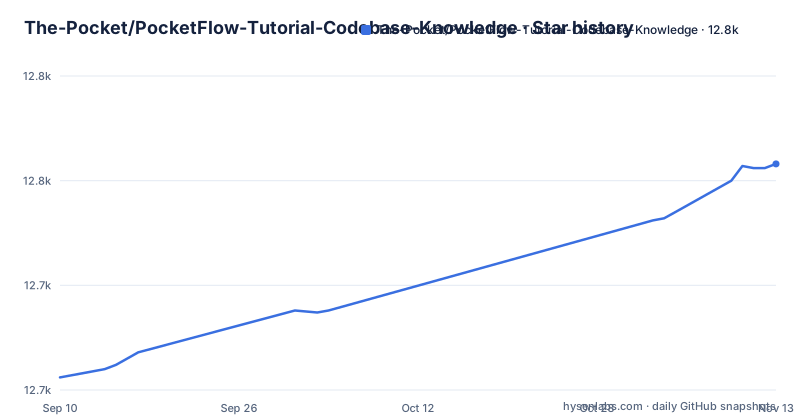
Star history
- The-Pocket/PocketFlow-Tutorial-Codebase-Knowledge12,758 ★ · +102
| Repository | 2026-09-10 | 2026-11-13 |
|---|---|---|
| The-Pocket/PocketFlow-Tutorial-Codebase-Knowledge | 12.7k | 12.8k |
102 Stars in the last 64 days, measured from the daily GitHub snapshot. Compare with other projects
Editorial analysis
flow.py, nodes.py and main.py split the pipeline three ways
The top level is short enough to read in one sitting: .clinerules, .cursorrules, .dockerignore, .env.sample, .gitignore, .windsurfrules, Dockerfile, LICENSE, README.md, assets/, docs/, flow.py, main.py, nodes.py, requirements.txt and utils/. main.py is the entry point you invoke, flow.py and nodes.py carry the work that reads the repository and writes the tutorial, and utils/call_llm.py is the one place a model gets contacted. This is a tutorial project of Pocket Flow, which the project describes as a 100-line LLM framework, and the framework arrives as an ordinary library dependency rather than something vendored into the tree. Three of those dotfiles, .clinerules, .cursorrules and .windsurfrules, are named after specific editor tools.
main.py takes one source, and --repo with --dir is not an option
You clone the tree once and then point the script at exactly one source:
git clone https://github.com/The-Pocket/PocketFlow-Tutorial-Codebase-Knowledge# Analyze a GitHub repository
python main.py --repo https://github.com/username/repo --include "*.py" "*.js" --exclude "tests/*" --max-size 50000
# Or, analyze a local directory
python main.py --dir /path/to/your/codebase --include "*.py" --exclude "*test*"
# Or, generate a tutorial in Chinese
python main.py --repo https://github.com/username/repo --language "Chinese"--repo and --dir are required and mutually exclusive, so no single invocation reads a remote repository and a local tree at once. The project name is derived from the URL or the directory path unless you supply -n, --name. Output goes to ./output unless -o, --output redirects it, and --language defaults to english, which is why the Chinese example needs nothing else changed. One detail worth catching before you copy a command: that first example passes --max-size 50000, which is below the documented 100KB default, so the sample line narrows the file ceiling instead of widening it. A GitHub token is accepted as -t, --token, or through the GITHUB_TOKEN environment variable.
-s, --max-size puts a hard 100KB ceiling on everything the agent reads
The default is a fixed number, 100KB per file, and the flag description does not say what happens to a file that crosses it. Projects that keep their central abstractions in one large module, in generated code, or in a bundled asset are precisely the ones where a per-file ceiling changes the result. The consequence for a reader is the worst kind: the generated tutorial still arrives, still reads smoothly, and simply never mentions the file you opened the tool in order to understand. Raise the cap deliberately, then read the output against the source instead of assuming the omission was not there.
--include and --exclude arrive with no default and no stated precedence
The first two worked examples pass both flags, and the flag descriptions give you shapes to copy, such as "*.py", "*.js", "tests/*" and "docs/*", without saying what happens when you pass neither. If inclusion defaults to everything, a bare run will walk dependency directories and fixture blobs; if it defaults to nothing, you get an empty tutorial and no error. The same gap covers ordering: when a path matches both an include and an exclude pattern, the README does not say which one wins. pathspec sits in requirements.txt, but the matching dialect is never named. So do not assume excluding tests/* also covers a file called test_something.py sitting at the top of your tree, and do not assume a broad include and a narrow exclude resolve in your favor. Pass both patterns explicitly and check the output for the files you meant to keep.
utils/call_llm.py is the only file you edit before the first run
Credentials go in a .env file rather than into the source, and .env.sample names five variables: GEMINI_PROJECT_ID, GEMINI_API_KEY, GITHUB_TOKEN, OPENROUTER_API_KEY and OPENROUTER_MODEL. The default route is a GEMINI_API_KEY used for Gemini Pro 2.5. To point the pipeline somewhere else you set LLM_PROVIDER, for example XAI, and then supply the matching variables such as XAI_MODEL, XAI_URL and XAI_API_KEY. A local Ollama also works, with the url fixed at http://localhost:11434/ and the API key left out entirely. Install the dependencies and then prove the credentials before you start a long crawl:
pip install -r requirements.txtpython utils/call_llm.pyRunning that second command on its own is the difference between finding out your key is wrong in a second and finding out after the repository has been fetched. What the README does not give you is a supported model list. It recommends the latest models with thinking capabilities and names Claude 3.7 with thinking and O1, with no minimum version and no test that would catch an unsupported pick.
requirements.txt sets a floor on every package and the project ships no releases
Every line is a lower bound and nothing is pinned: pocketflow>=0.0.1, pyyaml>=6.0, requests>=2.28.0, gitpython>=3.1.0, google-cloud-aiplatform>=1.25.0, google-genai>=1.9.0, python-dotenv>=1.0.0 and pathspec>=0.11.0. A floor of 0.0.1 on the framework the entire pipeline is written against constrains almost nothing, and there is no upper bound anywhere to stop a breaking major release from arriving underneath you. The repository also has no GitHub releases, so there is no tagged build to compare your install against, and the last recorded push was 2026-05-31. The consequence is that a tutorial generated today may come from a different dependency set than the one you resolve next month, and when it breaks the traceback will point into a library rather than at this project. If you plan to keep the output, record your own pip freeze at generation time.
The Dockerfile fires main.py with no arguments attached
The container is Python 3.10 on slim, git is installed in a single layer so the crawler can clone, and the whole tree is copied in before the entrypoint runs:
FROM python:3.10-slim

# update packages, install git and remove cache
RUN apt-get update && apt-get install -y git && rm -rf /var/lib/apt/lists/*

WORKDIR /app

COPY requirements.txt .
RUN pip install --no-cache-dir -r requirements.txt

COPY . .

ENTRYPOINT ["python", "main.py"]
The gap is the entrypoint line. It is python main.py with no --repo and no --dir, and both are required for the script to do anything, so the container as written starts and exits without a source to read. Every invocation has to supply --repo or --dir as arguments after the image name. The COPY. . step also bakes whatever your working tree holds into the image. A .dockerignore is present in the repository, so check whether it excludes a .env you created locally rather than assuming it does.
The published example tutorials are generated text, not reviewed documentation
The README shows sample output for repositories including Flask, LangGraph, NumPy Core, Requests and Click, served from the project's GitHub Pages path, and states that these tutorials are generated entirely by AI by crawling the GitHub repo. Each entry is a single marketing sentence rather than a sample of the structure that comes out, so you cannot judge the output format from the page. What follows from that is concrete: this is a first orientation pass, and a fluent tutorial can flatten a real control flow into a tidy story while never contradicting the source. A page that sounds correct is not evidence that it is correct. The project also links a Hacker News front page discussion from April 2025 with more than 900 up-votes, a book, a YouTube development tutorial and a Substack post, none of which substitute for reading the code the tutorial describes.
Editorial conclusion
Use it when you want a fast orientation map of an unfamiliar repository and can read the source afterward to check it. Leave it alone if you need documentation you can trust without verification, if your abstractions live in files over the 100KB cap, or if a reproducible dependency set matters to you. Before the first run, confirm what your include and exclude patterns actually match, and record the pip freeze of the environment that produced the output.
Frequently asked questions
How to make AI understand codebase?
This project is one published answer to that question. It crawls a GitHub repository, analyzes the code to identify core abstractions and how they interact, and turns that into a beginner-friendly tutorial. You drive it through main.py with either --repo or --dir.
What LLM does PocketFlow-Tutorial-Codebase-Knowledge need?
By default a GEMINI_API_KEY, used for Gemini Pro 2.5. You can switch by setting LLM_PROVIDER, for example XAI, together with the matching model, url and key variables such as XAI_MODEL, XAI_URL and XAI_API_KEY. A local Ollama is supported at http://localhost:11434/ with no API key. The README names no supported model list.
How do I run it against a local codebase instead of a GitHub URL?
Pass --dir with the path to the directory. One of --repo or --dir is required and the two are mutually exclusive, so a single run never reads a remote repository and a local tree together.
What happens to files above the 100KB default in PocketFlow-Tutorial-Codebase-Knowledge?
The -s, --max-size flag sets the ceiling at 100KB by default, and the flag description does not say what happens to a file above it. Note that the sample command in the README passes --max-size 50000, which is lower than the default rather than higher.
Does PocketFlow-Tutorial-Codebase-Knowledge publish versioned releases?
No. The repository has no GitHub releases, and requirements.txt lists every dependency with a lower bound only, such as pocketflow>=0.0.1 and pyyaml>=6.0, with no upper bounds. The last recorded push was 2026-05-31.
Are the example tutorials on the project page hand written?
No, the README states they are generated entirely by AI by crawling the GitHub repository, covering projects such as AutoGen Core, Browser Use, Celery and FastAPI. They are worth reading as generated orientation and worth checking against the source before you rely on any of it.
Official sources
Add this badge to your README
If you maintain this project, the badge below links readers to this analysis and shows its maintenance status from the daily GitHub snapshot. Paste the markdown into your README; add ?metric=license or ?metric=stars to the image URL for a different field.

[](https://hysenlabs.com/projects/the-pocket-pocketflow-tutorial-codebase-knowledge)Star history chart for your README
[](https://hysenlabs.com/projects/the-pocket-pocketflow-tutorial-codebase-knowledge)Was this useful?