llms-txt-hub is a directory with four validators and a typo in its own title
🤖 The largest directory for AI-ready documentation and tools implementing the proposed llms.txt standard
At a glance
- What is it?
- A TypeScript pnpm and turbo monorepo that curates sites publishing an llms.txt file, generated from data into a marked region of the README, with link and frontmatter checking kept as separate scripts.
- Who is it for?
- This hub is worth reading as a worked example of keeping a link directory honest, because the validation, link checking, frontmatter checking and site generation are four separate scripts with real commands attached to each. Do not expect to install it, since the root package is private and only llmstxt-cli reaches npm.
- Can I use it commercially?
- Check first. The repository uses a licence we do not classify automatically, so read its LICENSE file before any commercial use.
- Is it still maintained?
- Yes. The repository received new commits within the last day.
- What is it written in?
- Mainly TypeScript, according to GitHub's language statistics.
Answers come from the project's GitHub data, last synced on November 14, 2026, and from our analysis. They are not legal advice.
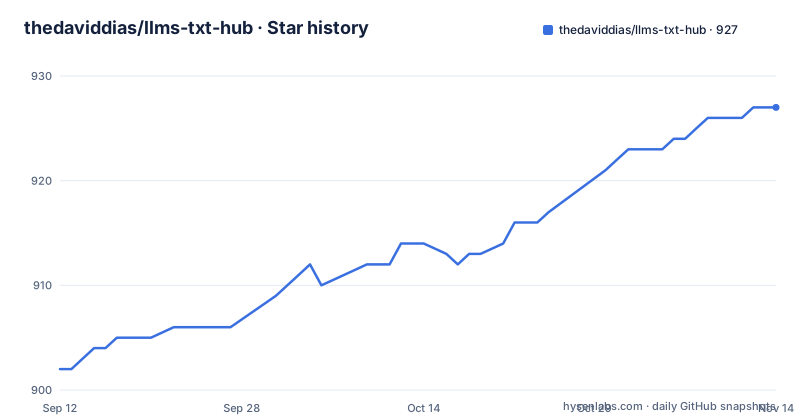
Star history
- thedaviddias/llms-txt-hub927 ★ · +25
| Repository | 2026-09-12 | 2026-11-14 |
|---|---|---|
| thedaviddias/llms-txt-hub | 902 | 927 |
25 Stars in the last 63 days, measured from the daily GitHub snapshot. Compare with other projects
Editorial analysis
The heading at the top of the README spells it llmx.txt
The one-line title of the README reads `llmx.txt hub`, with an x where the s belongs. Everything below that heading uses the correct spelling, including the section that opens the generated list and the six primary category names. So the typo sits in exactly one place, the H1, and it is the piece of text that gets quoted when the repository is linked from elsewhere.
The rest of the framing is more careful. The standard is called proposed, not ratified, and the README is explicit that this is a collection of implementations and resources rather than a single tool. It describes itself as a central hub for discovering and sharing implementations across different projects and platforms, which is a narrower claim than the size of the list would suggest.
What the list actually contains is worth stating plainly, because the name implies one kind of thing and the entries are another. They are small businesses. A law practice in Zielona Gora, a branding agency in Montreal, a locksmith service in Belgrade with a mobile number in its description, a notary handling apostille work for the Indian Ministry of External Affairs, a UK immigration eligibility assessment site, an interior design studio in Vancouver. Each one is listed because it serves a file at its own domain root.
Every entry links a root-level file, and many list no second one
The convention across the entries is a path at the site root. The Polish law office links `https://eadwokat.pl/llms.txt`, the Montreal agency links both `https://www.eaucube.com/llms.txt` and `https://www.eaucube.com/llms-full.txt`, and the Italian studio links `https://www.brolab.it/llms.txt`. Two distinct file names are in play and the directory tracks them as separate links rather than as one boolean flag.
Whether both appear is not consistent. The law office, the CMMC compliance consultancy and the Calgary automation firm each show a single `llms.txt` sub-link, while the B2B branding agency, the AI development company and the AI-ready website builder each show `llms.txt` followed by `llms-full.txt`. Nothing marks one state as preferred or warns that a single link means an incomplete listing.
Each entry also carries a one-line description written by a human rather than derived from the file. The AI development company entry promises production grade application built by a top one percent of engineers, and the locksmith entry lists the specific jobs it takes, from emergency opening to roller shutters. Those descriptions are the part a validator has to trust, since the file itself says nothing about whether the site is any good.
The alphabetical list is generated between two comment markers
The list section opens with an HTML comment that tells you not to touch it:
<!-- LLMS-LIST:START - Do not remove or modify this section -->Only the start marker is visible in the file that was read, and the section it opens runs from the heading `LLM Tools and Resources` down through `agency services` and an alphabetical run of A and B entries. That is a regenerated block, and the instruction inside the marker says so. Hand edits to an entry inside that range do not survive the next run of whatever writes it.
The generation path is visible in the workspace scripts rather than in the prose. `generate-websites` runs a TypeScript script called `generate-websites.ts`, `generate:website` delegates to a turbo task named `gen website`, and `generate:llms` filters the workspace down to a package literally called generator. There is also `generate-llms-chatbot-index`, a plain Node script with a `.js` extension while its neighbours use `.ts`, and `generate-search-index`, a `.cjs` file.
That is four generators with three different extensions and two different task runners. The build command runs the search index generator first and the turbo build second, so an index is always produced before anything is compiled. The dev command is the same idea in parallel, with `cross-env FORCE_COLOR=1` in front of it.
The category called agency collects locksmiths and notaries
Six primary categories cover the subject matter: AI and ML, developer tools, data and analytics, integration and automation, infrastructure and cloud, security and identity. Eight secondary categories cover the kind of organisation instead: personal, agency, e-commerce, education, media, international and other.
The secondary axis is where the list gets strange, because agency is used as a catch-all for any small service business. Under that heading sit a Rails consultancy that has been running since 2006, a web design agency in South Tyrol, a web design and development company, and then the locksmith, the notary, the immigration assessment service and the interior design studio. A firm that installs roller shutters is filed with a firm that modernises Ruby on Rails codebases because both sell a service rather than a product.
The international tag has the same looseness, and the individual entries carry their own country inside the description text, sometimes in French, sometimes in German, sometimes in Polish, sometimes with a dial code for a phone number. That is a human editorial layer sitting on top of a directory. It is also the part no script in package.json validates, since `check:frontmatter` and the website validator care about structure, not about whether a description reads correctly.
Six tools are listed, and one of them ships inside this repository
The developer tools table carries six rows. A Chrome extension checks whether a website implements llms.txt, a VS Code extension searches and explores those files in the editor, an MCP explorer does the same over the Model Context Protocol, a Raycast extension does it again in a launcher, a separate generator site turns a sitemap and crawled pages into a file, and llmstxt-cli installs documentation as skills into 35 or more AI coding agents.
Five of those six live somewhere else. The Chrome, VS Code, Raycast and generator rows are all external destinations. The MCP explorer is its own repository under the same owner. Only the CLI is part of this tree: its documentation path is given as `packages/cli/README.md`, and the repository has both a `packages/` directory and a `skills-lock.json` at the root, which is consistent with a tool whose job is writing skills into other agents.
So the directory and one of the tools it recommends are the same codebase. That has a practical consequence for anyone reading the table as a neutral survey: the one row with no external link is the one the project can change, and nothing in the table says which rows are affiliated.
Four checks exist, and only one of them runs as part of lint
The repository treats its own data as something to be checked, and each check has its own command:
pnpm check:websites
pnpm check:websites:warnings
pnpm check:frontmatter
pnpm check:links
The website validator is `scripts/validate-websites.ts`. The plain form treats missing descriptions as errors, and the variant adds a `--warn-descriptions` flag that demotes them, which is how a directory full of hand-written blurbs gets bootstrapped without a hard failure on every entry. Frontmatter has its own checker in `scripts/check-frontmatter.ts`. Link rot is a third concern and gets a third tool: lychee, configured through `lychee.toml` and pointed at the whole repository.
Wiring matters here. The lint script is `pnpm check:websites && turbo lint && manypkg check`, so the strict website validator is the only data check inside it. Frontmatter and link checking are separate commands that nothing chains together, and `manypkg check` covers workspace dependency consistency rather than content. Whether CI runs the other three is a question the repository answers in its workflow files, not in package.json.
A related detail sits in postinstall: `manypkg fix` runs automatically when dependencies install, which means the dependency versions in the workspace get rewritten on a plain install rather than only when someone asks.
A GitHub token drives a PR review path that has its own dry run
This is a link directory with a pull request review system attached. `review` runs a TypeScript script called `pr-backfill-dry-run.ts`, and `review:dry-run` re-runs it with a `--dry-run` flag. The test suite for the repository itself is named in `test:repo` and lists four files: `pr-triage.test.ts`, `pr-backfill-dry-run.test.ts`, `pr-direct-assessment.test.ts` and `deployment-dependencies.test.ts`. Two of those four are about judging pull requests, and a third is about deployment dependencies.
The credentials that path needs are listed in the example environment file, along with a warning never to commit real secrets. A feature flag secret, a GitHub personal access token with the scopes repo, user and read:org, GitHub OAuth client id and client secret, and a Sentry set of five values including the public DSN and an auth token. The file also opens an external services section on an RSS feed entry and then stops.
Publishing keeps its own rhythm. The three releases are all named llmstxt-cli and all carry the date 2026-02-13, at 03:36, 04:06 and 17:32 UTC. The repository itself has been pushed since, with the last commit on 2026-10-01. The directory, the site generation and the review tooling move faster than the published CLI does.
Editorial conclusion
This hub is worth reading as a worked example of keeping a link directory honest, because the validation, link checking, frontmatter checking and site generation are four separate scripts with real commands attached to each. Do not expect to install it, since the root package is private and only llmstxt-cli reaches npm. Before trusting an entry, check whether that site serves llms-full.txt as well as llms.txt, and settle the licensing question by reading the LICENCE file at the root, since no licence is recorded anywhere else.
Frequently asked questions
What is the llms.txt hub at llmstxthub.com?
It is a curated directory of sites and tools that publish an llms.txt file, kept as a TypeScript pnpm and turbo monorepo with a data directory and generator scripts. Entries are grouped under six primary categories and eight secondary ones such as agency, personal and international.
Does the llms.txt hub publish its own llms.txt file?
The repository root has no llms.txt among its top-level entries, which instead include README.md, AGENTS.md, CLAUDE.md, .mcp.json and .cursorrules. Where the live site serves a file for itself is not described anywhere in the repository.
How does the llms.txt hub check the sites it lists?
With scripts rather than a crawler. check:websites runs scripts/validate-websites.ts and a second variant adds a warn-descriptions flag, check:frontmatter runs scripts/check-frontmatter.ts, and check:links runs lychee against the repo using the config in lychee.toml. Only the first one is chained into lint.
Can I install the llms.txt hub from npm?
No. The root package is marked private at version 1.0.0, so nothing publishes from it. The piece that reaches npm is llmstxt-cli, and its three published releases are 0.3.0, 0.4.0 and 0.4.1, all dated 2026-02-13.
Which llms.txt tools does the hub list?
Six: a Chrome extension that checks whether a site implements llms.txt, a VS Code extension, an MCP explorer kept in a separate repository, a Raycast extension, a separate generator site at llmstxtgenerator.co, and llmstxt-cli on npm, which installs llms.txt docs as skills into 35 or more AI coding agents.
What licence does the llms.txt hub use?
No licence is recorded in the repository metadata, while a file named LICENCE sits at the root of the tree. Nothing in the repository connects the two, so the terms are unconfirmed until that file is read directly.
Official sources
Add this badge to your README
If you maintain this project, the badge below links readers to this analysis and shows its maintenance status from the daily GitHub snapshot. Paste the markdown into your README; add ?metric=license or ?metric=stars to the image URL for a different field.

[](https://hysenlabs.com/projects/thedaviddias-llms-txt-hub)Star history chart for your README
[](https://hysenlabs.com/projects/thedaviddias-llms-txt-hub)Was this useful?