Godot Road Generator: cross-section roads, and traffic that follows them
A Godot plugin for creating 3D highways/streets and lane-following traffic
At a glance
- What is it?
- A GDScript plugin for Godot 4.4 that builds highways and streets from cross sections, snaps them into containers and prefab intersections, flattens terrain to meet them, and generates AI paths that follow the lanes. The README is clear that the project is not feature complete, and the work happens on a `dev` branch while `main` only ever holds the current release.
- Who is it for?
- Godot Road Generator fits a Godot team building a driving game whose roads have to change shape, whose lane count has to vary along a route, and whose traffic has to follow the geometry rather than a spline the programmer drew by hand. It is the wrong tool for a project that only needs a straight road between two points, since a CSG polygon along a path is a few minutes of work, and it is the wrong choice on a Godot version outside the supported matrix.
- Can I use it commercially?
- Yes. MIT is a permissive licence: you can use, modify and sell software built on it, as long as you keep its copyright and licence notices.
- Is it still maintained?
- Yes. The repository received new commits within the last day.
- What is it written in?
- Mainly GDScript, according to GitHub's language statistics.
Answers come from the project's GitHub data, last synced on November 7, 2026, and from our analysis. They are not legal advice.
Star history
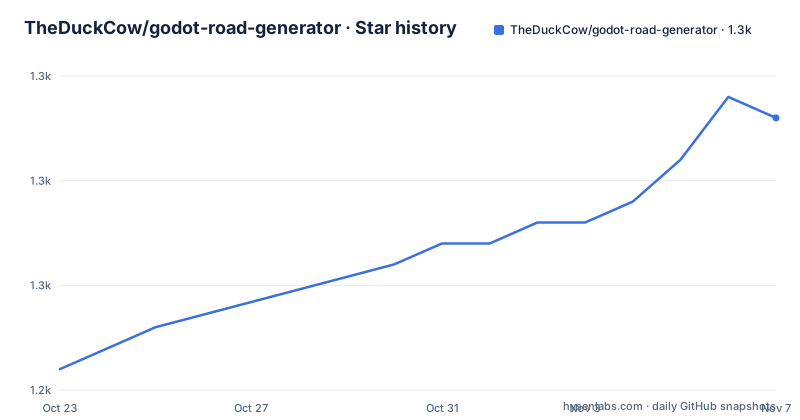
- TheDuckCow/godot-road-generator1,258 ★ · +12
| Repository | 2026-10-23 | 2026-11-07 |
|---|---|---|
| TheDuckCow/godot-road-generator | 1.2k | 1.3k |
12 Stars in the last 15 days, measured from the daily GitHub snapshot. Compare with other projects
Editorial analysis
Two branches, one of which holds the actual work
Godot Road Generator is a Godot plugin for creating flexible 3D highways and streets with traffic support, written in GDScript, MIT licensed, with the default branch `main` and the last push on 2026-10-13.
The first thing to understand about this repository is its branch layout, because the README explains it and it saves a lot of confusion. There are four lines.
| Branch | Plugin version | Godot Support | | --- | --- | --- | | `main` | current release | 4.4+ | | `dev` | latest and upcoming | 4.4+ | | `godot4.3` | 0.9.0 | 4.3+ | | `godot3` | 0.6.0 | 3.5-3.6 |
The reason is stated directly: the main branch always matches the current release, which is why `main` may look inactive, and all new development occurs in the `dev` branch. When a release is ready, the dev branch is merged into main. So a contributor works on `dev`, and a user installs from `main` or from a release.
The second thing to understand is the warning at the top of the version section: this project is not feature complete yet, with a link to the upcoming milestones on the repository. The recent release titles are consistent with that. Version 0.9.5, published on 2026-10-13, is titled Godot 4.4+ and Updates. Version 0.9.4 from 2026-10-01 is the dynamic scene placer, and 0.9.3 from 2026-07-16 is intersection feature parity.
The third is the version line itself. 0.9.x is a pre-1.0 line, and the plugin version in the table for the older branches, 0.9.0 and 0.6.0, shows how far the project has come from the Godot 3 era. A plugin in the same repository at 0.6.0 and another at 0.9.5 is a project that has changed shape several times, and the branch table is how a user is expected to navigate that.
Installing it and getting to a road in ten minutes
The install is a folder copy, and the README gives two ways to get the files.
Download the latest release that supports your Godot version from the releases page, or take it from the Godot Asset Store. Then copy the `addons/road-generator` subfolder into your project, and optionally the `demo_roads` folder. There is no build step, because the plugin is GDScript inside an `addons` directory, which is the standard place for a Godot plugin to live.
The demo is the fastest way to see what the thing does. Open the `road_demos/demo_menu.tscn` scene and navigate to any of the connected demo scenes, and the README suggests the Museum scene as a good starting place. The demo scenes are also how the feature list in the README is illustrated, since each feature has a linked animation next to it.
For anything beyond the demo, the Getting Started tutorial in the wiki is the next step, and the wiki pages hold the detailed usage notes.
One detail worth noting for a team that upgrades Godot: the plugin is tied to a Godot version range, and the range is in the branch table rather than in a separate compatibility note. Godot 4.4 and later on the current branches, 4.3 and later for the older plugin version, and 3.5 to 3.6 for the oldest line. So a project that is about to move to a new Godot release should check which branch of the plugin still matches, because the answer is a branch rather than a version bump.
The four ways to build roads without it
The README lists what a Godot user can do about roads without this plugin, and the list is an argument for the plugin more effectively than any feature table.
The first option is to use a CSGPolygon following a path. It is simple to use and requires no plugins, but it has many limitations. You need a custom material for every lane combination, so a one way street, a two lane road and a multi lane highway are three materials. There is no way to transition from one lane count to another. There is no easy way to create intersections without fiddly geometry placement. And it is largely impossible to avoid mesh gaps between different segments of CSG nodes, which is called an inherent limitation.
The second is to hand-model roads in 3D modelling software. That requires additional skills, and it is not dynamic, which greatly limits the iterative nature of game development, and it brings additional file and project management with it.
The third is to use an asset pack that comes with road segments. Those are typically limited to square-tile road layouts, and for non grid-based packs you then have to work out how to line the track pieces up properly. It is also hard to customise the pre-baked materials to fit another visual style.
The fourth is to write code to generate custom geometry, which the README describes as extra work, and which is exactly what the plugin aims to provide.
Then there is the point that applies to all four, and it is the one that usually decides it: in addition to each of those scenarios, each requires you to design your own AI traffic system to follow your roads. And the comparison with road generators for other game engines is that they lack features to create fine tuned lane shapes such as dynamic lane changes and settings based on discrete cross-sections, and they tend to focus on editor creation and lack the functionality necessary for in-game, procedural use cases.
Cross-sections, RoadPoints and containers
The geometry model is the core of the plugin, and it comes down to one idea: a road is defined by a cross-section that changes along its length.
Cross-section based geometry is the first feature in the table. The many settings of a RoadPoint smoothly interpolate from one point to the next, and a lane-control gizmo adjusts the lane count, either for a single RoadPoint or, with shift held, for a whole RoadContainer. So a road that starts as one lane and becomes three is a change to the cross-section, not a second piece of geometry, and the interpolation is what makes the transition smooth rather than a seam.
RoadContainer is the second feature, and it is about organisation. You group sibling RoadPoints together, and they snap together with other RoadContainers, and a RoadContainer can be saved to a scene file for reuse. That last part matters for a production pipeline, because a junction or a motorway on/off ramp is a piece of geometry that appears many times in a level and it should exist once.
The RoadPoint inspector panel is the third, where you define lane width, shoulder and more, with shift affecting all the RoadPoints in the same container. Click-to-draw with snapping is the fourth, where you draw the path and then fine tune the placement with the native 3D gizmo, which is a deliberate choice to keep the plugin inside the engine's own manipulation tools rather than inventing a second set.
Procedural intersections follow, dynamically connecting RoadPoints to create RoadIntersections, with support for non-planar setups, and the note that RoadLane and edge curve support are coming soon. The prefab intersection containers are the four way, three way, and highway on and off ramps, which snap together.
Terrain3D integration flattens the terrain to meet the level of the roads, with options for margins and falloff, and the format is described as extendable for other terrain generators as well. The multi-material support separates the surface and the underside materials per RoadContainer, and a source trim-sheet is provided to guide the creation of customised materials.
Traffic, and the procedural story of the plugin
The feature that separates this plugin from an asset pack is the traffic, and it is the reason the README contrasts the plugin with generators that focus on editor creation and lack the functionality for in-game, procedural use.
Auto-generated AI paths can be enabled for automatic RoadLane placement, or the lanes can be placed by hand in the scene. The RoadLaneAgent helper exists to help agents follow the roads, and it handles the transitions between segments, which is exactly the hard part, because a car crossing from a four lane road into a two lane one has to change lanes at the right moment and the path has to reflect that.
Decoration edge curves are the second traffic-related feature. Once enabled on a RoadContainer, they add CSG path geometry, or you can write your own scripts to instance assets along the left, right and center curves, which is how you get street lights, barriers or trees following a road.
The third is the one that matters for a procedural game. There are runtime-available functions for procedural use, and the note about performance is specific: the operations apply on a single RoadSegment at a time, to be performant. That is a design constraint worth understanding, because it means the plugin is not built to rebuild an entire road network every frame. It builds and edits geometry, and it can be used at runtime, but the granularity is a segment.
The last entry in the table is the export of RoadContainers to glTF, which is what lets the roads leave the editor and enter a pipeline, a 3D package format or an engine's own format.
The repository supports the same discipline as the plugin. There is a `test/` directory with a `run_tests.sh`, a `release.sh` for cutting a release, a `.gut_editor_config.json` for the test runner, a `default_env.tres` for the demo environment, and the `road_demos/` directory that holds the demo scenes and the animation files linked from the README.
Where this plugin is the wrong tool
The limits are visible in the README's own warnings, and it is fair to take them at face value.
The first is that the project says it is not feature complete, and the version numbers agree, with the line at 0.9.x and the release titles describing work in progress, an intersection feature parity push, a dynamic scene placer. For a team that needs a stable tool to put into a shipped game, that is the wrong side of the version number, and the answer has to be a judgement about your own schedule.
The second is the Godot version range. The current branches need Godot 4.4 or later, and the older lines are for Godot 4.3 and for the 3.5 to 3.6 era. A project on an older Godot is on the 0.9.0 or 0.6.0 line, which is a different plugin with a different feature set, and the branch table is the only place that says so.
The third is the scope. The plugin solves road geometry and the traffic that follows it, and it does not solve a level. The terrain has to be flattened to meet the roads, the vehicles have to be modelled, the traffic behaviour beyond following the lanes is yours. A team that expected a complete traffic simulation gets a road system and a lane follower.
The alternative, for a project that needs two straight roads and a car on them, is the CSGPolygon along a path, and the README's own first option in its list of alternatives. The difference in approach is that this plugin treats a road as a parametric cross-section that interpolates along a spline, so the lane count, the width and the shape are all editable at runtime, and the alternative treats a road as geometry you have built, which is fine until the road has to change shape.
For a game where the roads are the world, a racing game with a city that is generated, the difference is the whole project. For a game where the roads are a level, it is overhead, and the honest way to decide is to look at the milestones and at the demo scenes and work out how much of that you actually need.
Editorial conclusion
Godot Road Generator fits a Godot team building a driving game whose roads have to change shape, whose lane count has to vary along a route, and whose traffic has to follow the geometry rather than a spline the programmer drew by hand. It is the wrong tool for a project that only needs a straight road between two points, since a CSG polygon along a path is a few minutes of work, and it is the wrong choice on a Godot version outside the supported matrix. Before adopting it, read the milestones, because the README warns the project is not feature complete, and check the branch table, since the release and the development work live on different branches and only `main` matches a published version.
Frequently asked questions
How do I install the Godot Road Generator plugin?
Download the latest release that supports your Godot version from the releases page, or take it from the Godot Asset Store, then copy the `addons/road-generator` subfolder into your project and optionally the `demo_roads` folder. There is no build step, since the plugin is GDScript inside an addons directory.
Which Godot versions does the road generator support?
The main and dev branches target Godot 4.4 and later, the godot4.3 branch carries plugin version 0.9.0 for Godot 4.3 and later, and the godot3 branch carries version 0.6.0 for Godot 3.5 and 3.6. New development happens on the dev branch and is merged into main when a release is ready.
Does the Godot road generator create traffic that follows the roads?
Yes. It has auto-generated AI paths that can be enabled for automatic RoadLane placement or placed by hand, and a RoadLaneAgent helper that helps agents follow the roads and handle the transitions between segments.
Is the Godot Road Generator finished?
The README carries a warning that the project is not feature complete yet, and points at the milestones on the repository. The plugin line is still 0.9.x, and the recent releases have been an intersection feature parity push, a dynamic scene placer and an update.
Official sources
Add this badge to your README
If you maintain this project, the badge below links readers to this analysis and shows its maintenance status from the daily GitHub snapshot. Paste the markdown into your README; add ?metric=license or ?metric=stars to the image URL for a different field.

[](https://hysenlabs.com/projects/theduckcow-godot-road-generator)Star history chart for your README
[](https://hysenlabs.com/projects/theduckcow-godot-road-generator)Was this useful?