ts-nextjs-tailwind-starter: the readme says 14, the manifest says 15
🔋 Next.js + Tailwind CSS + TypeScript starter and boilerplate packed with useful development features
At a glance
- What is it?
- This starter template ships the usual Next.js conveniences, from brand-coloured components to commit hooks and a generated sitemap. What makes it worth reading closely is the gap between the feature list and the manifest: the prose advertises Next 14, React 18 and Tailwind 3, while the installed versions are Next 15, React 19 and Tailwind 4, and the companion expansion pack has been left behind by that upgrade.
- Who is it for?
- This starter fits someone starting a Next.js project who wants the boring parts already decided: path aliases, a test setup, import sorting, commit conventions, hooks and a sitemap after every build. Two things to check before you build on it.
- Can I use it commercially?
- Not without permission. GitHub finds no licence file in the repository, and without a licence all rights are reserved by default: you may read the code but not reuse it. Check the README, or ask the authors, before using it.
- Is it still maintained?
- Yes. The repository received new commits within the last day.
- What is it written in?
- Mainly TypeScript, according to GitHub's language statistics.
Answers come from the project's GitHub data, last synced on October 22, 2026, and from our analysis. They are not legal advice.
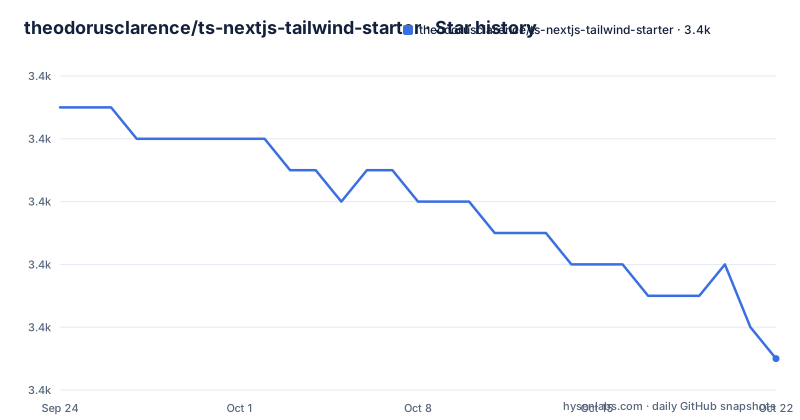
Star history
- theodorusclarence/ts-nextjs-tailwind-starter3,407 ★ · -8
| Repository | 2026-09-24 | 2026-10-22 |
|---|---|---|
| theodorusclarence/ts-nextjs-tailwind-starter | 3.4k | 3.4k |
-8 Stars in the last 28 days, measured from the daily GitHub snapshot. Compare with other projects
Editorial analysis
The feature list is three versions behind the manifest
Read the two halves of this repository against each other and the version numbers do not agree.
The feature list advertises Next.js 14 with the App Router, React 18, and Tailwind CSS 3 configured with CSS variables for the primary colour. The manifest installs the next generation of all three:
"next": "^15.4.3",
"react": "^19.1.0",
"react-dom": "^19.1.0",
"tailwindcss": "^4.1.11",
"@tailwindcss/postcss": "^4.1.11"
So the framework is two majors ahead of the description, React is one major ahead, and Tailwind is one major ahead with its PostCSS plugin replaced rather than merely bumped. A Tailwind major is not a version number change: the configuration model is different, and the readme's description of CSS variables wired to a primary colour describes the older approach.
This is the single most useful thing to know before you clone the template, because the two documents will give you opposite instructions and only one of them reflects what gets installed.
The instructions point you at a pages file while the features promise App Router
The internal inconsistency is not only between prose and manifest, it is inside the readme.
The feature list says App Router. The getting-started section then says to start the development server, open the local address, and begin editing by modifying a file under the pages directory, naming an index file inside a pages folder.
Both cannot be the layout the template ships, and the manifest leans towards the newer router, since the app directory and the Tailwind 4 plugin belong to the same generation as the installed framework.
There is also a branch for the older router, and the readme marks it explicitly as not actively maintained while still giving the command that clones it. So the project keeps a legacy path alive and labelled, and leaves the main instructions pointing at a file path from that legacy path.
That combination, an App Router template whose quick start names a pages file, is the kind of detail that costs an afternoon. Check the source tree before you follow step three literally.
The expansion pack was left behind by the framework upgrade
Extra functionality lives in a second repository, and the readme is candid about its state.
The expansion pack is a separate project by the same author that adds common libraries, extra components and further configuration. The pitch is a single command: React Hook Form with components, Storybook, and more. The commands themselves are in that repository rather than here.
Then the note, which is the important part: because of the App Router update, the expansion pack is currently outdated, it will be updated in the future, and the pieces can still be used by copying and pasting the files.
So the template itself moved to the new router and its companion tooling did not, and the workaround is manual. That also explains the version gap in the previous section: the framework was upgraded and the surrounding material was not.
For anyone planning a project here, the practical question is how much of the expansion pack you actually need. If it is Storybook, that is a day of wiring. If it is a component set written for the old router, you are porting rather than installing.
Four ways to start, introduced as three
The getting-started section is headed as one of three ways to clone the template, and then numbers four items.
The first is to use the repository as a template, and it carries a disclosure worth reading: doing that puts an attribution on your own repository, and the author asks you to keep it. The second uses the official generator with an example flag pointed at the template repository, giving a target directory name, and the same command is offered for the legacy pages branch. The third uses a scaffolder that copies a repository without its history.
The fourth is not a clone at all. It is a deploy button pointing at a hosting service, which creates a new project directly from the repository.
Three clone strategies and one deploy path, which is a sensible set of options with a slightly wrong label.
After cloning, the remaining steps are short: install dependencies, run the development command, and open the local address. The readme recommends the pnpm package manager specifically so that the commit hooks work, which is a detail that matters because the hooks are configured for it.
One environment variable, and a comment marker as the config guide
The example environment file has three comments and one variable, and the comments are the interesting part.
The marker appears twice. One tells you to duplicate the file to a local environment file. The other tells you to change a value to true if you want data logging. Between them sit two plain comments: a heading marking development tools, and a note that these should ideally not be added to production deployment environments.
The single variable is a public-prefixed flag controlling that logger, defaulting to false.
Two things follow. The prefix means the value is available to code running in the browser, so it is not a secret and should not carry one. And the marker convention is how the template tells you what to change: step four of the getting started says to find every comment carrying that marker and follow the guide, which is a grep instead of a documentation page.
The rest of that step is more ordinary: change the title, the urls and the favicons, and do not forget to change the package name in the manifest.
Three lint commands, and one of them rewrites the repository
The scripts show a project with opinions about formatting.
There is a plain lint command that delegates to the framework's own linting, a fix command that runs the linter with automatic fixing over the source directory and then runs the formatter, and a strict command that runs the linter with warnings treated as errors.
That second one is worth reading closely. The formatter it invokes is the write mode over the whole repository, not the source directory. So a command named for fixing lint problems will also reformat every file it can reach, including the ones you were not editing.
The tooling itself is in the same half-generation state as the framework. The linter configuration that comes from the framework is a major behind the installed framework, the TypeScript linter plugins are on an older major line than the TypeScript they check, and the formatter is pinned to an old major while the tailwind plugin that reorders class names is current.
A strict mode is a good thing to have in a template, because it stops the arguments from starting immediately. The version spread is what to check before you trust a clean run.
The test stack is the oldest thing in the manifest
Look down the dependency list and one entry group is a generation behind everything else.
The test runner is pinned to a version from 2021, while the testing library for React is on its fifteenth major and the React itself is on nineteen. There is also a router mocking package for testing navigation, a jest-dom matcher package for custom matchers, and two configuration files at the repository root, one for the runner and one for the environment.
The scripts offer a single run and a watch mode, and nothing else. No coverage script, no component test example in the feature list beyond the claim that it is configured for unit testing.
That gap is the practical risk of this template. A six-year-old runner against a two-year-old React is where the first afternoon goes, and the manifest gives you no signal that the combination is unusual: every other entry in the file is current.
If you plan to write tests here, the runnermajor is the first thing to check against your own React testing setup.
Hooks, mandatory commit format, and a sitemap after every build
The release hygiene in this starter is the most complete part of it.
A prepare script installs the git hooks, and a separate staged-files tool runs scripts against what you are about to commit. A commit message linter with the conventional commit configuration is in the tree, and the readme says the convention is mandatory rather than recommended.
The changelog is generated by a release automation workflow rather than written by hand, and a workflow lints pull requests. That is a sensible arrangement for a template that many people fork, since it gives every fork the same message format without anyone deciding to adopt it.
The build is where the sitemap appears: a postbuild script runs the sitemap generator with its own configuration file after the framework build finishes. So a production build produces a sitemap file as a side effect, and there is no separate step to remember.
The package itself is marked private with a version of 0.1.0, and the repository has no tagged releases at all. The last recorded push to the default branch is dated 2026-09-08.
Editorial conclusion
This starter fits someone starting a Next.js project who wants the boring parts already decided: path aliases, a test setup, import sorting, commit conventions, hooks and a sitemap after every build. Two things to check before you build on it. The prose and the manifest disagree by three framework generations, so read the manifest rather than the feature list, and expect to fix the small incompatibilities an upgrade left behind. And the expansion pack, which is where the extra components and libraries come from, is stated to be outdated and usable only by copying files across. There is also no licence file in the repository and none is recorded, which for a template you copy wholesale is the question to answer first.
Frequently asked questions
What is ts-nextjs-tailwind-starter?
A Next.js, Tailwind CSS and TypeScript starter template that ships pre-built components which adapt to a brand colour, a path alias for imports, a configured unit test setup, linting with automatic import sorting, formatting, commit hooks, a mandatory conventional commit format, and a sitemap generated after every build.
Which versions does ts-nextjs-tailwind-starter install?
The manifest declares Next 15, React 19, Tailwind CSS 4 and the Tailwind 4 PostCSS plugin, while the feature list still describes Next.js 14 with the App Router, React 18 and Tailwind CSS 3.
How do I start a project from ts-nextjs-tailwind-starter?
Use the repository as a template, which adds an attribution to your own repository, or run the official generator with the example flag pointed at the template repository, or use a scaffolder that copies the repository without its history. Then install dependencies with pnpm and run the development command.
What do I have to change after cloning the starter?
The readme says to find every comment carrying the starter configuration marker and follow the guide there, which covers the title, the urls and the favicons, and it also says to change the package name in the manifest. The example environment file contains those markers.
Is the ts-nextjs-tailwind-starter expansion pack usable with the current version?
Not as a command. The readme states that because of the App Router update the expansion pack is currently outdated, that it will be updated in the future, and that the pieces can still be used by copying and pasting the files into your project.
Official sources
Add this badge to your README
If you maintain this project, the badge below links readers to this analysis and shows its maintenance status from the daily GitHub snapshot. Paste the markdown into your README; add ?metric=license or ?metric=stars to the image URL for a different field.

[](https://hysenlabs.com/projects/theodorusclarence-ts-nextjs-tailwind-starter)Star history chart for your README
[](https://hysenlabs.com/projects/theodorusclarence-ts-nextjs-tailwind-starter)