TabbyAPI for ExllamaV3: OpenAI-Compatible Local Inference
The official API server for Exllama. OAI compatible, lightweight, and fast.
At a glance
- What is it?
- TabbyAPI is a FastAPI server that exposes ExllamaV3 language models through an OpenAI-compatible API. It fits local experimentation and small user groups, but its README explicitly excludes production server workloads.
- Who is it for?
- TabbyAPI is a reasonable choice for a developer or small group running ExllamaV3 locally and needing an OpenAI-style client interface. It is not suited to a production service, according to the README, and the first checks should be GPU compatibility, Python version, model format, and the exact deployment tag or image configuration.
- Can I use it commercially?
- Yes, with strict conditions. AGPL-3.0 is a network copyleft licence: if people use a modified version over a network, for example as a hosted service, you must offer them its source code under the same licence.
- Is it still maintained?
- Yes. The repository received new commits within the last day.
- What is it written in?
- Mainly Python, according to GitHub's language statistics.
Answers come from the project's GitHub data, last synced on October 23, 2026, and from our analysis. They are not legal advice.
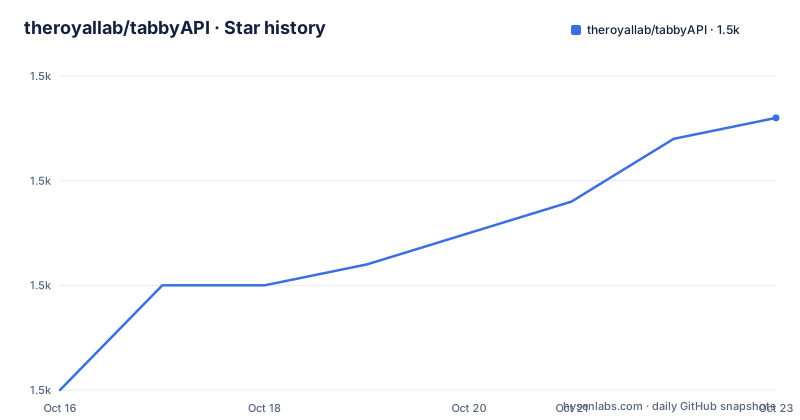
Star history
- theroyallab/tabbyAPI1,488 ★ · +13
| Repository | 2026-10-16 | 2026-10-23 |
|---|---|---|
| theroyallab/tabbyAPI | 1.5k | 1.5k |
13 Stars in the last 7 days, measured from the daily GitHub snapshot. Compare with other projects
Editorial analysis
What TabbyAPI is designed to solve
TabbyAPI addresses the gap between running an ExllamaV3 model locally and connecting applications through a conventional HTTP API. Its primary interface is OpenAI compatible, which means clients designed around that API style can send requests for text generation without being rewritten specifically for TabbyAPI. The target audience is people experimenting with local large language models, running applications against a private model server, or working with a small number of users.
The project is also the official API backend server for ExllamaV3. That relationship matters because TabbyAPI is not a general-purpose model hosting platform. It relies on Exllama for model loading and inference, and its supported model types are Exl3, FP16, and BF16. The README describes Exl3 as highly recommended. On Nvidia Ampere GPUs and higher, it also supports parallel batching through paged attention.
The project is intentionally small in scope. The README calls it a hobby project for a small number of users and says it is not meant to run on production servers. That limitation is part of the product decision, not a minor documentation caveat. It makes TabbyAPI more appropriate for a workstation, a development machine, or an internal experiment than for a public or high-availability deployment.
FastAPI request flow and ExllamaV3 inference
TabbyAPI is a FastAPI application built around ExllamaV3. The repository layout separates API endpoints from backend code, shared code, model-related files, templates, LoRA files, sampler overrides, and tests. That separation matches the path from an HTTP request to local inference: an endpoint receives an API-style request, backend code handles the model operation, and shared configuration and formatting support the request.
The server supports loading and unloading models rather than requiring every model to remain resident. It also supports HuggingFace model downloading, so model acquisition is part of the server workflow rather than an entirely separate concern. Chat completions use a Jinja2 template engine that conforms to HuggingFace templates. This gives clients a chat interface while leaving prompt formatting in templates rather than requiring every application to reproduce the model's expected format.
The inference engine can use continuous batching with paged attention, and the README states that concurrent inference uses asyncio. In practical terms, the documented design is aimed at serving multiple requests while keeping model work in the Exllama backend. It also includes speculative decoding through draft models, JSON schema, Regex, and EBNF constrained generation, plus OpenAI-style tool and function calling. These are server-side capabilities, not promises that every model supports every mode.
An inbuilt proxy can override client request parameters and samplers. That behavior is useful when several clients need consistent generation settings, but it also means the effective request may not be exactly the request sent by the caller. The documentation does not explain every precedence rule, so the proxy configuration should be reviewed before assuming that a client-side sampler setting is always authoritative.
Installing the CUDA container and making the first request
The README gives a direct Docker path for the published CUDA image. The command pulls the image, exposes port 5000, mounts the local models directory at `/app/models`, and enables access to the host GPU. Docker and the NVIDIA container toolkit are prerequisites. The README also says to retain `--shm-size=8g`, because ExLlamaV3 uses POSIX shared memory for tensor parallelism and CPU MoE offload.
Run the documented command after replacing `/path/to/models` with the directory containing the local model directories:
docker pull ghcr.io/theroyallab/tabbyapi:latestThe image is now available locally. The README lists `latest` as the CUDA 12.8 image.
Start the API with the model directory mounted and port 5000 published:
docker run --gpus all --shm-size=8g --name tabbyapi -p 5000:5000 -v /path/to/models:/app/models ghcr.io/theroyallab/tabbyapi:latestAfter startup, the API is exposed at `http://localhost:5000`. The README does not give a first client request or a documented health-check endpoint, so the initial verification is limited to checking that the container starts and that port 5000 responds. The API documentation and Wiki are the appropriate places to confirm the exact model-loading and completion request format.
For a local build, the repository supports an extras build argument for the optional embeddings stack:
The README identifies this as the build mechanism for including the embeddings stack. It also lists separate tags for CUDA 13, AMD ROCm, and an extras image. The tag choice is therefore part of deployment, not a cosmetic label.
Configuration, model formats, and hardware boundaries
The repository contains `config_sample.yml`, `api_tokens_sample.yml`, model directories, templates, and sampler override directories. This suggests that deployment involves YAML configuration rather than treating the server as a command with no persistent settings. The README does not reproduce the configuration keys, so it would be incorrect to invent a configuration file or claim that a particular setting is required.
Python 3.10 through 3.14 is shown by the project badge, while `pyproject.toml` declares `requires-python = ">=3.10"`. The dependency list includes FastAPI, Pydantic, Uvicorn, Jinja2, tokenizers, NumPy, HuggingFace Hub, HTTP libraries, and platform-specific event loop packages. Optional `extras` dependencies include `infinity-emb` and `sentence-transformers`, which are described as heavy dependencies for the optional embeddings stack. The project metadata does not build a normal distributable package with setuptools because the repository states that it is not building the project itself.
Hardware support is narrower than the API surface may suggest. NVIDIA CUDA is covered by the documented image tags. The README lists AMD support through `latest-rocm` for Radeon RX 7900 series and says other GPUs build from `docker/Dockerfile.rocm`. Parallel batching with paged attention is documented for Nvidia Ampere and newer. The README does not provide a CPU installation procedure or a universal hardware compatibility matrix.
The container command also establishes an operational requirement beyond the model itself. Docker's default shared memory size is called too small for tensor parallelism and CPU MoE offload. Omitting the documented `--shm-size` setting can therefore produce a deployment that looks configured but fails when a workload depends on shared memory.
Where TabbyAPI differs from a production API server
The clearest alternative is a production-oriented server built for availability, operational controls, and sustained multi-user workloads. The README itself directs readers who need those properties to look for other solutions. TabbyAPI does not document production deployment, health-check requirements, autoscaling, multi-node coordination, or a service-level contract. The difference is therefore architectural and operational, not merely a matter of how quickly the endpoint responds.
Another alternative is using ExllamaV3 directly without an OpenAI-compatible layer. That approach avoids TabbyAPI's API gateway responsibilities and may be preferable when an application only needs local model loading and inference. TabbyAPI adds value when the application needs endpoint routing, model loading controls, chat templates, tool calling, constrained output, embeddings, or an API interface that resembles the OpenAI format.
The proxy and sampler override features also create a different operating model from a thin pass-through server. A direct client may own its sampling parameters. With TabbyAPI, server-side overrides can change the effective behavior. This is useful for centralizing policy, but it requires the operator to understand which layer is changing a request. The README does not document rollback behavior for proxy changes, so that aspect should be verified in the API documentation before relying on it.
The project also has a rolling-release disclaimer. Users may need to reinstall dependencies as changes land, and there may be bugs. That makes source deployments less predictable than a release with pinned artifacts. The repository has no GitHub releases, so a stable versioned release stream cannot be assumed from the available release history.
Maintenance, licensing, and upgrade implications
TabbyAPI is not archived. Its last push was on 2026-10-16, which indicates recent repository activity, but the README still warns that the project is a rolling release and may change. The maintenance signal therefore comes from the repository's recent push, not from a claim of production support. The project has no GitHub releases, so dependency or behavior pinning must be considered by operators who need reproducibility.
The declared license is AGPL-3.0. That is a material adoption consideration for organizations that modify the server or distribute a modified version. The repository contains a `LICENSE` file and the README links to it. This article does not provide legal advice or interpret how a particular deployment satisfies the license. Operators should review the license text against their distribution and network-use model.
The dependency set also affects upgrade cost. The normal dependencies include version ranges such as `fastapi-slim >= 0.115`, `pydantic >= 2.11, < 3`, and `uvicorn >= 0.28.1`, while the extras group constrains embedding dependencies. A rolling release can require dependency reinstallation according to the project's own warning. Model files are outside the Python dependency upgrade path, but they still need compatible storage, memory, and supported model formats.
Editorial conclusion
TabbyAPI is a reasonable choice for a developer or small group running ExllamaV3 locally and needing an OpenAI-style client interface. It is not suited to a production service, according to the README, and the first checks should be GPU compatibility, Python version, model format, and the exact deployment tag or image configuration. The repository had its last push on 2026-10-16, so the current codebase and its dependencies should be checked before deployment.
Frequently asked questions
What is TabbyAPI used for?
TabbyAPI is a FastAPI-based server for generating text with ExllamaV3 models. It exposes an OpenAI-compatible API and supports local model loading, chat templates, batching, tool calling, constrained output, and embeddings.
How do I install TabbyAPI with Docker?
The README documents pulling `ghcr.io/theroyallab/tabbyapi:latest` and running it with Docker GPU access, port 5000, a mounted models directory, and `--shm-size=8g`. The Wiki contains the broader installation and configuration guide.
Can TabbyAPI be used on AMD GPUs?
The README lists `latest-rocm` for AMD Radeon RX 7900 series GPUs. It says other AMD GPU configurations build from `docker/Dockerfile.rocm`, but the README does not provide a broader compatibility guarantee.
Is TabbyAPI intended for production servers?
No. The README describes TabbyAPI as a hobby project for a small number of users and explicitly says it is not meant to run on production servers. It recommends looking for other solutions for those workloads.
Official sources
Add this badge to your README
If you maintain this project, the badge below links readers to this analysis and shows its maintenance status from the daily GitHub snapshot. Paste the markdown into your README; add ?metric=license or ?metric=stars to the image URL for a different field.

[](https://hysenlabs.com/projects/theroyallab-tabbyapi)Star history chart for your README
[](https://hysenlabs.com/projects/theroyallab-tabbyapi)Was this useful?