lovelace-auto-entities fills a Lovelace card from filters instead of a list
🔹Automatically populate the entities-list of lovelace cards
At a glance
- What is it?
- auto-entities is a Home Assistant Lovelace card that populates itself, taking include and exclude lists of filters over domain, state, area, floor, device, labels and more, with an optional jinja template, a sort configuration, and a fallback card for when the filter matches nothing. It installs through HACS, is built with rollup and lit, and is a small TypeScript project with a plain JavaScript bundle at the root.
- Who is it for?
- lovelace-auto-entities is the right card for a Home Assistant dashboard where the list of entities changes, because the filter language covers area, floor, device, label and state, which is exactly the set of attributes that change when a device moves rather than when a sensor changes value.
- Can I use it commercially?
- Yes. MIT is a permissive licence: you can use, modify and sell software built on it, as long as you keep its copyright and licence notices.
- Is it still maintained?
- Activity is slowing. The repository last received commits 6 months ago.
- What is it written in?
- Mainly TypeScript, according to GitHub's language statistics.
Answers come from the project's GitHub data, last synced on November 7, 2026, and from our analysis. They are not legal advice.
Star history
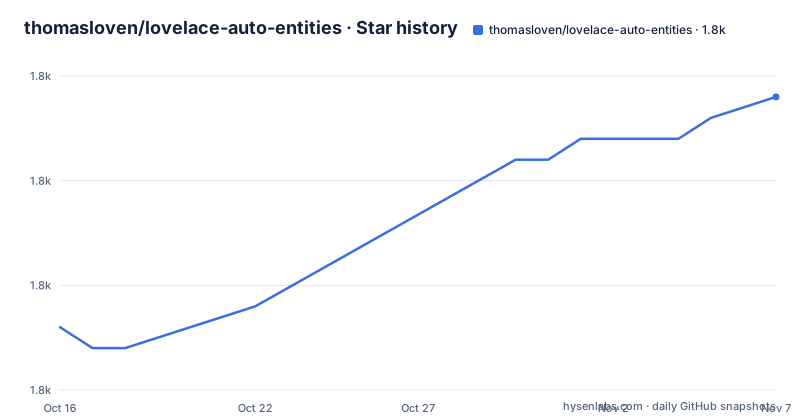
- thomasloven/lovelace-auto-entities1,839 ★ · +11
| Repository | 2026-10-16 | 2026-11-07 |
|---|---|---|
| thomasloven/lovelace-auto-entities | 1.8k | 1.8k |
11 Stars in the last 22 days, measured from the daily GitHub snapshot. Compare with other projects
Editorial analysis
The card you would have to maintain by hand
The problem is a Home Assistant dashboard that keeps a list of entities. Somebody writes a card, and the card lists every light in the house by hand, and then a new lamp is added and the card is stale, and the fix is to edit the YAML again. This card removes the list. You give it a card type and a set of rules, and it works out which entities belong. The card option is the card to display, specified as you would specify any normal dashboard card, but with the entities parameter omitted, and the entities list is optional too, since any entities added there are added to the card before any filters are applied, which is the escape hatch for the one lamp that has to be on a particular card whatever the filters say. The card_param option is the parameter of the card to populate with entities, and it defaults to entities, so the card receives a list of entity ids in the place it would normally declare them.
The configuration shape
The whole configuration is a YAML block, and it is short enough to read at a glance:
type: custom:auto-entities
card: <card>
card_param: <card_param>
entities:
  - <entity>
  - <entity>
filter:
  template: <template>
  include:
    - <filter>
    - <filter>
  exclude:
    - <filter>
    - <filter>

show_empty: <show_empty>
else: <else>
unique: <unique>
sort: <sort_method>
Three parts to it. The card and card_param say where the entities go. The filter block has three ways of selecting entities, a template, an include list and an exclude list. And the trailing options control what happens around the result, whether to display the card when there are no entities, what to show instead, and how to sort. The template option is a jinja template that evaluates to a list of entities to include, which is the escape hatch for a rule the filter language cannot express, and it sits alongside the filters rather than instead of them.
Every rule in a filter has to match
The semantics are simple and worth being precise about, because a filter is a conjunction. The two main filter sections, include and exclude, each take a list of filters, and each filter has a set of rules and will match entities which match all of them. The rule set is long and covers the attributes a Home Assistant entity actually has. There is domain, state, state_translated, entity_id and name for the basics. Then group, area, floor, level and device, which are the location rules, and the area, floor and level rules also match all the entities belonging to a device in that area, on that floor or on that level, which is the behaviour that makes house-wide cards practical. Then device_manufacturer and device_model for hardware. Then integration, with the caveat that this is not possible for all integrations. Then hidden_by, who has hidden an entity, and attributes, a map of attribute and value pairs to match. Then last_changed and last_updated, which are times since the last state change or update and default to minutes, and entity_category, which is the entity category.
state_translated is the rule that catches people out
One rule deserves a warning, and the documentation gives it. state_translated matches the current state of an entity as translated using the frontend language user setting, and for numeric states you should always use state, because translated numeric values will include formatting that will give unexpected results, with the example that 3.14 s becomes 3. The reason is that the translation layer formats numbers for display, so a sensor reporting 3.14 seconds is translated to a string with a unit, and a filter that compares against 3.14 fails. The plain state rule matches the raw value, and the translated rule is for the cases where a human readable string is what you want to compare, such as the French examples in the table with Éteint, Maison and Déclenché. The two rules exist for different purposes and confusing them is the most likely reason a filter silently stops matching.
What to show when nothing matches
Three options handle the empty case, and they are designed to be used together. show_empty is a boolean, defaulting to true, that decides whether the card is displayed at all when there are no entities. The else option is a dashboard card to display if the main card has no entities, and it overrides show_empty. And unique is the option for deduplicating entities, which matters because include and exclude lists can overlap and a template result can repeat an entity that a filter also matched. The sort option is a sort configuration, defaulting to none, and the README links to a sorting section for the details of how the configuration is written, which suggests it is more than a single key and a direction. The design here is reasonable, because an empty card is a common state in a house where a sensor is not reporting, and the fallback card lets you say something useful instead of showing nothing.
Installation through HACS, and the build behind it
Installation is through HACS, the Home Assistant Community Store, where you open your Home Assistant instance and add the repository, or you follow the guide in the author's own configuration wiki. The repository is a small TypeScript project, and the build is rollup with the babel, json, node-resolve and terser plugins plus rollup-plugin-typescript2, producing a single JavaScript file, auto-entities.js, at the root, which is the file Lovelace loads. The only runtime dependency is lit, and the only build-time dependency beyond rollup itself is babel with its preset-env. There is a hacs.json for the HACS metadata, a .devcontainer/ for a consistent development environment, a src/ directory for the sources, a test/ directory, and a script named update-card-tools that swaps the card-tools dependency for a fork, which is the kind of arrangement that shows the project depends on another project of the same author's.
Where this card fits
The boundary is between a dashboard that reflects the house and a dashboard that reflects a decision. A filtered card is a live view, and it is the right view for the entities that come and go, the lights in an area, the sensors on a floor, the devices by manufacturer, and the maintenance state of a machine. It is the wrong view for the things you want to look at in a particular order, because sorting is a configuration and not an expression of intent, and the card you populate is the card that decides the layout. The second boundary is that the card delegates rendering, since the card option names another dashboard card and card_param names the parameter it fills, so this project is a population mechanism rather than a visual one, and a card that is not a standard Home Assistant card will not work without a parameter it understands. On maintenance, the last release was v1.16.1 on 2025-05-28, which included floors and translations, and the last push was on 2026-05-09, so the tree is still being touched even though the published version is a year old, which is the usual state for a Home Assistant custom card.
Editorial conclusion
lovelace-auto-entities is the right card for a Home Assistant dashboard where the list of entities changes, because the filter language covers area, floor, device, label and state, which is exactly the set of attributes that change when a device moves rather than when a sensor changes value. It is the wrong tool for a dashboard where you want a deliberate, hand-curated order, since a filtered card reflects the state of the house rather than a decision, and it is the wrong tool if you need per-entity customisation, because the card hands the entities to another card rather than rendering them itself. Before you adopt it, read the filter rule list rather than the examples, because the matching is an AND across the rules of each filter, and check the state_translated caveat, since that is the rule that surprises people who filter on numeric states.
Frequently asked questions
What does the lovelace-auto-entities card do?
It populates a Home Assistant Lovelace card automatically with entities matching filters, so you do not maintain an entity list by hand. You specify the card to display, a filter block with an optional jinja template plus include and exclude lists, and options for sorting, deduplication and what to show when nothing matches.
Which filters can I use to select entities?
Rules include domain, state, state_translated, entity_id, name, group, area, floor, level, device, label, device_manufacturer, device_model, integration, hidden_by, attributes, last_changed, last_updated and entity_category. Every rule of a filter has to match, and the area, floor and level rules also match all entities belonging to a device in that location.
Why should I use state instead of state_translated for numeric states?
Because translated numeric values include display formatting that gives unexpected results, so a sensor reporting 3.14 is translated to a string such as 3.14 s and a filter comparing against 3.14 fails. Use state for numeric values and state_translated only when you want to compare human readable strings.
How do I install the auto-entities card?
Through HACS, the Home Assistant Community Store, by opening your Home Assistant instance and adding the repository, or by following the guide in the author's configuration wiki. The card is a single JavaScript bundle, auto-entities.js, built with rollup, TypeScript and lit, and it is MIT licensed.
Official sources
Add this badge to your README
If you maintain this project, the badge below links readers to this analysis and shows its maintenance status from the daily GitHub snapshot. Paste the markdown into your README; add ?metric=license or ?metric=stars to the image URL for a different field.

[](https://hysenlabs.com/projects/thomasloven-lovelace-auto-entities)Star history chart for your README
[](https://hysenlabs.com/projects/thomasloven-lovelace-auto-entities)Was this useful?