scooter makes find-and-replace a review step instead of a command
Interactive find-and-replace in the terminal
At a glance
- What is it?
- scooter is a Rust terminal application for interactive find-and-replace that searches the current directory or stdin, lets you toggle individual matches before applying them, and refuses to replace a line that has changed since the search ran. It is built on the ripgrep file walker and a deliberately restricted regex engine, with a full-featured mode behind a flag.
- Who is it for?
- Adopt scooter if your find-and-replace work is on a codebase large enough that a blind sed pass is risky, since the per-match toggling and the stale-line check are the two things a scripted replacement does not give you. Do not adopt it for a single mechanical substitution, because the setup cost is higher than running the tool you already have.
- Can I use it commercially?
- Yes. MIT is a permissive licence: you can use, modify and sell software built on it, as long as you keep its copyright and licence notices.
- Is it still maintained?
- Yes. The repository last received commits 5 days ago.
- What is it written in?
- Mainly Rust, according to GitHub's language statistics.
Answers come from the project's GitHub data, last synced on November 6, 2026, and from our analysis. They are not legal advice.
Star history
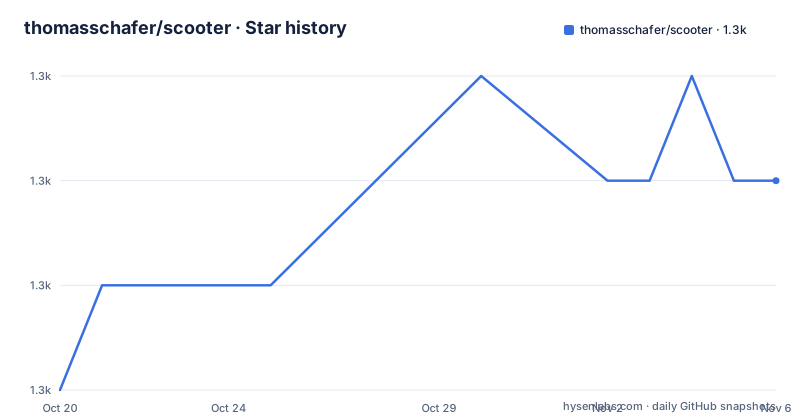
- thomasschafer/scooter1,303 ★ · +2
| Repository | 2026-10-20 | 2026-11-06 |
|---|---|---|
| thomasschafer/scooter | 1.3k | 1.3k |
2 Stars in the last 17 days, measured from the daily GitHub snapshot. Compare with other projects
Editorial analysis
The stale-line check is the feature that justifies the tool
scooter is an interactive find-and-replace terminal UI app that by default recursively searches through files in the current directory but can also process text from stdin. You search with either a fixed string or a regular expression, enter a replacement, and interactively toggle which instances you want to replace. The part that makes it more than a wrapper around sed is the check for staleness. If the instance you are attempting to replace has changed since the search was performed, for example because you switched branches and that line no longer exists, that particular replacement will not occur, and you will see all such cases at the end. The failure mode it prevents is the one that makes scripted replacement dangerous, which is silently writing a replacement into a file that has moved underneath you.
Search modes and the escape sequence default
By default scooter searches line by line, but multiline searching can be enabled either by launching with the `-U` flag or by hitting `alt-m` while it is already running. The escape sequence behaviour is the other default worth knowing. By default, escape sequences such as `\n` are entered literally, so you would get a backslash and an n. If you want them interpreted, so that `\n` inserts a newline, you use `-e` or `--interpret-escape-sequences`, and this applies to `\n`, `\t` and `\\` in the replacement text. That default is a reasonable choice, because a search for a literal backslash-n is more common than a search for a newline, but it is the kind of default that surprises people once.
The search screen has seven fields, and the glob rules are ripgrep's
The search screen offers search text, replace text, a fixed strings toggle, a match whole word toggle, a match case toggle, files to include and files to exclude. The include and exclude fields take comma-separated glob patterns, and the exclude field takes precedence over the include field. The glob matching comes from ripgrep, and the README says it matches the behaviour there, giving the example that including only files in a directory named dir1 requires `dir1/**`, because `dir1` alone would not work. That inheritance is worth understanding if you have used ripgrep, since the same surprises apply. The fixed strings toggle reverts the search to case-sensitive string search, and the whole word toggle only matches when the search string forms an entire word rather than a substring.
Capture groups in the replacement string
The regex support includes capture groups that you can use in the replacement. The example given is a search of `(\d) - (\w+)` with a replacement of `($2) "$1"`, so `9 - foo` becomes `(foo) "9"`. This is the feature that separates scooter from a literal string replacement, and it is the reason the tool defaults to regex mode rather than fixed strings. The regex engine is deliberately limited by default, however: the README says scooter uses a regex engine that supports only a subset of features to maximise performance, and to get the full range including negative lookahead you start with `-a` or `--advanced-regex`. So the trade is between speed and expressiveness, and the flag is the switch between them.
Opening the file where the match is
When viewing search results you can open the selected file at the relevant line by pressing `e`, and this uses the editor defined by the `EDITOR` environment variable. The tool attempts to open the editor at the correct line number automatically, and if you want to override the command used you set `editor_open` in the config file. This is a small feature that changes how the tool feels, because the usual flow of a search and replace leaves you with a list of files you now have to open yourself. The README also notes that a set of keymappings is shown at the bottom of the window, and that they vary slightly depending on which screen you are on, so the keys are discoverable rather than memorised.
Scripting it and the stdin mode
The tool can also be used without the interface, and the stdout and stderr split is the detail to know. In standard TUI mode the results are written to stderr, to avoid clashing with the TUI which writes to stdout, so you write the results using `2>`:
cat input.txt | scooter 2> output.txtIn `--no-tui` mode, with the short flag `-N`, the results are written to stdout instead, so the same thing becomes:
cat input.txt | scooter -N -s before -r after > output.txtThat gives you a scriptable find and replace without the interface, with the search and replace given on the command line. The search fields can also be pre-populated from the flags, with `--search-text`, `--replace-text`, `--fixed-strings` and `--files-to-include`, and by default pre-populated fields are disabled in the interface, which you can change with the `search.disable_prepopulated_fields` setting, or unlock temporarily with `<alt>+u`. Adding `--immediate-search` skips the search screen entirely and goes straight to searching.
The performance numbers are a benchmark of a real tree
The README includes a benchmark on the entire Linux kernel, finding and replacing the string "before" with "after", and the table is worth reading because it compares against the tools you would otherwise reach for. scooter in TUI mode averages 6.403 seconds with a relative figure of 1.46, scooter in no-tui mode averages 4.491 seconds at 1.02, ripgrep with sd takes 4.894 seconds at 1.11, fastmod takes 4.395 seconds at 1.00, and fd with sd takes 10.010 seconds at 2.28. So the interactive tool is in the same range as the scripted ones, and much of the speed comes from using the ripgrep file walker found in the ignore crate. The repository layout backs that up, with a `scooter-core/` crate separate from the `scooter/` binary, an `xtask/` crate for workspace tasks, a `tests/` directory, and a rust-toolchain.toml plus a flake.nix, with the workspace on edition 2024 and LTO enabled in the release profile. The licence is MIT and the last release is v0.10.0 from 2026-10-11.
Editorial conclusion
Adopt scooter if your find-and-replace work is on a codebase large enough that a blind sed pass is risky, since the per-match toggling and the stale-line check are the two things a scripted replacement does not give you. Do not adopt it for a single mechanical substitution, because the setup cost is higher than running the tool you already have. Verify first whether you need the advanced regex features, since the default engine is a subset, and check that your editor command is set, because the tool opens files through the EDITOR environment variable and will not find a line otherwise.
Frequently asked questions
What does scooter do?
It is an interactive find-and-replace terminal UI app. It recursively searches the current directory or processes text from stdin, lets you toggle individual matches before applying, and skips any replacement whose line changed since the search was performed, listing those cases at the end.
How do I use scooter with a regex that has negative lookahead?
The default regex engine supports only a subset of features for speed. Start scooter with the `-a` or `--advanced-regex` flag to get the full range of regex features.
How do I use capture groups in the scooter replacement?
Put them in the replacement string using the usual dollar syntax. A search of `(\d) - (\w+)` with a replacement of `($2) "$1"` turns `9 - foo` into `(foo) "9"`.
How do I pipe scooter output to a file?
In the default TUI mode the results go to stderr so they do not clash with the interface on stdout, so you redirect with `2>`. In `--no-tui` mode they go to stdout instead, so `cat input.txt | scooter -N -s before -r after > output.txt` writes the file.
How does scooter handle files that are not tracked by git?
When searching through files, scooter respects both `.gitignore` and `.ignore` files, and hidden files are ignored by default unless you pass the `--hidden` flag.
Official sources
Add this badge to your README
If you maintain this project, the badge below links readers to this analysis and shows its maintenance status from the daily GitHub snapshot. Paste the markdown into your README; add ?metric=license or ?metric=stars to the image URL for a different field.

[](https://hysenlabs.com/projects/thomasschafer-scooter)Star history chart for your README
[](https://hysenlabs.com/projects/thomasschafer-scooter)Was this useful?