Wild Workouts: a Go DDD example built to be refactored in public
Go DDD example application. Complete project to show how to apply DDD, Clean Architecture, and CQRS by practical refactoring.
At a glance
- What is it?
- A multi-service Go sample whose DDD, Clean Architecture, and CQRS layers arrived one article at a time. Its tags stop at v2.7 from April 2021 while the master branch kept taking pushes, so read it as a teaching sequence rather than a starter kit.
- Who is it for?
- Read Wild Workouts as a sequence with a frozen tag rather than a codebase you can adopt: follow the article trail to v2.7, expect one startup command and five deployment prompts, and plan to supply the Firestore credentials, a Go 1.25 toolchain, and any port changes yourself before the example becomes yours to change.
- Can I use it commercially?
- Yes. MIT is a permissive licence: you can use, modify and sell software built on it, as long as you keep its copyright and licence notices.
- Is it still maintained?
- Yes. The repository last received commits 80 days ago.
- What is it written in?
- Mainly Go, according to GitHub's language statistics.
Answers come from the project's GitHub data, last synced on November 15, 2026, and from our analysis. They are not legal advice.
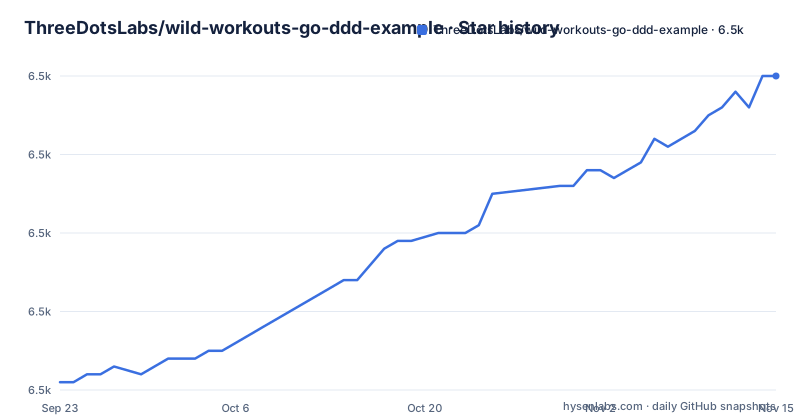
Star history
- ThreeDotsLabs/wild-workouts-go-ddd-example6,500 ★ · +39
| Repository | 2026-09-23 | 2026-11-15 |
|---|---|---|
| ThreeDotsLabs/wild-workouts-go-ddd-example | 6.5k | 6.5k |
39 Stars in the last 53 days, measured from the daily GitHub snapshot. Compare with other projects
Editorial analysis
The series is mid-refactor, and its last release tag is from 2021
Wild Workouts exists to show DDD, Clean Architecture, and CQRS through refactoring rather than through a finished design. The project says so itself: the idea for the series is to apply DDD by refactoring, and that process is in progress. Fourteen articles are listed, most of them paired with a release tag, starting at v1.0 for a serverless application on Cloud Run and Firebase and running through v2.0 on DRY, v2.2 on the repository pattern, v2.4 on Clean Architecture, and v2.5 introducing basic CQRS. The tags stop at v2.7, Run test suite in the CI/CD pipeline, published 2021-04-01; before it sit v2.6 Introduce test suite from 2021-01-28 and v2.5 Introducing basic CQRS from 2020-10-04. The default branch is master and its last push is dated 2026-08-27, so commits continue while the newest tag sits five years back. That gap is the first thing to know. You can follow the article trail to v2.7, but no tag covers the code pushed since, and the project opens by saying no application is perfect from the beginning.
docker-compose up is the whole documented local start
One command brings the stack up, and the documentation stops there.
> docker-compose up

# ...

web_1             |  INFO  Starting development server...
web_1             |  DONE  Compiled successfully in 6315ms11:18:26 AM
web_1             |
web_1             |
web_1             |   App running at:
web_1             |   - Local:   http://localhost:8080/
web_1             |
web_1             |   It seems you are running Vue CLI inside a container.
web_1             |   Access the dev server via http://localhost:<your container's external mapped port>/
web_1             |
web_1             |   Note that the development build is not optimized.
web_1
There is no separate install step, no Go toolchain check, and no per-service command anywhere in the docs. The compose project is named wild-workouts, and a single pass starts the frontend, three Go services, and a firestore container together, which is convenient and also blunt: nothing in the docs shows how to run a single service on its own, nothing explains what to do when port 8080 or 3000 is already taken on your machine, and the README does not document a teardown or reset path.
One service name runs twice, on two ports, with SERVER_TO_RUN
trainer-http and trainer-grpc are the same trainer code with two settings. SERVER_TO_RUN: http on 127.0.0.1:3000, SERVER_TO_RUN: grpc on 127.0.0.1:3010. trainings-http takes 3001 and users-http takes 3002, each with its own SERVICE value, so the running system is three contexts sharing one datastore rather than a single binary. Every Go service mounts the same three host paths: ./internal at /internal, ./.go/pkg at /go/pkg, and ./.go-cache at /go-cache, with GOCACHE pointing at /go-cache and working_dir at /internal.
    environment:
      SERVICE: trainer
      SERVER_TO_RUN: http
      GOCACHE: /go-cache
    depends_on:
      - firestore
The module cache and the build cache therefore live on your host in two dot directories instead of inside the image. Two limits follow from the same file. All five port mappings bind to 127.0.0.1, so nothing here is reachable from a colleague's machine or a phone on the network without editing the mappings, and the docs do not cover that edit.
The Firestore credential mount ships commented out
Every Go service repeats the same disabled volume line, `# - ./service-account-file.json:$SERVICE_ACCOUNT_FILE`, and the trainer, trainings, and users services sit behind a firestore entry in depends_on, so the datastore is part of the default local path rather than an optional extra. A fresh clone has no service-account-file.json in the top level listing, which holds .env, .env.test, .env.e2e, and the rest of the tree instead. The consequence is narrow and real: against a hosted Firestore project you have to add that credentials file yourself and uncomment the line in four places, and the docs never state which keys the .env files are supposed to define, only that each Go service loads .env through env_file. What this arrangement will not give you is a zero-configuration path to a real database, and the four copies of the same disabled line are four places to forget.
go.mod pins Go 1.25 and marks every requirement indirect
The module is github.com/ThreeDotsLabs/wild-workouts-go-ddd-example and it declares go 1.25.0, so the toolchain floor is higher than a lot of Go tutorials assume. Every entry in the require block ends with an indirect marker, including testify v1.12.1, ginkgo v1.16.5, gomega v1.27.10, kin-openapi v0.142.0, and oapi-codegen v2.8.0, and the file adds a tool directive for github.com/oapi-codegen/oapi-codegen/v2/cmd/oapi-codegen.
module github.com/ThreeDotsLabs/wild-workouts-go-ddd-example

go 1.25.0
That shape is what a workspace with generated API code looks like from the outside: api/ holds the OpenAPI and gRPC definitions, and go.work plus go.work.sum sit next to go.mod at the top level. Two things the list will not hand you. ginkgo sits on the 1.x line at v1.16.5, so suite and runner code written for the v2 series does not drop in unchanged, and an indirect block that lists your assertion libraries as transitive dependencies is a sign the direct imports are declared elsewhere, which means go mod tidy in your own fork rewrites this block.
The web container prints a placeholder URL instead of its own port
The frontend is the one service with its own build context and Dockerfile, and the only one that mounts a bare node_modules volume.
  web:
    build:
      context: docker/web
      dockerfile: Dockerfile
    working_dir: /web
    volumes:
      - ./web:/web
      - /web/node_modules/
    ports:
      - "127.0.0.1:8080:8080"
The anonymous volume at /web/node_modules is what keeps the modules installed on your host from shadowing the ones built inside the image. The startup text is where this gets loose: the CLI prints Access the dev server via http://localhost:<your container's external mapped port>/ rather than filling in the number, then reminds you that the development build is not optimized. For this compose file the mapped port is 8080. What you cannot get out of the docs is a production bundle, because no build, test, or lint command for the JavaScript under web/ is written down anywhere.
terraform make asks for a billing account before it creates anything
The deployment path is a make run inside terraform/, and it asks five questions before doing any work.
> cd terraform/
> make

Fill all required parameters:
	project [current: wild-workouts project]:
	user [current: [email protected]]:
	billing_account [current: My billing account]:
	region [current: europe-west1]:
	firebase_location [current: europe-west]:

# it may take a couple of minutes...

The setup is almost done!
Read those defaults as requirements rather than suggestions. The project is created for you, the billing account has to be a real one, the region defaults to europe-west1 and the Firebase location to europe-west. There is no non-interactive flag in what is shown, so nothing here scripts a repeatable deployment, and no teardown target is shown. This path does not run on a machine without a billing account.
The directory list leaves out sql/ and tools/
The docs name six places to look: api/ for the OpenAPI and gRPC definitions, docker/ for the Dockerfiles, internal/ for the application code, Taskfile.yml for deployment and development tasks, terraform/ for the infrastructure definition, and web/ for the frontend JavaScript. The top level of the tree holds more than that list. It also has sql/, tools/, docker-compose.ci.yml, go.work, go.work.sum, .env, .env.test, .env.e2e, and .github/. The gap matters the moment you go hunting for database migrations or the code generator, since sql/ and tools/ are where you would look and the README directory list does not describe either one. docker-compose.ci.yml points at the pipeline that release v2.7 was about, running the suite on a cloud build service with docker-compose. Taskfile.yml is called the home of deployment and development tasks without listing a single task name. If you would rather look than build, a hosted instance is reachable at https://threedotslabs-wildworkouts.web.app/, and the maintainers run a Discord community for questions.
Editorial conclusion
Read Wild Workouts as a sequence with a frozen tag rather than a codebase you can adopt: follow the article trail to v2.7, expect one startup command and five deployment prompts, and plan to supply the Firestore credentials, a Go 1.25 toolchain, and any port changes yourself before the example becomes yours to change.
Frequently asked questions
What does the Wild Workouts Go DDD example actually demonstrate?
It applies DDD, Clean Architecture, and CQRS by refactoring one application step by step, with release tags from v1.0 through v2.7 marking where each article left the code. The project states that the refactoring process is still in progress.
How do I run ThreeDotsLabs/wild-workouts-go-ddd-example locally?
A single docker-compose up starts the Vue frontend, three Go services, and firestore. The docs give no separate install step, no per-service command, and no teardown path, so a partial start is left to you.
Does Wild Workouts need a Firestore service account file to start?
Each Go service mounts ./service-account-file.json as a commented-out volume line, and a fresh clone has no such file in its top level listing. Against a hosted Firestore project you add the file and uncomment the line in four places yourself.
Which Go and test library versions does Wild Workouts require?
go.mod declares go 1.25.0 and lists ginkgo v1.16.5, gomega v1.27.10, testify v1.12.1, kin-openapi v0.142.0, and oapi-codegen v2.8.0, all of them marked as indirect requirements.
Official sources
Add this badge to your README
If you maintain this project, the badge below links readers to this analysis and shows its maintenance status from the daily GitHub snapshot. Paste the markdown into your README; add ?metric=license or ?metric=stars to the image URL for a different field.

[](https://hysenlabs.com/projects/threedotslabs-wild-workouts-go-ddd-example)Star history chart for your README
[](https://hysenlabs.com/projects/threedotslabs-wild-workouts-go-ddd-example)Was this useful?