Style 3.1 is the one recipe hand-drawn-styles will not reduce to a prompt
A Claude Code skill that fits your content into built-in hand-drawn art-style recipes, producing ready-to-copy image-generation prompts. Includes 5 verified styles: children's coloring book, minimalist line art, crayon doodle, Ghibli-style, and mini bean-character doodle.
At a glance
- What is it?
- hand-drawn-styles is a set of prompt recipes for drawing styles, packaged for coding agents rather than image models. Its 19 recipes, the anchor file behind 3.1, and the renderer that refuses to paraphrase them are where the decisions worth reading sit.
- Who is it for?
- Use hand-drawn-styles if you drive an agent from a terminal and already have an image backend you trust: it hands you repeatable prompt text and, for 3.1, a call package with the workflow and the mandatory references spelled out. Skip it if you expected a generator, a model or a versioned library, because nothing here renders an image and no release exists to pin.
- Can I use it commercially?
- Yes. MIT is a permissive licence: you can use, modify and sell software built on it, as long as you keep its copyright and licence notices.
- Is it still maintained?
- Yes. The repository last received commits 10 days ago.
- What is it written in?
- Mainly Python, according to GitHub's language statistics.
Answers come from the project's GitHub data, last synced on November 22, 2026, and from our analysis. They are not legal advice.
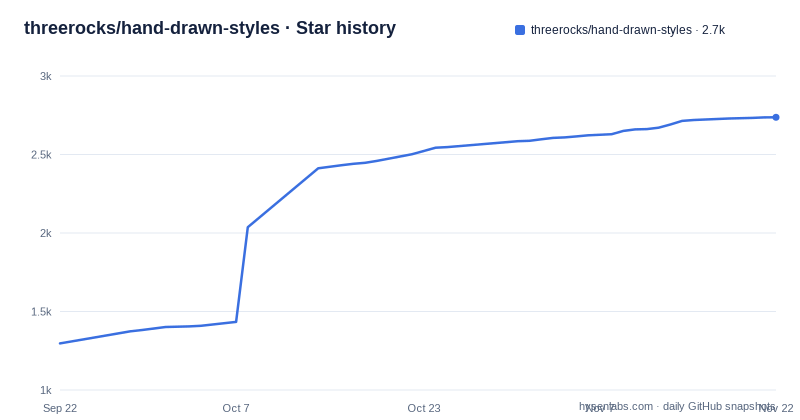
Star history
- threerocks/hand-drawn-styles2,737 ★ · +1,440
| Repository | 2026-09-22 | 2026-11-22 |
|---|---|---|
| threerocks/hand-drawn-styles | 1.3k | 2.7k |
1,440 Stars in the last 61 days, measured from the daily GitHub snapshot. Compare with other projects
Editorial analysis
Nineteen recipes in the style table, five in the repo blurb
The repository summary advertises five verified styles, naming children's colouring, minimal line, crayon child doodle, Ghibli and the little bean doodle. The style table inside the project is a different size. It carries 18 integer-numbered recipes plus one stable variant numbered 3.1, 19 in all, sorted into eight families: lifelike hand drawing, line and explanation sketching, deliberately bad drawing, traditional and retro texture, animation and concept art, paper craft, picture book and Nordic, and 3D art toys. Every row gives a Chinese name, a tone description and one to four English aliases in backticks, so a style can be addressed three ways: by number, by Chinese name, or by alias such as `ghibli`, `xkcd` or `ink-wash`. The five-style summary is not a subset label either, because those five sit in four different families of the eight. Read the table, not the summary, when you pick a style.
Style 3.1 is the one recipe that refuses to be a prompt
Most recipes here end at a block of prompt text. Number 3.1 does not. It is the only entry with a decimal number, the only one that depends on a binary asset at `assets/style-3.1/anchor-family.png`, and the only one whose default renderer output is a JSON call package named `family-crayon-card-v3`. That package carries the prompt, a replay of the inputs, a list of references that must be sent every time, and a forced three-stage workflow. Stage one generates the base image, stage two runs `scribble-correction`, stage three runs `scribble-chaos-correction`. The first two stages produce intermediate images only, and the third is the final one. The anchor is checked on two points: fixed dimensions, and the SHA-256 of the decoded pixels, so editing the file metadata leaves the style identity untouched. The docs go one step further and tell integrators not to keep a second set of rules for lines, facial features, colour, paper or scribble correction in their own codebase.
The agent fills the placeholders, which is where styles drift
Recipes are templates with holes in them, and the docs name the holes: subject, title word, main colour, N, and panel list, each written in full-width brackets inside the recipe text. In the plain chat path nobody types them. The agent infers every one from the description you gave, writes them in itself, then prints a finished prompt for you to copy. That is also where the promise of fixed recipes reducing drift is weakest, because the wording gets retyped on each run and the substitutions are the model's judgement rather than a parameter you passed. Two runs of the same sentence can come back with a different panel count and a different accent colour. The renderer exists to close that gap: it pulls the recipe text out of the file as it stands instead of letting the model paraphrase it on the way out. If you care that a recipe survives contact with the model, use the renderer and not the copy and paste route.
render_prompt.py takes five flags and one explicit opt out
The renderer under `scripts/` is described as an extractor with no rewriting in it: it hands back the recipe as written. The documented production call looks like this:
python3 scripts/render_prompt.py \
  --style 3.1 \
  --subject '爸爸把零食袋放回柜子,男孩站在旁边看着' \
  --text '不加任何文字' \
  --aspect 3:4 \
  --format json
Five flags carry that call: style, subject, text, aspect and format. A page meant to carry no lettering passes `不加任何文字` as its text; a page with a title sends the exact title string through a separate title flag, and the docs insist on the original wording rather than a paraphrase of it. One deliberate speed bump guards the plain output path: text alone needs an explicit text format and a preview flag together, and that pair is marked as unfit for production. Everything else is meant to leave the process as the JSON package.
Aspect ratio is your argument, not the project's default
Ratio handling is the clearest deliberate non-decision in the project. Pass one, such as `16:9`, a vertical frame or a square, and the recipe uses yours. Pass nothing and the pure style recipes, numbered 2, 3, 3.1 and 5 through 18, inject no ratio at all. The two layout recipes are handled apart: 1 and 4 add only soft structure wording, a multi-panel grid or a vertical stack of panels, with no numbers written into it. The stated reason is that a layout recipe should shape composition without pinning the canvas. The cost is visible in the same document, which describes style 5 as keeping its native vertical N-panel infographic layout while the ratio rule lists 5 among the pure styles that receive no layout hint. Whether that vertical structure survives a run therefore depends on what sits in the recipe text itself, not on the ratio rule.
Five install paths, and no release to pin
There is no package to install. The documented way in is a sentence you send to the agent, and the second is a clone:
git clone https://github.com/threerocks/hand-drawn-styles.gitWhere the clone lands depends on the tool. For Claude Code the whole repository becomes the skill directory at `~/.claude/skills/hand-drawn`, where `SKILL.md` is picked up automatically. For Cursor the two core files, `PROTOCOL.md` and `STYLES.md`, go into the project's `.cursor/rules/` folder or into `.cursorrules`. For Codex CLI, Gemini CLI and Jules, `AGENTS.md` or `GEMINI.md` is pointed at those same two files or absorbs their contents. Cline, Windsurf and Continue take the text merged into their own rules. Any other tool takes the same two files pasted into the system prompt. The docs warn against copying loose text fragments for real work, since the anchor file for 3.1 lives in the assets folder. The repository publishes no releases either, so the last push on record, 4 September 2026, is as close to a fixed version as you get.
benchmarks/ sits in the tree and not in the directory map
The project publishes a directory layout in its own documentation, and the repository does not quite match it. The documented map lists `README.md`, `LICENSE`, `PROTOCOL.md`, `STYLES.md`, the two thin adapter files `SKILL.md` and `AGENTS.md`, and the `assets`, `scripts` and `examples` folders. The actual top level also holds `.gitignore` and a `benchmarks` folder, and the benchmarks folder is never mentioned again: not in the layout block, not in the design principles, not in the contribution notes. Sample coverage inside `examples` is uneven too. Style 1 has a single file, style 11 has a solo and a duo, style 12 has a full bleed version and a boy, and style 16 has a bird, a boy and an old man. The recipe table is the index; the sample images are supporting evidence of varying weight, so a thin sample folder is not evidence that a recipe is unused.
The contribution rules pull against the layout rule
Adding a style means writing one recipe block in `STYLES.md` and registering it in the menu and alias table of `PROTOCOL.md`. The contribution notes give four rules for that recipe: keep the wording you actually tested, in Chinese or English, and do not swap in phrasing you have not verified; drop hard ratio constraints such as `1:1` or `3:4` and leave ratio handling to the protocol; abstract every content-specific part into a bracketed placeholder; and attach one or two output samples in `examples` for reviewers. Verification is not optional either: a new or upgraded style has to be checked on a reference image of the same scene plus one scene with a different subject. Maintainers may call an image model through the verification exception spelled out in `AGENTS.md`, but a sample only enters the repository after privacy metadata cleanup and an audit. The tension worth naming is with the principle that each style keeps its native layout, such as the vertical panel structure of style 5. A contributor who reads structure as a constraint to strip will flatten the very thing the project says it preserves.
Editorial conclusion
Use hand-drawn-styles if you drive an agent from a terminal and already have an image backend you trust: it hands you repeatable prompt text and, for 3.1, a call package with the workflow and the mandatory references spelled out. Skip it if you expected a generator, a model or a versioned library, because nothing here renders an image and no release exists to pin. Before adopting, read STYLES.md rather than the repository summary, confirm you can keep assets/style-3.1/anchor-family.png next to the text files, and decide whether your tool's rules file is somewhere you want a third-party recipe to live. If the exact canvas matters, pass the ratio yourself.
Frequently asked questions
How many drawing styles does hand-drawn-styles include?
The style table carries 18 integer-numbered recipes plus one stable variant numbered 3.1, 19 in total, grouped into eight families, while the repository summary still advertises five verified styles.
Does hand-drawn-styles generate the images itself?
No. It produces prompt text or a JSON call package and leaves rendering to the image model you already use, with gpt-image and Midjourney named in the docs as examples.
What does style 3.1 need that the other hand-drawn-styles recipes do not?
It needs the anchor file assets/style-3.1/anchor-family.png kept alongside the text files, and its renderer output is a family-crayon-card-v3 package that runs scribble-correction and then scribble-chaos-correction before the final stage.
How is hand-drawn-styles wired into an agent tool?
Clone the repository to ~/.claude/skills/hand-drawn for Claude Code so SKILL.md is picked up, or copy PROTOCOL.md and STYLES.md into .cursor/rules/, into AGENTS.md or GEMINI.md, or into the rules and custom instructions of Cline, Windsurf or Continue.
Does hand-drawn-styles lock the output aspect ratio?
No. A ratio you pass is used as given, and without one the pure style recipes inject nothing while the two layout recipes, 1 and 4, add soft structure hints such as a multi-panel grid or a vertical stack.
Are there releases of hand-drawn-styles to pin a version to?
The repository has no GitHub releases, and the last push on record is 4 September 2026, so anyone who needs a fixed version has to pin a commit themselves.
Official sources
Add this badge to your README
If you maintain this project, the badge below links readers to this analysis and shows its maintenance status from the daily GitHub snapshot. Paste the markdown into your README; add ?metric=license or ?metric=stars to the image URL for a different field.

[](https://hysenlabs.com/projects/threerocks-hand-drawn-styles)Star history chart for your README
[](https://hysenlabs.com/projects/threerocks-hand-drawn-styles)Was this useful?