verl-tool: the framework arrives through a submodule pointer, and the manifest never learned the version
A version of verl to support diverse tool use [TMLR 2026]
At a glance
- What is it?
- A tool-agent reinforcement learning framework that vendors verl as a git submodule instead of depending on it, and gates every tool behind its own optional extra. The manifest and the release list disagree about the version, one required dependency is spelled differently from its two counterparts, and click is pinned to two different numbers in two files.
- Who is it for?
- verl-tool fits a team that already trains with verl and wants tool calling added without rebuilding the rollout loop, and who is willing to pin their own infrastructure since the required list installs none of the broker, cache or database pieces the example environment expects.
- Can I use it commercially?
- Yes. MIT is a permissive licence: you can use, modify and sell software built on it, as long as you keep its copyright and licence notices.
- Is it still maintained?
- Yes. The repository last received commits 123 days ago.
- What is it written in?
- Mainly Python, according to GitHub's language statistics.
Answers come from the project's GitHub data, last synced on November 15, 2026, and from our analysis. They are not legal advice.
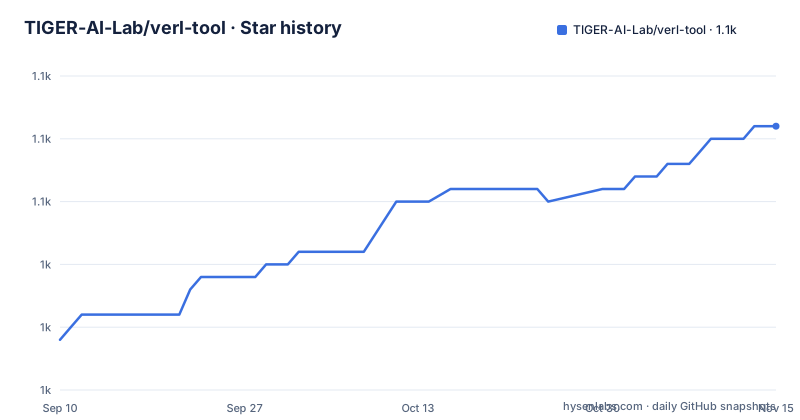
Star history
- TIGER-AI-Lab/verl-tool1,056 ★ · +17
| Repository | 2026-09-10 | 2026-11-15 |
|---|---|---|
| TIGER-AI-Lab/verl-tool | 1k | 1.1k |
17 Stars in the last 66 days, measured from the daily GitHub snapshot. Compare with other projects
Editorial analysis
The manifest and the release list disagree about which version this is
The project file and the release page tell different stories. `pyproject.toml` declares `version = "0.1.0"` under a project named `verl-tool`, while the release list shows v0.1.0 tagged on 2025-11-10 and v0.2.0 tagged on 2025-12-24, and the default branch was pushed on 2026-07-15. So the tree you get from the default branch is well past v0.2.0 and still identifies itself as 0.1.0. The same file carries a second placeholder, `description = "Add your description here"`, which is the string a scaffolding tool writes when it cannot think of one. Neither is fatal for a private fork, but together they mean anything that reads installed package metadata, including a resolver asking for a version floor, sees numbers the maintainers stopped maintaining. The versioning is tangled a second way as well. The only upgrade note the project links is named for an upstream framework version rather than its own, `verltool_v0.6.0_upgrade.md`, and the news entry that introduces it is the same 2025-11-10 item that reorganised the codebase for verl 0.6.0 and vllm 0.11.0. Three version schemes are in play here: the package version, the verl version and the vllm version, and only one of them is the project's own.
One required dependency is spelled differently from both places it reappears
The required dependency list names `psutils>=3.3.9`. The mcp_tool extra names `psutil>=5.9.0`, and the python_code_dep extra names `psutil` with no bound at all. Those are different distribution names rather than two ways of writing one, and the spelling in the required list is the one that installs when you ask for the project with no extras. If it is a typo, then every base install pulls a package nobody audited here, and the two extras quietly pull a different one alongside it, so both end up in the same environment under nearly identical names. If it is deliberate, nothing in the repository says so. Either way this is the first entry to check before you build an image around a plain install, because the required list is exactly what runs when nobody passes an extras flag.
click is pinned to two different versions in two different files
The required list mixes three pinning styles across eleven entries. Two carry a floor and nothing else, `fire>=0.7.0` and `timeout-decorator>=0.5.0`. One is a hard pin, `click==8.2.1`. Two carry no version information whatsoever, `pyext` and `qwen_omni_utils`, which means a resolver takes whatever is newest on the day you install. The remainder name libraries such as `transformers`, `tensorboard`, `ipython` and `aiofiles` with no bound either. Then there is the second file. `requirements.txt` is a fully locked export of several hundred exact versions, including `click==8.1.8`, `accelerate==1.6.0`, `anthropic==0.50.0`, `flash-attn==2.7.4.post1`, `math-verify==0.7.0` and a git URL pinned to the AceCoder commit `ad017bce`. So two files, two click versions. Installing from the manifest gives you 8.2.1, installing from the export gives you 8.1.8, and nothing at the root tells you which one the training recipes were written against. The Python floor is likewise stated in only one of the two places, `requires-python = ">=3.10"`.
verl is a submodule, and pip collects only one package
The reinforcement learning framework this project is named after appears in the root as a directory and as a submodule reference, not as an installed dependency. The root listing carries `.gitmodules` beside `verl/`, and the manifest narrows what packaging collects with an explicit line, `packages = ["verl_tool"]`. The framework you actually run is therefore whatever commit the submodule pointer names, and a plain install of the project does not fetch it. The maintainers are explicit that they want this arrangement, describing verl as a submodule precisely so that ongoing upstream repository updates flow in, and they record each time the pointer moves: a 2025-06-16 entry says the submodule was updated and code adapted to the new version, and a 2025-11-10 entry announces a reorganisation of the codebase targeting verl 0.6.0 and vllm 0.11.0. There is a dedicated page for updating the submodule version. The tradeoff is that a container built from the manifest and a container built from a cloned working tree are not guaranteed to hold the same RL framework, and the tag you recorded at build time does not describe what is inside it.
The example environment expects broker, cache and database that the manifest never installs
The example environment file is far wider than the dependency list. It names a Redis host and port under a comment about Celery, a Kafka host and port with the topic `agent-task-mq`, an MCP gateway address at `http://localhost:8000`, a SQLite tracer collector address, a Postgres address, a filesystem directory, a Slack bot token and team id, a Notion key and root page, a GitHub personal access token and account name, a Google service account path and Drive folder id, plus Google Maps and search keys. None of that infrastructure is in the eleven required dependencies. There is no broker client, no cache client, no database driver and no web framework among them. So copying this file into a fresh environment describes a distributed deployment that a base install cannot connect to, and the components that would use it, the evaluation service and the tool server, are directories at the root rather than something the manifest wires up. Which of those lines you actually need depends on which extras you installed, and the file marks none of them as optional.
Nine extras, each mapping to one recipe, and two of them install from git
Every tool lives behind its own extra, and the mapping to recipes is close to one to one. `torl` adds only `math-verify`, matching the entry that released ToRL training as the first example. `sql_tool` adds `sqlparse`, matching the NL2SQL support. `search_tool` adds `google-api-python-client`, `chardet`, `bs4`, `langid`, `pdfplumber` and `nltk`, matching the Search-R1 reproduction. `vllm` adds a single line, `vllm<=0.11.0`, which is an upper bound rather than a floor, so it refuses a newer inference engine instead of quietly accepting one. `mcp_tool` is the broadest, adding the Model Context Protocol client with its CLI extra, YAML, regex, process utilities, requests, datasets, pyarrow and a fetch server. `python_code_dep` reads as a sandbox in list form, from `pytesseract` and `cvxpy` down to `ortools` and `sympy`. The two sharpest entries install from git rather than an index. `tool_browser` points at a fork of mini_webarena, and `acecoder` points at the `dev` branch of an AceCoder repository, while the export file pins that same package to the commit `ad017bce`. A branch reference moves underneath you between two runs; a commit hash does not.
The 2x rollout claim is one changelog bullet with no baseline attached
The headline performance number in this repository is a single news line. The 2025-06-18 entry says trajectory-level asynchronous rollout speeds up rollout generation with tool calling by at least 2x, and it points at a document for the details. That figure is a bullet in a changelog rather than a table with a baseline, a model name and a batch size, and the page that would hold actual measurements is a separate training results document linked from the contents list. Two design documents sit next to each other, one for synchronous rollout and one for asynchronous, which tells you both paths exist in the tree and that choosing between them is your call rather than the default's. The root listing also carries a `patches/` directory that none of the linked design documents mention. If you adopt this framework, that directory is worth opening before you assume the code you read is what the recipes execute.
Evaluation is a service you launch beside the tool server
Running a trained model here is a service arrangement rather than a script. The feature description says you launch the model behind an OpenAI API alongside the tool server, then send questions and get final outputs with every interaction handled internally. That is why `eval_service/` and `benchmarks/` sit at the root as directories rather than commands. The example environment backs it with keys for OpenAI, Mistral, Anthropic, DeepSeek, Ollama at `http://localhost:11434`, Gemini, XAI, OpenRouter and a Salesforce gateway key, and the required dependencies install none of those SDKs. The single provider client that appears in any manifest is `google-api-python-client`, and it sits in the search_tool extra rather than in the base list, even though the search and maps keys sit in the base example environment. Two more root entries, `main.py` and `scripts/`, are left unmentioned by any of the linked guides, so the entry point for a training run is something you read out of the source.
Editorial conclusion
verl-tool fits a team that already trains with verl and wants tool calling added without rebuilding the rollout loop, and who is willing to pin their own infrastructure since the required list installs none of the broker, cache or database pieces the example environment expects. It does not fit someone who wants to install one package and get a working tool server, because the framework itself arrives through a submodule pointer and the version recorded in the manifest is behind the newest tag. Before you start, check five things. Check which version the manifest reports against which release you installed. Check whether the psutils spelling in the required list is the package you meant. Check whether your click pin came from the manifest or from the export. Check which extras your recipe actually needs, since the search, SQL, code execution and MCP tools are all optional. And check what the submodule points at on the commit you build, not on the tag. The licence is MIT, the paper was accepted to TMLR in June 2026, and the default branch was pushed on 2026-07-15.
Frequently asked questions
What is a Verl?
verl is the reinforcement learning framework that verl-tool is built on. This project does not install it from an index, it vendors it as a submodule so that upstream updates flow in, and the codebase was reorganised to target verl 0.6.0.
How do I install veRL?
Not from this repository, which installs only its own package and leaves the framework to a submodule pointer in the root. There is a dedicated page for updating the submodule version, and the release notes for the reorganisation describe moving the pointer to a specific upstream commit.
What is the Verl framework?
It is the RL layer underneath verl-tool, which adds multi-turn tool interaction on top of it rather than replacing it. The framework is acknowledged as the source of the RL design, while vLLM and SGLang are credited for inference support.
Does Verl use vLLM?
The vLLM dependency in this repository belongs to verl-tool, not to the vendored framework, and it arrives through an optional extra that caps it at version 0.11.0. Install that extra and you get vLLM; leave it out and nothing in the required list pulls an inference engine.
Official sources
Add this badge to your README
If you maintain this project, the badge below links readers to this analysis and shows its maintenance status from the daily GitHub snapshot. Paste the markdown into your README; add ?metric=license or ?metric=stars to the image URL for a different field.

[](https://hysenlabs.com/projects/tiger-ai-lab-verl-tool)Star history chart for your README
[](https://hysenlabs.com/projects/tiger-ai-lab-verl-tool)Was this useful?