LittleLink-Server reads its whole configuration at request time, which is why no rebuild is needed
A lightweight, open source, stateless, and self-hosted alternative to linktree in a Docker container!
At a glance
- What is it?
- A self hosted link page in Next.js and React, configured entirely through environment variables, with a container image built on the Next.js standalone output so the runtime stays small. The unusual choice is reading configuration at request time rather than build time, and it changes what you can change without restarting.
- Who is it for?
- Adopt LittleLink-Server if you want a self hosted link page that is configured entirely by environment variables and that you can redeploy without a rebuild. Do not adopt it if you need a multi user link tree with accounts, because the design is explicitly stateless with a single public profile.
- Can I use it commercially?
- Yes. MIT is a permissive licence: you can use, modify and sell software built on it, as long as you keep its copyright and licence notices.
- Is it still maintained?
- Yes. The repository last received commits 6 days ago.
- What is it written in?
- Mainly TypeScript, according to GitHub's language statistics.
Answers come from the project's GitHub data, last synced on November 7, 2026, and from our analysis. They are not legal advice.
Star history
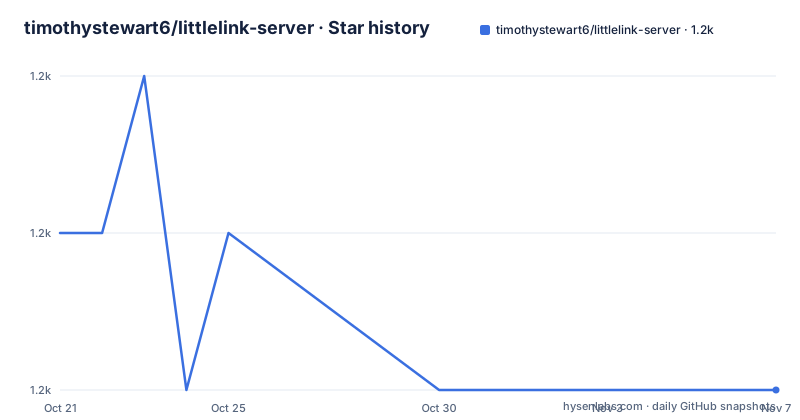
- timothystewart6/littlelink-server1,154 ★ · -1
| Repository | 2026-10-21 | 2026-11-07 |
|---|---|---|
| timothystewart6/littlelink-server | 1.2k | 1.2k |
-1 Stars in the last 17 days, measured from the daily GitHub snapshot. Compare with other projects
Editorial analysis
A stateless link page with no database and no admin UI
LittleLink-Server is a lightweight, self-hosted link page for publishing a profile, avatar, social links, custom buttons, metadata, analytics and health checks from environment variables.
The whole configuration surface is environment variables, and the README is explicit about the consequences. Configuration is evaluated at request time. Rebuilds are not required when environment values change, but containers should be restarted so the running process receives the new values.
That distinction is the design and it is a good one for this kind of application. A container that bakes configuration at build time has to be rebuilt and republished for every small change, which turns a text edit into a CI run. Reading at request time means the image is immutable and the configuration is data.
The second consequence is that there is no admin interface and no database, which is what stateless means here. The page is a rendering of the environment, and the environment is edited wherever you already edit your deployment configuration.
The project is inspired by LittleLink, which is the single page HTML version, and the difference is that this one packages the same idea as a configurable Node.js application. The stack is Next.js, React and TypeScript, and the container image uses the Next.js standalone output so the production runtime stays small and only includes the files needed to serve the app.
The feature list gives the surface. Over 60 brand buttons with more able to be requested, customisable themes, analytics support, health check support, and a fully customisable Docker Compose setup. The homepage is links.technotim.com, the licence is MIT, and the last push to the repository was on 2026-10-10 with the repository not archived.
The environment variables are the whole user interface
The docker-compose.yml in the repository is the real documentation for the application, and reading it tells you what a deployment looks like.
version: "3.0"
services:
  littlelink-server:
    image: ghcr.io/timothystewart6/littlelink-server:latest
    container_name: littlelink-server
    environment:
      - META_TITLE=Techno Tim
      - META_DESCRIPTION=Software Engineer | Gamer | Twitch Streamer
      - LANG=en
      - META_INDEX_STATUS=all
      - OG_SITE_NAME=Techno Tim
      - OG_URL=https://technotim.com
      - GA_TRACKING_ID=G-XXXXXXXXXX
      - THEME=Dark
      - NAME=TechnoTim
      - BIO=Software Engineer | Gamer
      - BUTTON_ORDER=YOUTUBE,TWITCH,TWITTER,GITHUB,INSTAGRAM
      - CUSTOM_BUTTON_TEXT=Documentation,Recommended Gear
      - CUSTOM_BUTTON_URL=https://l.technotim.com/docs,https://l.technotim.com/gear
      - CUSTOM_BUTTON_ICON=fas file-lines,fas gear
      - GITHUB=https://l.technotim.com/github
The structure falls into groups. The `META_` and `OG_` variables set the page metadata and the Open Graph card that link previews use, including the image dimensions, which matters because the preview renderers need the width and height. `NAME` and `BIO` are the profile itself, with `AVATAR_URL`, `AVATAR_2X_URL`, `AVATAR_ALT` and `FAVICON_URL` for the images.
The button system is where the design gets interesting. A platform is enabled by setting its variable, for example `GITHUB=https://...`. `BUTTON_ORDER` lists the platforms in the order they should appear, with the README noting that the listed buttons will be boosted to the top, which implies the rest follow in their own order. `BUTTON_TARGET` sets the link target, with `_blank` in the example.
And then the custom buttons, which are the extension point. `CUSTOM_BUTTON_TEXT`, `CUSTOM_BUTTON_URL`, `CUSTOM_BUTTON_COLOR`, `CUSTOM_BUTTON_TEXT_COLOR`, `CUSTOM_BUTTON_ALT_TEXT`, `CUSTOM_BUTTON_NAME` and `CUSTOM_BUTTON_ICON` are all comma separated lists, and the README says you can render an unlimited amount of custom buttons by adding the variables and using a comma as a separator. The icon syntax is `fas file-lines` and `fas gear`, a font awesome style and a name, which means the icons come from the same set as the brand buttons.
Sitemap and robots are generated at request time from the same variables
The two files that search engines read are generated rather than static, and the generation is driven by the same environment variables as everything else.
The sitemap is exposed at `/sitemap.xml` when `OG_URL` is configured and `META_INDEX_STATUS` allows indexing, and it contains the single public profile URL, generated at request time from environment variables.
OG_URL=https://links.example.com
META_INDEX_STATUS=all
If `OG_URL` is not set, or `META_INDEX_STATUS` contains `noindex`, `/sitemap.xml` returns 404.
The robots file is generated at request time as well. By default `META_INDEX_STATUS=all` allows crawling and adds a sitemap link when `OG_URL` is configured, and missing or `noindex` metadata disallows crawling.
There is a variable for appending crawler-specific rules, `ROBOTS_ADDITIONAL_RULES`, and the README explains the escaping convention, that escaped `\n` sequences are converted to new lines, which works well in container environment variables.
ROBOTS_ADDITIONAL_RULES=User-agent: GPTBot\nDisallow: /\n\nUser-agent: Googlebot\nDisallow: /And `ROBOTS_TXT` replaces the generated file entirely when you need it.
ROBOTS_TXT=User-agent: *\nDisallow: /privateThe `\n` convention is worth understanding rather than copying. A container environment variable is a single string, and a robots file is a multi-line document, so something has to encode the line breaks. Using the shell's own escape sequence keeps the value readable in a compose file, and the alternative, a literal newline inside a YAML value, is fragile in every tool that touches the compose file. The `ROBOTS_TXT` escape hatch is the same mechanism with a different scope.
The practical effect of the whole arrangement is that a deployment controls its own search engine visibility with a restart and no rebuild, which is a nice property for a personal site that might want to be discoverable one day and not the next.
The container is a three stage build and it drops the image libraries
The Dockerfile is the most instructive file in the repository, because it shows the trade-offs of running Next.js in a container.
FROM node:24.18.0-alpine@sha256:a0b9bf06e4e6193cf7a0f58816cc935ff8c2a908f81e6f1a95432d679c54fbfd AS deps
WORKDIR /usr/src/app
COPY package.json ./
COPY yarn.lock ./
RUN --mount=type=cache,id=littlelink-yarn-v1-cache-v2,target=/usr/local/share/.cache/yarn/v6,sharing=locked \
    yarn install --frozen-lockfile --check-files --network-timeout 600000
The base image is pinned by digest rather than by tag, which means the build is reproducible even if the tag moves. The dependencies are installed in their own stage with a BuildKit cache mount for the yarn cache, and the frozen lockfile means the build fails rather than silently resolving different versions.
The build stage then copies the source, disables Next telemetry and builds.
RUN --mount=type=cache,id=littlelink-next-cache-v2,target=/usr/src/app/.next/cache,sharing=locked yarn build
RUN rm -rf \
    .next/standalone/node_modules/@img/sharp-libvips-linux-* \
    .next/standalone/node_modules/@img/sharp-linux-*
That removal is the detail worth stopping on. The Next.js standalone output includes the sharp image processing binaries for every platform, and the build deletes the ones for other Linux distributions, because only the one matching the image is needed. It is a few lines that remove a surprising amount from the final image.
The runtime stage copies three directories out of the build, the standalone output, the static assets and the public directory, sets the environment, and runs as the non-root `node` user with an exposed port 3000.
USER node
EXPOSE 3000
HEALTHCHECK --interval=30s --timeout=3s --start-period=5s --retries=3 \
    CMD wget --no-verbose --tries=1 --spider http://127.0.0.1:3000/healthcheck || exit 1
CMD [ "node", "server.js" ]
The health check uses wget in spider mode against the healthcheck endpoint, which is why wget is in the Alpine base image and why the health check support is a first class feature rather than an afterthought.
The CI script chains six checks, and one of them keeps the docs honest
The package scripts show a project with a real quality gate, and one of the checks is unusual enough to be worth describing.
"ci": "yarn lint && yarn lint:style && yarn lint:markdown && yarn compose-env:check && yarn typecheck && yarn test"Six checks in sequence. The lint is `eslint .` with a flat config at `eslint.config.mjs`, the style lint is stylelint over the CSS in `src` and `public`, and the markdown lint runs markdownlint over the GitHub markdown files and over the README and CONTRIBUTING. The typecheck runs `next typegen` before `tsc --noEmit`, so the generated route types exist before the compiler checks against them. The test script runs jest with the experimental VM modules flag and the jsdom environment.
The unusual one is `compose-env:check`, which runs `node scripts/sync-compose-env.mjs --check`. The companion script `compose-env:sync` writes the environment. Together they keep the docker-compose.yml in the repository and the `.env.example` in the repository in agreement, and the check mode fails if they have drifted apart.
That is a small idea with a large payoff in a project whose entire interface is environment variables. In most projects, the compose file and the example env file drift, and the drift is discovered by a user who copies the example and finds a variable that does nothing. Here the check runs in CI.
The Playwright end to end tests are there as well, with a `test:e2e` script running the Playwright tests and a `test:e2e:minimal` variant running a shell script called `e2e/minimal-env.sh`, which is presumably the check that the container starts with nothing but the minimum configuration.
The development server runs `tsx server.ts` directly, so the server is TypeScript executed through tsx, and the production start is `NODE_ENV=production node dist-server/server.js`, with the build being `next build && tsc -p tsconfig.server.json`. There is a separate `tsconfig.server.json` because the Express server and the Next.js application compile under different settings, and the file conventions section in the README notes that `.ts` is for code without JSX and `.tsx` for React components and tests that contain JSX.
Editorial conclusion
Adopt LittleLink-Server if you want a self hosted link page that is configured entirely by environment variables and that you can redeploy without a rebuild. Do not adopt it if you need a multi user link tree with accounts, because the design is explicitly stateless with a single public profile. Verify first that the environment variables your deployment platform provides are read at request time, since the container must be restarted for a change to take effect even though no rebuild is needed, and that the button set you want exists in the compose file before you plan the deployment around it.
Frequently asked questions
How do you configure LittleLink-Server?
Entirely through environment variables, covering page metadata, theme, profile content, social links, custom buttons, analytics providers and health check behaviour. Configuration is evaluated at request time, so a container restart is enough and no rebuild is required.
How do I add a custom button to LittleLink-Server?
Use the CUSTOM_BUTTON_ variables, which are comma separated lists: CUSTOM_BUTTON_TEXT, CUSTOM_BUTTON_URL, CUSTOM_BUTTON_COLOR, CUSTOM_BUTTON_TEXT_COLOR, CUSTOM_BUTTON_ALT_TEXT, CUSTOM_BUTTON_NAME and CUSTOM_BUTTON_ICON, where the icon is a font awesome style and a name such as fas file-lines.
Does LittleLink-Server generate a sitemap and robots.txt?
Both are generated at request time. The sitemap at /sitemap.xml is served when OG_URL is set and META_INDEX_STATUS allows indexing, and returns 404 otherwise. The robots file can be extended with ROBOTS_ADDITIONAL_RULES or replaced entirely with ROBOTS_TXT, with escaped newlines converted to line breaks.
How do I run LittleLink-Server with Docker?
Build and run it with docker build -t littlelink-server . followed by docker run -p 8080:3000 littlelink-server, or use the compose file in the repository, which lists all the supported buttons and configuration.
What does the ci script check in LittleLink-Server?
It chains the ESLint run, the stylelint over the CSS, the markdownlint over the markdown files, a compose-env check that fails if the compose file and the example environment have drifted apart, the typecheck and the unit tests.
Official sources
Add this badge to your README
If you maintain this project, the badge below links readers to this analysis and shows its maintenance status from the daily GitHub snapshot. Paste the markdown into your README; add ?metric=license or ?metric=stars to the image URL for a different field.

[](https://hysenlabs.com/projects/timothystewart6-littlelink-server)Star history chart for your README
[](https://hysenlabs.com/projects/timothystewart6-littlelink-server)Was this useful?