Tinyflow's readme is sixty-seven words and the most consequential line is a negative one
Tinyflow is a lightweight AI agent solution.
At a glance
- What is it?
- A flow editor component rather than a product, built on a web component so it drops into any framework, with a Java backend, a Node backend not yet released, and a Python backend not yet released.
- Who is it for?
- Two things to know. The framework-agnostic claim is real and is the correct architectural choice here, because a flow editor embedded in someone else's interface is the only way to ship agent orchestration without asking them to replace their design system.
- Can I use it commercially?
- Yes, with conditions. LGPL-3.0 is a weak copyleft licence: you can use it inside commercial and closed-source software, but if you distribute changes to its own files, you must publish those changes under the same licence.
- Is it still maintained?
- Yes. The repository last received commits 81 days ago.
- What is it written in?
- Mainly Svelte, according to GitHub's language statistics.
Answers come from the project's GitHub data, last synced on November 13, 2026, and from our analysis. They are not legal advice.
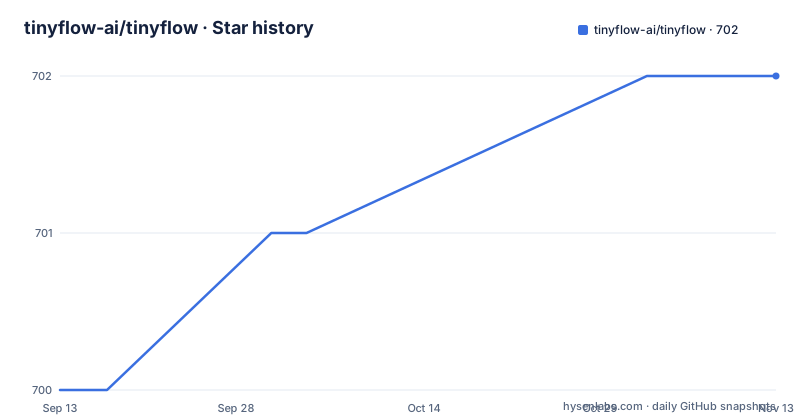
Star history
- tinyflow-ai/tinyflow702 ★ · +2
| Repository | 2026-09-13 | 2026-11-13 |
|---|---|---|
| tinyflow-ai/tinyflow | 700 | 702 |
2 Stars in the last 61 days, measured from the daily GitHub snapshot. Compare with other projects
Editorial analysis
It is a component, and the readme says so in its second sentence
The description is that this is a lightweight agent solution, and then the qualifier that changes how you should read everything else: it is not a product, it is a development component.
Through integrating it, an existing application gains the ability to orchestrate agents. That is a narrower and more honest framing than most projects in this category use, and it is the framing that determines whether you are a user.
As a user you would be looking for something you install and deploy. As an integrator you are looking for a component you embed in an interface you already have, next to the rest of your product, in the design language you already use.
This is the second category. There is no dashboard, no login, no settings page, no pricing page and no host to sign up for. There is a package, a container element, and a set of methods.
The second sentence of a sixty-seven word readme is doing a lot of work there, and I would point at it to anyone who has been evaluating agent tooling this month and finding that everything is a product with a signup wall.
The framework-agnostic claim is a web component, which is the right call
The first feature states that the frontend is built on a web component, and therefore works with React, Vue, Angular, Svelte, or plain markup, style and script.
That is worth pausing on because it is a decision that most editor components get wrong. The usual approach is to build for one framework and let the others integrate through a wrapper, which means the wrapper is now a second implementation of your component that nobody tests.
A web component sidesteps the whole question. The browser provides the custom element, the shadow boundary and the property API, and every framework can instantiate it because it is a platform feature rather than a library feature.
For an editor specifically this matters more than for a button. A flow editor is a large piece of stateful interactive interface with its own keyboard handling, its own selection model and its own rendering loop. Wrapping one of those in another framework's component model is where integration bugs live, and a platform primitive avoids that entire class of problem.
The install is one command:
npm install @tinyflow-ai/uiAnd the usage is three lines, including the stylesheet import:
import { Tinyflow } from '@tinyflow-ai/ui';
import "@tinyflow-ai/ui/dist/index.css";

new Tinyflow({
    element: '#tinyflow',
});
Two constructor parameters are documented: the container, which accepts either a selector string or an actual DOM element, and the data, which is the workflow as a JSON object.
There is a third parameter worth noting. The provider is the data source, and it currently supports configuration for two things: a model and a knowledge base. That is the integration seam. Everything the editor knows about your models and your retrieval comes through that object rather than being hardcoded.
Two methods, and they are the two you actually need
The readme lists exactly two methods on the instance, and both are about getting data out rather than putting it in.
One exports the workflow data. The other returns the initialisation options that were passed in.
That is a small API surface and it tells you what the design is optimised for. There is no imperative editing interface, no method to add a node, no event subscription list. You build the workflow, you hand it over, and you read it back.
The reason is the JSON data parameter. The workflow is a JSON object when it goes in and a JSON object when it comes out. That makes the component a view over a document rather than the owner of the document, which is exactly right if your application already has a document store.
So the integration is: your user drags boxes around, the editor mutates the JSON, something in your application persists it, and when you need to run it you send that JSON to a backend.
Read that way, the two methods make complete sense and the missing methods are not missing so much as deliberately not your problem. If you want programmatic node manipulation you would be reaching past the component's design, and the component is telling you so by not offering it.
One backend is ready and two are not
The backends are where this readme stops being a success story, and the honesty is worth crediting before the limitation.
The Java backend exists, and its source is hosted on a different platform than the rest of the project. It is described as the backend for executing workflows the designer produced. The dependency snippet is a standard build-tool coordinate with a group, an artifact and a version:
<dependency>
    <groupId>dev.tinyflow</groupId>
    <artifactId>tinyflow-core</artifactId>
    <version>2.0.3</version>
</dependency>
Then two lines that say the same thing in different languages. The Node backend is in development and not yet open. The Python backend is in development and not yet open.
Both are given as install commands anyway, which means the packages either exist on a registry and do not work, or are name reservations. Either way, running either command today will not get you a backend.
So the practical position is: the frontend component is usable, the Java backend is usable, and if your stack is Node or Python you are waiting.
That is not unusual for a young project and it is stated rather than implied. But the readme's own opening claim is that the backend supports Java, Python and Node, which is a claim the rest of the document then walks back twice. If you evaluate on the first paragraph you will be misled.
The hosting split is also worth noticing. The Java backend lives elsewhere, which means its licence, its release cadence and its issue tracker are not necessarily the same as the component's. For an embeddable component whose whole value is that it is one coherent thing, a backend that lives somewhere else is a seam you will have to manage.
The release tags tell you this is a multi-package monorepo
The release history is a small lesson in reading a monorepo's version numbers. Three tags published within seconds of each other, one per package, all at the same version number, and each tag named after the package it belongs to rather than after a project name.
So there is at least a framework-agnostic package, a framework-specific one, and a user-interface one, all released in lockstep. That is the standard way to publish a monorepo where several packages have to move together.
The interesting question is whether they always will. The Node and Python backends, when they arrive, will need to agree with the frontend's data format. If the workflow JSON has been changing between component releases and the backends catch up later, you will be pinning three packages to three versions to keep one document format consistent.
The repository structure supports the same reading: a workspace definition and lock file, a task runner configuration, two separate test configurations including one with an adapters setting, a changeset directory for version management, a shared directory, and a packages directory. Six packages published under one organisation with a shared format is a normal shape for a component library that supports several frameworks.
There is also a demos directory and a private flag on the root manifest, which together suggest the demos are built from the workspace rather than published. That is the right way to do it, since a demo that lags the published package tells you nothing.
What to check before you commit
Three practical things, in order.
First, find out whether your language has a backend today. If you are on Java you can evaluate this properly. If you are on Node or Python, the honest answer is that you are evaluating a component that currently has nowhere to send its output.
Second, look at how the provider parameter is shaped. That object is your entire integration surface with your own model configuration and your own knowledge base, and if it does not fit what you have, nothing else matters. The readme tells you it supports two things and does not describe their shape, so this is the first thing you will need to read in the source or the package documentation.
Third, check the licence against how you intend to use it. It is a file-level copyleft designation, which is the middle ground: modify the library and share the modifications, but linking it into a proprietary application does not by itself infect that application. For an embeddable component that is the appropriate licence, and it is more permissive than a project-level copyleft.
What you will not get from sixty-seven words is the data format. The workflow JSON is the contract between the editor and the backend, it is not documented in the readme, and it is the thing most likely to change between versions. Find it before you design around it.
Editorial conclusion
Two things to know. The framework-agnostic claim is real and is the correct architectural choice here, because a flow editor embedded in someone else's interface is the only way to ship agent orchestration without asking them to replace their design system. The other is that this is a component, not a finished product, and the readme says so in its second sentence. Two of the three backends are described as in development and not yet open, which means for anything but Java you are committing to a stack that does not exist yet.
Frequently asked questions
What is Tinyflow?
A lightweight agent orchestration component rather than a product, described as such in the second sentence of its readme. Integrating it gives an existing application the ability to design and run agent workflows. There is no dashboard, no account and no hosted service.
Does it work with my framework?
The frontend is built on a web component, which the readme says makes it work with React, Vue, Angular, Svelte, or plain markup and style and script. For an editor of this size that is the right choice, because wrapping a stateful interactive component in another framework's model is where integration bugs live.
Which backends can I use?
The Java backend is available and is what executes workflows the designer produced. The Node and Python backends are both described as in development and not yet open, even though install commands are given for them. If your stack is not Java, there is currently nowhere to send the workflow output.
How do I get the workflow data out of the editor?
Two methods are documented: one exports the workflow data, the other returns the initialisation options that were passed in. The workflow is a JSON object going in and a JSON object coming out, so the component is a view over a document rather than the owner of it.
What is the provider parameter for?
It is the integration seam for data sources, and the readme says it currently supports two: configuration for a language model, and configuration for a knowledge base. Everything the editor knows about your models and your retrieval comes through that object, so its shape is the first thing to check.
How are the packages versioned?
As a monorepo with several packages published in lockstep, each with its own release tag named after the package rather than the project. All visible tags sit at the same version number. Since the workflow JSON is the contract between the editor and the backends, check whether pinning to matching versions is something you need to do.
Official sources
Add this badge to your README
If you maintain this project, the badge below links readers to this analysis and shows its maintenance status from the daily GitHub snapshot. Paste the markdown into your README; add ?metric=license or ?metric=stars to the image URL for a different field.

[](https://hysenlabs.com/projects/tinyflow-ai-tinyflow)Star history chart for your README
[](https://hysenlabs.com/projects/tinyflow-ai-tinyflow)Was this useful?