primo: two container tags with different meanings, four empty credential variables, and a sync path that is still beta
Agent-native visual CMS. Build sites with Claude/Codex/whatever, manage them visually.
At a glance
- What is it?
- A visual content system for people who build sites for clients who then edit them, where each site exists twice, as a database and as a folder of files, so a coding agent can work on the same content the client edits in a browser. The page is unusually clear about what is stable and what is not, and the configuration files are clear about what you have to supply yourself.
- Who is it for?
- Use it if you are the person in the middle, building sites for someone who will later need to change them without breaking the layout, and if you are willing to own the server. Two things to check before you promise a client anything.
- Can I use it commercially?
- Yes. MIT is a permissive licence: you can use, modify and sell software built on it, as long as you keep its copyright and licence notices.
- Is it still maintained?
- Yes. The repository last received commits 7 days ago.
- What is it written in?
- Mainly Svelte, according to GitHub's language statistics.
Answers come from the project's GitHub data, last synced on November 22, 2026, and from our analysis. They are not legal advice.
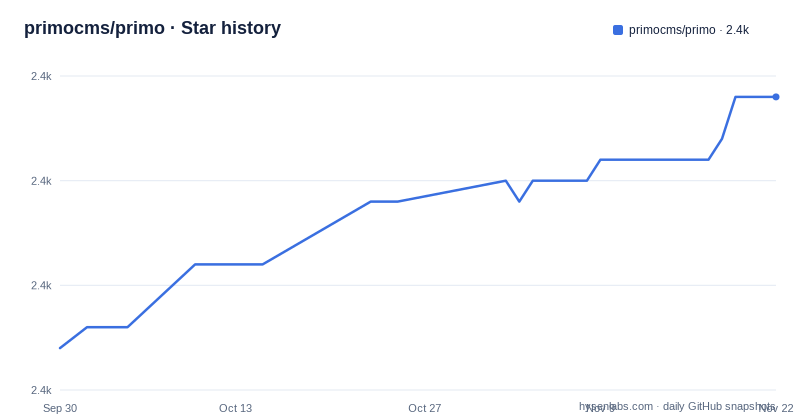
Star history
- primocms/primo2,384 ★ · +12
| Repository | 2026-09-30 | 2026-11-22 |
|---|---|---|
| primocms/primo | 2.4k | 2.4k |
12 Stars in the last 53 days, measured from the daily GitHub snapshot. Compare with other projects
Editorial analysis
Two container tags, and only one of them is a release
The quickstart is one command.
docker run -d -p 8080:8080 -v primo-data:/app/pb_data ghcr.io/primocms/primo:latestOne port published, one named volume for the data directory, one image. Then a note that is worth more attention than the command above it, because it describes a trap anyone who deployed earlier has already fallen into.
If you host on one of the managed platforms and want automatic updates, point the service at the `latest` tag, and the note explains why in plain terms: `main` is a rolling branch build rather than a release, so it will not advance when a version is published. In other words the two tags in the same repository mean different things, one tracks releases and one tracks whatever landed on a branch, and the difference is not visible from the tag names alone. The note adds that anyone who deployed before it existed should switch their source image, which means there is a cohort of installations that has been quietly following a branch build while believing it was following releases.
One binary is the whole deployment story. A single Go executable hosts the content system and serves the published sites, storage is an embedded database on a SQLite file, and the editor and the blocks are compiled into the same process. There is no external service to provision and no separate frontend to wire up.
A pull-push workflow with revision checks and a backup
The three-line workflow is the idea in its shortest form.
primo pull yourserver.com       # pull your site down as local files
claude                          # edit with Claude Code, Cursor, or any agent
primo push                      # push changes back — CMS updates live
Pull a site down as files, edit it with whichever agent you use, push it back, and the database side updates so the client's browser sees the change. The pitch for the two-representation design is that a site exists as a relational database, which powers the visual editor and multi-site serving, and as a folder of structured files, which powers code editors, version control, and agents. Edit either side and the other stays in sync.
The interesting part is the collision this creates, and the project addresses it directly. Because a client can be editing in the browser at the moment you push, the push path runs revision checks and refuses to clobber their work, with an explicit overwrite option that saves a backup first. There is a whole document about safe pushes and upgrade instructions, which tells you this is a known hazard rather than a hypothetical one.
And the status line is honest. The visual editor, block library, static output, multi-site, and self-hosted deployment are all listed as stable. The command-line and local-file workflow, which is the pull and push above, is listed as beta, and so is agent compatibility. So the capability the description leads with is the one the status section qualifies.
The runtime image ships four empty credential variables
The container definition is three stages: a Node stage builds the frontend twice, once with a shared configuration and once with an application configuration; a Go stage compiles the binary and injects a build timestamp and a version into it through linker flags; and the runtime stage copies one file into an Alpine base and stops.
What is interesting is what the final stage declares.
ENV PRIMO_SUPERUSER_EMAIL=
ENV PRIMO_SUPERUSER_PASSWORD=
ENV PRIMO_USER_EMAIL=
ENV PRIMO_USER_PASSWORD=
Four credential variables, all set to empty strings, no defaults, and no mention in the page of what happens when they are empty. The command it runs binds every interface on port 8080 rather than the loopback address, so whatever the answer is, it is reachable from the network as soon as the container starts.
That combination is the kind of thing to settle before a first deployment rather than after it. You are expected to supply a superuser account and a user account through the environment, and you are expected to set them before anyone else can reach the port. The page's own quickstart says to open the server's URL to create your first site, which implies an interactive setup path exists, so the empty defaults read as a deliberate invitation to use it. But an unattended start on a hosted platform, where a health check brings the container up before anyone has set anything, is a case the defaults do not cover.
The manifest version sits two minors behind the tags
The release record and the JavaScript manifest do not agree, and the gap is worth knowing if you build from source.
The three newest published versions are in the threes, with the latest tagged on the same day as the last commit. The manifest, which is private and only used for building, declares version 3.1.0. So the build you produce locally identifies itself as two minor versions behind the newest tag.
Nothing depends on that number being accurate, because the container image stamps its own version through a linker flag at build time, taking it from a build argument, and the build timestamp comes from the system clock. So the version a deployed binary reports is not the manifest's, and the manifest's is not what a release process would update. It is a leftover from when the frontend was the shipped artefact rather than the compiled frontend inside a Go binary.
The Go module makes the same point from the other side. It declares a language version older than the toolchain in the container image that builds it, and its dependency list mixes released versions with several libraries pinned to a commit rather than a tag. A JavaScript runtime is among the direct dependencies, which is what lets the server evaluate script, and that matters for a content system: the thing evaluating your code is a dependency, and it is pinned by date rather than by release.
A sixteen gigabyte build heap, and a browser that bundles
The build script sets a JavaScript heap limit in gigabytes, which is a number you only set when you have hit the default.
The dependency list explains what the frontend is doing. There is a drag-and-drop library from a vendor's component suite, a code editor with language modes for CSS, Markdown, and Svelte plus an abbreviation-expansion plugin, a rich-text editor with eight separate extensions for highlighting, images, links, typography, embedded video, and the starter set, a headless component library, and a Tailwind version four wired through the bundler plugin rather than a separate config step.
Two entries are more unusual. One is an image compression library that runs in the browser, which pairs with an IndexedDB wrapper in the same list, so uploaded media is compressed client-side and small things are kept locally. The other is a WebAssembly build of the bundler itself, published as a browser package, which means a page inside the editor can bundle code without a server round trip.
That combination explains the heap limit. The build is compiling a Svelte application, a code editor, a rich-text editor, and a bundler into one artefact, twice, once with a shared configuration for the block library and once with the application configuration. Two vite builds in one image, each with the heap raised, is the price of a single-binary deployment where the editor, the blocks, and the site all ship together.
Three test approaches and a Nix shell for the day-to-day
The repository root explains how a project like this is worked on, and the answer is not a single tool.
Integration tests run on Node's built-in test runner, pointed at a glob of test files. End-to-end tests run on one automation framework while a separate configuration file for a different one sits in the root, and there is a shell script whose job is to build the artefact the end-to-end suite tests against. So browser testing has two configurations and one of them is left over from an earlier suite, which is the ordinary cost of migrating.
Development does not start with an install command either. The default script runs a declarative development environment tool, and the root carries the matching files for it plus a directory environment file for a shell hook. That is a deliberate choice: a Nix-based environment pins the toolchain rather than asking each contributor to assemble one.
Two documents at the root are worth reading before you deploy anything. One is the safe-push and upgrade guide, which covers the revision checks described earlier. The other is a policy file on analytics, which is the kind of thing a project that markets itself on privacy should publish and this one does, even though the front page says nothing about its contents.
The deploy button points at another project name
The easiest way to start is offered twice, and both times it is the same link, and the link is not to this project's name.
Both links go to a one-click deployment template identified as `palacms`, with a referral code attached to the address. The repository is called primo, the module path is under this organisation, and the product is called Primo, so the name in the deploy URL belongs to neither the repository nor the product as presented on this page.
That is worth noticing twice over. The first is practical: the template you are about to deploy is a configuration someone else maintains, so the settings, the volumes, and the environment variables in it were written for a project whose default credentials and startup assumptions may not match what the image you just chose expects. The second is that a referral code on a deployment link is a small, honest commercial choice that most project pages make and few explain. Neither makes the deployment wrong; both are the kind of thing you want to see before you click rather than after.
The rest of the page positions the project honestly for its audience: freelancers, small agencies, and small teams who code sites for clients who need to change them later, with a visual editor constrained by guardrails the developer defines, reusable blocks shared across sites, static output deployable to any static host, and one server serving many sites behind one dashboard.
Editorial conclusion
Use it if you are the person in the middle, building sites for someone who will later need to change them without breaking the layout, and if you are willing to own the server. Two things to check before you promise a client anything. The pull and push workflow that makes agent editing possible is labelled beta, along with agent compatibility, so the capability the description leads with is the one the status section qualifies. And the image ships four credential variables with no defaults, so an unattended first start is not something the project has designed for. Everything else, the single binary, the two-way file sync, the revision checks on push, and the static output, is described as stable.
Frequently asked questions
What is primo used for?
Building sites for clients who need to edit them afterward. Each site exists as both a relational database, which powers the visual editor, and a folder of structured files, which powers code editors, version control, and AI agents. Editing either side keeps the other in sync.
Can an AI agent edit a primo site?
That is the intended workflow: pull a site down as local files with the command-line tool, edit it with any agent, and push it back so the visual editor updates live. The page lists the command-line and local-file workflow, along with agent compatibility, as beta.
Does primo push overwrite changes a client made in the browser?
Not by default. The page says pushes run revision checks to protect client edits, and that there is an explicit overwrite option which saves a backup first. A separate document covers safe pushes and upgrades.
What does primo need from the environment to run?
The container declares four credential variables for a superuser account and a user account, all set to empty with no defaults, and serves on every network interface on port 8080. The page does not say what happens when those variables are left empty.
Official sources
Add this badge to your README
If you maintain this project, the badge below links readers to this analysis and shows its maintenance status from the daily GitHub snapshot. Paste the markdown into your README; add ?metric=license or ?metric=stars to the image URL for a different field.

[](https://hysenlabs.com/projects/primocms-primo)Star history chart for your README
[](https://hysenlabs.com/projects/primocms-primo)Was this useful?