Adwaita for Steam: a GNOME skin for the Steam client, and the update cycle that erases it
A skin to make Steam look more like a native GNOME app
At a glance
- What is it?
- Adwaita for Steam patches the Steam client with Adwaita styling across five installation methods, from a Python installer script to third-party injectors, and its central weakness is that a Steam update can reset the patched files and leave you reinstalling.
- Who is it for?
- Adwaita for Steam fits a GNOME user who runs Steam on Linux and wants the client to stop looking like a Windows app, and who is willing to reinstall the skin after a Steam update. It is a poor fit for a SteamOS handheld where the client updates constantly, and a poor fit if you want the Steam website themed, since the store and community pages are no longer themable by the primary method.
- Can I use it commercially?
- Yes. MIT is a permissive licence: you can use, modify and sell software built on it, as long as you keep its copyright and licence notices.
- Is it still maintained?
- Yes. The repository last received commits 82 days ago.
- What is it written in?
- Mainly CSS, according to GitHub's language statistics.
Answers come from the project's GitHub data, last synced on October 23, 2026, and from our analysis. They are not legal advice.
Star history
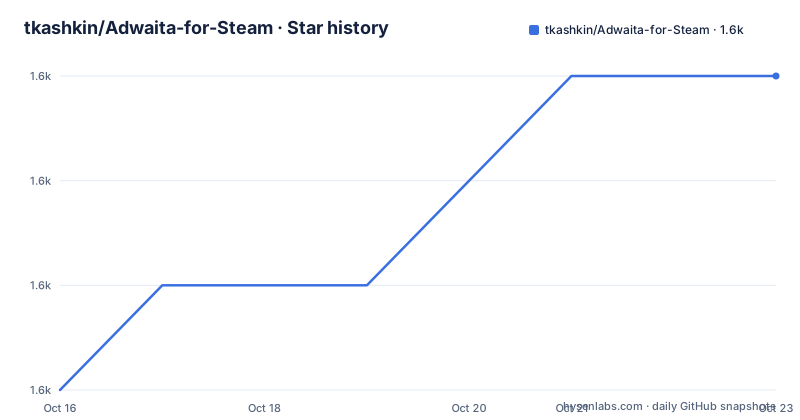
- tkashkin/Adwaita-for-Steam1,607 ★ · +3
| Repository | 2026-10-16 | 2026-10-23 |
|---|---|---|
| tkashkin/Adwaita-for-Steam | 1.6k | 1.6k |
3 Stars in the last 7 days, measured from the daily GitHub snapshot. Compare with other projects
Editorial analysis
What the skin actually changes
Adwaita for Steam is a skin to make Steam look more like a native GNOME app, and the primary language of the repository is CSS, which tells you the mechanism. There is an adwaita/ directory holding the styles, a skin.json and a theme.json describing them, an injectors/ directory, a scripts/ directory, an install.py, and screenshots.
The result is that Steam's client chrome stops looking like a Windows application and starts looking like a GNOME one, with the Adwaita widget styling applied. There are light and dark screenshots in the README, which is the practical demonstration of the whole thing.
The colour palette is a large part of the offer. The README lists 25 previews: adwaita and adwaita-gray, breeze and canta, four catppuccin variants named frappe, latte, macchiato and mocha, dracula, everforest, gruvbox, kate, metro, nord, oled, one-dark, pop, rose-pine, three tokyo-night variants named tokyo-night, tomorrow-night and vapor, vgui2, and yaru. The previews are stored per theme under adwaita/colorthemes/<name>/preview.png, so each theme is a self-contained directory.
That list also tells you what the project is competing with. Most of those names are GTK or terminal colour schemes first, and the project is offering them as a Steam palette, which is a different thing from offering them as a full GTK theme.
The project is MIT licensed, the last push was on 2026-08-02, and the releases are 4.4 from 2026-07-29, 4.3 from 2026-07-29 and 4.2 from 2026-07-25. Several releases in a single week is consistent with a project that has to react to Steam changing its own interface.
Five installation methods, and a matrix of what each supports
The installation options are listed with a platform support matrix, and that matrix is the most useful thing in the README for planning an install.
The methods are the installer script, described as the primary installation method which does not require any third-party CSS injectors. AdwSteamGtk is a graphical application for Linux and flatpak that configures installation options and automatically installs skin updates. Millennium is an open-source modding framework for creating and managing Steam Client themes and plugins. CSSLoader is a native standalone styling engine for Steam on Windows and Linux. And SFP is a skin and script injector for Steam, formerly SteamFriendsPatcher. The installer script and AdwSteamGtk are the recommended ones, and third-party injector support is provided for users who already run one of them.
On platforms, the installer script covers Linux, SteamOS, Windows and macOS, AdwSteamGtk covers Linux and SteamOS only, Millennium and CSSLoader cover Linux, SteamOS and Windows, and SFP is the only one covering macOS.
On features, all methods except SFP support most of the available customization options. The rows are colour themes, light and dark mode, accent colours, window controls and extras, and SFP is limited to the base theme, system only for light and dark, theme default for accent colours and window controls, and nothing at all for extras.
Automatic updates are the row that separates the methods most sharply. The installer script does not support them, AdwSteamGtk, Millennium and CSSLoader do, and SFP does not.
That last row is the one that matters most, because it interacts directly with the first limitation in the project: a Steam update can reset the patched files.
So the practical reading of the matrix is that the installer script gives the widest platform and option coverage but no automatic updates, while the injector methods that do update automatically are the ones that require a third-party tool you may not already have.
macOS is the odd one out, with only the installer script and SFP available and no accent colour or window control customisation on SFP.
The installer script, and what its arguments control
The installer script path is three commands:
git clone https://github.com/tkashkin/Adwaita-for-Steam
cd Adwaita-for-Steam
./install.py
It is a Python script run from a clone rather than a binary you download, which is the usual pattern for a skin project that patches files in place.
The arguments table is where the options live. The target option, with the short form -t, takes default, flatpak, snap, or a Steam installation path, defaulting to default, and it selects the Steam directories the skin is installed into. The flatpak and snap values are the ones that matter on Linux, where Steam is frequently installed as a Flatpak or a Snap and the install path is not where a native installation would put it.
The color-theme option, short form -c, takes the available themes and defaults to adwaita, selecting the overall palette. The color-scheme option, short form -s, takes auto, light or dark, defaulting to auto, which follows the system appearance or forces one. The accent-color option, short form -a, takes auto or theme, with theme expanding to a set of predefined colours, blue, teal, green, yellow, orange, red, pink, purple and slate, or a custom colour, defaulting to auto, where auto uses the system accent when supported and theme uses the selected theme's default.
The font option, short form -f, takes adwaita, cantarell or system, defaulting to adwaita, which is the Adwaita default pairing since Cantarell is the older GNOME typeface.
The windowcontrols-theme option, with no short form listed, follows the same pattern with auto, adwaita and more.
Two things to notice about the design. First, the options are all about a system rather than a single look, so a user with a dark terminal palette and a light desktop can mix them, and the accent colour in particular is designed to follow the system where that is supported. Second, the list of themes referenced by --list-options is what connects the argument to the 25 previews in the README, and the documentation points at that option rather than repeating the names.
Where the skin lives in the repository, and the third-party injectors
The repository layout is small and tells you how little code there is here.
At the top level there is install.py, the skin.json and theme.json files that describe the skin and the theme, the adwaita/ directory with the styles and the per-theme previews, an injectors/ directory, a scripts/ directory, a screenshots/ directory and a LICENSE.
The injectors directory is where the third-party integration lives, and it corresponds to the four alternative methods in the installation section. SFP is the skin and script injector formerly called SteamFriendsPatcher, and it is the one that works on macOS. CSSLoader is a native standalone styling engine for Steam on Windows and Linux, and Millennium is the open-source modding framework for creating and managing Steam Client themes and plugins. AdwSteamGtk is a separate graphical application for Linux and flatpak, and it is not part of this repository but is listed as one of the installation methods.
The division of labour between the skin and the injectors is the interesting architectural point. The skin is a set of CSS and a description of where to apply it. The injector is the mechanism that applies it and, crucially, reapplies it. That is why the injectors support automatic updates and the installer script does not: the injector knows how to get back in after Steam has reset its files, while the installer script has to be run again by hand.
So the project is really two things in one repository. There is a standalone skin with a Python installer that patches Steam directly and needs no third-party software, which is the widest-coverage option. And there is a set of adapters for injectors that many Steam users already run, which is the lower-friction option for the people who have already accepted that dependency.
The theme.json file is worth noting for anyone scripting an install. The arguments table documents the options the installer understands, and a machine-readable description of the same options is what lets a wrapper script, a dotfile manager or a distro package drive the install without parsing the help output.
The three limitations, and why the Steam update one bites
The limitations section is short and each item is a real constraint rather than a disclaimer.
Steam updates may reset the theme. The installer will patch Steam files in order to theme the interface, and those files may be reset by Steam updates, at which point you need to reinstall to repatch them. This is the structural weakness of the whole approach: the skin works by modifying files that Steam owns, and Steam restores its own copies when it updates. The skin is not a plugin, it is an edit.
That is also why the automatic updates row in the feature matrix matters so much. AdwSteamGtk installs skin updates automatically and Millennium and CSSLoader do too, which is the same problem solved by a different mechanism: instead of patching the files and hoping, the injector reapplies the styling after Steam replaces them. The installer script has no such mechanism, so a Steam update leaves you with a stock client until you rerun it.
On a SteamOS handheld this is the difference between a skin that survives and one that disappears weekly, and the platform matrix in the README lists Linux, SteamOS with a check for every method, which is where the Steam update frequency is worst.
Rounded corners: not all elements can be rounded, and the recommendation is to use the Rounded Window Corners Reborn extension on GNOME. That is an honest statement that the skin cannot deliver the full GNOME look on its own, since the window shape is decided by the compositor and not by CSS inside the client.
And the Steam website pages, the Store, Community and Profiles, are no longer themable with the primary method. So the skin covers the desktop client and leaves the browser-based parts of Steam alone, which is a reasonable line to draw but a visible one once you click through to the store.
Editorial conclusion
Adwaita for Steam fits a GNOME user who runs Steam on Linux and wants the client to stop looking like a Windows app, and who is willing to reinstall the skin after a Steam update. It is a poor fit for a SteamOS handheld where the client updates constantly, and a poor fit if you want the Steam website themed, since the store and community pages are no longer themable by the primary method. Before installing, read the limitations section, and if you already run Millennium or CSSLoader, use those rather than the installer script, since the skin will be overwritten on the next Steam update either way.
Frequently asked questions
What does Adwaita for Steam do?
It is a skin that makes the Steam client look more like a native GNOME app, implemented as CSS in the adwaita directory and applied by patching Steam's own interface files. It ships 25 colour themes, from adwaita and breeze through the catppuccin, gruvbox, nord, tokyo-night and yaru families.
How do I install Adwaita for Steam?
The primary method is the installer script: clone the repository, change into the directory and run ./install.py. The script takes a --target option, with the short form -t, whose values are default, flatpak, snap or a Steam installation path, plus --color-theme, --color-scheme, --accent-color and --font. AdwSteamGtk, Millennium, CSSLoader and SFP are alternative methods.
What happens when Steam updates?
Steam updates may reset the theme, because the installer patches Steam files in order to theme the interface and those files can be restored by an update, at which point you need to reinstall to repatch them. The AdwSteamGtk, Millennium and CSSLoader methods support automatic updates, while the installer script and SFP do not.
Can the Steam website pages be themed?
No, not with the primary method. The Store, Community and Profiles pages are no longer themable, so the skin covers the desktop client only. The documentation also notes that not all elements can be rounded, and points to the Rounded Window Corners Reborn extension for that on GNOME.
Official sources
Add this badge to your README
If you maintain this project, the badge below links readers to this analysis and shows its maintenance status from the daily GitHub snapshot. Paste the markdown into your README; add ?metric=license or ?metric=stars to the image URL for a different field.

[](https://hysenlabs.com/projects/tkashkin-adwaita-for-steam)Star history chart for your README
[](https://hysenlabs.com/projects/tkashkin-adwaita-for-steam)Was this useful?