simple-git-hooks: a small Git hook manager for Node projects
A simple git hooks manager for small projects
At a glance
- What is it?
- simple-git-hooks configures one command per Git hook through package.json or a project configuration file. It suits small Node.js projects that want a zero-dependency setup, but its manual update requirement excludes teams needing richer hook orchestration.
- Who is it for?
- Adopt simple-git-hooks when the project is small, commands are committed to the repository, and one command per Git hook is enough. Do not choose it when hooks change frequently or need multiple commands, conditional configuration, or automatic updates.
- Can I use it commercially?
- Yes. MIT is a permissive licence: you can use, modify and sell software built on it, as long as you keep its copyright and licence notices.
- Is it still maintained?
- Yes. The repository last received commits 71 days ago.
- What is it written in?
- Mainly JavaScript, according to GitHub's language statistics.
Answers come from the project's GitHub data, last synced on November 7, 2026, and from our analysis. They are not legal advice.
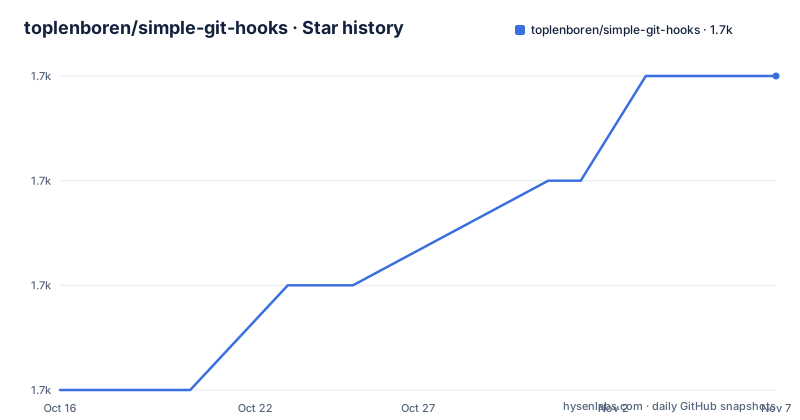
Star history
- toplenboren/simple-git-hooks1,690 ★ · +6
| Repository | 2026-10-16 | 2026-11-07 |
|---|---|---|
| toplenboren/simple-git-hooks | 1.7k | 1.7k |
6 Stars in the last 22 days, measured from the daily GitHub snapshot. Compare with other projects
Editorial analysis
The one-command hook model
simple-git-hooks solves a narrow repository maintenance problem: keeping a small set of local Git hooks synchronized with a checked-in configuration. It is intended for developers who want commands such as linting or formatting to run during actions like `git commit` and `git push` without maintaining hook files by hand. Git invokes a hook script when the relevant action begins, and a failed hook causes that Git action to abort.
The package is designed around one command string for each hook. A `pre-commit` entry can point to `npx lint-staged`, while `pre-push` can point to `npm run format`. That simplicity is useful when each hook has a single entry point, such as an npm script or another tool that performs the underlying work. It does not model hook groups, shell arrays, or multiple independent commands per event.
This makes the package a poor fit for projects that need verbose hook logic directly in configuration. The README specifically directs projects needing several commands per hook, flexible configuration, or automatic hook updates toward Lefthook, husky, or pre-commit. Those are functional differences, not just package-name choices: simple-git-hooks keeps configuration small but asks maintainers to rerun the CLI after command changes.
Configuration sources and generated hook files
The documented primary configuration is one `simple-git-hooks` object in `package.json`. Hook names are keys and shell commands are string values. The package also accepts JavaScript and JSON files in the project, including `.simple-git-hooks.cjs`, `.simple-git-hooks.js`, `.simple-git-hooks.mjs`, `simple-git-hooks.cjs`, `simple-git-hooks.js`, `simple-git-hooks.mjs`, `.simple-git-hooks.json`, and `simple-git-hooks.json`. The README states that using one of these configuration files makes the `package.json` configuration stop taking effect.
The repository layout separates the public entry points into `simple-git-hooks.js`, `cli.js`, `postinstall.js`, and `uninstall.js`. The `package.json` identifies `simple-git-hooks.js` as the package entry point and `cli.js` as the executable. Its lifecycle configuration runs `node ./postinstall.js` after installation, while the CLI is available through `npx simple-git-hooks`.
Based on this layout, installation, explicit configuration application, and hook removal are distinct operations. That separation matters because modern package managers can block dependency lifecycle scripts. The README says pnpm, Yarn Berry, and Bun already block the built-in `postinstall`, and that npm v12+ will also block it under RFC #868. A project using one of those environments therefore needs the documented `prepare` script rather than assuming that adding the dependency alone created the hooks.
Installing the package and applying its first hooks
Install simple-git-hooks as a development dependency from the project root. The README uses npm for this first step, and the resulting dependency is intended to configure a development repository rather than ship as a runtime component.
npm install simple-git-hooks --save-devAdd the hook mapping to `package.json`. This example sends `pre-commit` to `npx lint-staged` and `pre-push` to `npm run format`. It also preserves every unused hook. The JSONC comments are valid documentation syntax for `package.json`, but a real project should remove comments before saving the file.
{
  "simple-git-hooks": {
    "pre-commit": "npx lint-staged",
    "pre-push": "npm run format",
    "preserveUnused": true
  }
}
Run the CLI from the repository root. According to the README, this creates the Git hooks from the current configuration.
npx simple-git-hooksFor the first real use, make a commit that triggers the configured `pre-commit` hook. If the selected command fails, Git aborts the commit. The project must also provide the commands referenced by the configuration. This package wires Git events to commands; the README does not claim that `simple-git-hooks` installs or configures `lint-staged` or a formatter by itself.
Automatic setup through the prepare lifecycle
Manual installation is only the first run. The README recommends adding `simple-git-hooks` to the project `prepare` script so that package installation updates the hooks. This matters because package managers may suppress the dependency's own `postinstall` script.
{
  "scripts": {
    "prepare": "existing-command && simple-git-hooks"
  }
}
The documented `existing-command` placeholder shows that an existing project lifecycle command can run first. Once `npm install` runs `prepare`, the hook CLI is invoked in the same environment used to install dependencies.
Yarn users receive separate command guidance. Yarn 2 and later use `yarn dlx simple-git-hooks`, while Yarn 1 uses `ynpx simple-git-hooks`. These are explicit invocations, so the package does not present one universal command for every package manager.
The README also warns package developers not to publish a package whose own `postinstall` runs `npx simple-git-hooks`. It says that doing so can cause errors for downstream users. For an application or private repository, the `prepare` pattern is the documented cross-package-manager approach. For a published library, maintainers need to decide how hooks fit development without imposing installation behavior on consumers.
Updating, preserving, and removing hook definitions
Changing a hook command does not update the generated hooks by itself. The README says to change the configuration and run `npx simple-git-hooks` from the root of the project every time a command changes. This is the clearest operational cost in the package and the main reason the README does not recommend it for projects that update hooks often.
Unused hooks are removed automatically by default. A project can instead preserve all unused hooks with `"preserveUnused": true`, or preserve selected hooks with an array such as `"preserveUnused": ["commit-msg"]`. This matters for repositories that combine simple-git-hooks with hooks managed by another source or manually installed scripts.
Multiple configurations are also possible. The CLI accepts a path, so the README documents `npx simple-git-hooks ./my-config.js`. That supports separate configurations without changing the main project file, although it does not change the one-command-per-hook restriction.
Removal has a sharp boundary. The README states that uninstalling removes all existing Git hooks. It gives `pnpm uninstall simple-git-hooks` as an automatic route, but notes that npm does not support the equivalent uninstall script behavior. For npm, the documented manual command directly runs the package's uninstall script:
node node_modules/simple-git-hooks/uninstall.jsBecause this removes all existing hooks rather than only hooks associated with the package, teams sharing a repository should inspect the hook set before using that command.
Why this size comes with configuration limits
The repository advertises zero runtime dependencies and compares its unpacked size with larger hook managers. Those figures describe the package's packaging choice, but they do not remove the need to maintain hook commands. A smaller manager can still impose meaningful operational cost when every hook edit requires a CLI run.
The package also does not replace the tools invoked by hooks. A configuration such as `"pre-commit": "npx lint-staged"` depends on a linting workflow that the project has already chosen and installed. If that command is unavailable, the hook fails and Git aborts the action. The README uses lint-staged as an integration example, but it does not define lint-staged configuration or guarantee compatibility with every project.
For teams wanting more flexible configuration or automatic hook updates, the README points to Lefthook, husky, or pre-commit. Based on the README's stated boundaries, simple-git-hooks should be selected for a small project with stable hooks, not for a large repository that treats hook policy as a frequently changing subsystem.
Maintenance signals and the MIT package boundary
The repository is not archived, and its last push was on 2026-08-28. The release history for the repository lists version 2.14.0 on 2026-08-28, version 2.13.1 on 2025-07-31, and version 2.13.0 on 2025-04-23. Those facts show recent repository activity and published releases, but they do not guarantee compatibility with every package manager or Git workflow.
The package is distributed under the MIT License. That is a permissive software license with obligations defined by its text, including preserving the license notice and disclaiming warranty. This is a factual description of the license, not legal advice. Consumers still need to review `LICENSE.txt` for the exact terms that apply to their use.
Upgrade cost is mostly configuration work. A newer package may change installation behavior, and the README already documents a transition caused by package managers blocking dependency lifecycle scripts. Projects should therefore verify the `prepare` script and the generated hook files rather than relying only on a successful package installation. The repository's own development configuration uses `"pre-commit": "yarn lint"`, which illustrates the same one-command mapping model that downstream projects receive.
Editorial conclusion
Adopt simple-git-hooks when the project is small, commands are committed to the repository, and one command per Git hook is enough. Do not choose it when hooks change frequently or need multiple commands, conditional configuration, or automatic updates. Before adoption, verify that the package manager runs the `prepare` lifecycle and inspect the generated hook files after the first `npx simple-git-hooks` run. The first project-specific judgement is that its zero-dependency, one-command model fits the repository exactly, while teams needing advanced hook behavior must stop at that boundary.
Frequently asked questions
How do I install simple-git-hooks and set up my first Git hook?
Install it as a development dependency, add a `simple-git-hooks` object to `package.json`, then run `npx simple-git-hooks` from the project root. For automatic setup after installs, the README recommends adding `simple-git-hooks` to the `prepare` script.
Does simple-git-hooks run commands when the package.json hook configuration changes?
No automatic update is documented for changed commands. The README says to run `npx simple-git-hooks` from the project root each time a hook command changes.
Can simple-git-hooks run multiple commands in one Git hook?
The README says the package allows only one command per Git hook. Projects needing multiple commands or more flexible configuration are directed to alternatives such as Lefthook, husky, or pre-commit.
Official sources
Add this badge to your README
If you maintain this project, the badge below links readers to this analysis and shows its maintenance status from the daily GitHub snapshot. Paste the markdown into your README; add ?metric=license or ?metric=stars to the image URL for a different field.

[](https://hysenlabs.com/projects/toplenboren-simple-git-hooks)Star history chart for your README
[](https://hysenlabs.com/projects/toplenboren-simple-git-hooks)Was this useful?