NativeLink remote execution and build cache review
NativeLink is a Nix-powered, open source, high-performance build cache and remote execution server, compatible with Bazel, Soong, Pants, Buck2, Reclient, and other RE-compatible build systems. It offers drastically faster builds, reduced test flakiness, and support for specialized hardware.
At a glance
- What is it?
- NativeLink is a Rust-based remote execution and build cache server for RE-compatible build systems. It fits large monorepos and specialized hardware fleets, but its deployment model, custom licence, and operational scope require scrutiny before adoption.
- Who is it for?
- NativeLink is a credible choice for organizations operating large RE-compatible build graphs and willing to manage its storage, workers, configuration, and upgrade cadence. It is a poor fit for a small project seeking a lightweight local cache or a server with a standard open source licence.
- Can I use it commercially?
- Check first. The repository uses a licence we do not classify automatically, so read its LICENSE file before any commercial use.
- Is it still maintained?
- Yes. The repository received new commits within the last day.
- What is it written in?
- Mainly Rust, according to GitHub's language statistics.
Answers come from the project's GitHub data, last synced on November 7, 2026, and from our analysis. They are not legal advice.
Star history
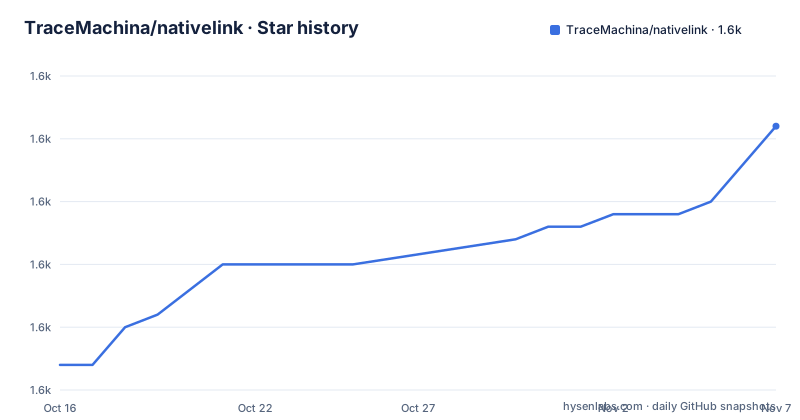
- TraceMachina/nativelink1,636 ★ · +19
| Repository | 2026-10-16 | 2026-11-07 |
|---|---|---|
| TraceMachina/nativelink | 1.6k | 1.6k |
19 Stars in the last 22 days, measured from the daily GitHub snapshot. Compare with other projects
Editorial analysis
Why NativeLink addresses shared compilation waste
NativeLink solves a specific infrastructure problem: developers and CI workers repeatedly compile unchanged targets because each machine has its own build state. It places a build cache and remote execution service between compatible clients and a pool of execution machines. An unchanged target can be recovered from cached results, while new work can be sent to another machine.
The intended users are organizations with expensive or specialized build workloads. The README names Chromium-scale and mobile monorepos, robotics and autonomous-vehicle stacks, semiconductor flows, and biocomputing pipelines. Those environments often combine large dependency graphs with C++, CUDA, firmware, hardware simulation, or other tools that benefit from controlled worker capacity. The project also targets ordinary CI and developer machines that need a common cache rather than isolated local caches.
Compatibility is the central part of the proposition. The repository description lists Bazel, Soong, Pants, Buck2, and Reclient as compatible build systems. The README additionally names Goma and Siso, while CMake projects can connect through `recc`. This breadth matters because NativeLink is not tied to one repository language or build graph generator. The client still needs a compatible Remote Execution path, however, and the README does not provide a universal one-command client setup.
NativeLink's cache, scheduler, worker, and store boundaries
The repository layout exposes a service divided into Rust crates for configuration, errors, protocol definitions, scheduling, services, storage, utilities, and workers. `Cargo.toml` wires those internal packages into a `nativelink` binary. This separation matches the responsibilities of a remote build infrastructure service, although the README does not document the full request lifecycle in enough detail to claim a specific protocol sequence.
The build cache stores results from previous steps and reuses them when components are unchanged. Remote execution distributes build and test tasks across multiple machines and offloads work from developer laptops. Storage is a separate concern, represented by the `nativelink-store` package and by the example configuration named `basic_cas.json5`. The presence of scheduler and worker packages indicates that task placement and execution are separated from service handling rather than placed in one binary component.
The root Cargo package exposes a `nix` feature that enables `nativelink-worker/nix`. That connects the advertised Nix-powered model to a concrete build option, but the README does not explain worker sandboxing, action isolation, resource declarations, retention, garbage collection, or scheduler policy. Those are central operational questions for a build service. The repository supports implementing such infrastructure, but the README is insufficient to determine how each policy is configured.
Deploying the prebuilt NativeLink container on x86_64
The shortest documented deployment uses the prebuilt Docker image. The README limits these images to `x86_64` systems and points to the GitHub container registry for available tags. The example downloads a configuration file and maps it into the container as `/config`.
On Linux, download the exact configuration used by the documented example:
curl -O \
    https://raw.githubusercontent.com/TraceMachina/nativelink/v1.4.0/nativelink-config/examples/basic_cas.json5
The command writes `basic_cas.json5` into the current directory. Start NativeLink with the documented image and port mapping:
docker run \
    -v $(pwd)/basic_cas.json5:/config \
    -p 50051:50051 \
    ghcr.io/tracemachina/nativelink:v1.4.0 \
    config
This maps host port `50051` to the container and invokes the image with the `config` argument. The README calls these production-grade installations, but the example does not establish readiness for a particular production topology. It also does not show how to connect Bazel, Buck2, Pants, or `recc`, so the first complete use must include a client configuration step from the NativeLink documentation.
For Windows x86_64, the README provides the equivalent download and Docker invocation using PowerShell:
Invoke-WebRequest `
    -Uri "https://raw.githubusercontent.com/TraceMachina/nativelink/v1.4.0/nativelink-config/examples/basic_cas.json5" `
    -OutFile "basic_cas.json5"
The file is saved locally, after which the documented Windows container command mounts it under `/config`, publishes port `50051`, and passes `config` to the `v1.4.0` image. These commands demonstrate deployment mechanics, not a complete client integration.
Nix support and Rust build requirements
NativeLink can be built from source through Bazel, Cargo, or Nix, according to the README's contribution documentation links. The Rust package uses edition 2024 and declares `rust-version = "1.97.1"`. Its release profile enables link-time optimization, while a separate `smol` profile disables debug data, optimizes for size, and strips symbols.
The `smol` profile is intended for CI according to the repository comment:
cargo test --all --profile=smolThat command is documented for testing, not as an installation command, and it does not stand up a server. Source builds also add operational complexity because an operator may need to reproduce the configuration, toolchain, and dependencies used for deployment. The Nix path may fit organizations already managing infrastructure declaratively, but the README does not quantify its upgrade implications.
The `nix` feature is optional at the Cargo level. Enabling it activates `nativelink-worker/nix`, which indicates that Nix execution support belongs to worker capabilities. The README does not explain whether default container deployments include that feature or how a client requests a Nix-enabled worker. This matters for workloads that depend on Nix-provided tools or a reproducible execution environment. A deployment should not be treated as equivalent to a standard Bazel worker fleet until that feature boundary has been verified.
Operational limits for NativeLink's large-build use case
The clearest limitation is deployment scope. Prebuilt images are limited to `x86_64`, which rules out immediate use of those images on ARM64 hosts. Source builds are documented, but they move the toolchain and dependency burden to the adopter. The project does not claim that the container path works unchanged on every non-x86_64 environment.
NativeLink also creates a stateful infrastructure service rather than a local build optimization. Someone must decide how storage is backed up, how cached data is retained, how workers are labelled or constrained, how capacity changes, and what happens when the service is unavailable. A client with no working remote endpoint still needs a correct local execution path. The README says remote execution provides a controlled environment, but it does not document retry behavior, degraded-mode operation, cache eviction, disaster recovery, or rollback.
The documentation is especially thin on security boundaries. The repository contains `SECURITY.md`, and the `nativelink-worker` package is the natural place for execution controls, yet the README does not state the sandbox model, authentication scheme, authorization model, or isolation guarantees. Therefore, untrusted build actions should not be assumed safe merely because NativeLink distributes them to workers. Operators handling proprietary code need answers from the relevant documentation before enabling remote execution across administrative boundaries.
NativeLink compared with local caching and direct workers
The practical alternative for a small build system is direct execution on the developer machine or CI runner with only a local cache. That approach keeps configuration small and avoids operating a shared server, scheduler, worker fleet, and network-facing storage path. It is often the simpler choice when a single machine owns the cache and compilation fits comfortably within local capacity.
NativeLink changes the execution location. It can share cached artifacts across laptops and CI systems and place work on machines selected for available or specialized resources. The README specifically calls out robotics, AV, semiconductor, and biocomputing environments, where worker hardware may differ substantially from a general-purpose client machine. Shared caching also reduces repeated compilation of unchanged components across separate machines.
The trade-off is direct: centralized reuse and remote capacity come with service configuration and operational responsibility. A local cache has a smaller network failure surface, but it cannot provide the same cross-machine reuse or independent worker capacity. For a small project with few targets and inexpensive tests, that server layer may add more administrative work than it saves. For a large graph with recurring dependency compilation and multiple client environments, the shared service addresses a concrete resource problem.
NativeLink release cadence, upgrades, and licence review
The repository is not archived, and its last push was on 2026-10-16. Releases include `v1.7.7` on 2026-10-14, `v1.7.6` on 2026-10-08, and `v1.7.5` on 2026-10-06. This indicates active development at the time represented by the repository, although release frequency alone does not establish upgrade compatibility or operational stability.
The README's Docker example remains pinned to `v1.4.0` while the Cargo package is version `1.7.7` and the repository has newer releases. The README also directs readers to the container registry to find the latest tag. That mismatch means the quickstart is a concrete working reference, not proof that its image version matches the current package version. Operators should inspect release notes and configuration changes between the chosen tags. The README does not document a migration procedure or rollback process.
The repository identifies its licence as FSL 1.1 Apache 2.0 through its badge, but the project description classifies the `LICENSE` as custom because GitHub cannot categorize it. The actual obligations must therefore be read from the `LICENSE` file. The README does not establish redistribution, hosting, modification, or source-disclosure terms, so this review does not interpret them. Internal legal review is required before NativeLink is embedded in a commercial build service or offered as a hosted product.
Editorial conclusion
NativeLink is a credible choice for organizations operating large RE-compatible build graphs and willing to manage its storage, workers, configuration, and upgrade cadence. It is a poor fit for a small project seeking a lightweight local cache or a server with a standard open source licence. Before adoption, verify the exact `LICENSE` terms, confirm that the required prebuilt image architecture is available, and test one complete client build and test path through the deployed service.
Frequently asked questions
Which build systems can use NativeLink?
NativeLink supports Remote Execution-compatible tools including Bazel, Soong, Pants, Buck2, and Reclient. The README also names Goma and Siso, and says CMake projects can use it through `recc`.
How do I install NativeLink with Docker?
The README provides a prebuilt Docker image for `x86_64`, with port `50051` published and `basic_cas.json5` mounted as `/config`. The full integration also requires connecting a compatible build client.
What licence and system requirements apply to NativeLink?
The repository requires Rust `1.97.1` for the root package, and the prebuilt image path is limited to `x86_64`. Licence terms must be checked directly in `LICENSE`, since GitHub classifies it as custom.
Official sources
Add this badge to your README
If you maintain this project, the badge below links readers to this analysis and shows its maintenance status from the daily GitHub snapshot. Paste the markdown into your README; add ?metric=license or ?metric=stars to the image URL for a different field.

[](https://hysenlabs.com/projects/tracemachina-nativelink)Star history chart for your README
[](https://hysenlabs.com/projects/tracemachina-nativelink)Was this useful?