Trail of Bits skills is a marketplace, not a pip package
Trail of Bits Claude Code skills for security research, vulnerability detection, and audit workflows
At a glance
- What is it?
- Trail of Bits publishes Claude Code plugins for auditing code, verifying fixes, and reading binaries, grouped into category tables and installed by slash command instead of a package manager. The maintenance tooling is unusually defensive: the Makefile points its own validators at themselves before it trusts them, and it openly leaves loadability and version checks to CI.
- Who is it for?
- Use it if you already run Claude Code and want opinionated audit workflows instead of writing prompts by hand, and plan to wire in external tools yourself, because Semgrep, CodeQL, Rust, Lean 4, and Hypothesis show up as plugin subjects rather than as bundled dependencies. Leave it alone if you need a pinned, auditable install, since the repository publishes no GitHub releases and a slash command install tracks a branch.
- Can I use it commercially?
- Yes, with credit. CC-BY-SA-4.0 allows commercial use as long as you credit the authors and indicate what you changed. It is written for creative content, so check how it applies to any code.
- Is it still maintained?
- Yes. The repository last received commits 2 days ago.
- What is it written in?
- Mainly Python, according to GitHub's language statistics.
Answers come from the project's GitHub data, last synced on November 14, 2026, and from our analysis. They are not legal advice.
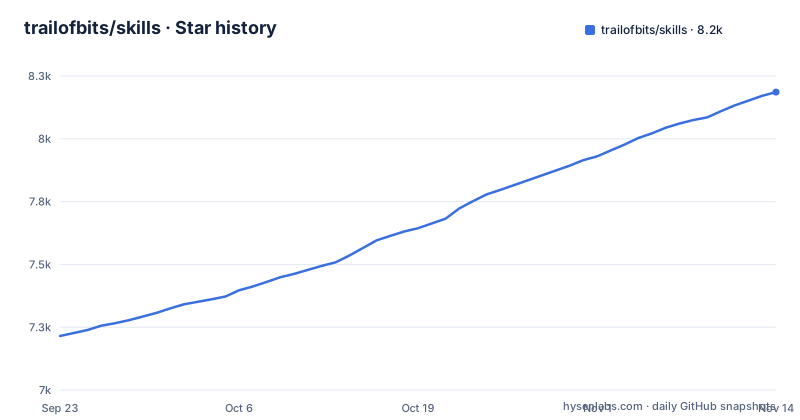
Star history
- trailofbits/skills8,186 ★ · +971
| Repository | 2026-09-23 | 2026-11-14 |
|---|---|---|
| trailofbits/skills | 7.2k | 8.2k |
971 Stars in the last 52 days, measured from the daily GitHub snapshot. Compare with other projects
Editorial analysis
The install target is a slash command inside Claude Code
trailofbits/skills is a marketplace, not a library. Nothing at the top level looks like something to install: the entries are .claude-plugin/, plugins/, .github/, .pre-commit-config.yaml, AGENTS.md, CLAUDE.md, CODEOWNERS, a Makefile, ruff.toml, and the README. Python is the primary language, but there is no pip install step, because the thing being added is a list of plugins that a coding agent loads into a session. Registration happens inside Claude Code, and selection happens in a menu. The repository has no GitHub releases, so the address you type is a branch rather than a version.
/plugin marketplace add trailofbits/skillsThat command registers the source. The next one opens the menu where individual plugins get chosen.
/plugin menuThe local path spells the command /plugins, not /plugin
For a local checkout the instructions do not send you to a clone URL. You move to the parent directory of the repository and add it by path, which means the last argument in the command is your folder name rather than anything the repository defines. The block below is written with a plural /plugins, while every hosted marketplace command above uses the singular /plugin. If you retype the local command from memory with the singular spelling, you are no longer copying the documented command, and the README gives no second form of it. The inline comment is also load bearing: it tells you to sit one level above the repository folder, because the path handed to the command is relative to your current directory.
cd /path/to/parent  # e.g., if repo is at ~/projects/skills, be in ~/projects
/plugins marketplace add ./skills
Codex reuses the manifest, ChatGPT needs a second YAML file
Codex is the cheaper target, because this repository needs no Codex specific sidecar metadata to be loaded there. Marketplace add, list, then per plugin add is the whole flow, and the placeholder in the last line is the plugin name, not the repository name.
codex plugin marketplace add trailofbits/skills
codex plugin list
codex plugin add <plugin-name>@trailofbits
ChatGPT workspaces are the harder target. Workspace imports read this repository's .claude-plugin/marketplace.json, and any skill that ships an agents/openai.yaml file also needs interface.display_name and interface.short_description written into that YAML, because plugin metadata does not supply them. An import can therefore fail over a field living in a file you do not own. The only documented recovery is to wait for a metadata fix to be published, then sync the repository again in the workspace marketplace and let the import retry.
make check runs the validators against themselves first
The Makefile treats a passing run as a claim that needs proof, so the first target is not a linter. The default goal check runs self-test, eval-self-tests, lint, shell, bats, python-tests, js-tests, and validate, and the file is marked .NOTPARALLEL so those steps stay in order. self-test fires the metadata and skill interface validators at their own --self-test flag, and it runs before validate on purpose, because a checker that quietly stops matching reports a clean repository forever.
@uv run --no-project python3 .github/scripts/validate_plugin_metadata.py --self-test
@uv run --no-project .github/scripts/validate_skill_interfaces.py --self-test
Ruff is pinned as RUFF_VERSION := 0.14.13 and has to match the ruff pre-commit rev in .pre-commit-config.yaml, which the validator self-test asserts. What check does not cover is printed in its own output: the loadability checks, the version increment check, and the non-ruff pre-commit hooks are left to CI. So a green local run is not a green pipeline, and the file says so rather than implying otherwise.
Every plugin brings its own reviewer, not one shared scanner
There is no common engine underneath these plugins, and the one line summaries make that visible. fp-check adds mandatory gate reviews to false positive triage. insecure-defaults runs a parallel audit and assigns a refuting verifier to each candidate file, so a finding has to survive an argument against it. c-review verifies its coverage against a parse of the source. rust-review is scoped to the safe and unsafe boundary, memory safety, concurrency, panic DoS, FFI, and the async runtime, and it writes SARIF. static-analysis is the one that bundles tools, pairing CodeQL, Semgrep, and a SARIF parser. Practical consequence: switching plugins changes the process, not just the output format.
Seven tables, each scoped to one artifact or one language
The tables are grouped by what you point a plugin at, and several entries are narrower than their names imply. firebase-apk-scanner reads Android APKs and looks for Firebase misconfigurations, not for general mobile flaws. dwarf-expert works on DWARF debug information, parsing DIEs, checking integrity, and writing new DWARF parsing code. burpsuite-project-parser reads Burp Suite project files, so the data has to come out of a Burp session first. yara-authoring covers rule authoring with linting and atom analysis. writing-lean-proofs targets Lean 4 libraries following Mathlib conventions. spec-to-code-compliance spans contracts, C, C++, services, and firmware. The consequence for a reader is blunt: a clean report from one of these says nothing about the other parts of a target.
Triage and verification plugins sit beside the scanners
Quite a few entries exist to decide whether a result deserves belief. vulnerability-triage-brocards applies 7 brocards to a report and forces an accept, dismiss, or request more info decision before deeper analysis starts. post-patch-validation works the other side of a fix, hunting missed variants and regressions, with reproducible failures and explicit validation gaps. property-based-testing covers Hypothesis, fast-check, proptest, and Echidna or Medusa for Solidity invariants. constant-time-analysis looks for timing side channels the compiler introduces. zeroize-audit finds secrets that are never zeroed, and secrets whose zeroization the compiler removed. Read those together and you get a review process around your code, not a single scan.
One sentence per plugin, and no dependency list
In the tables, every plugin gets one sentence and no dependency list. No row tells you that static-analysis expects Semgrep and CodeQL to be present, that writing-lean-proofs assumes a Lean 4 toolchain and Mathlib, or that property-based-testing spans four separate property testing libraries. No row tells you what a plugin reads or writes inside your checkout. So read the plugin directory after installing it, and expect to confirm for yourself that the external tool it drives exists.
Editorial conclusion
Use it if you already run Claude Code and want opinionated audit workflows instead of writing prompts by hand, and plan to wire in external tools yourself, because Semgrep, CodeQL, Rust, Lean 4, and Hypothesis show up as plugin subjects rather than as bundled dependencies. Leave it alone if you need a pinned, auditable install, since the repository publishes no GitHub releases and a slash command install tracks a branch. Before treating a green make check as a release signal, read what that target says it leaves out: loadability checks, the version increment check, and the non-ruff pre-commit hooks.
Frequently asked questions
how to install skills in claude code
Register the marketplace with /plugin marketplace add trailofbits/skills, then run /plugin menu to browse it and pick plugins one at a time.
how to install skills in codex
Codex loads Claude plugin marketplaces directly, so this repository needs no Codex specific sidecar metadata. Run codex plugin marketplace add trailofbits/skills, then codex plugin list and codex plugin add with the plugin name.
how to install skills in chatgpt
A ChatGPT workspace imports the repository's .claude-plugin/marketplace.json. Skills carrying agents/openai.yaml also need interface.display_name and interface.short_description inside that YAML, which plugin metadata does not supply, and a failed import is retried after syncing the repository again.
how to install skills from github to claude
For a local checkout, move to the parent directory of the repository and add it by path with /plugins marketplace add ./skills. That command is written with a plural /plugins, unlike the singular /plugin used for the hosted marketplace.
Official sources
Add this badge to your README
If you maintain this project, the badge below links readers to this analysis and shows its maintenance status from the daily GitHub snapshot. Paste the markdown into your README; add ?metric=license or ?metric=stars to the image URL for a different field.

[](https://hysenlabs.com/projects/trailofbits-skills)Star history chart for your README
[](https://hysenlabs.com/projects/trailofbits-skills)Was this useful?