Transformer Lab's install script, cluster overlay, and two license notices
The open source research environment for AI researchers to seamlessly train, evaluate, and scale models from local hardware to GPU clusters.
At a glance
- What is it?
- Transformer Lab is a self-hosted ML research environment that trains, fine-tunes and evaluates models on your own hardware or on Slurm and SkyPilot. The install is one piped shell script, the Teams edition is a control plane above your scheduler rather than a replacement, and the repository carries two different license notices.
- Who is it for?
- Transformer Lab fits a lab that wants training, evaluation and model registry in one place on hardware it already owns, and that is comfortable running an AGPL licensed stack. Before you commit, check the license question with your own counsel, since the repository declares both AGPL-3.0 and MIT.
- Can I use it commercially?
- Yes, with strict conditions. AGPL-3.0 is a network copyleft licence: if people use a modified version over a network, for example as a hosted service, you must offer them its source code under the same licence.
- Is it still maintained?
- Yes. The repository last received commits 10 days ago.
- What is it written in?
- Mainly Python, according to GitHub's language statistics.
Answers come from the project's GitHub data, last synced on November 15, 2026, and from our analysis. They are not legal advice.
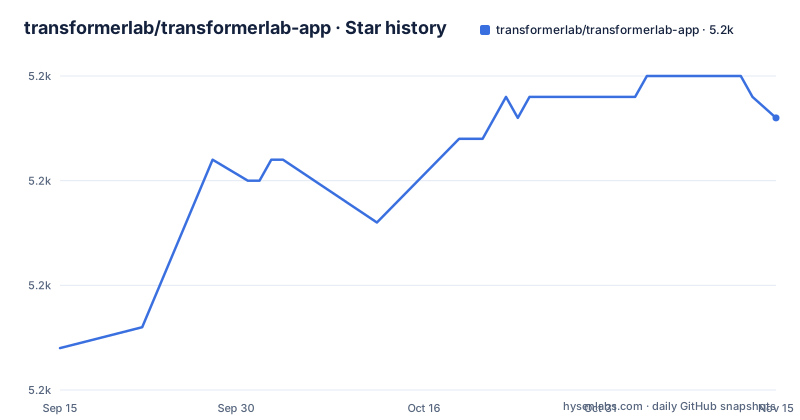
Star history
- transformerlab/transformerlab-app5,198 ★ · +11
| Repository | 2026-09-15 | 2026-11-15 |
|---|---|---|
| transformerlab/transformerlab-app | 5.2k | 5.2k |
11 Stars in the last 61 days, measured from the daily GitHub snapshot. Compare with other projects
Editorial analysis
One piped shell script, then a browser on port 8338
The install is a single command that fetches a script and hands it straight to bash:
curl https://lab.cloud/install.sh | bashThe script leaves the source tree in your home directory, and the second step starts it:
cd ~/.transformerlab/src
./run.sh
Then you open `http://localhost:8338` in a browser. What it does document is the hardware floor, and that is the part worth reading before running a curl into a shell. macOS needs Apple Silicon, listed as M1 through M4. Linux needs an NVIDIA or AMD GPU. Windows needs an NVIDIA GPU through WSL2, with a separate setup guide for that route. An older Intel Mac or a Linux box with no discrete GPU has no documented path here.
MLX, CUDA, or ROCm: your accelerator picks the trainer
The README claims hardware agnosticism and then names three stacks: MLX for Apple Silicon, CUDA for NVIDIA, and ROCm for AMD. The same split runs through inference, where the engines are MLX, vLLM, Ollama, and HuggingFace Transformers, and through formats, where it converts between HuggingFace, GGUF, and MLX. So the feature list is real but conditional. The model list names Llama 3, DeepSeek, Mistral, Qwen, and Phi. Training methods span full fine-tuning, LoRA and QLoRA, RLHF with DPO, ORPO and SIMPO, reward modeling, and YAML parameter ranges scheduled as grid searches. The cost of that breadth is that the page never maps a check to a backend, so you find out which combination you have by trying it on your own box before a week of fine-tuning depends on it.
For Teams sits above Slurm instead of replacing it
The Teams edition describes itself as an overlay on infrastructure you already run, and says in as many words that it does not replace your scheduler. Jobs go to Slurm or to SkyPilot against AWS, GCP, and Azure from one interface, and configuration takes three steps: follow the teams install guide, set your compute providers in Team Settings, then queue tasks with the `lab` CLI or the web UI. What the page adds over a raw scheduler is centralized experiment tracking, a model registry, artifact management, one-click Jupyter, VSCode, and SSH sessions on remote nodes, plus automatic recovery from checkpoints and from spot instance preemption. What stays yours is Slurm itself: partitions, accounts, quotas, and the failure behaviour of the version you run. The named clouds are AWS, GCP, and Azure.
The example environment ships TRANSFORMERLAB_JWT_SECRET=APPLE
The `.env.example` at the root is where the multiuser story becomes concrete, and where the sharpest edge sits. Only variables prefixed `TL_` are exposed to the renderer through `window.env`, so renaming one drops it from the browser side silently. Two URLs have to agree: `TL_API_URL` points at `http://localhost:8338/` and `FRONTEND_URL` at `http://localhost:1212`. Enabling `TFL_REMOTE_STORAGE_ENABLED` makes the app create S3/GCS/Azure buckets or containers and use a workspace per team, and requires `TFL_STORAGE_PROVIDER` set to `aws`, `gcp`, or `azure`, with `localfs` plus `TFL_STORAGE_URI` for a plain directory. `DISABLE_LOCAL_PROVIDERS` set to true blocks local providers for every team and stops the default admin path from seeding one. Then the secret:
TRANSFORMERLAB_JWT_SECRET="APPLE"That placeholder is what ships. Anything reachable by more than one person has to replace it.
package.json declares MIT while the LICENSE file says AGPL-3.0
Two license notices sit in the same tree and they disagree. The License section and the LICENSE file say AGPL-3.0. The `package.json` at the root declares MIT instead. For a team that redistributes or hosts this stack, that is a question for legal rather than for a README, and the repository offers no note reconciling the two. Version drift sits next to it: `package.json` carries 0.40.1, which matches the v0.40.1 release dated 2026-06-19, while the last push to main is dated 2026-10-26, and the two releases before it were v0.40.0 on 2026-06-12 and v0.39.0 on 2026-06-04. The suggested citation still carries the year 2023 and names Ali Asaria and Tony Salomone. A tree that declares June while commits land in October is ordinary, and it is still a decision to pin rather than inherit.
The browser free path is pip install transformerlab and one CLI bullet
Two routes exist for people who never want the web interface. The Lab SDK installs with pip:
pip install transformerlabAn existing training script joins it through `import lab`, which brings automatic logging, progress bars, and artifact tracking instead of wiring those by hand. A command line tool called `lab` submits tasks and monitors jobs without a browser. That single bullet is the entire description, with no subcommands, no flags, and no sample output, so you cannot script against it from this page. Working on the project itself is a third route: the frontend needs Node.js v22 with `npm install` and `npm start`, and the backend is a Conda setup in two steps:
cd api
./install.sh   # Sets up Conda env + Python deps
./run.sh       # Start the API server
The root also holds `playwright.config.ts`, `ruff.toml`, `knip.json`, and a `docker-compose.test.yml`, which is where the test path lives.
Editorial conclusion
Transformer Lab fits a lab that wants training, evaluation and model registry in one place on hardware it already owns, and that is comfortable running an AGPL licensed stack. Before you commit, check the license question with your own counsel, since the repository declares both AGPL-3.0 and MIT. Replace the example JWT secret before exposing a multiuser deployment, and read the docs for the CLI and scheduler details this page leaves out.
Frequently asked questions
What hardware does Transformer Lab need?
macOS needs Apple Silicon, listed as M1 through M4, Linux needs an NVIDIA or AMD GPU, and Windows needs an NVIDIA GPU through WSL2, which has its own setup guide. The Individuals edition is aimed at researchers working on a single machine.
Does Transformer Lab replace Slurm on a cluster?
No. The Teams edition runs as an overlay on infrastructure you already have and acts as a control plane for your scheduler. You configure compute providers in Team Settings and submit work to Slurm or to SkyPilot against AWS, GCP, and Azure.
Can Transformer Lab run tasks without a browser?
Yes, through a command line tool called `lab` for submitting tasks and monitoring jobs, or through the Lab SDK installed with `pip install transformerlab`, where an existing script joins it with `import lab` for automatic logging, progress bars, and artifact tracking.
Official sources
Add this badge to your README
If you maintain this project, the badge below links readers to this analysis and shows its maintenance status from the daily GitHub snapshot. Paste the markdown into your README; add ?metric=license or ?metric=stars to the image URL for a different field.

[](https://hysenlabs.com/projects/transformerlab-transformerlab-app)Star history chart for your README
[](https://hysenlabs.com/projects/transformerlab-transformerlab-app)Was this useful?