pipdeptree now ships a Rust extension built through Meson, and the README never mentions it
A command line utility to display dependency tree of the installed Python packages.
At a glance
- What is it?
- A dependency tree display for installed Python packages that now also resolves trees against an index or a lock file it has never seen. The package builds a compiled extension through four build files, declares three runtime dependencies the documentation does not name, and carries keyword metadata unrelated to its purpose.
- Who is it for?
- pipdeptree fits inspecting an environment you already have and, more usefully now, answering dependency questions about packages you have not installed, since the index and lock subcommands take a requirement rather than reading the current environment. Three things to check first.
- Can I use it commercially?
- Yes. MIT is a permissive licence: you can use, modify and sell software built on it, as long as you keep its copyright and licence notices.
- Is it still maintained?
- Yes. The repository last received commits 2 days ago.
- What is it written in?
- Mainly Rust, according to GitHub's language statistics.
Answers come from the project's GitHub data, last synced on November 21, 2026, and from our analysis. They are not legal advice.
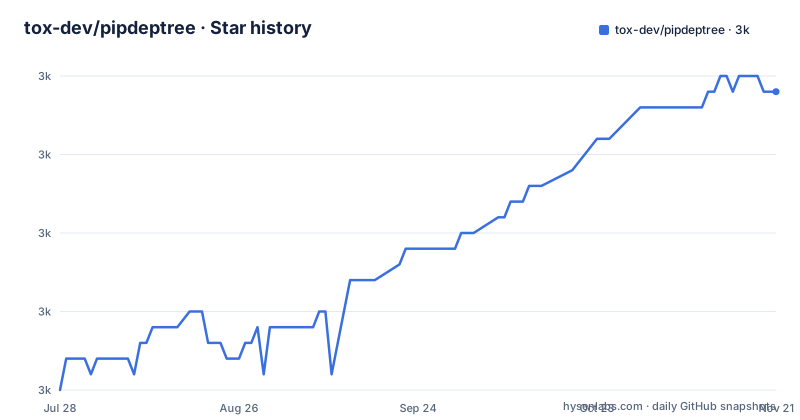
Star history
- tox-dev/pipdeptree3,034 ★ · +19
| Repository | 2026-07-28 | 2026-11-21 |
|---|---|---|
| tox-dev/pipdeptree | 3k | 3k |
19 Stars in the last 116 days, measured from the daily GitHub snapshot. Compare with other projects
Editorial analysis
The implementation is Rust and the documentation describes a Python script
The README reads like the small command line utility it has always been. It says pipdeptree displays installed Python packages as a dependency tree, contrasts itself with the flat list that pip freeze produces, and gives one install command. Nowhere does it say what the program is written in.
The repository says otherwise. Its primary language is Rust. The Python packaging metadata names a Meson-based build backend and requires Meson, the Meson Python bridge and Ninja. There is a Cargo manifest, a Cargo lock file, a Rust toolchain pin and a build script at the root. The library target inside the manifest is named with a leading low line and a Rust source path, and it is built as a dynamic library and a Rust library through the standard Python extension bindings, at a version that is current.
The console script that Python installs points at a module inside the Python package, so the shape is a thin Python entry point over a compiled extension.
For a user, that changes what installing means. A wheel is a binary artefact; building one needs a pinned Rust toolchain, Meson and Ninja on the build machine. None of that is stated in the document whose only install instruction is a single pip command.
Three runtime dependencies the README does not name, and keywords that describe nothing
The entire runtime dependency list of this package is three entries. They share a name stem, they share a floor of the same 0.0.x version, and none of them appears anywhere in the README.
That is worth stating plainly, because for a utility whose entire purpose is to explain someone else's dependencies, the dependency list is the one part a reader is least able to reason about. The names suggest a family of related packages rather than three independent choices, and their versions are all pre-release in appearance. What they do is not stated in the project documentation available here.
The keyword metadata is a separate finding and a stranger one. The package declares five keywords: application, cache, directory, log and user. Those are five common nouns that describe nothing about a dependency tree display. It is the kind of placeholder list that ships once and is never revisited, and it does real damage, because keywords are how a package is found by search engines and indexers.
The rest of the metadata is careful. There is a licence file listed explicitly, three named maintainers, and a Python floor of 3.10 with classifiers running from 3.10 through 3.15, plus a classifier for Rust itself.
The version is injected at build time, and the crate's own version is a placeholder
The Python metadata lists its version as dynamic, which means it is filled in during the build rather than written down. The Rust manifest says where the number comes from, in a comment attached to a version field set to zero.
The comment states two things: that the build resolves the release version, and that the crate is never published to a crate registry. The second explains the first. If the Rust library is never distributed on its own, there is no reason for it to carry a meaningful version, so it does not, and the version a user sees on the package index is stamped in at build time from somewhere outside the source.
The practical consequence is that no file in this repository contains the version a user installs. The recent releases are patch numbers in a four part scheme, and two of them were published on the same day less than three hours apart, which is consistent with a project shipping small fixes in batches rather than on a schedule.
For anyone pinning this in a build, the version has to come from the index. Reading it out of the repository will not work, and neither will reading it out of the Rust manifest.
It can now answer questions about packages that are not installed
The newest capability is the one the opening sentence does not describe. The README adds a section for inspecting a tree without installing it, and gives two subcommands:
pipdeptree from-index "flask"          # i is a shorthand alias
pipdeptree from-index --requirements requirements.txt
pipdeptree from-lock pylock.toml       # l is a shorthand alias
The first resolves a requirement against a package index, and takes either a bare name as a single argument or a requirements file. The second reads a resolved lock file, and the lock format it reads is the standardised Python lock specification rather than a tool's private format, which is why the file in the example is named for that specification. Each subcommand has a single letter alias, stated as a trailing comment rather than in prose.
The README also says the render flags, including the summary flag, work with both subcommands. So the output formats and the summary are not limited to inspecting your own environment.
That is a meaningful widening of scope. The first line of the README still says the tool displays installed packages, and the index and lock subcommands take a requirement instead. A reader skimming the opening would not know the tool could answer the question they actually have, which is what would happen if two packages you are considering clash.
Conflicts are marked inline, with the required and installed versions side by side
The sample output in the README is a tree drawn with box characters, and every line carries a status marker. Satisfied requirements get a check mark, and a requirement that is not met gets a warning mark, with the required range and the installed version printed together on the same line.
In the example, a version of Flask has three satisfied requirements and one that is not: a markup library requires a minimum version and has an older one installed, so it is the single warning in that tree. That is the whole conflict report, delivered in the shape of the tree rather than in a separate list.
Three output formats are documented beyond the default tree, with flags for JSON, for a diagram language that renders from a text description, and for vector graphics written to standard output. The third is given as a redirect into a file, which is the usual way that flag has to be used.
There is also a reverse mode, given with a packages filter, for answering the other direction: which packages depend on this one. And a summary flag that reports counts, depth, conflicts, cycles, licences and size, in three renderings of the same data, being aligned text by default, a styled table and machine-readable output.
Licences appearing in that summary is the one item on the list with a compliance use rather than a debugging one.
Two changelog destinations, and a duplicated badge
Two small inconsistencies in the documentation are worth naming because both send you to a different place than you expect.
The first is the changelog. The packaging metadata lists a changelog URL pointing at a page on the documentation site, under a how-to path. The README's own link list points at the releases page on the forge instead. So the canonical URL recorded in the metadata and the link a reader would click resolve to two different documents, and only one of them is a list of releases.
The second is at the very top of the README, where the badge row contains two badges pointing at the same package index page. The badge set around them is otherwise thorough: the package index, a third-party package popularity service, the documentation site, the licence text and a build status workflow.
The link list at the bottom of the file is the more useful part, and it is short: installation, usage, changelog, issues, the package index and the forge. That is the whole table of contents, which for a tool with this many flags is thin, and the usage page it points to is where the flag reference lives rather than in the repository.
Four build files, unsafe Rust forbidden, and a test target named public_api
The root contains four files that participate in building one project. There is a Meson build definition, a Cargo manifest, a Cargo build script, and the Python project metadata that selects the Meson bridge as its backend. A Cargo lock file and a Rust toolchain pin sit beside them, along with separate source directories for the Rust code and the Python package, and a test configuration named with the newer format rather than the old dotted one.
The Rust manifest is unusually explicit about its own constraints. Unsafe code is forbidden outright rather than discouraged, which is a hard guarantee rather than a lint setting. Three clippy lint groups are all set to warn, covering the default set plus the pedantic and nursery groups, so the bar is above the default. The release profile asks for a single codegen unit, full link time optimisation and symbol stripping, which is the configuration for the smallest and fastest binary rather than the fastest build.
Two smaller details. A library feature exists for the Python stable ABI, so the extension can be built once against a minimum Python version rather than per version, and it is not in the default set. And on Windows the extension bindings are rebuilt with import library generation enabled, which is the step that makes an extension loadable there.
Finally, there is an explicit Rust test target named for the public API, declared with its own path, alongside a directory of tests in the Python half of the project.
Editorial conclusion
pipdeptree fits inspecting an environment you already have and, more usefully now, answering dependency questions about packages you have not installed, since the index and lock subcommands take a requirement rather than reading the current environment. Three things to check first. The package is a compiled extension with a pinned Rust toolchain and a Meson-based build, so installing from source needs that toolchain, and the README does not say so anywhere. Its three runtime dependencies are named after a family of packages at version 0.0.x that the documentation does not describe, so what they do has to be established from the packaging metadata rather than from the project. And the version you install appears in no source file, because it is injected at build time and the crate's own version is a fixed placeholder.
Frequently asked questions
how to install pipdeptree
One command: `pip install pipdeptree`, after which the `pipdeptree` command is available. Python 3.10 or newer is required, with classifiers running through 3.15. The package builds a compiled extension through a Meson-based backend with a pinned Rust toolchain, which matters if you install from source rather than from a wheel.
how to use pipdeptree
Run it with no arguments for the tree of installed packages. Use the reverse and packages flags to find what depends on a given package, the output flags for JSON, a diagram language or vector graphics, and the summary flag for counts, depth, conflicts, cycles, licences and size. Two subcommands work without installing anything: from-index resolves a requirement against a package index, and from-lock reads a resolved lock file.
Is pipdeptree still written in Python?
The repository's primary language is Rust. The Python metadata selects a Meson-based build backend and requires Meson, its Python bridge and Ninja, and the Rust manifest builds a library with the standard Python extension bindings. A Python console script is declared on top of it. The README does not mention the implementation language anywhere.
Can pipdeptree be used as a Python library?
The README documents command line use only. The packaging metadata declares one console script entry point pointing at a module inside the Python package, and the Rust manifest declares a test target named for the public API, so an interface is being held stable somewhere. No Python API and no import example appear in the documentation available here.
Official sources
Add this badge to your README
If you maintain this project, the badge below links readers to this analysis and shows its maintenance status from the daily GitHub snapshot. Paste the markdown into your README; add ?metric=license or ?metric=stars to the image URL for a different field.

[](https://hysenlabs.com/projects/tox-dev-pipdeptree)Star history chart for your README
[](https://hysenlabs.com/projects/tox-dev-pipdeptree)Was this useful?