Compartment: A Self-Hosted Kubernetes Deployment Layer for Small Internal Tools
Compartment is a self-hosted deployment system for small software on infrastructure your team controls.
At a glance
- What is it?
- Compartment is a CLI-first, repository-first deployment system that installs into Kubernetes and turns a simple compartment.yml into a running, SSO-protected app. It targets teams that outgrew scripts but do not want a managed platform.
- Who is it for?
- Adopt Compartment if you run internal tools, private apps, or public services on your own Kubernetes infrastructure and want a repository-first deploy flow without building a custom platform. Skip it if you need multi-node HA out of the box, because the managed install targets a single-node host, or if you want a GUI-first experience; this is CLI-first.
- Can I use it commercially?
- Yes. Apache-2.0 is a permissive licence: you can use, modify and sell software built on it, as long as you keep its copyright and licence notices.
- Is it still maintained?
- Yes. The repository last received commits 86 days ago.
- What is it written in?
- Mainly TypeScript, according to GitHub's language statistics.
Answers come from the project's GitHub data, last synced on November 13, 2026, and from our analysis. They are not legal advice.
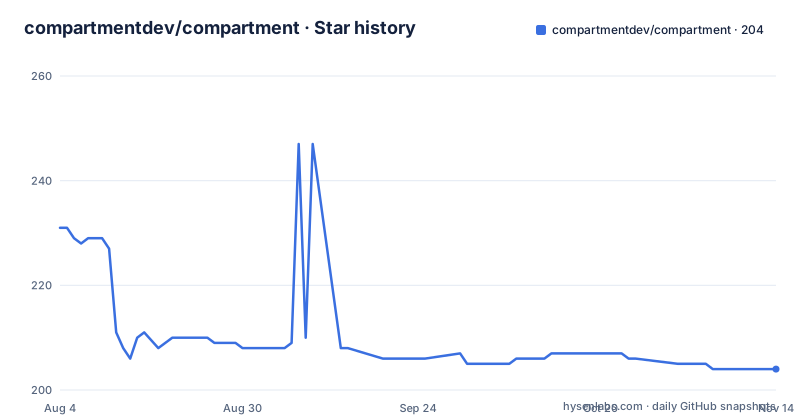
Star history
- compartmentdev/compartment204 ★ · -27
| Repository | 2026-08-04 | 2026-11-13 |
|---|---|---|
| compartmentdev/compartment | 231 | 204 |
-27 Stars in the last 101 days, measured from the daily GitHub snapshot. Compare with other projects
Editorial analysis
The Problem Compartment Solves
Compartment addresses a specific gap: software that starts as a script, an internal app, a worker, or an AI-generated tool becomes useful enough to need a stable runtime. Without a deployment system, that software lives behind ad hoc links, manual handoffs, and unclear ownership. Compartment gives teams a controlled place to run such software on their own infrastructure, not on a managed platform. The README states that teams use it to share software without informal permission paths, to keep runtime control on owned infrastructure, and to avoid turning sustained compute or traffic into managed-platform spend. It is for teams that already have Kubernetes or are willing to provision a single-node host, and who want a deploy path from a normal repository to a working app without building a custom platform stack.
The Repository-First Workflow
Compartment's core model is CLI-first and repository-first. You add a compartment.yml descriptor to your application repository, deploy from a checkout or a connected Git repository, and the result runs through a self-hosted control plane. The smallest descriptor is two lines: a name and a services map that points a service name at a directory. For example, `services: web: .` tells Compartment to build the current directory as the web service. This is deliberately minimal. The README claims that if an app can build into a container image with Docker or Railpack, it can usually fit the Compartment model. That means the system does not care about the language or framework, as long as a container image can be produced. The repository-first approach is a real difference from platforms that require you to push artifacts or use a proprietary manifest format.
How the Control Plane and Runtime Fit Together
The repository layout reveals a multi-package architecture. The CLI in packages/cli is the user-facing command. It talks to an SDK in packages/sdk, which uses shared contracts from packages/contracts. The control plane is split into an API package for auth, persistence, and migrations, a console package for a Vite and React browser UI, a worker package for deployment execution, and an edge package that enforces ingress and access. This separation means the CLI is not a thin wrapper over kubectl; it orchestrates a full control plane. The API handles authentication and stores state, presumably in PostgreSQL given the local development requirement for COMPARTMENT_DATABASE_URL. The worker executes deployments, and the edge boundary enforces access on hosted apps. The README does not explain how these components are deployed into a cluster, but the existence of an edge package implies that traffic to your apps goes through a dedicated enforcement layer, which is where SSO, RBAC, and audit logs likely live.
Getting Started: Install, Init, Deploy
The quickstart gives exact commands. Install the CLI with `curl -fsSL https://compartment.dev/install.sh | sh`, then run `compartment install`. When no usable Kubernetes context exists, the CLI selects a managed-VM target, checks the host, shows one mutation review, and requests sudo only after confirmation. That design choice is notable: it avoids silently making system changes. Operators can instead target an existing cluster explicitly with `compartment install --target kubernetes`. After installation, prepare a repository with `compartment init`, write a minimal descriptor, then run `compartment deploy`, `compartment status`, and `compartment logs`. For branch-driven deploys, you connect the repository through the Console or with `compartment source connect git`. The README points to the docs for the full Git flow, but the commands are enough to get a first deployment working. Local development requires PostgreSQL, caddy, buildctl, docker, and railpack on PATH, plus a reachable BuildKit daemon via BUILDKIT_ADDR.
A Genuine Limitation: Single-Node Managed Install
The managed installation path provisions a single-node Kubernetes host. That is a real constraint. If you need high availability or horizontal scaling across multiple nodes, the managed install is the wrong tool; you would need to bring your own cluster and use `--target kubernetes`. The README does not state whether the control plane itself is highly available or whether it can be run in a multi-node setup. It says the managed target is a single-node host, and the local development note says the Docker-compatible CLI and daemon are not an application runtime target. That implies the managed install is for small workloads, not production-grade multi-tenant infrastructure. The edge package enforces access, but the README does not describe how it scales or whether it becomes a bottleneck. Teams with strict uptime requirements should verify the control plane's failure modes before relying on it.
Trade-Offs: CLI-First vs. Console, and the Toolchain Dependency
Compartment is CLI-first, and the README says the Console is a browser control plane, but it does not claim the Console covers every operation. The quickstart uses CLI commands for deploy, status, and logs, while Git connection happens through the Console or a CLI command. That split is a trade-off: the CLI is scriptable and fits CI pipelines, but the Console is likely where you manage access and view history. The README mentions deployment history and an operations surface, but does not detail what the Console shows. Another trade-off is the external toolchain. Building images requires Docker or Railpack, and local development needs BuildKit. The install script and the managed VM hide some of that, but if you bring your own cluster, you must ensure BuildKit is reachable. Teams that already use a different build system, such as Kaniko or Buildah, may find the Docker/Railpack requirement limiting.
Alternatives and the Difference in Approach
The obvious alternative is a managed platform like Heroku or Railway, but those are exactly what Compartment avoids. A closer alternative is something like Dokku, which also deploys to a single host via Git pushes and uses a buildpack model. The difference is that Dokku runs on a bare VM without Kubernetes, while Compartment sits on Kubernetes and provides SSO, RBAC, and audit logs as first-class features. Another alternative is raw Kubernetes with Helm and an ingress controller, which gives you full control but requires you to build the access model, deployment history, and operations surface yourself. Compartment's approach is to provide those around your existing repositories, so you do not write custom controllers or RBAC policies. The README does not name competitors, but the design choices are clear: it is not a PaaS, and it is not a Helm wrapper. It is a layer that assumes Kubernetes and adds an application-centric workflow.
Maintenance and License Considerations
The project is Apache-2.0 licensed, which is permissive for commercial use, but you should read the LICENSE file for exact terms. The repository shows active development with releases v0.10.8, v0.11.0, and v0.12.0 in August 2026, suggesting a fast release cadence. That means upgrades may come frequently, and you should plan for version drift. The README's contributing guide says to keep changes package-owned and to update public docs when user-visible behavior changes, which is a sign of disciplined maintenance. However, the project is at version 0.12.0, so the API and CLI may change without backward compatibility guarantees. The local development spec requires a specific toolchain, but for production use, you rely on the managed install or your own cluster. The cost of maintaining Compartment is the cost of keeping the control plane updated and ensuring your cluster meets the PostgreSQL and BuildKit requirements. The README does not mention a migration path or upgrade procedure, so you should check the docs before adopting.
Editorial conclusion
Adopt Compartment if you run internal tools, private apps, or public services on your own Kubernetes infrastructure and want a repository-first deploy flow without building a custom platform. Skip it if you need multi-node HA out of the box, because the managed install targets a single-node host, or if you want a GUI-first experience; this is CLI-first. Before adopting, verify that the control plane's PostgreSQL dependency and the required BuildKit, Docker, and Railpack toolchain fit your existing cluster and CI. Check the Apache-2.0 license terms, and confirm that the project's recent release cadence (v0.12.0 in August 2026) matches your tolerance for fast-moving versions. Validate that the access model and audit logs cover your compliance needs, since the README does not detail audit log retention or export.
Frequently asked questions
What does Compartment install onto?
Either an existing Kubernetes cluster, selected with `compartment install --target kubernetes`, or a managed single-node Kubernetes host the CLI provisions when no usable context exists. In the managed path the CLI checks the host, shows one mutation review, and asks for sudo only after confirmation.
What goes in a compartment.yml file?
A name and a services map whose values are directories to build. The smallest descriptor is `name: internal-tools` with `services: web: .`, where the dot is the repository root. Any app that builds into a container image with Docker or Railpack can usually use this model.
How long can a single build run in Compartment?
The shipped default is `COMPARTMENT_BUILD_TIMEOUT_MS=1800000`, a 30-minute ceiling. Deployment infrastructure provisioning is allowed 600000 ms by comparison, and BuildKit itself is fenced with a 2Gi data size limit and garbage collection keeping 1024 MB.
How many builds can run at once in Compartment?
Two settings differ by a hundredfold: `COMPARTMENT_MAX_CONCURRENT_BUILDS` is 100 and `COMPARTMENT_MAX_CONCURRENT_BUILDS_PER_ORGANIZATION` is 2, so one tenant cannot consume a shared cluster's build capacity regardless of scale.
What do I need to run Compartment locally?
The Node version from `.nvmrc` and the pnpm version in `package.json`, then a copy of `.env.example` as `.env`. On `PATH` you also need caddy, buildctl, docker and railpack, plus PostgreSQL through `COMPARTMENT_DATABASE_URL` and a reachable BuildKit daemon at `BUILDKIT_ADDR`. Docker runs the loopback registry and is not an application runtime target.
Official sources
Add this badge to your README
If you maintain this project, the badge below links readers to this analysis and shows its maintenance status from the daily GitHub snapshot. Paste the markdown into your README; add ?metric=license or ?metric=stars to the image URL for a different field.

[](https://hysenlabs.com/projects/compartmentdev-compartment)Star history chart for your README
[](https://hysenlabs.com/projects/compartmentdev-compartment)Was this useful?