A self-hosted DNS and VPN stack for a Raspberry Pi, written as one guide
Linux ultimate self-hosted network security guide ║ Linux 终极自托管网络安全指南 ║ Guía definitiva de seguridad de red autohospedada de Linux ║ लिनक्स परम स्व-होस्टेड नेटवर्क सुरक्षा गाइड ║ Окончательное руководство по безопасности собственной сети Linux
At a glance
- What is it?
- The AdGuard WireGuard Unbound DNScrypt repository is not a software project but a guide, with configuration files for AdGuard Home, Unbound, Stubby, cloudflared and the rest, aimed at a Raspberry Pi running as a private DNS resolver and VPN endpoint. It is careful about what it claims, including the caveats on its own timing figures.
- Who is it for?
- The AdGuard WireGuard Unbound DNScrypt guide suits a homelabber or a small office that wants its own DNS resolver, its own ad blocking and its own VPN endpoint instead of a public resolver and a commercial VPN subscription. It does not suit anyone who wants managed software with someone else's support, and the components themselves are separate upstream projects whose terms are not set by this repository.
- Can I use it commercially?
- Yes. MIT is a permissive licence: you can use, modify and sell software built on it, as long as you keep its copyright and licence notices.
- Is it still maintained?
- Yes. The repository last received commits 145 days ago.
- What is it written in?
- Mainly YAML, according to GitHub's language statistics.
Answers come from the project's GitHub data, last synced on November 7, 2026, and from our analysis. They are not legal advice.
Star history
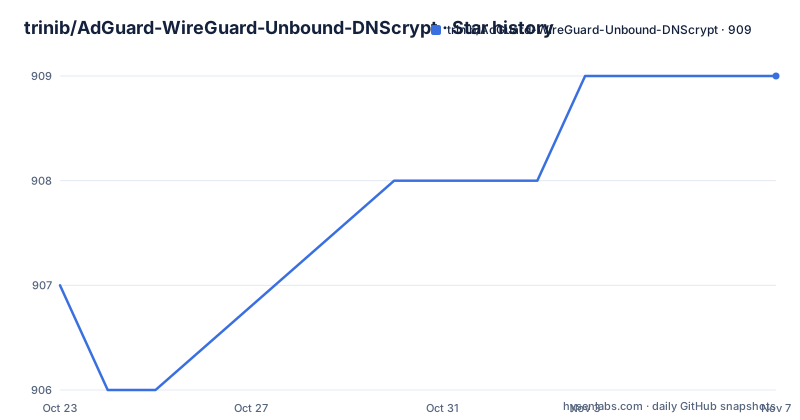
- trinib/AdGuard-WireGuard-Unbound-DNScrypt909 ★ · +2
| Repository | 2026-10-23 | 2026-11-07 |
|---|---|---|
| trinib/AdGuard-WireGuard-Unbound-DNScrypt | 907 | 909 |
2 Stars in the last 15 days, measured from the daily GitHub snapshot. Compare with other projects
Editorial analysis
A stack diagram in the form of a guide
The repository is a guide to self-hosting a network stack on Linux, and the project description gives the scope in five languages: Linux ultimate self-hosted network security guide.
What makes it useful is that it is not a theory document. The top level of the tree contains unbound.conf, stubby.yml, cloudflared.service, bulkurls.py and AcrylicConfiguration.ini, which are working configuration files for the pieces of the stack, plus an assets/ directory and the README itself with its table of contents covering the requirements, installing Raspberry Pi OS, accessing Pi OS with SSH, and installing AdGuard Home, with the list continuing beyond what is visible here.
The components are listed as pairs, and the choice is deliberate: AdGuard Home or Pi-hole for blocking banners, pop-ups and video advertisements network-wide; WireGuard or OpenVPN for a VPN server reachable from public networks over IPv4 and IPv6; Unbound or Knot for validating, recursive, caching DNS resolvers; and then Stubby, Cloudflared Tunnel and DNScrypt for the encrypted DNS layers.
The README states that all of the software is free, open-source and self-hosted. That framing is the point of the project. The audience is somebody who has decided that the default arrangement, a public resolver and a commercial VPN, is not what they want, and wants the components assembled on hardware they own.
What each layer of the stack contributes
The six components divide into three jobs, and understanding the division is what tells you whether you need all of them.
The blocking layer is AdGuard Home or Pi-hole, described as blocking banners, pop-ups and video advertisements network-wide. The point of running it on your own network is that the filtering happens before the query leaves your house.
The transport layer is WireGuard or OpenVPN, providing a VPN server accessible from public networks over IPv4 and IPv6. This is the piece that makes the rest of the stack usable from outside, and it is also the component with the most operational consequence, since it is the one that faces the internet.
The DNS privacy layer has three parts. Unbound or Knot is the validating, recursive, caching resolver, which does the actual resolution and is where the DoT support lives. Stubby is the client that sends DNS queries to resolvers over an encrypted TLS connection, providing increased privacy. Cloudflared Tunnel is a tunnelling daemon that proxies traffic from a DNS network to your origins, giving you DoH. DNScrypt covers modern encrypted DNS protocols such as DNScrypt v2, DNS-over-HTTPS, Anonymized DNScrypt and oDoH, Oblivious DoH.
That last item is the one worth a sentence. Oblivious DoH exists to break the link between the client and the resolver, and Anonymized DNScrypt is the older equivalent of the same idea. A guide that includes them is aiming at someone who has thought past simply encrypting the hop to the resolver.
The repository topics match the stack: adguard, wireguard, unbound, dnscrypt-proxy, stubby, cloudflare, quad9, nextdns, knot-resolver, ssl-certificates, dns-over-https, dns-over-tls, oblivious-dns-over-https and openvpn.
The timing figures, and what they assume
The README includes a comparison of DNS query times on an Ethernet LAN, measured with the BIND9 dig tool and linked to a wiki page:
AdGuard default DNS resolvers - `60-70 msec`
Public Cloudflare/Quad9/Google DNS Resolvers - `50-70 msec`
Self-hosted setup - `5-10 msec`
The result is that a self-hosted resolver answers in a small fraction of the time of a public one, which is unsurprising: a resolver on your own LAN is one hop away, while a public resolver is a round trip across the internet.
The note under those figures is the honest part, and it changes how you read them. Originally the setup was 0 msec or the same as ISP DNS speed, but multiple blocklists with excessive URLs slow down low-end devices affecting DNS query. The result was from a 1GB memory and 1.4GHz ARM architecture, and the blocklists used are linked to a specific file in the repository, bulkurls.py.
So the numbers describe a Raspberry Pi class device with a modest blocklist, and the warning is that a large blocklist is expensive to evaluate on a small machine. That is a genuinely useful caveat to have written down, since the natural reaction to a slower resolver is to blame the resolver rather than the list.
The rest of the section links to two side-by-side comparison videos, one for AdGuard default versus self-hosted and one for the public resolvers, with a note that the same results apply if the addresses are added manually in the system network DNS options.
The Raspberry Pi path the guide is written for
The table of contents starts with requirements, then installing Raspberry Pi OS, then accessing Pi OS with SSH, then installing AdGuard Home. That ordering is the guide's actual scope, and it is worth noticing what it implies: this is a build-it-yourself-on-your-own-hardware document, not a package you deploy somewhere.
The SSH step is mentioned before anything else because the whole configuration is done over the network rather than on a screen attached to the Pi. The configuration files in the repository are edited remotely, and the systemd unit for the tunnel, cloudflared.service, is the kind of file you drop into /etc/systemd/system rather than something the tool downloads for you.
There is also a wiki with an About page, an FAQ, a discussion area and a separate page for the dig installation notes, and the README links into the wiki from several places. The guide treats the wiki as part of the product, which is a sensible arrangement when the README is the table of contents and the wiki holds the step-by-step detail.
The reference to bulkurls.py matters for the same reason the timing caveat does. It is the blocklist generator the guide points at, and it lives in the repository, so the list content is something you can inspect and adjust rather than a black box fetched from somewhere else.
Repository contents and a naming inconsistency
The tree is small: .gitattributes, .github/, AcrylicConfiguration.ini, LICENSE, README.md, assets/, bulkurls.py, cloudflared, cloudflared.service, stubby.yml and unbound.conf.
Two things in that list are worth explaining. The cloudflared entry is the tunnelling binary itself, committed into the repository, which is what makes the tunnel step a copy rather than a package installation. And AcrylicConfiguration.ini is a file for Acrylic, a Windows DNS proxy, which is the one component in the tree that does not obviously belong to a Raspberry Pi build, so it is presumably there for the Windows configuration paths the guide also covers.
There is a naming inconsistency across the links. The repository itself is AdGuard-WireGuard-Unbound-DNScrypt, but a large share of the README's internal links still point at AdGuard-WireGuard-Unbound-Cloudflare, including the image assets, the About wiki page, the FAQ discussion and the DIScuss link. The repository was evidently renamed at some point, and the documentation was not fully updated to match.
That is a small thing, but for a document whose entire job is to be followed step by step on a remote machine, stale links are the kind of friction that makes a guide get abandoned. It is also a signal about the maintenance model: the README is updated, but the surrounding wiki and link set are not audited in the same pass.
MIT on the guide, and the support note that raises an eyebrow
The licence field on the repository says MIT, with the LICENSE file at the top of the tree. That licence covers the guide and the configuration files in this repository.
It does not cover the software the guide installs. AdGuard Home, Pi-hole, WireGuard, OpenVPN, Unbound, Knot, Stubby, cloudflared and DNScrypt are separate upstream projects with their own terms, and the README simply asserts that all software is free, open-source and self-hosted without enumerating the individual licences. If you are deploying this for an organisation, the licence check has to be done against each component rather than against this repository.
The line at the top of the README deserves separate mention. Dated 4/15/2025, it says that if there are issues or questions to be answered, remember to use AI chats now to solve and help. The wiki has an FAQ and a discussions area, and the repository has a .github directory, so the usual routes exist, but the banner points people at a chatbot instead.
On maintenance, the repository is not archived and the last push was on 2026-06-15. There are no GitHub releases, so the guide has no version history beyond its commits, and the README is the deliverable rather than a tool with a changelog.
That is the honest summary of this project. It is a well-organised, opinionated configuration reference with working config files and a rare willingness to publish the caveats behind its own performance figures. What it is not is a supported product, and the AI-chat banner is a reasonable signal of where the maintainer sees the boundary.
Editorial conclusion
The AdGuard WireGuard Unbound DNScrypt guide suits a homelabber or a small office that wants its own DNS resolver, its own ad blocking and its own VPN endpoint instead of a public resolver and a commercial VPN subscription. It does not suit anyone who wants managed software with someone else's support, and the components themselves are separate upstream projects whose terms are not set by this repository. Before you start, read the configuration files in the tree, unbound.conf, stubby.yml and cloudflared.service, because they are what the guide actually ships, and test the DNS timing on your own hardware rather than assuming the figures in the README transfer to a device with more memory.
Frequently asked questions
What does the AdGuard WireGuard Unbound DNScrypt project provide?
It is a guide to self-hosting a network stack on Linux, together with configuration files such as unbound.conf, stubby.yml, cloudflared.service and bulkurls.py. The components are AdGuard Home or Pi-hole for ad blocking, WireGuard or OpenVPN for the VPN, Unbound or Knot as resolvers, Stubby, Cloudflared Tunnel and DNScrypt for encrypted DNS.
Which DNS encryption protocols does the guide cover?
Stubby sends queries to resolvers over an encrypted TLS connection, Cloudflared Tunnel provides DNS-over-HTTPS by proxying from a DNS network to your origins, and DNScrypt covers DNScrypt v2, DNS-over-HTTPS, Anonymized DNScrypt and Oblivious DoH.
How fast is DNS with the self-hosted setup according to the README?
On an Ethernet LAN measured with BIND9 dig, the README reports 60-70 msec for AdGuard default resolvers, 50-70 msec for public Cloudflare, Quad9 and Google resolvers, and 5-10 msec for the self-hosted setup, with the caveat that the result came from a 1GB, 1.4GHz ARM device and that blocklists with excessive URLs slow down low-end devices.
What hardware is the guide written for?
The table of contents starts with requirements, installing Raspberry Pi OS, accessing Pi OS with SSH and installing AdGuard Home, so the guide is written around a Raspberry Pi configured over SSH rather than a generic server.
What licence applies to this repository?
The licence field on the repository says MIT, and the LICENSE file is at the top of the tree. That covers the guide and its configuration files; the software the guide installs are separate upstream projects with their own terms.
Official sources
Add this badge to your README
If you maintain this project, the badge below links readers to this analysis and shows its maintenance status from the daily GitHub snapshot. Paste the markdown into your README; add ?metric=license or ?metric=stars to the image URL for a different field.

[](https://hysenlabs.com/projects/trinib-adguard-wireguard-unbound-dnscrypt)Star history chart for your README
[](https://hysenlabs.com/projects/trinib-adguard-wireguard-unbound-dnscrypt)Was this useful?