youtube-viewer, a terminal YouTube client written in Perl with a GTK front end
Lightweight YouTube client for Linux
At a glance
- What is it?
- youtube-viewer is a lightweight application for searching and playing videos from YouTube, and it ships in two forms: a command line client and a GTK+ interface, both written in Perl. It is distributed for a long list of Linux distributions and BSDs, and it does the actual video fetching by driving yt-dlp, with an optional YouTube API key for searching and logging in.
- Who is it for?
- Adopt youtube-viewer if you want to search and play YouTube videos from a terminal or a lightweight GTK window on Linux, and skip it if you want a full featured desktop browser for YouTube, since this is deliberately a lightweight client.
- Can I use it commercially?
- Yes. Artistic-2.0 is a permissive licence: you can use, modify and sell software built on it, as long as you keep its copyright and licence notices.
- Is it still maintained?
- Yes. The repository last received commits 146 days ago.
- What is it written in?
- Mainly Perl, according to GitHub's language statistics.
Answers come from the project's GitHub data, last synced on November 7, 2026, and from our analysis. They are not legal advice.
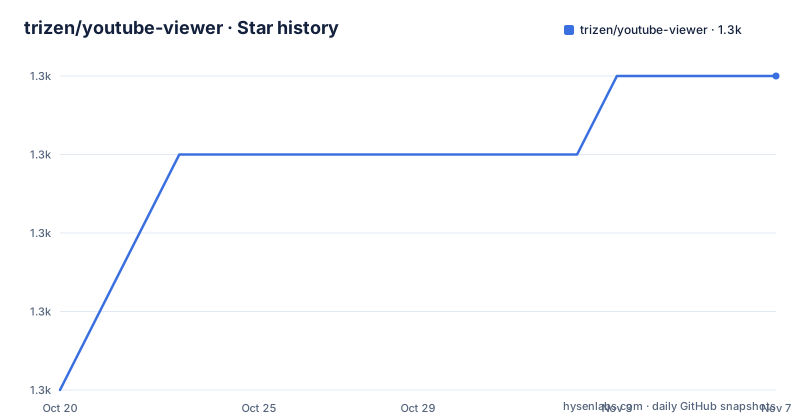
Star history
- trizen/youtube-viewer1,321 ★ · +4
| Repository | 2026-10-20 | 2026-11-07 |
|---|---|---|
| trizen/youtube-viewer | 1.3k | 1.3k |
4 Stars in the last 18 days, measured from the daily GitHub snapshot. Compare with other projects
Editorial analysis
Two interfaces over the same core
The project describes itself as a lightweight application for searching and playing videos from YouTube, and it ships as two pieces that share a library. The first is youtube-viewer itself, the command line interface to YouTube, and the second is gtk-youtube-viewer, the GTK+ interface. Both are written in Perl, and the README shows a screenshot of each, which is a small thing that tells you the project is a real desktop application rather than a script. The directory structure reinforces that: a bin/ directory for the executables, a lib/ directory for the modules, a share/ directory for the data files, a t/ directory for the test suite, a utils/ directory, and the build files Build.PL, Makefile.PL, MANIFEST and MANIFEST.SKIP, which is the standard layout of a Perl distribution. The primary language recorded for the repository is Perl, and the licence is Artistic 2.0.
* command-line interface to YouTube.
* GTK+ interface to YouTube.
Where it is packaged, which says a lot about its audience
The availability list is the longest part of the documentation and it is a signal in itself. The project is in Alpine Linux through the apk package manager, in Arch through the AUR with separate entries for the GTK build and the CLI only build, in Fedora through a COPR, on FreeBSD through Freshports, on Frugalware, Gentoo, OSX through Homebrew, Puppy Linux, Slackware through SlackBuilds, Solus through its own package manager, Ubuntu and Linux Mint through a PPA, Void Linux through xbps, and OpenSUSE through the build service. A project packaged in a dozen distributions with a decade of history behind it is a different kind of software from a library that lands on a registry, and the packaging burden is part of why the architecture is conservative. The mainline release is 3.11.6 from April 2025, with 3.11.5 from March and 3.11.4 from January, and the last push to the repository was on 2026-06-15.
* Alpine Linux: `doas apk add youtube-viewer`
* Solus: `sudo eopkg it youtube-viewer`
* Void Linux: `sudo xbps-install youtube-viewer`
Installing from source, and trying it without installing
The build uses the standard Perl toolchain, and the difference between the two binaries is a flag on the configure step. For the command line client you run perl Build.PL, then sudo ./Build installdeps to pull the prerequisites, then sudo ./Build install. For the GTK interface you add the --gtk flag to the same command and the rest of the sequence is identical. There is also a try-it path that avoids installing anything: download the master archive, unzip it, change into the bin directory of the extracted source and run the viewer directly, which is the fastest way to find out whether the thing suits you. Packaging for distribution follows the same toolchain with a destdir and an install path, and the test suite is run with ./Build test as part of it.
perl Build.PL
sudo ./Build installdeps
sudo ./Build install
The dependencies, and who actually fetches the video
The dependency list explains the architecture better than any description would. The command line client needs libwww-perl, LWP::Protocol::https, Data::Dump and JSON, and the crucial entry is yt-dlp or youtube-dl, which is where the actual video fetching happens. That is the key design decision: the client is the interface and the orchestration, and the downloader is an external program whose behaviour changes on its own schedule. The GTK variant adds Gtk3 and File::ShareDir on top of the same set, and there are optional dependencies for local caching through LWP::UserAgent::Cached, better standard input with history through Term::ReadLine::Gnu, faster JSON deserialization through JSON::XS, and fixed width formatting through Unicode::LineBreak or Text::CharWidth. The optional list is a good indication of what a user on a slow machine or with a big library actually needs.
libwww-perl
LWP::Protocol::https
Data::Dump
JSON
yt-dlp
API keys, and the alternative that skips them
Since version 3.7.4 the application reads an api.json file in the user's config directory, which holds a YouTube API key and the client id and secret values. Setting up the key means creating a Google Platform project, enabling the YouTube Data v3 API on it, and creating credentials, with the option of adding a native OAuth client id and secret to log in, which requires the youtube scope on the project and granting access in the credentials consent console. The documentation points at two issues for further detail, and the tutorial link is annotated as possibly outdated, which is a candid signal about how this part of the project ages. The alternative is pipe-viewer, a fork of straw-viewer, which parses the YouTube website directly and therefore does not require an API key at all. The project describes it as a separate repository, and for a user who does not want to register an API project, that is the more practical route even if it is the less official one.
{
    "key":           "API_KEY",
    "client_id":     "CLIENT_ID",
    "client_secret": "CLIENT_SECRET"
}
What it is like in practice, and where it is dated
The reviews section is a good proxy for the audience, and it is a list of blog posts from 2012 through the late 2010s, in English, Spanish, Hungarian, Japanese, Portuguese, Romanian, Russian and Turkish, several of them about running it on Puppy Linux. That tells you two things: the project has been in continuous use for over a decade, and its audience is people who want a small, scriptable client rather than a browser. The honest limitation is the same one any YouTube client has, which is that the site and the API change, and a client written in Perl against a shifting web interface accumulates work. The project has kept up, with releases through 2025 and commits into 2026, and the existence of the API key path and the site parsing fork shows it adapting rather than standing still. For a reader deciding, the relevant question is not whether it is modern but whether the Perl and GTK dependencies fit the machine, and whether delegating to yt-dlp suits the workflow, since the split of responsibility between the interface and the downloader is the defining shape of this project.
A lightweight application for searching and playing videos from YouTube.Editorial conclusion
Adopt youtube-viewer if you want to search and play YouTube videos from a terminal or a lightweight GTK window on Linux, and skip it if you want a full featured desktop browser for YouTube, since this is deliberately a lightweight client. Verify three things before you install it: that your Perl and GTK dependencies are present, since the CLI and the GTK variant need different module sets; that you accept the split design, where the interface is Perl and the video fetching is delegated to yt-dlp, which means the client depends on an external tool that moves independently; and whether you need the API key path or the fork that parses the site directly, since the two behave differently on what data they can reach.
Frequently asked questions
What is youtube-viewer and what does it provide?
It is a lightweight application for searching and playing videos from YouTube, shipped as two things: youtube-viewer, a command line interface to YouTube, and gtk-youtube-viewer, a GTK+ interface to YouTube. Both are written in Perl.
How do I install youtube-viewer from source?
Run `perl Build.PL`, then `sudo ./Build installdeps`, then `sudo ./Build install`. Add the --gtk flag to the Build.PL step if you also want the GTK+ interface. You can also try the latest commit without installing by downloading the master archive, unzipping it and running the executable from its bin directory.
What does youtube-viewer need to play a video?
The client needs libwww-perl, LWP::Protocol::https, Data::Dump and JSON, and it delegates the actual video fetching to yt-dlp or youtube-dl. The GTK variant adds Gtk3 and File::ShareDir on top of the same set.
Do I need a YouTube API key to use youtube-viewer?
Not necessarily. Since version 3.7.4 the application supports an api.json file in the user config directory holding a YouTube API key and optionally a client id and secret for logging in. Alternatively, pipe-viewer is a fork of straw-viewer that parses the YouTube website directly and does not require an API key.
Official sources
Add this badge to your README
If you maintain this project, the badge below links readers to this analysis and shows its maintenance status from the daily GitHub snapshot. Paste the markdown into your README; add ?metric=license or ?metric=stars to the image URL for a different field.

[](https://hysenlabs.com/projects/trizen-youtube-viewer)Star history chart for your README
[](https://hysenlabs.com/projects/trizen-youtube-viewer)Was this useful?