agentfs: a beta filesystem for agents, where every operation lands in one SQLite file
The filesystem for agents.
At a glance
- What is it?
- A filesystem built for AI agents, shipped as SDKs for TypeScript, Python and Rust plus a command line interface that mounts with FUSE on Linux and NFS on macOS, built on a SQLite-based agent filesystem specification implemented with Turso. The file warns against production data in its second screen, the licence badge points at a path the tree does not contain, and the timeline sample output is dated 2024.
- Who is it for?
- AgentFS provides a filesystem, key-value store and tool-call tracking backed by SQLite for agent integrations. Its README marks the project beta and recommends backups for production data.
- Can I use it commercially?
- Not without permission. GitHub finds no licence file in the repository, and without a licence all rights are reserved by default: you may read the code but not reuse it. Check the README, or ask the authors, before using it.
- Is it still maintained?
- Yes. The repository last received commits 32 days ago.
- What is it written in?
- Mainly Rust, according to GitHub's language statistics.
Answers come from the project's GitHub data, last synced on November 15, 2026, and from our analysis. They are not legal advice.
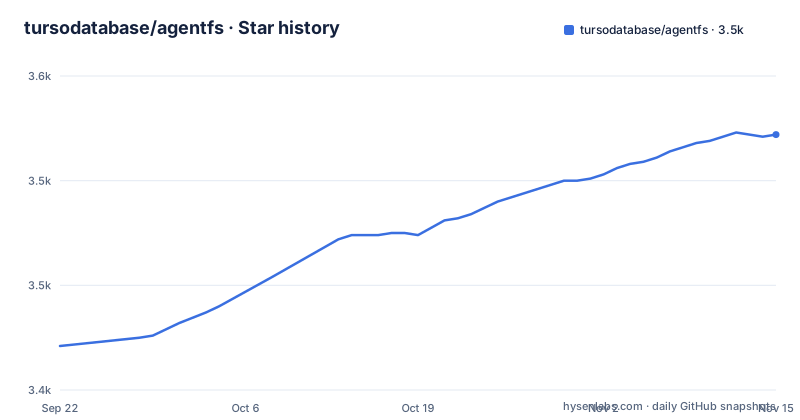
Star history
- tursodatabase/agentfs3,522 ★ · +101
| Repository | 2026-09-22 | 2026-11-15 |
|---|---|---|
| tursodatabase/agentfs | 3.4k | 3.5k |
101 Stars in the last 54 days, measured from the daily GitHub snapshot. Compare with other projects
Editorial analysis
The warning comes before the description
The second thing in the file, after the title, is a warning rather than a feature list.
It says the software is in beta, that it may still contain bugs and unexpected behaviour, and instructs the reader to use caution with production data and to ensure they have backups. That is the project's own statement about its own readiness, printed above everything else.
The release history supports treating it as young rather than settled. The three most recent releases are 0.6.2 from February 2026, then 0.6.3 and 0.6.4 both on the same day in March, half an hour apart, with the date written into the release name alongside the version.
So the numbering is pre-one-point-oh and the cadence is tight enough that two patch releases shipped together. Combined with the warning, that reads as a project moving quickly rather than one with a stable contract, which is the right frame for the design decisions below.
Three interfaces, and one SQLite file holding all of it
AgentFS documents three SDK interfaces: a POSIX-like filesystem, key-value storage and a tool-call audit trail. Data managed through those interfaces is backed by a SQLite-based store. Complete audit coverage depends on the integration recording the relevant operations; activity outside it may not appear. The README illustrates snapshots with a file copy, but copying a live SQLite database can miss uncheckpointed WAL data or be inconsistent. Use a database-aware backup or quiesce and checkpoint according to the deployed configuration, then test restore.
The licence badge points at a file the repository does not have
The current README identifies the project license as MIT. Check the license files and any component-specific terms in the version you use before redistribution.
The timeline sample output is dated 2024
The command line section shows a timeline of an agent's actions, and the table is worth reading for what it contains as well as when.
The columns are an identifier, the tool, the status, a duration and a start time. The four sample rows are a web search that succeeded in 1200ms, a file read that succeeded in 50ms, an API call that errored after 300ms, and a code execution still pending with no duration. Every one of them is timestamped the fifth of January 2024.
The project is at version 0.6.4 in March 2026, so the sample output predates the code by more than two years. Whether that is a stale copy of real output or a hand-written illustration is not stated.
What the rows do show is the shape of the audit trail the third interface exists to provide: a tool call that failed is retained next to ones that succeeded, and one that has not finished is retained as pending rather than omitted. The dates are the only thing here that has gone out of date.
Three of the six examples are one application on three frameworks
The examples directory is presented as integrations with popular agent frameworks, and there are six.
Three of them are the same project. A research assistant built with Mastra, a research assistant built with Anthropic's Claude Agent SDK, and a research assistant built with the OpenAI Agents SDK. Three frameworks, one application, which is a sensible way to show that the storage layer is framework-independent, and also means there is one design idea being demonstrated rather than three.
The other three are about deployment rather than frameworks. One is a minimal Firecracker virtual machine with AgentFS mounted over version three of the network filesystem protocol, which is the most infrastructure-shaped example in the set. One is an interactive agent using the Vercel AI SDK with just-bash for command execution. And one runs that same combination on Cloudflare Workers, using Durable Objects for storage.
So the range runs from a virtual machine to an edge runtime, which is a wide claim for a project whose first release this year was 0.6.2.
Recording tool calls with the SDK
The README's TypeScript example opens persistent and in-memory AgentFS instances, writes a key-value entry and a file, and calls `agent.tools.record` with a tool name, start and end times, input and result. The ellipsis in the example result is illustrative: supply actual values in an application. Check the SDK's current API and record the operations your integration needs to audit.
FUSE on Linux, NFS on macOS, and a sandbox marked experimental
Mounting is the feature that puts AgentFS next to existing tools, and it is implemented per platform. On Linux it is FUSE, on macOS it is the network filesystem protocol, and the command is the same in both cases: mount a named filesystem at a directory, after which ordinary shell redirection and cat work against the mounted path.
There is a third mode, a sandbox, described as experimental. It runs a program with the agent filesystem mounted at a fixed path, so inside the sandbox an absolute path leads into the agent's storage rather than the host's.
The file also positions itself against existing isolation tools, which it does carefully. Bubblewrap is described as providing isolation through Linux namespaces and overlays, and it concedes you could approximate it by mounting the root read-only and using a temporary overlay on the working directory. The stated difference is persistence and queryability: the upper filesystem is a single SQLite file that can be queried, snapshotted and moved.
Docker Sandboxes are called complementary rather than competing. The sentence explaining what Docker Sandboxes answers instead stops partway through, which is the one gap in an otherwise careful comparison.
Editorial conclusion
AgentFS provides a filesystem, key-value store and tool-call tracking backed by SQLite for agent integrations. Its README marks the project beta and recommends backups for production data. Verify which operations your integration actually records, and use a database-consistent backup or snapshot procedure appropriate to its SQLite/Turso configuration before relying on copied state.
Frequently asked questions
What is AgentFS?
It is a filesystem explicitly designed for AI agents, providing storage abstractions the way a traditional filesystem provides file and directory abstractions. The repository contains SDKs for TypeScript, Python and Rust, a command line interface, and a SQLite-based agent filesystem specification.
How does AgentFS differ from a sandbox such as Bubblewrap or Docker Sandboxes?
The file positions them differently. Bubblewrap provides filesystem isolation through Linux namespaces and overlays, and the stated difference is persistence and queryability, since with AgentFS the upper filesystem is a single SQLite database file you can query, snapshot and move. Docker Sandboxes are described as complementary rather than competing.
How do I install the AgentFS command line interface?
Run curl -fsSL https://agentfs.ai/install | bash, then agentfs init my-agent, which creates .agentfs/my-agent.db. You can inspect it with agentfs fs my-agent ls, or point the same command straight at a database path.
Can I mount an AgentFS filesystem on my own machine?
Yes. It mounts with FUSE on Linux and with the network filesystem protocol on macOS, so agentfs mount my-agent ./mnt makes the agent's files appear under that directory. There is also an experimental sandbox, agentfs run, which mounts the filesystem at /agent.
What does the AgentFS SDK expose?
Three interfaces: a POSIX-like filesystem, a key-value store for agent state and context, and a toolcall audit trail for debugging and analysis. The TypeScript entry point opens a filesystem by identifier, which creates a database file, or opens an ephemeral in-memory one.
Official sources
Add this badge to your README
If you maintain this project, the badge below links readers to this analysis and shows its maintenance status from the daily GitHub snapshot. Paste the markdown into your README; add ?metric=license or ?metric=stars to the image URL for a different field.

[](https://hysenlabs.com/projects/tursodatabase-agentfs)Star history chart for your README
[](https://hysenlabs.com/projects/tursodatabase-agentfs)Was this useful?