OpenKey types Vietnamese on macOS with the Backspace technique instead of marking a vowel
Vietnamese Input for macOS, Windows and Linux - Bộ gõ Tiếng Việt nguồn mở đa nền tảng
At a glance
- What is it?
- OpenKey is a GPL-3.0 Vietnamese input method for macOS, with a Windows port and a Linux version still in development in the same repository. Its selling point is the Backspace technique, plus a long list of workarounds for the macOS apps that misbehave with Vietnamese text.
- Who is it for?
- OpenKey suits a Vietnamese speaker writing on macOS who is tired of the system input method marking a vowel it then has to correct, or who needs the legacy TCVN3 and VNI Windows encodings for legacy documents and tools such as Photoshop or CAD.
- Can I use it commercially?
- Yes, with conditions. GPL-3.0 is a copyleft licence: if you distribute software that includes it, you must release that software's source code under the same licence. Running it internally without distributing it does not trigger that obligation.
- Is it still maintained?
- Yes. The repository last received commits 145 days ago.
- What is it written in?
- Mainly C++, according to GitHub's language statistics.
Answers come from the project's GitHub data, last synced on November 7, 2026, and from our analysis. They are not legal advice.
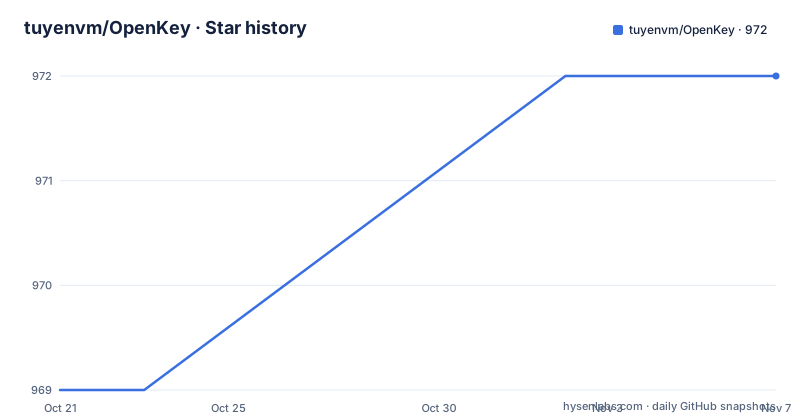
Star history
- tuyenvm/OpenKey972 ★ · +3
| Repository | 2026-10-21 | 2026-11-07 |
|---|---|---|
| tuyenvm/OpenKey | 969 | 972 |
3 Stars in the last 17 days, measured from the daily GitHub snapshot. Compare with other projects
Editorial analysis
What OpenKey is and why the Backspace technique is the whole pitch
OpenKey is an open source Vietnamese input application for macOS. The project describes it as a new Vietnamese input method that uses the Backspace technique and removes the irritating underline problem of the default input method.
That is a precise problem statement, and it is worth understanding what it means. The default macOS Vietnamese input method places a mark on the vowel you type first and then moves it later when you type the consonant that determines the correct position, which leaves a visible mark during typing. The Backspace technique works the other way round, so the character is corrected by rewriting rather than by moving a mark, and the underline artefact goes with it. The result is that you type Vietnamese the way you would type any other text, without watching a diacritic flicker into the wrong slot.
For a Vietnamese speaker who writes daily in their own language, this is not a cosmetic preference. It is the difference between a usable input method and one you tolerate. The README also lists a separate fix for the macOS underline issue as its own switch, so the two problems are treated as distinct in the settings panel.
The application is written by Mai Vũ Tuyên, the project site is open-key.org, and the code is published under GPL-3.0. The licence terms are spelled out in the project's own words: you may download the source and build and improve it yourself, and if you redistribute an improved version it must also be open source and must state that the original is OpenKey.
One rule from the documentation is worth repeating because it is the most common support problem: you should turn off other input methods, because two input programs conflict with each other and produce inaccurate typing.
Telex, VNI and Simple Telex, plus the legacy encodings underneath
Three typing styles are supported. Telex, VNI and Simple Telex. That covers the main Vietnamese input conventions, and the choice is per user rather than per application.
Underneath the typing style sits a separate concern, which is the character encoding. The list of commonly used encodings includes Unicode as the built-in default, TCVN3, also called ABC, VNI Windows, Unicode Compound, and the Vietnamese locale CP 1258, with more listed after the ellipsis. This matters for anyone working with older documents, because Vietnamese text in the wild is still routinely stored in TCVN3 or VNI Windows, and a tool that only writes Unicode cannot open it.
The relationship between the two is handled by an option introduced in version 2.0.1 that remembers the encoding per application. The described use case is Photoshop, CAD and similar tools, where the user works with VNI or TCVN3 material, and OpenKey switches back to the encoding that application used last time.
There is a separate conversion tool for the general case. Added in version 1.4, it converts text back and forth between encodings, which the documentation describes as suitable for converting old text written in VNI or TCVN3 to Unicode. It comes with configurable shortcuts for the conversion. So the practical picture is: Unicode for everything new, legacy encodings for legacy work, and a converter to migrate between them.
The feature list is where the differentiation actually is
Most of the value in OpenKey is in the switches rather than in the typing engine, and several of them are unusual enough to be worth naming individually.
Modern orthography is on by default in the sense that it is offered as a toggle, placing the mark as òa and úy rather than oà and uy. Quick Telex expands doubled consonants into digraphs, so cc becomes ch, gg becomes gi, kk becomes kh, nn becomes ng, qq becomes qu, pp becomes ph and tt becomes th. Both are useful for people who learned one convention and have to work in the other.
Grammar check and spelling check are separate toggles. Restore key if invalid word returns the keys of a word that the checker rejects, which is a small thing that saves a lot of frustration when a word is flagged wrongly.
Macros are described as unlimited, in contrast to the macOS text substitution feature which supports only 20 characters. The macro editor screenshots in the project show a dedicated panel for it.
There is also a smart mode switch, in which OpenKey remembers that you were typing Vietnamese in one application, switch to another where you were typing English, and switch back to Vietnamese when you return to the first application.
Capitalising the first letter of a sentence automatically is another toggle, intended for long documents where the habit of capitalising is easy to lose at the end of a line.
None of these are exotic ideas. What is notable is that they are all configurable switches in a single control panel rather than a scattering of separate utilities.
Working around the applications that break with Vietnamese text
Several settings exist purely because other software does not handle Vietnamese input well, and this is the part of the project that tells you the real state of desktop Vietnamese text support.
Autocorrect fixed targets the browsers and office suites: the documentation names Chrome, Safari, Firefox and Microsoft Excel as the places where autocorrect mangles Vietnamese. The send each key mode exists for the same reason. By default OpenKey sends a whole character sequence in one operation rather than key by key, which is faster, and the documentation says that if an application is incompatible with that, you should turn this option on, while noting that the default should stay off because the newer technique runs faster.
The Windows underline problem on macOS has its own switch. The convert tool and the per-application encoding memory cover the legacy encoding cases.
Other switches cover running OpenKey at startup, a grey menu bar icon that suits dark mode, a shortcut key to switch input mode, showing the icon in the Dock so that clicking it opens the control panel, and temporarily disabling spelling check or OpenKey itself with Ctrl or Cmd and Alt. There are also options to use f, z, w and j as initial consonants and to type initial or final consonants as digraphs, where f becomes ph, j becomes gi and w becomes qu.
Automatic updates are supported from version 1.3 onwards, checking for a newer version each time OpenKey opens or when you ask it to from the about section.
Installing: drag the app or let Homebrew do it
There are two documented routes on macOS, and they are not equivalent in one important respect.
The manual route is to download the latest release from the project's releases page, open the dmg file and drag OpenKey.app into your Applications folder. That is the route that gets you the newest build.
The Homebrew route uses a cask.
$ brew info --cask openkeyThat command reports the available version before you commit to anything. To install, run:
$ brew install --cask openkeyAnd to move to a newer version later:
$ brew upgrade --cask openkeyThe project notes that the Homebrew cask was contributed by a third party, nhymxu, and the visible documentation does not say how the cask is kept in step with new releases. Given the release dates in this repository, that gap is visible: the latest release is 2.0.5 from 2022-03-19, with 2.0.4 from 2021-01-28 and 2.0.3 from 2019-11-06, while the last push to the repository was on 2026-06-15. Work has continued in the source for years without a new tagged binary, so a cask can only ever give you the 2022 build unless it tracks something else.
If you want the current code, the manual download path and a local build are the ways to get it, and the repository includes a macOS_Build.md file and a version.json at the top level.
Accessibility permission, one input method, and the Windows and Linux ports
OpenKey needs permission, and the documentation is direct about it: in System Preferences, under Security and Privacy and Accessibility, you must enable OpenKey.app, and you should not turn that off while you are using OpenKey. The reason is mechanical. An input method that intercepts and rewrites keystrokes has to be allowed to observe them, which is what the Accessibility grant provides, and switching it off stops the rewriting, which is exactly the feature you came for.
That grant also means the application can see everything you type, which is a fair reason for any user to read the licence and the source before installing it. The project publishes the source under GPL-3.0 for exactly that kind of scrutiny.
The repository is multi-platform in structure even though the shipped product is macOS. The Windows version lives in Sources/OpenKey/win32, and the Linux version lives in Sources/OpenKey/linux, which the documentation marks as under development. The repository description calls the project a Vietnamese input method for macOS, Windows and Linux, so the description is ahead of what the README describes as finished.
Alongside the sources sit a CHANGELOG.md, the licence file, the macOS build notes and a version.json, which is the kind of file a release script updates. The README also points to a donation page, so the project is maintained by one person with a very large user base in Vietnam, and that shapes what support looks like.
Editorial conclusion
OpenKey suits a Vietnamese speaker writing on macOS who is tired of the system input method marking a vowel it then has to correct, or who needs the legacy TCVN3 and VNI Windows encodings for legacy documents and tools such as Photoshop or CAD. It does not suit someone on Windows or Linux who expects a finished port, since the README describes both as separate source trees and marks Linux as still in development, and it does not suit a user who will not grant Accessibility permission or who runs two input methods at once. Before installing, read the Accessibility note, download the release build rather than the stale cask, and decide whether you need the convert tool for VNI and TCVN3 text before you move your documents to Unicode.
Frequently asked questions
What is the Backspace technique in OpenKey?
OpenKey uses the Backspace technique so the Vietnamese character is corrected by rewriting rather than by moving a mark that was placed on the first vowel you typed, which is what removes the underline problem of the default macOS input method.
How do I install OpenKey on macOS?
Download the latest release dmg and drag OpenKey.app into your Applications folder, or use the Homebrew cask with brew install --cask openkey. The cask can be updated with brew upgrade --cask openkey.
Which typing styles and encodings does OpenKey support?
The typing styles are Telex, VNI and Simple Telex. The encodings include Unicode, TCVN3 (ABC), VNI Windows, Unicode Compound and the Vietnamese locale CP 1258, and a conversion tool moves text between them.
What permissions does OpenKey need and why?
You must enable OpenKey.app under System Preferences, Security and Privacy, Accessibility, and the documentation says not to disable it while using the application. It is an input method, so it needs to observe and rewrite keystrokes.
Is OpenKey available for Windows and Linux?
The repository contains the Windows sources under Sources/OpenKey/win32 and the Linux sources under Sources/OpenKey/linux, which the documentation marks as still in development. The released binaries are for macOS, and the latest release is 2.0.5 from 2022-03-19.
Official sources
Add this badge to your README
If you maintain this project, the badge below links readers to this analysis and shows its maintenance status from the daily GitHub snapshot. Paste the markdown into your README; add ?metric=license or ?metric=stars to the image URL for a different field.

[](https://hysenlabs.com/projects/tuyenvm-openkey)Star history chart for your README
[](https://hysenlabs.com/projects/tuyenvm-openkey)Was this useful?