Waza's eight skills land in one shared directory
🥷 Engineering habits you already know, turned into skills Claude can run.
At a glance
- What is it?
- Waza turns eight engineering habits into installable agent skills, and one copy of them sits where every agent on your machine can read it. The install is a single command, the review skill works by reading your repository while it works, and two of the extras run a shell script fetched from the newest release.
- Who is it for?
- Waza earns a place on a machine where you want eight opinionated workflows that any installed agent can read, and where you would rather authorise a chain once than approve every transition.
- Can I use it commercially?
- Yes. MIT is a permissive licence: you can use, modify and sell software built on it, as long as you keep its copyright and licence notices.
- Is it still maintained?
- Yes. The repository last received commits 3 days ago.
- What is it written in?
- Mainly Python, according to GitHub's language statistics.
Answers come from the project's GitHub data, last synced on November 14, 2026, and from our analysis. They are not legal advice.
Star history
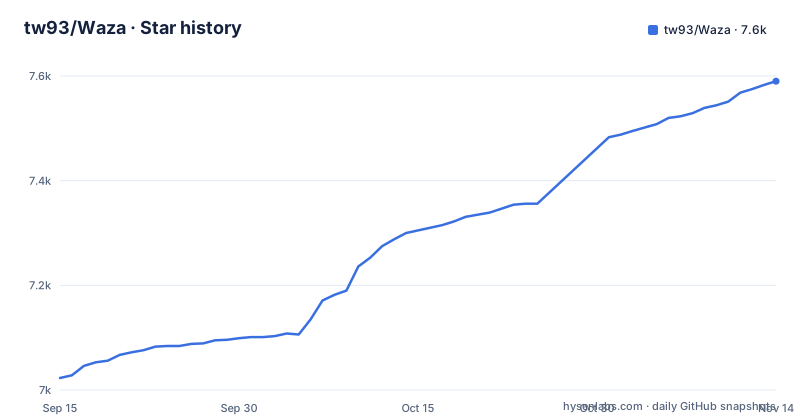
- tw93/Waza7,590 ★ · +567
| Repository | 2026-09-15 | 2026-11-14 |
|---|---|---|
| tw93/Waza | 7k | 7.6k |
567 Stars in the last 60 days, measured from the daily GitHub snapshot. Compare with other projects
Editorial analysis
One install puts all eight skills in a shared directory
Waza is delivered as folders of skills, and the shortest route in is a single command:
npx skills add tw93/Waza -a claude-code codex cursor -g -yOne copy lands in `~/.agents/skills`, the shared skills directory. Claude Code is symlinked in, and Codex, Cursor, Gemini CLI, Copilot, Amp, Kimi Code CLI and every other agent that reads that directory picks the eight skills up as `/check`, `/think` and so on. The `-a` flag carries the agent ids that get installed, so a host with a private skills directory simply takes its own id there, for example `antigravity-cli` or `qwen-code`. Updating is the same shape with a different verb: `npx skills update -g -y`. Nothing is duplicated per agent, which is also why one change to a skill reaches every tool on the machine at once instead of drifting between copies.
The host plugin path namespaces every command under waza
If you would rather lean on the host's own update command, the plugin route exists for both hosts, and its price is a namespace: the skills appear as `/waza:check` rather than `/check`.
# Claude Code (update: claude plugin update waza)
/plugin marketplace add tw93/Waza
/plugin install waza@waza

# Codex (update: codex plugin marketplace upgrade waza, then codex plugin add waza@waza)
codex plugin marketplace add tw93/Waza
codex plugin add waza@waza
Two other hosts take a different road. Pi installs the npm package with `pi install npm:@tw93/waza` and updates with `pi update npm:@tw93/waza`. Claude Desktop takes a ZIP from the latest release: open Customize, then Skills, then the plus button, choose Create skill, and upload waza.zip; replacing it later means the three dots on the skill card, then Replace, then the new ZIP. Four routes, one set of eight skills, and the differences come down to how the bytes arrive and how you update them.
/check learns your project by reading it while it reviews
Waza ships no project specific rules. `/check` becomes aware of a repository at runtime, by reading its public context: READMEs, package manifests, Makefiles and CI workflows, together with the task constraints you handed it. What it will not touch is just as specific, since private paths, credentials and tokens stay out. The template for that review context sits in skills/check/references/project-context.md, so the assumption is visible and you can edit it. The consequence for a reader is direct. Constraints that never reach the repository, a deadline living in a ticket, an agreement made in chat, a rule somebody holds in their head, are invisible to the reviewer, and a diff that breaks them can still pass. Anything the review has to weigh has to be written where the agent can read it.
Chaining is opt in, and the stop points are the design
Each skill stops at the outcome it was asked for, and the page is explicit that an explicitly authorized workflow continues without asking you to approve every transition. Three common workflows are spelled out. Planning a feature runs `/think` to settle the plan, implementation after approval, then `/check` before merging. Shipping a fix runs `/hunt`, the fix, `/check`, and then release, publish, push or issue follow through. Research and writing runs `/read` to fetch sources, `/learn` to synthesise and `/write` to polish. Without that authorization each skill stops where it is, so an agent left to guess halts between every step of a task that you assumed was one command.
make test globs its own tests, and pytest can vanish quietly
The Makefile's `test` target is a chain: verify-docs, verify-generated, verify-routing, verify-scripts, verify-unit, and one smoke target per file found in tests/. Those targets are not written by hand. The Makefile globs tests/test_*.sh, filters out tests/test_helpers.sh because it is a shared library rather than a runnable test, and converts each remaining path into a smoke-<name> target. The sources get the same treatment, with `bash -n` applied to every scripts/*.sh and skills/*/scripts/*.sh, and the comment in the file explains the reason: a hand maintained list silently skips new files.
python3 scripts/verify_skills.py --root .
python3 scripts/build_metadata.py --check
python3 scripts/check_routing_drift.py --root .
python3 -m pytest tests/python/ -q
One gap matters if you rely on that green run. verify-unit first checks whether pytest imports, and when it does not, it prints a skip line and carries on, so a passing suite on a machine without pytest has quietly left the Python unit tests unrun.
The extras run a shell script fetched from the newest release
The statusline and the optional rules are not files you clone. Each is a curl into a mktemp path with a trap that deletes it afterwards, then bash on that path, and the URL points at the latest GitHub release asset, so what runs is whatever the newest tag happens to hold. Set `WAZA_REF=main` before the command to pull bleeding edge scripts instead. The rules script takes a rule name and an agent id, and the README's examples include `english` appends a short correction when your prompt has an English mistake, `anti-patterns` switches on cross skill guardrails such as reading before acting, no scope creep and no unsolicited summaries, and the third is a routing hint for hosts other than Claude.
(
  set -e
  WAZA_RULE_SCRIPT="$(mktemp -t waza-rule.XXXXXX)"
  trap 'rm -f "$WAZA_RULE_SCRIPT"' EXIT
  curl -fL https://github.com/tw93/Waza/releases/latest/download/setup-rule.sh -o "$WAZA_RULE_SCRIPT"
  # review it first: less "$WAZA_RULE_SCRIPT"
  bash "$WAZA_RULE_SCRIPT" english claude-code
)
What this route cannot offer is a pinned script. The block tells you to review the file first, and that is the only inspection step inside it.
Three releases landed within an hour on the same afternoon
Version numbering here moves in small steps. v3.39.0 shipped on 2026-10-06, v3.40.0 on 2026-10-15 and v3.41.0 on 2026-10-30, with the package version in package.json reading 3.41.0 to match the newest tag. The repository's last push was on 2026-11-02, so commits keep arriving after a release rather than stopping at it. Two packaging details matter if you vendor this into your own tooling. The published file list carries LICENSE, llms.txt, README.md, the rules folder, three scripts and the skills folder, with `__pycache__` and `.pyc` kept out, and the Pi manifest points at ./skills while excluding skills/RESOLVER.md. The practical consequence is that an unpinned install moves with every new release.
Editorial conclusion
Waza earns a place on a machine where you want eight opinionated workflows that any installed agent can read, and where you would rather authorise a chain once than approve every transition. Pass on it if reproducibility is the requirement, since the curl based extras follow whatever the newest release tag contains and three releases landed in October 2026, or if your review rules live in people's heads rather than in the repository, because /check only reads what is written down. Before wiring it into a team setup, confirm which skills directory your agents already read, pin a version, and read the shell scripts you intend to run.
Frequently asked questions
How do I install the Waza skills into Claude Code or Codex?
One command copies all eight skills into the shared directory: `npx skills add tw93/Waza -a claude-code codex cursor -g -y`. The copy lands in `~/.agents/skills`, Claude Code is symlinked in, and agents with a private skills directory take their own id after `-a`. Updates run through `npx skills update -g -y`.
What does the Waza /check skill read from my repository?
It reads the target repository's public context at runtime: READMEs, package manifests, Makefiles and CI workflows, plus the task constraints you pass in. It never reads private paths, credentials or tokens. The review context template lives in skills/check/references/project-context.md.
Does Waza work with agents other than Claude Code?
The install line names claude-code, codex and cursor, and the shared `~/.agents/skills` directory is also read by Gemini CLI, Copilot, Amp and Kimi Code CLI. There is also a host plugin route where commands are namespaced, for example `/waza:check`, a Pi package installed with `pi install npm:@tw93/waza`, and a ZIP upload path for Claude Desktop.
Official sources
Add this badge to your README
If you maintain this project, the badge below links readers to this analysis and shows its maintenance status from the daily GitHub snapshot. Paste the markdown into your README; add ?metric=license or ?metric=stars to the image URL for a different field.

[](https://hysenlabs.com/projects/tw93-waza)Star history chart for your README
[](https://hysenlabs.com/projects/tw93-waza)Was this useful?