lowdb v7: four presets, one dependency, and the null left behind a missing file
Simple and fast JSON database
At a glance
- What is it?
- lowdb keeps a plain JavaScript object in a JSON file and ships exactly one runtime dependency, but the preset layer hides the classes you need in order to extend it, a missing db.json leaves db.data as null, and the published tarball omits the examples the documentation points at.
- Who is it for?
- lowdb fits a single process that owns one small file: a CLI, an Electron setting screen, a browser demo, a config store. It does not fit a shared file, a server with concurrent writers, or a team that needs migrations, and the feature list names no concurrent access support or lock file, so verify that question yourself before you commit.
- Can I use it commercially?
- Yes. MIT is a permissive licence: you can use, modify and sell software built on it, as long as you keep its copyright and licence notices.
- Is it still maintained?
- Activity is slowing. The repository last received commits 7 months ago.
- What is it written in?
- Mainly JavaScript, according to GitHub's language statistics.
Answers come from the project's GitHub data, last synced on November 14, 2026, and from our analysis. They are not legal advice.
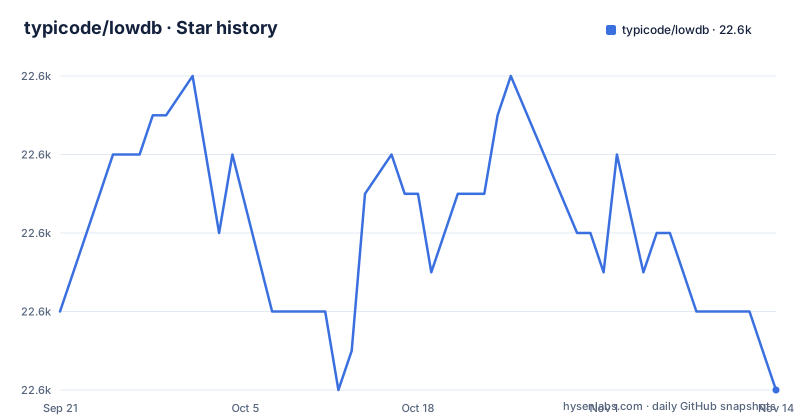
Star history
- typicode/lowdb22,578 ★ · -2
| Repository | 2026-09-21 | 2026-11-14 |
|---|---|---|
| typicode/lowdb | 22.6k | 22.6k |
-2 Stars in the last 54 days, measured from the daily GitHub snapshot. Compare with other projects
Editorial analysis
Four presets sit on top of the two classes you eventually need
The entry points are four presets: JSONFilePreset, JSONFileSyncPreset, LocalStoragePreset, and SessionStoragePreset. Each one takes a filename or storage name plus your default data and hands back a ready database object. Underneath sit two classes, Low for asynchronous adapters and LowSync for synchronous ones, and the preset is what fuses a class with an adapter for you. That fusion is the first thing to understand, because it caps what you can do later. The lodash walkthrough in the documentation has to abandon the preset and build the adapter and the class separately, because you cannot subclass something you never received. The class form is short enough to write out in full, and it is the form you want the first time you need a different file format, encryption, or a chainable query API. Picking a preset on day one and a custom Low subclass on day two means rewriting the setup code, not just swapping one line.
import { Low } from 'lowdb'
import { JSONFile } from 'lowdb/node'

const db = new Low(new JSONFile('file.json'), {})
await db.read()
await db.write()
A missing db.json leaves db.data as null rather than your defaults
The clearest documented failure mode concerns the file adapters. JSONFile and JSONFileSync set db.data to null if the file does not exist, and the documentation shows the transition explicitly: a null value before the read, a non-null value after it. Your default data object is not what rescues you at the class level, because read() calls the adapter read and assigns whatever comes back. The consequence shows up in application code rather than in the library: a handler that does await db.read() and then goes straight to db.data.posts.push works during development, when a previous run left a file behind, and throws on a fresh checkout, in a container, or in CI where nothing has written the file yet. Presets absorb this because they create the file, so the failure hides until someone drops the preset. If your evaluation passes defaults to JSONFilePreset but production code constructs Low directly, that is the bug you are signing up for.
db.data // === null
db.read()
db.data // !== null
One dependency, steno, is carrying the entire durability story
The runtime dependency list has a single entry, steno at ^4.0.2, and the corresponding feature in the documentation is safe atomic writes. Installation is one command: npm install lowdb. That is the whole picture for durability: writes go through one small library so a crash mid-write does not leave a half-written JSON file behind. Nothing else comes with it. There is no server binary, no CLI in the published package, and no migration tool, and the documentation hands CLI, server, browser, and test usage to a src/examples directory instead of shipping a runner. The feature list names no lock file or multi-process coordination, and a single-file store makes that question unavoidable the moment two processes can see the same path, whether that is two containers, a server plus a cron job, or a sync client. Treat atomicity as the guarantee you get and serialization as the thing you have to arrange yourself.
Pure ESM with three export entries and no CommonJS fallback
The manifest sets type to module and defines three exports: the root entry, a node entry, and a browser entry. Type declarations ride along through typesVersions, which points the node and browser conditions at separate declaration files inside lib. The documentation is blunt that lowdb is a pure ESM package and links out to a third-party writeup for anyone having trouble using it in an existing project, which tells you where the friction is expected. The consequence is concrete for anyone still shipping CommonJS: there is no require build in the files list and no dual-format output, so a CommonJS consumer needs dynamic import or a conversion, and the node and browser entries are not interchangeable because they expose different adapters. Node resolves the root and node entries, a browser bundler resolves the browser one, and picking the wrong entry gives you an import error or a missing adapter rather than a subtle runtime bug.
The examples the documentation sends you to are not in the tarball
The files array in the manifest publishes lib and then excludes two things from it, lib/examples and every test file matched under lib. Meanwhile the documentation repeatedly points at a src/examples directory for CLI usage, server usage, browser usage, and unit test usage, and it says to look there for the LocalStorage and SessionStorage presets as well. Those examples ship in the repository but not in the package. The consequence is that anyone installing lowdb from a registry and then following the documentation hits a path that does not exist on disk, and the only way to see the intended wiring for a storage preset is to clone the repository and read the source. The same exclusion means you cannot audit a published install by inspecting its example code, because the examples are not there to inspect. Worth checking before you point a new team member at the getting started path.
Tests run through node:test and tsx while the newest tag is from 2023
The test script runs the Node built-in test runner with tsx loaded as an ESM import hook, against test files under src, and the lint script runs eslint over src with the gitignore respected. A build is del-cli removing lib followed by tsc, prepublishOnly forces that build, and a husky install hook is wired through prepare. The dev dependencies pin eslint at ^8.56.0, Node types at ^20.10.5, del-cli at ^5.1.0, and the commitlint packages at ^18.4.3, with commitlint configuration in its own dotfile, so commits are checked against a conventional config as well. Against that, the release record is thin: the tags are v7.0.0 from 2023-12-26, v6.1.1 from 2023-10-23, and v6.1.0 from 2023-10-14, while the manifest version already reads 7.0.1 and the last push to main is dated 2026-03-27. There is no changelog file in the tree to explain the difference, so check the commit history for what changed after that tag.
Swapping adapters changes semantics, and tests may not touch the file at all
Adapters are grouped by what they can do, and the grouping changes behavior rather than only storage. The browser adapters for window.localStorage and window.sessionStorage are synchronous, so they pair with LowSync, while the JSON file adapters come in both flavours. Memory and MemorySync are in-memory adapters for speeding up unit tests, and the feature list adds that the library switches to a fast in-memory mode during tests, which means test runs can bypass the file path without you choosing to. DataFile and DataFileSync take a parse and a stringify pair, which is the documented way to reach YAML or to add encryption:
import { DataFile } from 'lowdb/node'
new DataFile(filename, {
  parse: YAML.parse,
  stringify: YAML.stringify
})
The consequence for a team is that a green test run may be testing a different adapter than production, and moving from a preset to a Memory adapter can quietly remove the null-on-missing-file behavior and the atomic write you were relying on. Decide the adapter per environment explicitly rather than letting the test mode choose for you.
Editorial conclusion
lowdb fits a single process that owns one small file: a CLI, an Electron setting screen, a browser demo, a config store. It does not fit a shared file, a server with concurrent writers, or a team that needs migrations, and the feature list names no concurrent access support or lock file, so verify that question yourself before you commit. Check two more things before adopting: whether your build can consume a pure ESM package with no CommonJS entry, and whether your tests still exercise the file adapter once the in-memory mode takes over. Maintenance signals deserve a look too, since the last release tag is v7.0.0 from 2023-12-26 while the last push to main is dated 2026-03-27 and the manifest already reads 7.0.1. Take the dependency, steno, seriously, because atomic writes are the only durability feature in the box.
Frequently asked questions
what is lowdb
lowdb is described as a tiny local JSON database for Node, Electron and the browser, MIT licensed and written as a pure ESM package. It stores your data as a plain JavaScript object, queried with native Array functions, and exposes Low for async adapters plus LowSync for synchronous ones.
how to use lowdb
Install it with npm install lowdb, then pick a preset for the common cases or build Low with an adapter yourself. The four presets are JSONFilePreset, JSONFileSyncPreset, LocalStoragePreset, and SessionStoragePreset, and the methods are read, write, and update, where update calls your function and then writes.
lowdb vs mongodb
The project documentation describes a single-file JSON store with four presets, one runtime dependency, steno, for atomic writes, and adapters you write yourself for other formats or encryption.
What does "local database" mean?
In this project it means a JSON file that the same process reads and writes: the JSONFile and JSONFileSync adapters open a filename, and the presets create db.json when it is missing. The browser adapters target window.localStorage and window.sessionStorage instead, and Memory adapters hold data only in process memory.
Official sources
Add this badge to your README
If you maintain this project, the badge below links readers to this analysis and shows its maintenance status from the daily GitHub snapshot. Paste the markdown into your README; add ?metric=license or ?metric=stars to the image URL for a different field.

[](https://hysenlabs.com/projects/typicode-lowdb)Star history chart for your README
[](https://hysenlabs.com/projects/typicode-lowdb)Was this useful?