Ultralytics YOLO is AGPL code with an enterprise licence attached
Ultralytics YOLO26, YOLO11, YOLOv8 : object detection, instance segmentation, semantic segmentation, image classification, pose estimation, object tracking
At a glance
- What is it?
- An AGPL-3.0 Python package covering detection, segmentation, depth, pose and tracking, installed with one pip command and sharing a configuration surface between its CLI and its API. The banner advertises a model family with no weights and no release date, and three patch releases landed in three days.
- Who is it for?
- Adopt Ultralytics YOLO when you want one package covering detection through tracking with a shared CLI and Python configuration, and pin a specific 8.4 patch release rather than tracking the branch. Do not adopt it into a closed-source product without reading the licence position first, because the package you install is AGPL-3.0 and the README points commercial use at a separate enterprise licence.
- Can I use it commercially?
- Yes, with strict conditions. AGPL-3.0 is a network copyleft licence: if people use a modified version over a network, for example as a hosted service, you must offer them its source code under the same licence.
- Is it still maintained?
- Yes. The repository received new commits within the last day.
- What is it written in?
- Mainly Python, according to GitHub's language statistics.
Answers come from the project's GitHub data, last synced on November 13, 2026, and from our analysis. They are not legal advice.
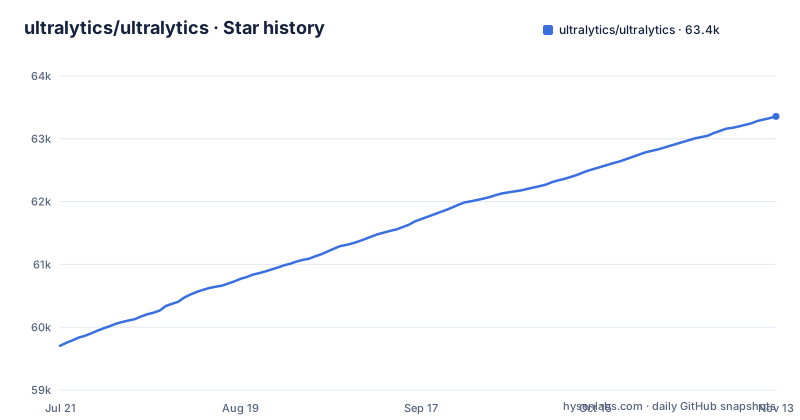
Star history
- ultralytics/ultralytics63,356 ★ · +3,652
| Repository | 2026-07-21 | 2026-11-13 |
|---|---|---|
| ultralytics/ultralytics | 59.7k | 63.4k |
3,652 Stars in the last 115 days, measured from the daily GitHub snapshot. Compare with other projects
Editorial analysis
AGPL-3.0 is what you install, and the enterprise licence sits one line below it
The package you get is AGPL-3.0, and the pyproject says so in its own metadata rather than leaving you to infer it. The README then carries a line asking you to request an Enterprise License for commercial use, with a link to Ultralytics Licensing. So the licensing question is answered twice, in agreement, and the shape of the answer is that open source and commercial are two separate doors rather than one with a switch. The consequence for an engineer is that this is not a model quality decision. A script on your own machine and a service you expose to other people are different questions under this licence, and the metadata is unambiguous about which side of the line you are on by default. Read it before you resolve the dependency, because it becomes AGPL the moment it installs.
pip install ultralyticsYOLO27 is on the banner with no weights and no date
The top of the README is a link to YOLO27, and the models section states plainly that the family is coming soon, is currently undergoing final research and development, that models are not yet available, and that no launch date is set. The repository description meanwhile names three families you can actually install, YOLO26, YOLO11 and YOLOv8. So the page advertises a version that cannot be downloaded while listing the versions that can. That is an ordinary thing for a fast-moving project to do, and it carries a concrete cost for anyone writing a tutorial, a course or a pinned dependency: the most prominent name in the repository is not the one to install, and the documentation for it already exists ahead of the artifact. The range you can plan against is stated as running from YOLOv3 through YOLO26.
Python 3.8 is the floor and setuptools has a ceiling
The declared floor is Python 3.8, with PyTorch 1.8 given as the minimum, and requires-python in the pyproject repeats that 3.8 floor. The build backend is the constraint worth noticing: setuptools is required at 70.0.0 or newer and capped at 84.0.0. A ceiling on a build backend is unusual, so building from source needs a setuptools within that range. The alternative installs the project names, Conda, Docker and building from Git, and each resolves that toolchain differently, so the route you pick decides whether you meet the ceiling at all. The old floor has the mirror effect, quietly allowing this install onto hosts that current Python releases have already left behind.
Three patch releases in three days, and one of them un-shipped the tests
Read the release names rather than the dates and the rhythm is visible. v8.4.197 on 2026-11-01 checks AMP on an untrained YOLO26n without downloading weights. v8.4.198 on 2026-11-02 saves NumPy float64 values as numbers in YAML files. v8.4.199 on 2026-11-03 sends the raw run name to Ultralytics Platform. Three patch releases in three days, all inside the 8.4 line. The consequence is about how you depend on it. A pin at 8.4.x is behind within days, and a floating pin means behaviour changes like these can reach you without a major version bump.
One configuration surface for the CLI and the API, which cuts both ways
The strongest design decision in this package is that there is a single configuration surface. The command line is driven with key=value arguments, and the Python class is described as accepting the same configuration arguments as the CLI, so imgsz=640 typed in a shell and imgsz=640 passed to a training call mean the same thing. That removes the usual drift where a notebook and a shell script end up configured differently. The documented example shows the shape of a single invocation, and the predict mode takes a model file and a source the same way the Python call does.
Export targets live in the examples directory, not the core package
Read the top level and the deployment story looks thin: a docker directory, docs, examples, tests and the ultralytics package itself. Then read the examples directory and it turns out to be mostly other runtimes. There are ONNX Runtime samples for Python, for Rust and for OpenCV, a Rust sample for the YOLO Series, a C++ directory, a segmentation-specific ONNX Runtime sample, an Axelera sample, an interactive tracking user interface, and notebooks for heatmaps, object counting and object tracking.
Pretrained weights come from different datasets for different tasks
The task list is long: object detection, instance segmentation, semantic segmentation, depth estimation, image classification, pose estimation, oriented object detection, and tracking objects across video frames. The weights behind those tasks do not come from one dataset. The YOLO26 detection, segmentation and pose models are pretrained on COCO, while the semantic segmentation models are pretrained on Cityscapes, with depth estimation listed alongside. So the impression that one package hands you one interchangeable model is simply wrong, and the consequence shows up the first time you write a label mapping. Class identifiers do not carry across task boundaries, and a pipeline written against the COCO label set will produce nonsense when pointed at a Cityscapes-pretrained semantic segmentation checkpoint. Establish which dataset backed the checkpoint you downloaded before you map anything.
Editorial conclusion
Adopt Ultralytics YOLO when you want one package covering detection through tracking with a shared CLI and Python configuration, and pin a specific 8.4 patch release rather than tracking the branch. Do not adopt it into a closed-source product without reading the licence position first, because the package you install is AGPL-3.0 and the README points commercial use at a separate enterprise licence. Two things to check before you build on it. Confirm which dataset pretrained the checkpoint you downloaded, because semantic segmentation weights come from Cityscapes while detection, segmentation and pose weights come from COCO, so label identifiers do not transfer between them. And treat the YOLO27 pages as a preview, since the project states no models are available and no launch date is set.
Frequently asked questions
What do Ultralytics do?
They build the YOLO model family and ship it as a Python package. The listed tasks are object detection, instance segmentation, semantic segmentation, depth estimation, image classification, pose estimation and oriented object detection, plus tracking detected objects across video frames. The supported model range runs from YOLOv3 through YOLO26.
How do you install ultralytics?
With one command, pip install ultralytics, in a Python 3.8 or newer environment with PyTorch 1.8 or newer. Conda, Docker and building from source via Git are named as alternative routes, with the details in the quickstart guide. Note that the build backend requires setuptools between 70.0.0 and 84.0.0.
How do you use ultralytics YOLO from the command line?
With the yolo command, which takes key=value arguments. The documented example is a predict run passing a model file and an image source, and extra arguments such as imgsz=640 are accepted. The command supports the various tasks and modes.
Is Ultralytics a company?
It operates both an open source package and a commercial business. Alongside the AGPL-3.0 library there is a hosted platform at platform.ultralytics.com, a community forum, a Discord server, and a paid route: the README asks you to request an Enterprise License for commercial use.
Official sources
Where this project is recommended
Add this badge to your README
If you maintain this project, the badge below links readers to this analysis and shows its maintenance status from the daily GitHub snapshot. Paste the markdown into your README; add ?metric=license or ?metric=stars to the image URL for a different field.

[](https://hysenlabs.com/projects/ultralytics-ultralytics)Star history chart for your README
[](https://hysenlabs.com/projects/ultralytics-ultralytics)Was this useful?