ultralytics/xview-yolov3: training YOLOv3 on satellite chips, one epoch at a time
YOLOv3 training, preprocessing, validation, and inference for object detection in xView satellite imagery and the xView detection challenge.
At a glance
- What is it?
- The training, preprocessing and inference code Ultralytics published for the xView satellite detection challenge, with sigma-rejection cleanup, 30 regenerated k-means anchors, and a recorded ceiling of 0.16 validation mAP. The scripts are small and readable, the license is AGPL-3.0, and the project has exactly one tagged release from 2019.
- Who is it for?
- Use this if you are entering the xView challenge or want a readable reference for tiling full resolution satellite imagery into training chips, since the preprocessing and augmentation decisions are the reusable part. Do not expect a modern baseline from it: the best validation figure the project records is 0.16 mAP, the only tagged release is v0 from 2019-04-04, and the code targets Python 3.6.
- Can I use it commercially?
- Yes, with strict conditions. AGPL-3.0 is a network copyleft licence: if people use a modified version over a network, for example as a hosted service, you must offer them its source code under the same licence.
- Is it still maintained?
- Yes. The repository last received commits 78 days ago.
- What is it written in?
- Mainly Python, according to GitHub's language statistics.
Answers come from the project's GitHub data, last synced on November 13, 2026, and from our analysis. They are not legal advice.
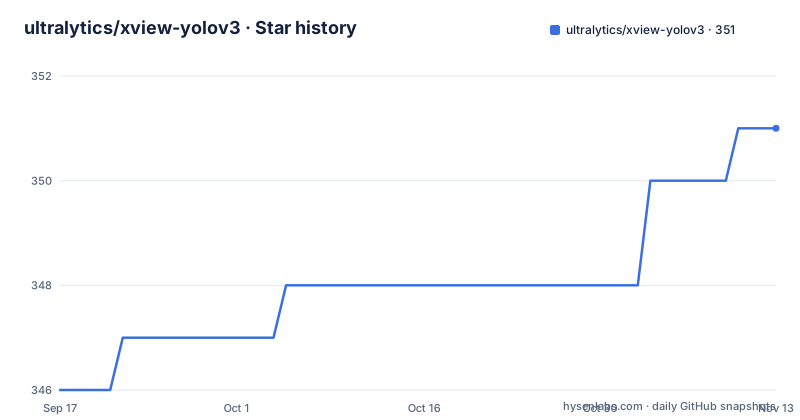
Star history
- ultralytics/xview-yolov3351 ★ · +5
| Repository | 2026-09-17 | 2026-11-13 |
|---|---|---|
| ultralytics/xview-yolov3 | 346 | 351 |
5 Stars in the last 57 days, measured from the daily GitHub snapshot. Compare with other projects
Editorial analysis
Sigma rejection and 30 k-means anchors before the first epoch
Two preprocessing steps run over the labels before any training happens, and both are about making the label set fit YOLOv3 rather than about the imagery. The first is outlier removal, where outliers in the dataset are identified and dropped with sigma-rejection, which is the mechanism that keeps a handful of mislabeled satellite objects from dominating the loss. The second is anchor generation: a fresh set of 30 k-means anchors computed for the c60_a30symmetric.cfg configuration rather than reusing the anchors shipped with the stock model, because satellite objects have a different size and aspect ratio distribution than the photographs YOLOv3 was originally tuned on. The anchors are produced by a MATLAB script, utils/analysis.m, which is the one non-Python dependency in the pipeline and the one piece of this repository you cannot run inside the Docker-free Python environment the rest expects.
Eight 800x800 chips per image, with img_size 32 x 25
The training loop never sees a whole satellite image. Each epoch processes eight randomly sampled 800 by 800 pixel chips cut out of every full resolution image in the dataset, and the img_size argument defaults to 32 x 25, which is 800. So the effective batch per image is fixed at eight crops, resampled every epoch, which means an epoch is cheap in memory and expensive in file reading, since the same large image is reopened repeatedly to cut new chips. That is the mechanism behind the throughput figure the project gives for a single consumer card, an Nvidia GTX 1080 Ti, at around 100 epochs a day. Tiling satellite imagery at this ratio is also where annotation quality shows up: a chip boundary that clips an object produces a label the model cannot learn from, and nothing in the pipeline warns you about it.
0.16 validation mAP is the number to plan around
The experiments recorded in the repository put the ceiling low, and it is better to know that before you start than after three days of training. The best observed validation mean average precision was 0.16, reached after 300 epochs, which the file describes as roughly three days of training, and the corresponding training mAP was 0.30. The gap between those two numbers is the whole story of this project: the model fits its training chips far better than it generalizes. The file also warns that overfitting becomes a significant issue after approximately 200 epochs, which sits awkwardly close to the 300 epoch best result, so the useful window is narrow and validation metrics have to be watched rather than trained blind. Three loss curves are named as the ones to follow, bounding box regression, objectness and class confidence, and all three are expected to trend downward.
Augmentation is training only, and boxes follow the transform
The augmentation lives in datasets.py and runs on the full resolution input images through OpenCV before chips are cut. The parameter set is small and fixed: translation of plus or minus 1% in both directions, rotation of plus or minus 20 degrees, shear of plus or minus 3 degrees, scale of plus or minus 30%, reflection at 50% probability, and plus or minus 50% on both HSV saturation and HSV intensity. Two rules matter more than the numbers. Augmentation is applied only during training, so inference and validation see the original unaugmented images, which means a mismatch between training and serving chips does not come from this code. And bounding box coordinates are adjusted automatically to match the transforms, so an incorrect box after augmentation is a bug in this repository rather than something you introduced downstream. Albumentations is named as the route to more techniques.
Resuming is a single flag reading weights/latest.pt
Long runs on a single card need a resume story, and this one is deliberately minimal. If a session is interrupted, training continues from the last saved checkpoint by passing a resume flag to the same script, and the weights are loaded automatically from the file weights/latest.pt:
python train.pypython train.py -resume 1There is no separate evaluate or export step and no scheduler configuration in the documented interface, so tuning is done by editing train.py itself, which is also where the data paths live. The file instructs you to set the train_path values in train.py for whatever machine you are on, and it names Google Colab and Kaggle as the intended cloud targets. Since the repository ships data/ and output/ directories alongside cfg/ and scoring/, the expected workflow is a working tree you edit in place rather than a configured package you install, which matches the single-release, script-oriented shape of the project.
Inference is detect.py plus a weights download script
Running the trained model is the shortest part of the pipeline. Checkpoints, which are .pt files, are written into the weights/ directory, and the detection entry point is detect.py, which takes an image folder rather than a single file. The published weights are fetched with a shell script inside that directory, then detection runs over a directory of xView images:
(cd weights && bash download_weights.sh)
python detect.py -image_folder path/to/train_images
The script processes each image, draws the boxes and saves the output image, so there is no structured output format, no confidence threshold argument in the documented usage, and no batching option to set. For evaluation, the repository carries a scoring/ directory, and the file points readers to the xView challenge website for the dataset's own citation guidelines, with a Zenodo record for this repository and its tools. If you need machine readable detections for a pipeline, you would be extending detect.py rather than configuring it.
Python 3.6, and a requirements file that disagrees with the prose
The environment section asks for Python 3.6 or later, recommends a virtual environment, and installs with a single command:
pip3 install -U -r requirements.txtThe prose then names the key dependencies as numpy for numerical work, scipy for scientific computing, torch as the deep learning core, opencv-python for the vision work including the augmentations, h5py for the HDF5 format the dataset is stored in, and tqdm for progress bars. The file itself lists seven packages rather than six, because matplotlib is pinned in it without appearing in the written list, which is the kind of small inconsistency worth knowing about when you are diagnosing an import error on a fresh machine. There is no lock file and no version constraint on any of them, so the resolution you get depends entirely on the day you install. Torch in particular is unpinned, and this code predates the current major versions of the detection API.
AGPL-3.0, one release in 2019, and a repository shaped like a notebook
The licensing is the first constraint to read, because AGPL-3.0 is a copyleft license with network use provisions and it is not what most experiment wrappers ship. The repository was created for the xView challenge, with the stated goal of supporting participants and advancing object detection in satellite imagery, and it has exactly one tagged release, v0 as an initial release on 2019-04-04. The last push was on 2026-08-28 and the project is not archived, so the code is not frozen, but there is no release history to pin and no changelog to read. The file layout confirms the origin: models.py, train.py, detect.py, datasets.py referenced from the prose, plus cfg/, data/, output/, scoring/, utils/ and a checked in results.txt, and both AGENTS.md and CLAUDE.md sitting at the root next to the license.
Editorial conclusion
Use this if you are entering the xView challenge or want a readable reference for tiling full resolution satellite imagery into training chips, since the preprocessing and augmentation decisions are the reusable part. Do not expect a modern baseline from it: the best validation figure the project records is 0.16 mAP, the only tagged release is v0 from 2019-04-04, and the code targets Python 3.6. Before building on it, read the AGPL-3.0 license with your own lawyer, confirm the xView dataset terms separately since this repository does not grant them, and read results.txt rather than the README numbers, since the two are maintained by different people.
Frequently asked questions
What architecture does YOLO use in ultralytics/xview-yolov3?
The anchor based form of YOLOv3. Before training, this repository regenerates 30 k-means anchors tailored to the c60_a30symmetric.cfg configuration with the MATLAB script utils/analysis.m, because satellite objects differ in size and aspect ratio from the photographs the stock anchors were fitted to. Beyond that configuration the file does not describe the backbone.
Is YOLO an AI model?
YOLOv3 is an object detection model, and this repository exists to train it on the xView satellite imagery dataset for the xView challenge. Training samples eight random 800x800 pixel chips per full resolution image each epoch, and the recorded best validation mAP is 0.16 after 300 epochs.
Is YOLO free to use?
This repository is distributed under the AGPL-3.0 license, which carries copyleft obligations including for network use, so read the LICENSE file before embedding it in a product. The documentation does not address separate terms for the pretrained weights fetched by download_weights.sh or for the xView dataset itself, which has its own citation and access guidance on the challenge website.
Official sources
Add this badge to your README
If you maintain this project, the badge below links readers to this analysis and shows its maintenance status from the daily GitHub snapshot. Paste the markdown into your README; add ?metric=license or ?metric=stars to the image URL for a different field.

[](https://hysenlabs.com/projects/ultralytics-xview-yolov3)Star history chart for your README
[](https://hysenlabs.com/projects/ultralytics-xview-yolov3)Was this useful?