Pandera's extras, its two schema styles, and the 0.29.0 deprecation it outgrew
A light-weight, flexible, and expressive statistical data testing library
At a glance
- What is it?
- unionai-oss/pandera is an MIT licensed Python package for validating dataframe-like objects, and its README is short. The operational detail sits in pyproject.toml: five base dependencies, extras whose names do not survive the trip to conda, and a console script declared unconditionally whose dependencies sit in the cli extra.
- Who is it for?
- Pick pandera when your pipeline already speaks pandas and you want the rules collected in one schema object instead of scattered assertions, and hold the frictionless extra at or below 4.40.8 if you rely on it. Verify before you commit that your environment clears Python 3.10 and that you installed only the extras you meant to, since cli, strategies, hypotheses, io, and frictionless are all optional and none of them arrive with the base package.
- Can I use it commercially?
- Yes. MIT is a permissive licence: you can use, modify and sell software built on it, as long as you keep its copyright and licence notices.
- Is it still maintained?
- Yes. The repository last received commits 4 days ago.
- What is it written in?
- Mainly Python, according to GitHub's language statistics.
Answers come from the project's GitHub data, last synced on November 22, 2026, and from our analysis. They are not legal advice.
Star history
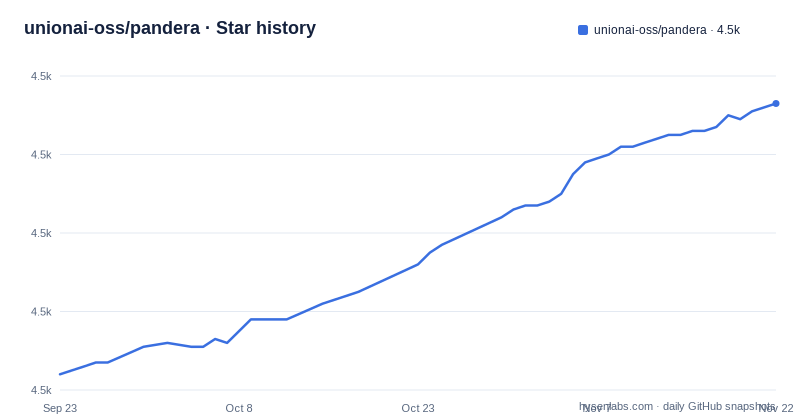
- unionai-oss/pandera4,533 ★ · +69
| Repository | 2026-09-23 | 2026-11-22 |
|---|---|---|
| unionai-oss/pandera | 4.5k | 4.5k |
69 Stars in the last 60 days, measured from the daily GitHub snapshot. Compare with other projects
Editorial analysis
The pandas extra is named differently on pip and on conda
Installation is a choice of package manager plus a choice of dataframe library. pandas, polars, pyspark, and more are all supported backends, and validating pandas DataFrames means installing with the `pandas` extra. On pip and uv that extra is spelled `pandera[pandas]`. On conda the distribution is a different package, `pandera-pandas` from the conda-forge channel, so the extra name does not survive the trip. pyproject.toml declares no conda name at all.
pip install 'pandera[pandas]'
uv pip install 'pandera[pandas]'
conda install -c conda-forge pandera-pandas
Consequence for the reader: mixing the two routes can leave you importing pandera from an environment whose version does not match the install line you ran.
The base install pulls in no dataframe library at all
The five runtime dependencies in pyproject.toml are packaging >= 20.0, pydantic, typeguard, typing_extensions, and typing_inspect >= 0.6.0. Not one of them is pandas, numpy, polars, or pyspark. The backend arrives through an extra. The `pandas` extra adds numpy >= 1.24.4 and pandas >= 2.1.1. `strategies` adds hypothesis >= 6.92.7, `hypotheses` adds scipy, `io` adds pyyaml >= 5.1, `cli` adds typer >= 0.12.3 with rich and pyyaml, and `frictionless` adds frictionless with a ceiling, written as frictionless <= 4.40.8. That ceiling is the sharpest edge in the file: a frictionless release past 4.40.8 is not accepted, and pyproject.toml does not say what inside pandera is expected to break with it.
pandera.pandas replaced the top-level module and 0.29.0 is behind us
Version v0.24.0 introduced the `pandera.pandas` module, described as the highly recommended way of defining `DataFrameSchema` and `DataFrameModel` for pandas structures. Define a schema from the top-level `pandera` module instead and you get a `FutureWarning`, and the stated plan was to deprecate top-level access to `DataFrameSchema` and the other pandera classes or functions in version `0.29.0`. The current release line is v0.35.0, so the deprecation milestone named inside that warning sits several releases behind the shipped code.
import pandera.pandas as pa

schema = pa.DataFrameSchema({"col": pa.Column(str)})
Consequence: the warning text promises a cleanup for a version you have already moved past, which makes `pandera.pandas` the only import form worth writing into new code.
Object schemas and class schemas encode the same rule twice
The same three columns can be validated two ways. The object-based form builds `pa.DataFrameSchema` from a dict of `pa.Column` values, where each column carries its dtype and a list of `pa.Check` objects such as `ge`, `lt`, and `isin`. The class-based form subclasses `pa.DataFrameModel` and writes the dtype as a plain Python annotation, with `pa.Field(ge=0)` sitting as the default value. Both print an identical three row dataframe after `.validate(df)`. The custom check is where the two surfaces diverge: inline in the object form it is `pa.Check(lambda series: series.str.len() == 1)`, while in the class form it is a method decorated with `@pa.check("column3")` returning the same boolean series. Both spell the allowed values as `isin=[*"abc"]`.
schema = pa.DataFrameSchema({
    "column1": pa.Column(int, pa.Check.ge(0)),
    "column2": pa.Column(float, pa.Check.lt(10)),
    "column3": pa.Column(
        str,
        [
            pa.Check.isin([*"abc"]),
            pa.Check(lambda series: series.str.len() == 1),
        ]
    ),
})

print(schema.validate(df))
Consequence: choosing one style is a real decision, because a codebase that mixes them has two places to look for every rule.
The pandera command lives behind the cli extra
The command itself comes from `[project.scripts]`, which maps `pandera` to `pandera.cli:main`. That mapping is declared unconditionally, but the code it calls needs typer >= 0.12.3, rich, and pyyaml >= 5.1, and all three sit in the optional `cli` extra rather than in the five base dependencies. The install line most readers start from, `pip install 'pandera[pandas]'`, therefore gives you a library without a command. Both extras are needed, and pyproject.toml does not spell out the single install string that covers them together.
requirements.txt is generated, and reading it as dependencies misleads
The first line of requirements.txt states that the file is auto-generated from environment.yml, should not be modified, and points back to that file for the need and usage of each dependency. What it lists is a complete development and test environment rather than a package requirement set: torch, ray, dask[dataframe], pyspark[connect] >= 3.2.0, polars >= 1.20.0, xarray >= 2024.10.0, narwhals >= 1.26.0, ibis-framework[duckdb]>= 11.0.0, modin, tensordict, geopandas, mypy == 1.19.1 pinned exactly, then pytest, nox, uv, twine, and asv >= 0.5.1. Installing that file installs the world, not the library. Regenerating it runs `python scripts/generate_pip_deps_from_conda.py`, which the Makefile wires to the target `deps-from-environment.yml`.
The package metadata points at a different repository path
`[project.urls]` in pyproject.toml sets the Issue Tracker to `https://github.com/pandera-dev/pandera/issues` and the Homepage to `https://github.com/pandera-dev/pandera`, while the tree this code actually lives in is unionai-oss/pandera and the README homepage is `https://www.union.ai/pandera`. setup.py is three lines long: it imports setup from setuptools and calls it. Every piece of packaging metadata therefore comes from pyproject.toml, including the `dynamic = ["version"]` entry that setuptools_scm fills in by writing `pandera/_version.py`. The publish targets run `python setup.py sdist bdist_wheel` followed by `twine upload`, with a test variant pointed at test.pypi.org. Consequence: an issue filed from the metadata of an installed copy lands in the pandera-dev path, not in the repository you cloned.
Sphinx runs with -W, so one bad reference fails the docs build
The Makefile `docs` target is `python -m sphinx -W -E "docs/source" "docs/_build"` followed by `make -C docs doctest`. The `-W` flag turns warnings into errors and `-E` discards the cached environment, so a stale pickle cannot hide a problem and one unresolvable cross reference stops the build. The `quick-docs` target drops the `-W`, which is the escape hatch for a working session. Tests run as `pytest tests/core tests/pandas` for the unit pass and `pytest --cov-report=html --cov=pandera tests/` for coverage, with nox available as `nox -db uv -s tests ${NOX_FLAGS}` and NOX_FLAGS defaulting to `"-r"`. At the repository root, `adrs/`, `specs/`, `AGENTS.md`, and `asv_bench/` are not read by any of these targets, and CONTRIBUTING.md is missing from the root listing while CODE_OF_CONDUCT.md is present, so design notes and contributor instructions are not where a newcomer would look first.
Editorial conclusion
Pick pandera when your pipeline already speaks pandas and you want the rules collected in one schema object instead of scattered assertions, and hold the frictionless extra at or below 4.40.8 if you rely on it. Verify before you commit that your environment clears Python 3.10 and that you installed only the extras you meant to, since cli, strategies, hypotheses, io, and frictionless are all optional and none of them arrive with the base package.
Frequently asked questions
what is pandera
Pandera is an open source Python project that provides a flexible and expressive API for performing data validation on dataframe-like objects. It is MIT licensed, published on PyPI as `pandera`, and requires Python 3.10 or newer.
what is pandera in python
It is the `pandera` package, built with setuptools and setuptools_scm, which writes the version into `pandera/_version.py`. Its classifiers cover Python 3.10 through 3.14, OS Independent, and a development status of 5, Production/Stable.
What is pandera used for?
It is used to make data processing pipelines more readable with statistically typed dataframes. The README frames the audience as scientists, engineers, and analysts seeking correctness, and the entry point for a pandas project is `import pandera.pandas as pa`.
how to install pandera
For pandas dataframes use `pip install 'pandera[pandas]'`, `uv pip install 'pandera[pandas]'`, or `conda install -c conda-forge pandera-pandas`. The `pandas` extra is what pulls in numpy >= 1.24.4 and pandas >= 2.1.1.
how to use pandera
Create a dataframe, then validate it with either `pa.DataFrameSchema` from the `pandera.pandas` module or a `pa.DataFrameModel` subclass. Both forms declare per column checks with `pa.Check` or `pa.Field` and finish with a call to `.validate(df)`.
Official sources
Add this badge to your README
If you maintain this project, the badge below links readers to this analysis and shows its maintenance status from the daily GitHub snapshot. Paste the markdown into your README; add ?metric=license or ?metric=stars to the image URL for a different field.

[](https://hysenlabs.com/projects/unionai-oss-pandera)Star history chart for your README
[](https://hysenlabs.com/projects/unionai-oss-pandera)Was this useful?