Code Mode replaces hundreds of tool schemas with one code executor, and its sandbox is a Node.js isolate
🔌 Plug-and-play library to enable agents to call MCP and UTCP tools via code execution.
At a glance
- What is it?
- An MPL library for letting agents call MCP and UTCP tools by executing TypeScript, packaged four ways in one repository, with benchmark numbers borrowed from a Python study and a recommended shell path that fetches the newest build every time.
- Who is it for?
- The design argument for Code Mode is sound in principle: a model that writes code well does not need four hundred tool definitions in context to read three pull requests. Two things have to be checked before shipping it.
- Can I use it commercially?
- Yes, with conditions. MPL-2.0 is a weak copyleft licence: you can use it inside commercial and closed-source software, but if you distribute changes to its own files, you must publish those changes under the same licence.
- Is it still maintained?
- Yes. The repository last received commits 81 days ago.
- What is it written in?
- Mainly TypeScript, according to GitHub's language statistics.
Answers come from the project's GitHub data, last synced on November 14, 2026, and from our analysis. They are not legal advice.
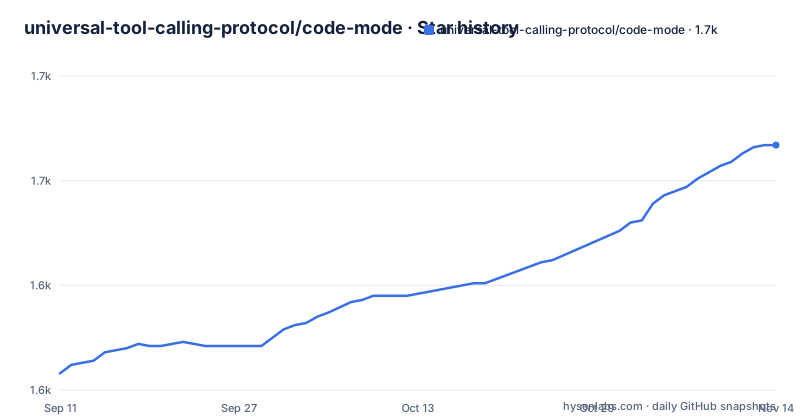
Star history
- universal-tool-calling-protocol/code-mode1,667 ★ · +109
| Repository | 2026-09-11 | 2026-11-14 |
|---|---|---|
| universal-tool-calling-protocol/code-mode | 1.6k | 1.7k |
109 Stars in the last 64 days, measured from the daily GitHub snapshot. Compare with other projects
Editorial analysis
Three lines, and four packages in one repository
The whole entry point fits in three lines:
import { CodeModeUtcpClient } from '@utcp/code-mode';

const client = await CodeModeUtcpClient.create();                    // 1. Initialize
await client.registerManual({ name: 'github', /* MCP config */ });  // 2. Add tools
const { result } = await client.callToolChain(`/* TypeScript */`);   // 3. Execute code
The unit of work is a string of TypeScript passed to `callToolChain`, not a tool name with arguments. Registration is where a tool server enters: `registerManual` takes a name and a configuration object, and the sample leaves the configuration as a comment. The protocol table names four values for `call_template_type`: `mcp` for Model Context Protocol servers, `http` for REST APIs with auto-discovery, `file` for local JSON or YAML configurations, and `cli` for command line execution. So the same chain mechanism sits over four kinds of tool source, not only over MCP.
The repository root carries four directories matching that spread: `typescript-library/`, `python-library/`, `code-mode-cli/` and `code-mode-mcp/`. The npm package documented above is one of the four.
Secure VM Sandboxing is the heading, Node.js isolates are the mechanism
The Enterprise-Ready section lists five claims and one of them contradicts itself on a single line. The label is Secure VM Sandboxing. The explanation is that Node.js isolates prevent unauthorized access. A Node.js isolate is not a virtual machine, and the rest of the page never mentions hypervisor, container or process isolation anywhere else.
The remaining four claims are more specific. Timeout protection is described as configurable execution limits that prevent runaway code, with no default value and no ceiling given. Complete observability means full console output capture and error handling, which is also why the natural execution example destructures `logs` alongside `result`. Runtime introspection is the mechanism behind dynamic interface discovery, and it is the same mechanism as the progressive tool discovery sample. Zero external dependencies is qualified in the same sentence: tools are only accessible through registered UTCP or MCP servers.
The demos are consistent with the qualified reading rather than the headline. The execution sample carries the comment about processing data in-sandbox while doing nothing but calling three GitHub methods and returning three fields. Nothing in the visible documentation says what a chain is prevented from reaching once it is running.
The CLI writes a config file and an OAuth token into your working directory
For agents that can run shell commands, named in the README as Claude Code, Cursor, Codex and Claude Cowork, the recommended route is a separate CLI package. It self-configures by writing a `.utcp_config.json`, discovers tools, runs chains, and completes interactive OAuth logins, with Notion given as the example:
npx -y @utcp/code-mode-cli search "<task>"           # discover tools + TS interfaces
npx -y @utcp/code-mode-cli run <<'EOF'               # run a tool-chain
const r = await openlibrary.read_search_json_search_json_get({ q: "tolkien", limit: 3 });
return r.docs.map(b => b.title);
EOF
npx -y @utcp/code-mode-cli login <manual>            # interactive OAuth, writes token to .env
That last line is the part to read twice: the login subcommand runs an OAuth flow interactively and writes the resulting token into a `.env` file. The CLI is described as needing no MCP server, no client config and no env variables, which is true of the transport and false of the credentials, since the token lands on disk as a file. The MCP-only path is not different in kind: its server configuration passes `UTCP_CONFIG_FILE` pointing at a `.utcp_config.json` path, so a client without a shell still has to have that file prepared.
Every documented invocation resolves to the newest published build
No version number appears in any of the install or run commands. The library goes in with `npm install @utcp/code-mode` and no tag. The CLI is invoked as `npx -y @utcp/code-mode-cli`, where the flag is a shorthand for yes, answer the install prompt without asking. The MCP server's own bullet list states that it downloads and runs the latest version via npx. Three different entry points, one behavior: whatever is newest at the moment of the call is what executes.
That matters more than usual here, because the page explicitly prefers this path for coding agents. The CLI is called the preferred way to use Code Mode for any agent with shell access, and the MCP server is reserved for MCP-only clients such as Claude Desktop. The instructions for reaching the CLI are to point the agent at a built-in guide, obtained with `npx -y @utcp/code-mode-cli prompt`.
So the recommended configuration for an agent that already runs shell commands is to let it fetch, install and execute the newest build of a package that can then be handed a plain-English description of an API, an OpenAPI spec, or a call template. Whether that is acceptable is a decision about the agent's permissions, not about the library.
The benchmark table counts iterations, and the study behind it is Python
The numbers are presented as a table with a percentage column and are attributed to an independent Python benchmark study hosted in a separate repository. The improvement column runs 67 percent, 75 percent and 88 percent for simple, medium and complex scenarios, and the underlying counts are iterations against executions: 3 against 1 for two or three tools, 8 against 1 for four to seven, 16 against 1 for eight or more.
So the percentages are derived from call counts rather than from elapsed time or tokens, and the page says nothing about which model ran either side. The money figure is presented as $9,536 in annual savings at 1,000 scenarios a day, with no token counts, no model price and no cost model shown behind it.
The language mismatch is worth noting because the study is a Python benchmark while this repository's primary language is TypeScript and its quickstart is a TypeScript import. The README also cites three outside write-ups, from Apple research, a Cloudflare blog post and an Anthropic engineering page, as arguing that code execution beats dumping function information and extracting JSON. Those are third-party arguments, and the code under them is published by the universal-tool-calling-protocol organization, not by any of the three.
Generated interfaces describe the input side, and the output shape is left open
Interfaces are generated for registered tools, and the sample shows what one looks like:
namespace github {
  interface get_pull_requestInput {
    /** Repository owner */
    owner: string;
    /** Repository name */
    repo: string;
    /** Pull request number */
    pull_number: number;
  }
}
Every property is typed and carries a doc comment, and the interface name ends in Input. That naming is the honest part of the design. The natural execution example that uses it reads `pr.title`, `comments.length` and calls `filter` on a reviews array, none of which is declared anywhere in the visible samples, and the return value of the chain is only ever described as `result`.
The example itself stops mid-expression. The last line of that block is `reviews.filter(r => r.s`, with no closing parenthesis, so the shape of the return value is not demonstrated in the page either. Progressive discovery has its own unmeasured figure in a comment, where a search for a pull request stands in for 500 tool definitions narrowed to 3 relevant tools. The mechanism, `searchTools`, is documented; the ratio in the comment is not.
Two tags in total, and no release since November 2025
The release history is short. v1.0.5 is titled as the first public release of Code Mode and is dated 2025-11-15. v1.0.6, dated 2025-11-23, is the release that added Python alongside TypeScript. Those are the only two tags, and the last push to the default branch is dated 2026-08-25, roughly ten months later. Ten months of commits sit on top of a published version of 1.0.6, and there is no 1.0.7 to mark any of it.
The README's own headings do not track that. It opens by calling itself the first library for tool calls via code execution, offers a consultation booking link for enterprise users, and describes the CLI as preferred, all in language that reads as current. A reader deciding whether to depend on the package gets one signal from the tags and a different one from the page.
The header carries the same drift. One badge points at the npm downloads endpoint for the package while its alt text reads PyPI Version, a label left over from the Python side of the project, and the topmost link points at the organization itself with no image inside it. Small things, but they are the kind of detail that tells you which README a project copies when it forks one.
Editorial conclusion
The design argument for Code Mode is sound in principle: a model that writes code well does not need four hundred tool definitions in context to read three pull requests. Two things have to be checked before shipping it. The sandbox claim in the README is a Node.js isolate, not a virtual machine, and the recommended path for any agent with shell access runs an npx command that installs the newest published package with consent already granted. Pin the version yourself if that matters to you.
Frequently asked questions
What is Code Mode and what does it change about tool calling?
An MPL-2.0 library from the universal-tool-calling-protocol organization that exposes one tool to the agent instead of hundreds of tool definitions. The agent passes a block of TypeScript to callToolChain, and the chain can call registered MCP, HTTP, file or CLI tools.
How do I use @utcp/code-mode in three lines?
Import CodeModeUtcpClient, call CodeModeUtcpClient.create(), register a tool server with registerManual, then pass TypeScript to callToolChain. The package installs with npm install @utcp/code-mode, and no version is pinned in the documented command.
Does Code Mode run agent code in a virtual machine?
The README labels the feature Secure VM Sandboxing but describes it as Node.js isolates preventing unauthorized access. It also claims configurable execution timeouts and full console output capture, without naming a default timeout or an isolation technology beyond Node.js.
Which protocols can Code Mode call tools through?
Four call_template_type values: mcp for Model Context Protocol servers, http for REST APIs with auto-discovery, file for local JSON or YAML configurations, and cli for command line tools. The CLI package also accepts an OpenAPI spec or a plain-English description of an API.
What improvements do the Code Mode benchmarks show?
The table reports 3 iterations against 1 execution for 2 to 3 tools, 8 against 1 for 4 to 7 tools, and 16 against 1 for 8 or more, labelled 67, 75 and 88 percent faster. The figures come from an independent Python benchmark study in a separate repository, which also gives $9,536 a year in savings at 1,000 scenarios a day.
Official sources
Add this badge to your README
If you maintain this project, the badge below links readers to this analysis and shows its maintenance status from the daily GitHub snapshot. Paste the markdown into your README; add ?metric=license or ?metric=stars to the image URL for a different field.

[](https://hysenlabs.com/projects/universal-tool-calling-protocol-code-mode)Star history chart for your README
[](https://hysenlabs.com/projects/universal-tool-calling-protocol-code-mode)Was this useful?