Executor keeps one catalog of integrations and policies behind an MCP endpoint, and its default port is a suggestion
The missing integration layer for AI agents. Let them call any OpenAPI / MCP / GraphQL / custom js functions in secure environment.
At a glance
- What is it?
- UsefulSoftwareCo/executor is a TypeScript integration layer that lets any MCP-capable agent call MCP servers, OpenAPI specifications, GraphQL endpoints and Google Discovery APIs from one configured catalog, with credentials and per-tool policies defined once. It runs as a hosted service, a CLI with a background daemon, a desktop app, a Docker container or a Cloudflare Worker, and the workspace manifest is numbered differently from the released package.
- Who is it for?
- Executor fits a team running more than one agent against the same handful of APIs, because the problem it removes is duplication rather than capability: the same keys pasted into three clients, the same MCP servers rewired per client, and no shared answer to what each tool may do. It does not fit a single-agent setup with two integrations, where the bookkeeping costs more than it saves.
- Can I use it commercially?
- Yes. MIT is a permissive licence: you can use, modify and sell software built on it, as long as you keep its copyright and licence notices.
- Is it still maintained?
- Yes. The repository received new commits within the last day.
- What is it written in?
- Mainly TypeScript, according to GitHub's language statistics.
Answers come from the project's GitHub data, last synced on November 14, 2026, and from our analysis. They are not legal advice.
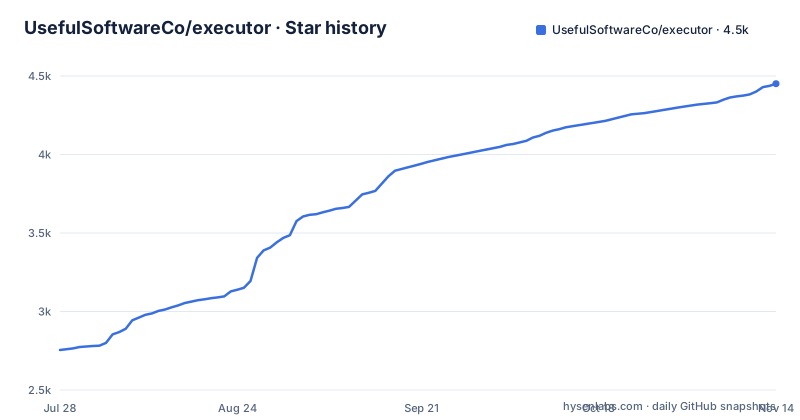
Star history
- UsefulSoftwareCo/executor4,451 ★ · +1,696
| Repository | 2026-07-28 | 2026-11-14 |
|---|---|---|
| UsefulSoftwareCo/executor | 2.8k | 4.5k |
1,696 Stars in the last 109 days, measured from the daily GitHub snapshot. Compare with other projects
Editorial analysis
Three concepts carry the whole model
The design is easier to understand than the feature list suggests, because it rests on three nouns. An integration is a description of something you can call: an MCP server, an OpenAPI specification, a GraphQL API, or a Google Discovery document. The boundary between integration and plugin is stated as a rule rather than a list, namely that if you can describe it with a JSON schema it can be an integration, and that the plugin system is open to any integration type at all. A connection is one configured, optionally authenticated instance of an integration, and an integration may have many connections, which is how one API specification becomes three environments. A policy is the per-tool decision: always allowed, gated behind approval, or blocked, with defaults derived from the specification itself so you start from something the tool's own metadata implies.
Five packages, one runtime, and only one of them needs a node version
The table of ways to run is explicit that every form exposes the same functionality and differs only in packaging, and that distinction is where the real trade-offs sit. The hosted cloud is described as the fastest start, usable from many agents including cloud agents that cannot run local software, with a free tier. The command line form is for headless or server environments and runs a local background service. The desktop app is the same runtime as a native application on the three desktop systems. Then there are two self-hosting routes: Docker for your own infrastructure, and a Cloudflare Worker for edge deployment. Only the local CLI route states a runtime requirement, Node.js 20 or newer. The rationale for the whole product is given in one paragraph: every agent needs its own copy of every integration, so keys get pasted in several places and no client agrees on what a tool is allowed to do.
The last step of every setup is restarting the agent
Connecting an agent is done through a separate command-line tool that detects the client and writes its configuration, rather than by asking you to edit a JSON file. Over HTTP, pointing it at the running service, which serves a streamable HTTP endpoint:
npx add-mcp http://127.0.0.1:4788/mcp --transport http --name executorOr over standard input and output, using the executor command from your path:
npx add-mcp "executor mcp" --name executorThe web interface has a Connect card that fills in the exact command for you, including the port if it is not the default, which matters because the local daemon picks a free port when the default one is busy. The failure mode this creates is documented rather than hidden: most MCP clients only load servers at startup, so a freshly connected Executor will not appear in a running session until you restart the client or open a new chat. Several commands also auto-start the daemon if it is not running, so the service does not have to exist before you type.
Relative server URLs in an OpenAPI document need an override
Adding an integration has one wrinkle worth knowing before you file a bug about it. The interface detects whether you pasted an OpenAPI document, a GraphQL endpoint or an MCP server URL, indexes the tools it finds, and handles authentication. But when the OpenAPI document declares its servers with relative entries rather than absolute URLs, there is nothing to call until you say where the base is, so a separate base URL field exists for exactly that case. The documentation also says the whole thing can be done from the command line, passing a JSON object with the spec address, a namespace and that base URL, which means the catalog is scriptable and not only clickable. A namespace is how tools are addressed later, since a command browses a namespace and then calls a tool inside it, and a separate listing command confirms which integrations actually came up live rather than merely being configured.
The workspace manifest and the published package disagree on the version
The root package manifest is the workspace, marked private, and it carries a version of 1.4.0-beta.0. The published releases are numbered 2.0.0, with beta.32, beta.33 and beta.34 published on consecutive days. So the number in the file a contributor opens does not tell you which release the artifacts came from. Release mechanics are documented in their own file at the root, and a changeset directory exists for recording them, which is the convention where version bumps are proposed in pull requests rather than typed at tag time. The build itself is driven by a task runner that fans out across workspaces.
Eight packages are named in the build command, in order
The workspace globs its packages rather than listing them, so the shape is nested and the scripts are the place where you learn what exists. The build command names eight of them in sequence: a database package, a package with a name suggesting a coding mode, one wrapping a QuickJS runtime, then the software development kit, configuration, execution, the command line interface, and finally a wildcard for plugins. That ordering is itself a dependency order written by hand, which is the kind of thing that breaks quietly when a new package is added. Elsewhere in the same manifest: a bootstrap script, a reap script for stray development servers, a test command that excludes end-to-end tests and takes a concurrency override from the environment, a separate release bootstrap smoke test, and a development command with a data directory that defaults into the local app folder. There is also a patch directory, so dependencies are modified at install time rather than forked.
There is a telemetry document, a design document and a plans directory
Four things in the root are not code and are not the usual project furniture, and each answers a question a reader would otherwise have to guess at. A telemetry document states what the software sends, which is the first thing to read before pointing an agent at it, because an integration layer sees every call. A running document covers the ways to run the thing beyond the summary table, and a design document and a vision document sit next to it, which suggests the intended shape of the product is written down separately from the readme. A plans directory holds longer planning material. Then there is the agent configuration again: directories for agents, for Claude and for one other assistant, instruction files for each, a skills directory with its own lock file, and a configuration file for a further client. Five places to tell a coding assistant how to behave in this tree is a pattern worth watching in AI tooling repositories generally.
Paused executions get an identifier and a resume command
One detail reveals how the approval policy actually works at runtime. A tool call can pause, and the two cases named are waiting on authentication and waiting on approval, which are exactly the two things the policy layer governs. When that happens the run is not lost, it is given an execution identifier, and a resume command takes that identifier and continues it. The same family of commands, call, resume, and the tools listing, will start the local daemon on demand rather than failing when nothing is running, and they will take a free port when the default one is taken. Embedding it in your own code goes through a TypeScript software development kit with a promise-based interface and a second one written for a different effect-oriented style, plus per-integration plugin packages, and the examples directory holds runnable end-to-end scripts for the promise path, the documentation quickstart and a folder that turns on every plugin at once.
Editorial conclusion
Executor fits a team running more than one agent against the same handful of APIs, because the problem it removes is duplication rather than capability: the same keys pasted into three clients, the same MCP servers rewired per client, and no shared answer to what each tool may do. It does not fit a single-agent setup with two integrations, where the bookkeeping costs more than it saves. Two things to check before you commit. Which packaging you want, since the hosted tier, the local daemon, the desktop app and a Worker are the same runtime with different operational costs, and the hosted tier is the form that serves cloud agents with nothing running locally. And how your client loads MCP servers, because most of them read the server list only at startup, so the last step of every setup is restarting the client rather than debugging the connection.
Frequently asked questions
What is Executor?
It is an open-source integration layer for AI agents, licensed MIT and written in TypeScript. You configure each integration once, with its authentication and per-tool policies, and any MCP-compatible agent then uses that single catalog. First-party support covers MCP servers, OpenAPI specifications, GraphQL APIs and Google Discovery, and it runs as a hosted service, a CLI with a local daemon, a desktop app, a Docker container or a Cloudflare Worker.
how to use executor with Claude Code or Cursor
Point the client at Executor's MCP endpoint with the add-mcp command, which detects the client and writes its configuration: over HTTP at the running service's streamable HTTP endpoint, or over standard input and output using the executor command on your path. The web interface has a Connect card that fills in the exact command for you. Most MCP clients only load servers at startup, so restart the client or open a new chat before the tools appear.
Do I have to install Executor locally?
No, if you use Executor Cloud, which is described as the fastest start: sign in, add an integration, and point your agents at the hosted MCP endpoint with nothing installed locally, and there is a free tier. The local forms need Node.js 20 or newer, after which the package installs globally and a command installs the durable background service while another opens the web interface.
Can I add my own kind of integration to Executor?
The stated rule is that if you can describe it with a JSON schema it can be an integration, and that the plugin system is open to any integration type. Each integration can then have many connections, one per configured and optionally authenticated instance, and each tool on each connection gets its own policy of always allowed, needing approval, or blocked.
Official sources
Add this badge to your README
If you maintain this project, the badge below links readers to this analysis and shows its maintenance status from the daily GitHub snapshot. Paste the markdown into your README; add ?metric=license or ?metric=stars to the image URL for a different field.

[](https://hysenlabs.com/projects/usefulsoftwareco-executor)Star history chart for your README
[](https://hysenlabs.com/projects/usefulsoftwareco-executor)Was this useful?