Voicebox: A Local-First Voice Studio That Covers Both Input and Output
Voicebox is a local AI voice studio for recording, cloning voices, dictation, and speech generation.
At a glance
- What is it?
- Voicebox is an open-source, local-first voice studio that handles dictation, voice cloning, and speech generation. It combines eight TTS engines, a global dictation hotkey, and an MCP server for agent voice output, all running on your machine.
- Who is it for?
- Voicebox is for developers and privacy-focused users who want a single local tool for both voice input and output, especially those already using MCP-aware agents like Claude Code or Cursor. It is not for users who need a fully polished commercial product with prebuilt Linux binaries or who rely on paralinguistic tags beyond Chatterbox Turbo.
- Can I use it commercially?
- Yes. MIT is a permissive licence: you can use, modify and sell software built on it, as long as you keep its copyright and licence notices.
- Is it still maintained?
- Yes. The repository last received commits 40 days ago.
- What is it written in?
- Mainly TypeScript, according to GitHub's language statistics.
Answers come from the project's GitHub data, last synced on November 14, 2026, and from our analysis. They are not legal advice.
Star history
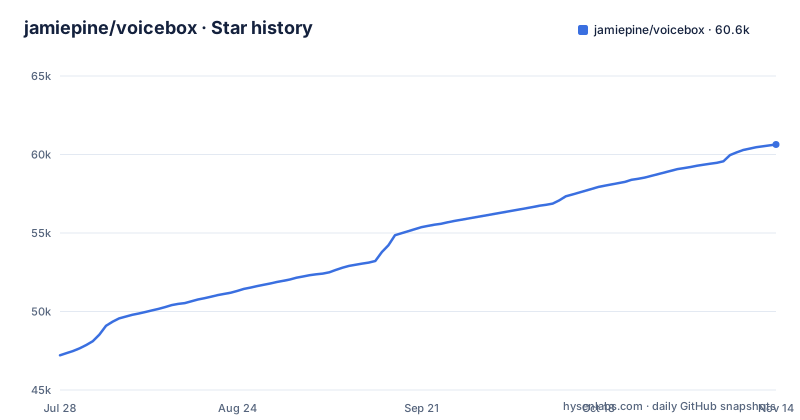
- jamiepine/voicebox60,637 ★ · +13,424
| Repository | 2026-07-28 | 2026-11-14 |
|---|---|---|
| jamiepine/voicebox | 47.2k | 60.6k |
13,424 Stars in the last 109 days, measured from the daily GitHub snapshot. Compare with other projects
Editorial analysis
What Voicebox Solves and Who It Is For
Voicebox targets a gap in the voice AI market. ElevenLabs handles speech output, WisprFlow handles input, but neither does both, and both are cloud-based. Voicebox is a local-first alternative that combines voice cloning, speech generation, dictation, and agent voice output in one app. It is built for developers who want to integrate voice into their own applications via a REST API and MCP server, and for privacy-conscious users who do not want their voice data or captures leaving their machine. The README is explicit: models, voice data, and captures never leave your machine.
The Architecture: Tauri, Local Models, and a Bundled LLM
Voicebox is built with Tauri, which means the frontend uses web technologies but the desktop shell is Rust rather than Electron; the repository also has a Python backend directory and requirements.txt. The core loop is: you record or provide a reference audio sample, Voicebox clones the voice using one of eight TTS engines, and then you can generate speech. For dictation, Whisper-based speech-to-text runs locally. The bridge between input and output is a bundled local LLM that handles refinement and per-profile personas. This LLM enables modes like Compose, Rewrite, and Respond, which can also be invoked by agents over MCP. The architecture is modular: engines are switchable per-generation, and post-processing effects such as pitch shift, reverb, delay, chorus, compression and filters are available. This modularity is a real strength, but it also means the user must understand which engine to choose for a given task.
Seven TTS Engines: How to Choose
Voicebox does not rely on a single TTS model. It offers eight engines (Qwen3-TTS, Qwen CustomVoice, Qwen VoiceDesign, LuxTTS, Chatterbox Multilingual, Chatterbox Turbo, HumeAI TADA and Kokoro), each with different language coverage and strengths. Qwen3-TTS is the high-quality multilingual option with 10 languages and supports delivery instructions like "speak slowly" or "whisper". Chatterbox Multilingual has the broadest coverage at 23 languages, including Arabic, Swahili, and Hindi. Chatterbox Turbo is a fast 350M model that is the only one that interprets paralinguistic tags like [laugh] and [sigh]. Kokoro is a tiny 82M model with 50 curated preset voices and fast CPU inference. LuxTTS is lightweight, requiring only about 1GB VRAM, and runs 150x realtime on CPU. TADA from HumeAI is a speech-language model that can produce 700 seconds or more of coherent audio. This variety is useful, but it also creates complexity. The user must know that if they type [laugh] with Qwen3-TTS, it will be read literally as text, not as an emotional cue. The README is clear about this limitation, but it is a trap for newcomers.
Getting Started: Commands and Configuration
Installation is straightforward on macOS and Windows. The README provides direct download links for DMG and MSI files. For Docker, the command is simply `docker compose up`. Linux users do not get prebuilt binaries; they must build from source using instructions on voicebox.sh/linux-install. This is a significant barrier for Linux users, especially since the project claims to support Linux, AMD ROCm, and Intel Arc. The troubleshooting guide covers common install, generation, model-download, and GPU issues. Configuration is mostly through the GUI, but the API-first design means you can interact programmatically. The MCP server exposes a `voicebox_speak` tool call, which any MCP-aware agent can use. This is a concrete integration point: if you use Claude Code, Cursor, or Cline, you can give them a voice you have cloned. For exact endpoints, see the docs at docs.voicebox.sh.
The Dictation and Agent Voice Output Workflow
Voicebox covers both sides of the voice loop. For input, it offers a global dictation hotkey with push-to-talk and toggle modes. On macOS, auto-paste is accessibility-verified. There is also an in-app mic on every text field. For output, the MCP server is the key feature. An agent can call `voicebox_speak` and the user hears the response in a chosen voice, including a cloned voice. This is different from typical TTS integrations because the voice can be a personal clone, not just a preset. The bundled LLM adds persona management: you can attach a free-form persona to a voice profile, and agents can invoke Compose, Rewrite, or Respond modes over MCP. This turns Voicebox into a voice interface for agents, not just a text-to-speech tool. The trade-off is that all of this runs locally, so you need a machine capable of running a local LLM alongside the TTS engines.
Limitations and Failure Modes
The most obvious limitation is the paralinguistic tag support. Only Chatterbox Turbo interprets tags like [laugh] and [sigh]. If you select any other engine, those tags are read literally. This is a documentation detail that can ruin a generation if you are not careful. Another limitation is Linux support: there are no prebuilt binaries, so Linux users must compile from source, which can be time-consuming and error-prone. The README lists LuxTTS at about 1GB VRAM; check the docs for the requirements of larger models like Qwen3-TTS 1.7B. The latest release is v0.5.0 from 2026-04-25 (v0.4.4 and v0.4.5 came days earlier), and the last push was 2026-10-07, so the API and MCP interface may still change. The troubleshooting guide exists, but the README does not list common issues, so you will need to read it for GPU and model-download problems. Finally, the promise of "complete privacy" is strong, but it rests on the README's statement that models, voice data, and captures never leave your machine, which you would need to audit to confirm.
Alternatives and the Difference in Approach
The two named alternatives are ElevenLabs and WisprFlow. ElevenLabs is a cloud-based TTS service with high-quality voices and a large ecosystem, but it is not local and does not handle dictation. WisprFlow is a cloud dictation tool that focuses on voice input and transcription, but it does not offer voice cloning or TTS output. Voicebox combines both, but its local-first approach is the key difference. This means no data leaves your machine, but it also means you need to manage model downloads and GPU resources yourself. Another alternative is to use a dedicated local TTS like Piper or Coqui TTS, but those do not have the integrated dictation or MCP server. The MCP integration is a differentiator: it gives agents a voice without requiring a separate API key or network call. If you already use MCP-aware tools, Voicebox's built-in server is a direct integration point. If you do not need dictation or agent output, a simpler TTS tool might be easier to manage.
Maintenance and Upgrade Considerations
The latest release is v0.5.0 (2026-04-25), following v0.4.5 and v0.4.4 within days; the last push was 2026-10-07 and package.json already shows version 0.6.0. The repository contains a CHANGELOG.md, so check it before upgrading. The license is MIT, which is permissive: you can use, modify, and distribute the code, including for commercial purposes, as long as you preserve the copyright notice. This is an advantage over some open-source projects that use AGPL. For maintenance, the main cost is model downloads and storage. Each TTS engine likely requires a separate model file, and the larger ones (Qwen3-TTS 1.7B, TADA 3B) will take up significant disk space and VRAM. The Docker option simplifies deployment: docker-compose.yml is the CPU build by default, with a docker-compose.rocm.yml overlay for AMD ROCm. Before adopting, verify that your hardware meets the requirements for the specific engines you plan to use, and budget time for regular updates.
Editorial conclusion
Voicebox is for developers and privacy-focused users who want a single local tool for both voice input and output, especially those already using MCP-aware agents like Claude Code or Cursor. It is not for users who need a fully polished commercial product with prebuilt Linux binaries or who rely on paralinguistic tags beyond Chatterbox Turbo. Before adopting, verify the GPU and VRAM requirements for your chosen engines, confirm the Linux build-from-source path if you are not on macOS or Windows, and test that the global dictation hotkey works reliably on your platform. The latest release is v0.5.0 (2026-04-25) and the repository has a CHANGELOG.md, so check it for breaking changes. If you need a specific language not covered by the engines you plan to use, confirm coverage first, since Chatterbox Multilingual covers 23 languages while Qwen3-TTS covers 10 and LuxTTS is English only.
Frequently asked questions
Is voicebox free?
Yes, the project is MIT licensed and describes itself as a free and open-source alternative to ElevenLabs and WisprFlow in one app. The app itself carries no licence fee, while the model weights are downloaded from Hugging Face on first use rather than bundled.
what is voicebox ai
Voicebox is a local-first AI voice studio that clones a voice from a few seconds of audio, generates speech through eight switchable TTS engines across 23 languages, and dictates into any text field with a global hotkey. It is built as a Tauri application in Rust over a Python backend, and it exposes both a REST API and a built-in MCP server.
how to install voicebox
macOS on Apple Silicon and macOS on Intel take a DMG, Windows takes an MSI, and Docker is started with docker compose up. Prebuilt binaries for every platform are on the releases page, except Linux, where the project states that pre-built binaries are not yet available and points to build-from-source instructions at voicebox.sh/linux-install.
how to set up voicebox
For a container install, the base compose file is the CPU build and the AMD overlay is applied on top with docker compose -f docker-compose.yml -f docker-compose.rocm.yml up --build. The service publishes the host port 17600 to the container's 17493, mounts an output directory for generated audio, and stores profiles, database and cache in a named volume that survives restarts.
what is voicebox.sh
voicebox.sh is the project's site, and it is where the platform downloads live, including separate DMG builds for Apple Silicon and Intel and an MSI for Windows. It also hosts the documentation at docs.voicebox.sh and the Linux build-from-source instructions, while the source itself is on GitHub under an MIT licence.
Official sources
Add this badge to your README
If you maintain this project, the badge below links readers to this analysis and shows its maintenance status from the daily GitHub snapshot. Paste the markdown into your README; add ?metric=license or ?metric=stars to the image URL for a different field.

[](https://hysenlabs.com/projects/jamiepine-voicebox)Star history chart for your README
[](https://hysenlabs.com/projects/jamiepine-voicebox)Was this useful?