spotify-mcp: an MCP server for Spotify that tells you it is inactive
MCP to connect your LLM with Spotify.
At a glance
- What is it?
- spotify-mcp connects an MCP client to Spotify for playback control, search, the queue and playlists, built on spotipy. It is not maintained: a March 2026 notice in the README says most pull requests will not be merged, and the packaging still points at a pre-release MCP SDK.
- Who is it for?
- Use spotify-mcp if you want playback, search and queue control for Spotify from an MCP client and you are willing to run it yourself, since it needs your own Spotify developer app and a premium account for the developer API. Skip it if you need paginated search or playlist listing, which are on the TODO list because Spotify deprecated the endpoints behind them.
- Can I use it commercially?
- Yes. MIT is a permissive licence: you can use, modify and sell software built on it, as long as you keep its copyright and licence notices.
- Is it still maintained?
- Activity is slowing. The repository last received commits 8 months ago.
- What is it written in?
- Mainly Python, according to GitHub's language statistics.
Answers come from the project's GitHub data, last synced on November 15, 2026, and from our analysis. They are not legal advice.
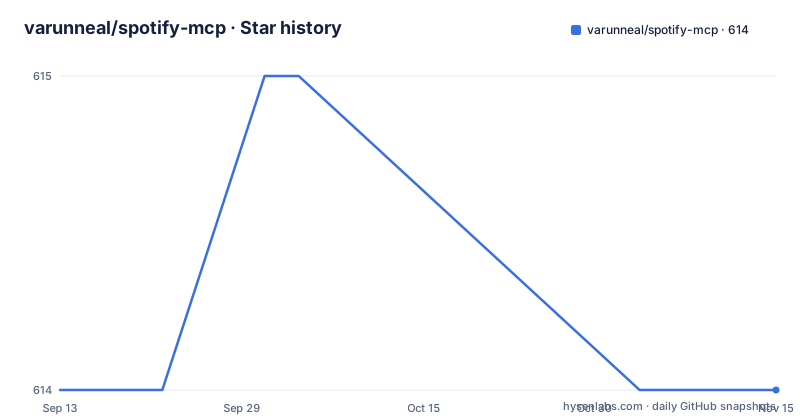
Star history
- varunneal/spotify-mcp614 ★ · +0
| Repository | 2026-09-13 | 2026-11-15 |
|---|---|---|
| varunneal/spotify-mcp | 614 | 614 |
0 Stars in the last 63 days, measured from the daily GitHub snapshot. Compare with other projects
Editorial analysis
The inactivity notice is the first line of the project
The README opens its content with a notice that reads, in substance: as of March 2026 this is an inactive project and most pull requests will not be merged. The last push to main is dated 2026-03-11, and the package version in pyproject.toml is 0.2.0.
What follows from that notice is more specific than it first looks. The tool surface is small and stable: start, pause and skip playback; search for tracks, albums, artists and playlists; get information about any of those four; manage the Spotify queue; and manage, create and update playlists. Nothing about that list is aspirational, and playlist management is the one entry already marked as done in the TODO list.
The project is built on top of spotipy, the Python client for the Spotify Web API, which is why almost everything here is a thin wrapper over an API the Spotify developer dashboard already exposes.
uvx runs it straight from git, which has a cost
There is no install step. The MCP configuration points `uvx` at the Git repository and names the console script:
{
  "mcpServers": {
    "spotify": {
      "command": "uvx",
      "args": [
        "--python", "3.12",
        "--from", "git+https://github.com/varunneal/spotify-mcp",
        "spotify-mcp"
      ],
      "env": {
        "SPOTIFY_CLIENT_ID": YOUR_CLIENT_ID,
        "SPOTIFY_CLIENT_SECRET": YOUR_CLIENT_SECRET,
        "SPOTIFY_REDIRECT_URI": "http://127.0.0.1:8080/callback"
      }
    }
  }
}
The trade is written down plainly: using uvx opens the Spotify redirect URI for every tool call. Each call resolves and runs the package fresh from Git, and each fresh process goes through the authorisation redirect, so a browser keeps appearing at you. That is a consequence of the packaging choice, not a bug in the client.
Note also the Python version pinned in the arguments. The project metadata requires 3.12 or newer, and the uvx invocation asks for exactly 3.12 rather than whatever your default interpreter happens to be.
Cloning locally is the fix for a browser on every call
The alternative is one clone, and it exists for that single reason:
git clone https://github.com/varunneal/spotify-mcp.gitThe MCP entry then changes from `uvx` with a git URL to `uv` with a `--directory` argument pointing at the checkout and `run spotify-mcp`. The environment block stays identical: the same client id, client secret and redirect URI.
The mechanism is worth understanding rather than memorising. A long-lived local process can hold the authorisation state obtained once through the redirect, whereas a process created per tool call cannot, so it has to ask again. Running from a checkout is what turns one browser prompt into a one-time event.
Cloning has a cost of its own, and the troubleshooting notes call it out: because you are running a local checkout rather than an installed package, you have to grant execution permissions with `chmod -R 755`.
Three environment variables and a loopback redirect URI
Credentials come from a Spotify developer app you create yourself. You register an account on developer.spotify.com, open the dashboard, create an app, and set its redirect URI to `http://127.0.0.1:8080/callback`.
The port is yours to change, with one constraint that is easy to get wrong: the URI must use http and an explicit loopback address, in either IPv4 or IPv6 form. That is a requirement from the Web API rather than a choice this project made, and the README links the Spotify documentation on redirect URIs for the detail.
Three environment variables carry the configuration into the process, `SPOTIFY_CLIENT_ID`, `SPOTIFY_CLIENT_SECRET` and `SPOTIFY_REDIRECT_URI`. Where the config file lives depends on the client: for Claude Desktop on macOS it is `~/Library/Application\ Support\ Claude/claude_desktop_config.json`, and on Windows it is `%APPDATA%/Claude/claude_desktop_config.json`. Cursor and other MCP clients have their own location.
Troubleshooting starts with uv, file permissions, and premium
The README offers three checks before anything else. Update `uv`, with version 0.54 or newer recommended. If you cloned locally, run `chmod -R 755` on the project. And confirm you have a Spotify premium account, which is needed for running the developer API at all.
That third item is the one that catches people. A free account is not enough, and the failure looks like an authentication problem rather than a subscription problem.
Logs go to standard error, as the MCP specification requires, which changes where you look. On macOS, Claude Desktop writes them under `~/Library/Logs/Claude`. On other platforms the README points at the MCP documentation rather than guessing at a path. The project asks you to open an issue if none of this resolves it, while the notice at the top of the file says most pull requests will not be merged.
One npx command opens the Inspector for debugging
When you need to see what the server is actually doing, the debugging path is the MCP Inspector, launched with npm:
npx @modelcontextprotocol/inspector uv --directory /path/to/spotify-mcp run spotify-mcpThe Inspector prints a URL, you open it in a browser, and you can exercise the tools directly rather than through your client. That matters here because the alternative debugging loop involves an LLM deciding whether to call a tool, which is a poor way to isolate a tool that is not behaving.
Running it against a local directory rather than the uvx configuration also means the session persists, which shortens the loop between a change and a retest. The README does not document a test suite, so the Inspector is effectively the verification path the project offers.
Tests are on the TODO list and the dev group is empty
The packaging tells you how settled this is. Dependencies are `mcp==1.3.0` and `spotipy==2.26.0`, both pinned exactly, plus `python-dotenv`. The build backend is hatchling, the console script is `spotify_mcp:main`, and the project requires Python 3.12 or newer with a `uv.lock` and a `.python-version` file beside it.
Two entries in pyproject.toml are worth pausing on. The `dev` dependency group is an empty list, which is consistent with the first item on the TODO list being tests. And the version is 0.2.0 with no GitHub releases, so the only version anyone can cite is the one in the manifest.
The TODO list explains why new work is small. Spotify deprecated a batch of developer features in late 2024, so paginated search results, paginated playlists and paginated albums are listed as future work rather than shipped behaviour. Playlist management is struck through as done, leaving pagination and tests as what is actually left.
Editorial conclusion
Use spotify-mcp if you want playback, search and queue control for Spotify from an MCP client and you are willing to run it yourself, since it needs your own Spotify developer app and a premium account for the developer API. Skip it if you need paginated search or playlist listing, which are on the TODO list because Spotify deprecated the endpoints behind them. Before you build anything on it, read the March 2026 inactivity notice, plan for the pinned `mcp==1.3.0` SDK, and clone it locally rather than running under uvx.
Frequently asked questions
Can I use Spotify in Claude?
Yes, through this MCP server. It exposes playback control, search across tracks, albums, artists and playlists, information lookups, the Spotify queue, and playlist management. You need your own Spotify developer app credentials and a premium account for the developer API.
is there a spotify mcp for claude
That is what this repository is. It is an MCP server built on spotipy, configured through an MCP client config file, and run either with uvx pointing at the Git repository or from a local clone with uv.
What tools does spotify-mcp expose?
Start, pause and skip playback; search for tracks, albums, artists and playlists; get information about a track, album, artist or playlist; manage the Spotify queue; and manage, create and update playlists.
Why does the Spotify redirect open on every tool call?
Because the uvx configuration resolves and runs the package from Git for each call, and each fresh process goes through the authorisation redirect. Running from a local clone with uv and a --directory argument keeps one process alive so the redirect is used once.
Is spotify-mcp still maintained?
No. The README carries a March 2026 notice calling it an inactive project and saying most pull requests will not be merged. The package version is 0.2.0, the last push to main is dated 2026-03-11, and there are no GitHub releases.
Official sources
Add this badge to your README
If you maintain this project, the badge below links readers to this analysis and shows its maintenance status from the daily GitHub snapshot. Paste the markdown into your README; add ?metric=license or ?metric=stars to the image URL for a different field.

[](https://hysenlabs.com/projects/varunneal-spotify-mcp)Star history chart for your README
[](https://hysenlabs.com/projects/varunneal-spotify-mcp)Was this useful?