three-globe for WebGL Data Visualization
WebGL Globe Data Visualization as a ThreeJS reusable 3D object
At a glance
- What is it?
- three-globe is a reusable ThreeJS object for rendering geographic data on a spherical WebGL globe. It fits applications that need points, arcs, polygons, paths, labels, and related layers without building the globe and projection plumbing themselves.
- Who is it for?
- Adopt three-globe when the application already uses ThreeJS and needs geographic layers as reusable 3D objects. Do not choose it as a standalone mapping application, a server-side visualization tool, or a replacement for a full tile engine without first checking the omitted APIs and runtime dependencies.
- Can I use it commercially?
- Yes. MIT is a permissive licence: you can use, modify and sell software built on it, as long as you keep its copyright and licence notices.
- Is it still maintained?
- Yes. The repository last received commits 25 days ago.
- What is it written in?
- Mainly JavaScript, according to GitHub's language statistics.
Answers come from the project's GitHub data, last synced on November 6, 2026, and from our analysis. They are not legal advice.
Star history
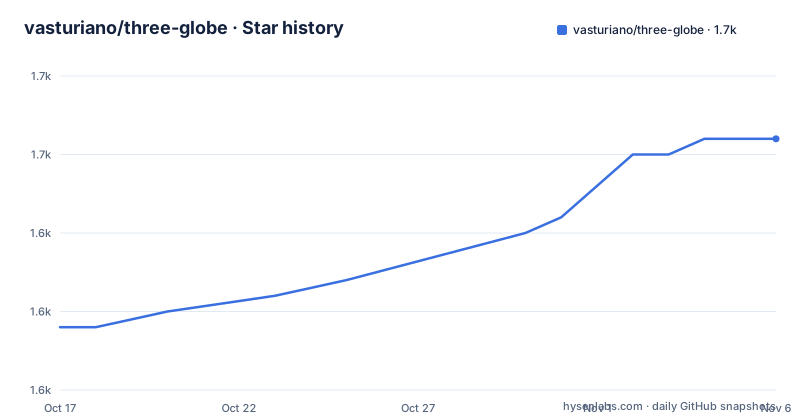
- vasturiano/three-globe1,651 ★ · +12
| Repository | 2026-10-17 | 2026-11-06 |
|---|---|---|
| vasturiano/three-globe | 1.6k | 1.7k |
12 Stars in the last 20 days, measured from the daily GitHub snapshot. Compare with other projects
Editorial analysis
A ThreeJS object for layered geographic scenes
three-globe addresses a specific gap between ordinary maps and fully custom WebGL scenes. It packages globe visualization layers as a ThreeJS class, so an application can add a globe to a `THREE.Scene` and supply geographic data through chained configuration methods. The intended users are web developers who already work with ThreeJS and want to represent spatial information interactively in a browser.
The repository examples cover more than a single marker layer. They include country polygons, arc links, path lines, heatmaps, hexagonal binning, hexed country polygons, tiles, ripple rings, clouds, day and night rendering, a solar terminator, labels, HTML markers, satellites, custom materials, and custom layers. This range is useful when several kinds of geographic phenomena must share one spherical scene.
The component is a visualization object, not a complete application framework. The README does not document data loading, camera controls, server integration, or a complete deployment workflow. Those parts remain the responsibility of the surrounding ThreeJS application. The README also points readers to a standalone version, `globe.gl`, and React Three Fiber bindings, `r3f-globe`, which shows that application integration is an explicit design concern.
Spherical projection and configurable data layers
The core model is a globe represented as a ThreeJS 3D object using a spherical projection. `globeImageUrl()` sets the image wrapped around the globe, and the image must use an equirectangular projection. A bump image can be supplied separately through `bumpImageUrl()` to represent terrain. If no globe image is provided, the README states that the globe is represented by a black sphere.
Data is added through layer-specific methods rather than a separate chart abstraction. `pointsData()` supplies point data. The API reference also names methods for arcs, polygons, paths, heatmaps, hex bins, hexed polygons, tiles, particles, rings, labels, HTML elements, 3D objects, and custom layers. Each layer can therefore be considered a separate rendering concern within the same ThreeJS scene graph.
The initialization options affect the first render. `waitForGlobeReady` controls whether rendering waits until the globe wrapping image has loaded. `animateIn` controls whether initialization scales and rotates the globe into its initial position. Both default to `true`, so applications that need an immediate static render may need to account for those defaults in their scene setup.
Importing three-globe and creating the first scene
The README provides an ES module import and a script-tag alternative. The package metadata identifies `three-globe` as an NPM package, with `three` listed as a peer dependency of `>=0.154`. The README does not document a complete installation command, so this tutorial uses the documented import and CDN entry points without inventing a package-manager instruction.
For an ES module project, add the documented import. The package's `exports` configuration points the default entry to the distributed ES module and also provides type definitions.
import ThreeGlobe from 'three-globe';The README also documents loading the UMD build through jsDelivr when a script tag is preferable. The `three-globe` global is available after that script has loaded, assuming the surrounding page provides ThreeJS and loads scripts in the correct order.
<script src="//cdn.jsdelivr.net/npm/three-globe"></script>A first real use can configure a globe image and point data, then add the object to a ThreeJS scene. The README presents this as the quick-start sequence. It does not include the renderer or camera setup, so those must already exist in the host page or application.
const myGlobe = new ThreeGlobe()
  .globeImageUrl(myImageUrl)
  .pointsData(myData);

const myScene = new THREE.Scene();
myScene.add(myGlobe);
In this flow, `myImageUrl` identifies the equirectangular surface image and `myData` contains the point records accepted by the points layer. The expected result is a globe object in `myScene` with the configured surface and point layer.
Layer choices that shape the scene
The examples indicate several distinct visual representations. Arc links suit connections between locations, while path lines represent routes or sequences. Country polygons and hexed polygons provide geographic areas at two different levels of detail. A heatmap concentrates values over the globe surface, and hex binning aggregates data into hexagonal cells.
Tiles are a separate layer concept, and the repository includes a tiled map engine example. That differs from supplying a single equirectangular image through `globeImageUrl()`. The project therefore supports both a globe texture and more granular map layers. The README does not specify the complete tile data schema or tile engine configuration, so an application should consult the relevant example source before assuming that all map providers or tile formats are interchangeable.
The layer catalog also includes labels, HTML elements, and 3D objects. These can be useful for annotations or objects placed near geographic coordinates, but their coexistence introduces a scene composition issue. The developer must determine whether an annotation should remain visible, how it responds to camera changes, and how it is positioned relative to the globe. The repository confirms that these layers exist, but the README does not explain their occlusion or interaction semantics.
Performance and rendering trade-offs
The first visible trade-off is between image readiness and perceived initialization. `waitForGlobeReady` defaults to `true`, which prevents the globe and data layers from rendering until the wrapping image has fully loaded. That can avoid showing incomplete globe imagery, but it also means the application depends on the image request completing before the relevant rendering begins. Setting it to `false` changes that timing policy, although the README does not document the loading-state implications in detail.
`animateIn` also has a rendering cost. The documented behavior is a scale-and-rotation animation during initialization. This can improve the first visual transition, but applications with strict rendering timing, reduced-motion requirements, or automated visual snapshots may need to decide whether that animation fits their needs. The API exposes the switch, but the README does not describe reduced-motion handling.
The package dependencies include geometry, projection, color, scale, animation, and geographic-indexing libraries such as `d3-geo`, `d3-scale`, `d3-color`, `h3-js`, `three-geojson-geometry`, and `three-conic-polygon-geometry`. That dependency set supports a broad layer API, but it also means an application will ship several transitive packages. The repository layout shows separate `src/` files, Rollup build configurations, and a generated `dist/` package output, so upgrades can affect both the public bundle and the surrounding ThreeJS application.
MIT licensing and maintenance signals
The repository identifies the package as MIT licensed and lists the license as `MIT` in `package.json`. That describes the project's licensing declaration, but it is not legal advice. An adopting organization still needs to review the license file and its own distribution practices, especially because this package depends on other open-source libraries.
The repository is not archived, and the last push was on 2026-10-14. Those are the available maintenance facts. The repository has no GitHub releases, so there is no release tag in the repository metadata to use as an upgrade checkpoint. The package version in `package.json` is `2.45.6`, but the README does not document a changelog or compatibility matrix for that version.
The build scripts show the maintenance surface. `npm run build` removes `dist/` and runs Rollup, while `npm run dev` starts a Rollup watch build with `rollup.config.dev.js`. The `prepare` script runs the build during package preparation. A project maintaining its own integration will need to account for changes in ThreeJS peer requirements, distribution formats, generated type files, and the behavior of the layer dependencies. The README does not document a rollback procedure or a formal support policy.
When globe.gl or r3f-globe fits better
three-globe is the lower-level choice for a team that already has a ThreeJS scene and wants globe layers as a reusable object. The README explicitly distinguishes it from the standalone version, `globe.gl`, and the `r3f-globe` React Three Fiber bindings. Those are real alternatives with a different integration approach.
`globe.gl` is presented as the standalone version, so it is the relevant direction when the project wants a globe-oriented entry point rather than composing `three-globe` into an existing ThreeJS object model. `r3f-globe` is presented as React Three Fiber bindings, which changes the application architecture by placing the globe within a React and React Three Fiber component structure. The README does not provide their installation commands or a detailed API comparison, so the distinction should be verified against those projects before choosing one.
The same boundary applies to conventional GIS and mapping software. three-globe is centered on WebGL rendering and reusable 3D layers, not on data cataloging, spatial queries, editing, or server-side tile infrastructure. A team needing those services should keep that responsibility outside the component or evaluate a different system.
Editorial conclusion
Adopt three-globe when the application already uses ThreeJS and needs geographic layers as reusable 3D objects. Do not choose it as a standalone mapping application, a server-side visualization tool, or a replacement for a full tile engine without first checking the omitted APIs and runtime dependencies. The first verification should be whether the data formats, globe imagery, renderer setup, and layer behavior match the target browser and application architecture.
Frequently asked questions
What is three-globe used for?
three-globe is a ThreeJS class for representing geographic data visualization layers on a WebGL globe. It can display points, arcs, polygons, paths, heatmaps, tiles, labels, and other layers.
How do I import three-globe?
The README documents `import ThreeGlobe from 'three-globe';`. It also documents loading `//cdn.jsdelivr.net/npm/three-globe` with a script tag.
Does three-globe include a complete WebGL application?
No. It provides a reusable ThreeJS globe object and visualization layers. The quick-start example creates a `THREE.Scene`, but the surrounding renderer, camera, data loading, and application setup remain part of the host project.
What image format does the globe layer use?
The README states that images passed to `globeImageUrl()` and `bumpImageUrl()` should use an equirectangular projection. If no globe image is provided, the globe is represented as a black sphere.
What are the initialization options for three-globe?
The constructor accepts `waitForGlobeReady` and `animateIn`. Both default to `true`: rendering waits for the globe image to load, and initialization performs a scale-and-rotation animation.
Official sources
Add this badge to your README
If you maintain this project, the badge below links readers to this analysis and shows its maintenance status from the daily GitHub snapshot. Paste the markdown into your README; add ?metric=license or ?metric=stars to the image URL for a different field.

[](https://hysenlabs.com/projects/vasturiano-three-globe)Star history chart for your README
[](https://hysenlabs.com/projects/vasturiano-three-globe)Was this useful?