Every chat adapter releases in lockstep with the core package
Project brief: A unified TypeScript SDK for building chat bots across Slack, Microsoft Teams, Google Chat, Discord, and more.
At a glance
- What is it?
- A unified TypeScript SDK for chat bots whose core package and adapters all ship at the same version, built on a toolchain that validates with mock credentials for Slack, Teams and Google Chat. Thread subscription is explicit, state is an adapter, and the scaffolder targets Next.js while the examples cover four other frameworks.
- Who is it for?
- Chat SDK is a reasonable choice if your bot has to exist on more than one chat platform and you would rather write one handler than five, and the adapter catalog plus the community adapter tier make that promise credible rather than aspirational. Verify three things first.
- Can I use it commercially?
- Yes. MIT is a permissive licence: you can use, modify and sell software built on it, as long as you keep its copyright and licence notices.
- Is it still maintained?
- Yes. The repository last received commits 2 days ago.
- What is it written in?
- Mainly TypeScript, according to GitHub's language statistics.
Answers come from the project's GitHub data, last synced on November 15, 2026, and from our analysis. They are not legal advice.
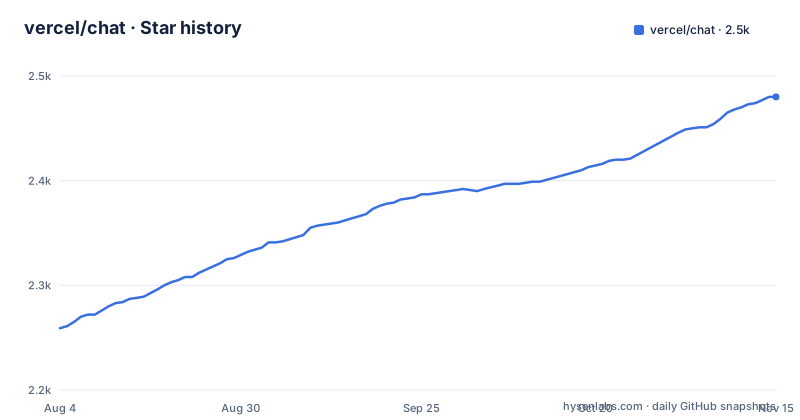
Star history
- vercel/chat2,480 ★ · +221
| Repository | 2026-08-04 | 2026-11-15 |
|---|---|---|
| vercel/chat | 2.3k | 2.5k |
221 Stars in the last 103 days, measured from the daily GitHub snapshot. Compare with other projects
Editorial analysis
The core and every adapter move to one version together
The three most recent releases carry the same number. `chat` is at 4.41.1, `@chat-adapter/x` is at 4.41.1, and `@chat-adapter/whatsapp` is at 4.41.1, all published within a minute of each other on 2026-09-28.
That is deliberate and it has a cost. Releases are driven by a `.changeset/` directory, so a version bump in one package propagates through the workspace and the whole set is republished. The result is that adapters are version-locked to the core: you cannot run a newer adapter against an older `chat`, and an upgrade pulls every adapter forward at once whether or not that adapter changed.
For a library whose entire value is that you swap adapters without rewriting logic, that is a defensible trade. It also means your dependency bumps are all-or-nothing, and a breaking change in a platform you do not even use still reaches you.
Naming runs across three schemes, which adds a moment of friction on first install. The repository is `vercel/chat`, the workspace root manifest is named `chat-sdk-monorepo` and is private, the published core package is `chat`, and every adapter sits under the `@chat-adapter/` scope. So the string you install is not the string in the repository URL.
One build script carries mock credentials for three platforms
The workspace has a second build command whose entire job is to prove the packages build with configuration present. It runs `turbo build` with a full environment inlined on the command line, and the variables it sets are a compact inventory of what each platform needs:
`SLACK_BOT_TOKEN` and `SLACK_SIGNING_SECRET` for Slack, where the signing secret is what verifies an inbound webhook. `TEAMS_APP_ID`, `TEAMS_APP_PASSWORD`, and `TEAMS_APP_TENANT_ID` for Microsoft Teams, which needs all three. `GOOGLE_CHAT_CREDENTIALS` for Google Chat, set to a complete service account JSON object including a project id, a client email, and an inline RSA private key. Plus `REDIS_URL` and `RECORDING_ENABLED=false`.
Every value is a placeholder. The Slack token is the literal string `xoxb-mock`, the Teams values are the string `mock`, and the private key is a well-formed but meaningless PEM block with `MOCK` where key material would go.
Two things are worth pulling out of that. First, the Google Chat credential is a whole service account rather than an API key, which is a heavier setup than the other two platforms. Second, `RECORDING_ENABLED` appears nowhere else on the page, and its presence next to a validation script suggests the test suite can record and replay HTTP traffic, which is how adapter tests avoid live platform calls.
The mock inline in a checked-in script is a convenience for CI and a small hygiene smell, since it is the kind of string that gets pattern-matched by real secret scanners.
A bot must subscribe to a thread before it sees the rest of it
The usage example shows the whole interaction model in about fifteen lines:
import { Chat } from "chat";
import { createSlackAdapter } from "@chat-adapter/slack";
import { createRedisState } from "@chat-adapter/state-redis";

const bot = new Chat({
  userName: "mybot",
  adapters: {
    slack: createSlackAdapter(),
  },
  state: createRedisState(),
});

bot.onNewMention(async (thread) => {
  await thread.subscribe();
  await thread.post("Hello! I'm listening to this thread.");
});

bot.onSubscribedMessage(async (thread, message) => {
  await thread.post(`You said: ${message.text}`);
});
The order matters. A new mention arrives at `onNewMention`, and the handler's first act is `await thread.subscribe()`. Only after that does `onSubscribedMessage` fire for anything else in the thread. Subscription is not implicit in being mentioned, so a bot that posts a reply without subscribing goes quiet after that one message.
The second thing the constructor shows is that state is a pluggable dependency rather than part of the core. `createRedisState` comes from a separate package, `@chat-adapter/state-redis`, and is passed as `state`. What tracks a conversation across requests, and whether it survives a restart or scales past one process, is therefore a choice you make and operate, not something you inherit. The core example imports three packages to do one thing.
Five policies decide what happens when two messages arrive together
Concurrency on a single thread is not left to the adapter. There is a documented set of policies for overlapping messages on the same thread, and the choice among them is one of five: burst, queue, debounce, drop, or process.
That list is the honest answer to the question every chat bot has to answer eventually. Two people talking at once, or one person sending a follow-up before the bot replies, can mean the bot answers both, answers them in order, coalesces them, discards one, or handles them concurrently.
Drop is the one to think hardest about, because it is a data-loss decision rather than a scheduling one, and whether it applies per user, per thread, or globally is not stated in the visible feature list. Burst is the opposite risk: unbounded parallel handling on a thread whose ordering the platform may or may not guarantee.
Debounce is the sensible default for a chat interface, since a human typing a paragraph produces several messages, and queue is the safe one when every message must be acted on. The point of exposing all five is that the SDK does not pretend there is one right answer, which means the choice is yours and it belongs in the same category of decision as the state backend.
Ephemeral messages become direct messages where scoping is impossible
Ephemeral messages are described as user-only visible messages with a DM fallback.
Read the fallback literally. On a platform that supports a message only one person can see, the SDK uses that. On a platform that does not, it opens a direct message to the user instead. A direct message is not the same guarantee as an ephemeral message: it is a persistent channel between you and the recipient, it can be exported or forwarded depending on retention settings, and it often syncs to devices the original thread did not.
So a feature you might reach for precisely because its content is sensitive has a code path where that content lands in a durable one-to-one conversation. That is a normal engineering compromise and it is the sort platforms force, but it is worth knowing before you put anything into an ephemeral handler that you would not want kept.
The same pattern shows up elsewhere in the feature list. Direct messages can be initiated programmatically, and AI streaming has its own per-platform fallback, described as post-and-edit where native streaming is unavailable. Nothing is uniform across the nine platforms named, and the adapter catalog is where you find out which platform is which.
One JSX card becomes one of three vendor formats
Cards are described as JSX-based interactive cards, and the parenthetical lists Block Kit, Adaptive Cards, and Google Chat Cards.
Three different names for three different vendor schemas, written once in JSX and translated per platform. That is the load-bearing feature for anyone deploying to more than one chat app, because Block Kit, Adaptive Cards, and Google Chat Cards have different block types, different action models, and different limits. A card that renders on one platform may silently lose a component on another.
Buttons and dropdowns are handled by a separate actions feature, and form dialogs with text inputs, dropdowns, and validation by a separate modals feature, so interactive surfaces are split into three mechanisms rather than folded into the card abstraction.
AI streaming has the same shape of asymmetry. The page names native Slack streaming, Telegram private chat draft previews, and a post-and-edit fallback, which means the streaming experience is native in one place, previewed differently in a second, and emulated by editing a posted message in the rest.
Emoji is described as type-safe and cross-platform with custom emoji support, which is a small but real problem to have solved: custom emoji differ per platform, and a bot that echoes a user's reaction can hit that boundary constantly.
The scaffolder builds Next.js and the examples cover four other frameworks
The CLI scaffolds one shape of application:
npx create-chat-sdk@latest my-botIt generates a minimal Next.js bot app, and specifically produces the `Chat` configuration, a webhook route, a `.env.example`, the dependencies, and an optional Web adapter route, all selected from the adapter catalog.
The example directories tell a wider story than the scaffolder does. The five listed are `examples/express-discord-chat/`, `examples/nextjs-chat/`, `examples/nuxt-chat/`, `examples/tanstack-start-chat/`, and `examples/telegram-chat/`. So Next.js is one of five demonstrated targets, with Express, Nuxt, and TanStack Start alongside it.
Two gaps are visible in that list. The scaffolder only produces the Next.js variant, so the other four start from an example rather than from a command. And the install line on the front page shows the Slack, Teams, and Google Chat adapters, while the example set has no Slack example directory: the two examples that name a platform in their folder name are Discord and Telegram.
Slack is the platform used throughout the usage snippet, so it is the one a new user reaches for first. Following the adapter catalog rather than the examples is the better route there.
Everything the README says about features is a link out to a documentation site. That is a reasonable choice for a library with this many surfaces, and it means the page itself is closer to a table of contents than a manual.
An alpha-pinned tool named konsistent sits inside the validate chain
The workspace validation command runs five gates in sequence: unused-export detection, lint, typecheck, tests, and the mock-credential build.
The lint step is `ultracite check`, with `ultracite fix` to repair, and a `biome.jsonc` at the root, so formatting and linting go through a Biome-based wrapper rather than a separate ESLint and Prettier pair. Tests run through Turbo, and `test` filters out a workspace named `docs`, with a separate `test:workspace` script running Vitest directly.
The toolchain also includes `knip` for finding unused exports, with a `knip.json` configuration, and a separate resource sync script run through `tsx`.
Then there is the one worth knowing about. The final validate step runs `konsistent` against a config file at `.github/konsistent.json`, and the pinned version is `0.0.1-alpha.20`. A pre-release build of a tool whose name is a spelling variant of a common English word sits in the command your continuous integration runs on every push. If that is intentional it is a deliberate bet on an early tool; if it is not, it is the kind of dependency that should be called out to whoever owns the pipeline.
The rest of the repository root tells a similar story about how this is developed. `DCO.txt` means contributions require a Developer Certificate of Origin sign-off. `.nvmrc` pins the Node version for a pnpm workspace at 10.30.3. `.vercel.approvers` and `.vercelignore` gate what gets deployed. And there are four separate agent integration artifacts: an `AGENTS.md`, a `CLAUDE.md`, an `.agents/` directory, and a `skills/` directory, the last of which is what the published package's skill references.
Editorial conclusion
Chat SDK is a reasonable choice if your bot has to exist on more than one chat platform and you would rather write one handler than five, and the adapter catalog plus the community adapter tier make that promise credible rather than aspirational. Verify three things first. Version coupling is total: the core package and every adapter move together, so you cannot take a newer adapter against an older core, and you inherit every breaking change across all of them at once. Thread state is not built in, it is an adapter you choose, so budget for picking and operating one before multi-threaded conversations work. And ephemeral messages fall back to a direct message on platforms that cannot scope them, which changes where nominally private content is delivered. The build validation path runs against mock credentials for Slack, Teams and Google Chat, so if you are bringing this into a CI pipeline, expect to supply your own equivalents.
Frequently asked questions
what is vercel chat sdk
It is a unified TypeScript SDK for building chat bots across Slack, Microsoft Teams, Google Chat, Discord, Telegram, GitHub, Linear, WhatsApp, and more, released under the MIT license. You install the core `chat` package plus one adapter package per platform you support.
vercel chat sdk vs ai sdk
The repository does not contain a comparison with the AI SDK. It states its own scope as writing bot logic once and deploying everywhere, covering event handlers, AI streaming, cards, modals, slash commands, emoji, file uploads, direct messages, and ephemeral messages.
vercel chat sdk alternative
No alternatives are listed in the repository. It points instead to an adapter catalog at chat-sdk.dev/adapters, which carries official, vendor-official, and community adapters, and it documents how to build your own adapter.
Official sources
Add this badge to your README
If you maintain this project, the badge below links readers to this analysis and shows its maintenance status from the daily GitHub snapshot. Paste the markdown into your README; add ?metric=license or ?metric=stars to the image URL for a different field.

[](https://hysenlabs.com/projects/vercel-chat)Star history chart for your README
[](https://hysenlabs.com/projects/vercel-chat)Was this useful?