Verilator is a compiler that emits C++, not an interpreter, and it says where that breaks
Verilator open-source SystemVerilog simulator and lint system
At a glance
- What is it?
- verilator/verilator reads SystemVerilog, runs lint checks and emits optimized C++ or SystemC rather than interpreting the design. That design is where the speed comes from and also where the limits are: tristate buses and unknowns are handled in restricted contexts, and SDF annotation and mixed-signal simulation are named as reasons to choose something else.
- Who is it for?
- Verilator suits a team that wants to run SystemVerilog designs fast, that is willing to write a C++ or SystemC wrapper or use the generated executable, and that measures its verification cost in licences rather than in simulation cycles. It suits a migration path away from an interpreted simulator toward compiled models, since that is the case the project describes itself as best at.
- Can I use it commercially?
- Check first. The repository uses a licence we do not classify automatically, so read its LICENSE file before any commercial use.
- Is it still maintained?
- Yes. The repository received new commits within the last day.
- What is it written in?
- Mainly SystemVerilog, according to GitHub's language statistics.
Answers come from the project's GitHub data, last synced on November 24, 2026, and from our analysis. They are not legal advice.
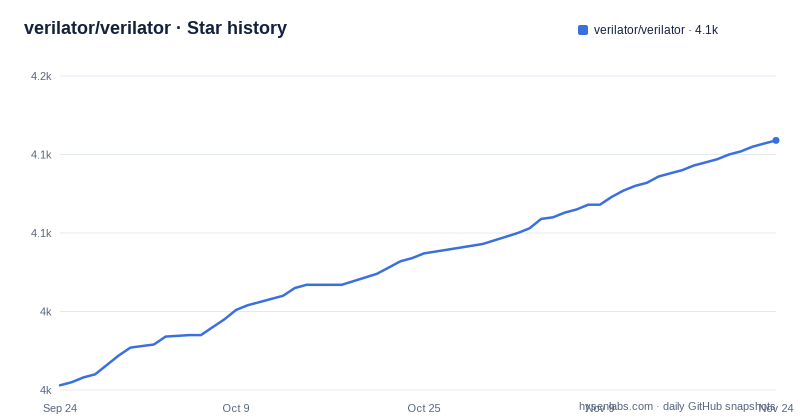
Star history
- verilator/verilator4,109 ★ · +156
| Repository | 2026-09-24 | 2026-11-24 |
|---|---|---|
| verilator/verilator | 4k | 4.1k |
156 Stars in the last 61 days, measured from the daily GitHub snapshot. Compare with other projects
Editorial analysis
The output is C++, which is why there is no interpreter in the loop
The distinction the project draws most carefully is between translating and compiling. Verilator does not translate hardware description directly into C++ or SystemC; it compiles the design into a faster, optimized model, optionally partitioned across threads, and that model is then wrapped inside a C++ or SystemC module. The stated consequences of that arrangement are the headline numbers: a single thread runs over ten times faster than a standalone SystemC model, and roughly a hundred times faster than an interpreted Verilog simulator such as Icarus Verilog. Threading the compiled model adds another factor of two to ten, putting the total between two hundred and a thousand times an interpreted simulator. Those are the project's own figures and no harness accompanies them, but the mechanism is what makes them plausible: there is no parse-and-execute cycle at run time because the design was already compiled.
The command line is shaped like a compiler, and one flag builds the whole executable
Verilator is invoked with parameters described as similar to those of a compiler or of one commercial simulator, which is the practical hint that it belongs in a build system rather than in an interactive session. The tool reads the design, performs lint code-quality checks, and can insert assertion checks and coverage-analysis points along the way, then writes header and source files, the Verilated code. From there there are two paths. One flag makes the tool generate a complete simulator executable on its own, and the other is to write your own wrapper in C++ or SystemC that instantiates the model yourself. The project also supports linking Verilator-generated libraries into other simulators, and says those libraries can optionally be encrypted, which is the mechanism behind the protected-library example directories.
Four-state and tristate handling is deliberately partial, and the text says so
The clearest statement of limits is in the same paragraph as the feature list. All design constructs are supported, and so are most verification constructs including the standard verification methodology, intra-assignment delays written in Verilog, and events. Tristate buses and unknown values are the exception: they are handled in limited contexts, in a special manner, and that manner exists for performance. The following sentence is the one to quote when someone asks whether this is a drop-in replacement for a commercial simulator: it may not be the best choice if that is what you are expecting, or if you need SDF annotation, or if you need mixed-signal simulation. That is three named exclusions rather than a general caveat, and each one is the kind of thing that is cheap to discover early and expensive to discover after a testbench has been written against it.
Six commercial simulators are named as the comparison set
The performance section compares Verilator against a named list of commercial tools: Riviera-Pro, Incisive and its successor, ModelSim and Questa, VCS, VTOC, and Pragmatic's two products. The claim is similar or better performance against those tools, and the argument that follows is not about speed at all. Because Verilator is open source, money can be spent on compute rather than on licences, so the metric that matters is simulation cycles per unit of cost rather than cycles per second. That reframing is the one to hold on to when reading the numbers, because a commercial tool with a fast licence model can still be cheaper for a small team. It is also why the project lists commercial support as an available contract alongside the free licence rather than treating support as evidence against the open one.
Twelve example directories split the same hello world four ways
The examples directory is where the tool's two axes become visible. The first axis is the build system: half the examples are driven by a makefile and half by CMake, with matching names for the same target. The second axis is the model wrapper: a hello world that links against a C++ model, one that links against a SystemC model, one that produces a complete executable with a single flag, and one that traces. Tracing appears in both build systems for both wrapper styles, and protected libraries appear in both, so the four combinations that matter are each covered once. There is also an example whose name mentions JSON, matching the documented ability to emit JSON to front-end your own tools. A directory listing like this is a better statement of scope than a feature list, because it shows exactly how many integration shapes the maintainers consider supported.
Install instructions are a website page, and distributions are tracked elsewhere
There is no install command in the repository readme, and that is deliberate rather than an omission. Installation and the package directory structure are documented on the project's own site, with the manual available in both HTML and PDF, an announcement mailing list for release notices, a forum, and an issue tracker. The badge row at the top of the readme points at where the tool is packaged across distributions, which is the practical answer for anyone who does not want to build it: most Linux distributions carry a package, and there is a container image published under the project's name with its own pull count badge. The repository itself has no GitHub releases at all, so there is no release page to check a version against, which makes the announcement list and the Changes file in the source tree the two places a version number actually appears.
The repository carries two linters and a licensing manifest for a codebase spanning decades
The top level of the tree describes how the project is built and policed rather than what it does. Build configuration is autoconf, with a configure script, a template makefile and CMake files including a package-config template and a pkg-config template. Quality tooling is unusually layered: a clang format config, a clang tidy config, a CPPLINT config, a yapf style file, a pre-commit hooks file, coverage configuration for two services, and a dev container definition for reproducible environments. Licensing is handled with a dedicated licences directory and a reuse manifest, matching the dual licence the code is offered under. Copyright runs from 2003 to 2026 under a named individual, and governance sits with a semiconductor industry consortium hosted by a software foundation rather than with a single company.
Editorial conclusion
Verilator suits a team that wants to run SystemVerilog designs fast, that is willing to write a C++ or SystemC wrapper or use the generated executable, and that measures its verification cost in licences rather than in simulation cycles. It suits a migration path away from an interpreted simulator toward compiled models, since that is the case the project describes itself as best at. It does not suit a project that needs full-fidelity four-state or tristate behaviour everywhere, SDF annotation, or mixed-signal simulation, since the project names all three as cases where another tool is the better choice. Before adopting it, decide which of your testbenches depend on unknowns propagating, check whether your verification flow depends on waveform annotation, and note that the repository publishes no GitHub releases, so version tracking happens through the announcement list and the Changes file rather than a release page.
Frequently asked questions
What is Verilator used for?
It is used to lint SystemVerilog and Verilog designs and to compile them into optimized C++ or SystemC models that run as a simulator executable or inside a wrapper you write. The compiled output is what makes it fast: a single thread is described as about a hundred times faster than an interpreted Verilog simulator, and multithreading can add another factor of two to ten.
Is Verilator free to use?
Yes. It is free software you may redistribute and modify under either the GNU Lesser General Public License version 3 or the Perl Artistic License version 2.0. Commercial support, design support and enhancement contracts are also offered separately, and the project is guided by a semiconductor consortium hosted by a software foundation.
How do I install Verilator?
Installation and package directory structure are documented on the project's website, with the manual in HTML and PDF. Most Linux distributions carry a package, which the project tracks through a distribution package service, and a container image is published under the project's name. The repository readme contains no install command itself.
Official sources
Add this badge to your README
If you maintain this project, the badge below links readers to this analysis and shows its maintenance status from the daily GitHub snapshot. Paste the markdown into your README; add ?metric=license or ?metric=stars to the image URL for a different field.

[](https://hysenlabs.com/projects/verilator-verilator)Star history chart for your README
[](https://hysenlabs.com/projects/verilator-verilator)Was this useful?