DEVOPS-WORLD: a nine-step roadmap printed above an eight-stage table that disagrees with it
The complete DevOps learning and engineering hub: roadmap, resources, tools, projects, labs, interviews, troubleshooting, production, and career guides.
At a glance
- What is it?
- A documentation-only learning hub organised into five numbered directories, with a stage table, a one-line engineering path, a troubleshooting area and interview material. The two roadmap representations do not match, the areas table promises three sections that have no directory, and the policy list omits the licence that sits in the root.
- Who is it for?
- Use it as a map rather than a curriculum. It is genuinely well organised for someone who already knows where their gaps are, because the by-area table lets you jump straight to troubleshooting or incidents without walking eight stages, and the seven-step loop it describes is better advice than most curricula give.
- Can I use it commercially?
- Check first. The repository uses a licence we do not classify automatically, so read its LICENSE file before any commercial use.
- Is it still maintained?
- Yes. The repository last received commits 18 days ago.
- What is it written in?
- GitHub does not report a main language for this repository.
Answers come from the project's GitHub data, last synced on November 24, 2026, and from our analysis. They are not legal advice.
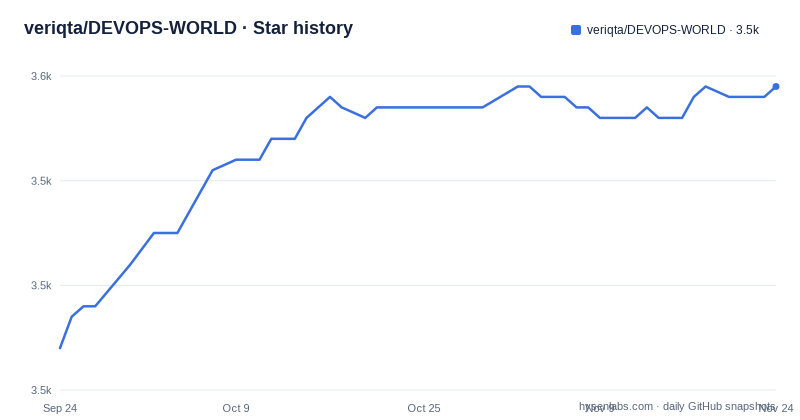
Star history
- veriqta/DEVOPS-WORLD3,549 ★ · +25
| Repository | 2026-09-24 | 2026-11-24 |
|---|---|---|
| veriqta/DEVOPS-WORLD | 3.5k | 3.5k |
25 Stars in the last 61 days, measured from the daily GitHub snapshot. Compare with other projects
Editorial analysis
The one-line roadmap has nine steps and the table has eight
Two representations of the same path sit a few lines apart, and they do not agree. The table has eight numbered stages. The arrow line has nine items:
Foundations → Cloud → Containers → Infrastructure as Code → CI/CD → Kubernetes → Observability → Security → Production OperationsCount them: nine. And the disagreement is not only the count. In the table, stage six is availability, scaling, incidents and recovery, which is production operations, and stage seven is identity, secrets, supply-chain security and policy as code, which is security. The arrow line puts security before production operations. So the one-line summary reverses the order of the last two stages. The eighth stage has no counterpart in the arrow line at all, since platform engineering, cost management, governance and applied operations are absent from it. A reader who plans a study schedule from the arrow line will reach security after operations, and will not discover the final stage exists until they open the table. The table is also more careful than the arrow line about how to enter it, because it carries a third column stating what each stage leaves you able to do: work confidently from the command line, build and run foundational infrastructure, provision infrastructure and automate delivery, deploy and manage containerised workloads at scale, observe systems and measure reliability, operate and troubleshoot production systems, apply security throughout the delivery lifecycle, and explore advanced specialisations. And the text above the table tells you not to walk it blindly: follow the stages in order if you are new, and if you already have experience, start at the stage matching your current gap. The arrow line offers no such guidance, which is the other reason to trust the table.
The areas table promises six, the root directory holds five
The repository describes itself as organised by purpose, and gives a table of six areas: learning resources, projects and labs, engineering handbooks, troubleshooting, production incidents, and interview preparation. The root of the repository contains five numbered directories and those are the only content directories:
00.  ARCHIVE RESOURCES/
01. COMPLETE BEGINNERS GUIDE TO ALL TOOLS/
02. PROJECTS/
03. LEARNING RESOURCES/
04. INTERVIEWS/
Three of the six table rows have no directory at their level: engineering handbooks, troubleshooting and production incidents. They may well exist nested inside the numbered directories, and the readme does not say. Two directories that do exist have no row in the table: the archive of resources and the complete beginners guide to all tools, which is a substantial-sounding document with no description anywhere in the readme. So the map and the territory differ in both directions, and the two unmapped directories are exactly the two a newcomer would most want to know about. What the table does describe is precise. Learning resources are structured concepts, commands, examples and foundational lessons. Projects and labs are guided builds with verification, failure testing and cleanup. Engineering handbooks are focused references for tools, platforms and operational practices. Troubleshooting is symptom-led diagnosis with evidence collection, fixes and prevention. Production incidents are realistic failure scenarios with investigation paths and lessons learned. Interview preparation is technical questions, scenarios, system design and practical exercises. Reading that list, two of the five directories map cleanly onto rows of it, the projects directory and the interviews directory. The other three rows are the ones with no top-level home.
One directory carries two spaces after its number
Look at the numbering again. Directories one through four each have a single space between the number and the following characters: a dot, then a space, then the name. The first one has two:
00. ARCHIVE RESOURCES/A stray extra space, in the name of the directory that holds the archive, which is the one place where a stray character is easiest to miss and easiest to break a link with. Nothing in the readme links to it, which is exactly why it has survived. It matters more than it looks because the whole layout depends on directory names being stable: the readme's own links encode spaces as percent-escapes, so every internal link is written by hand against these exact names, and a name that gains or loses a character invalidates any link someone wrote to it. A contributor creating directory six has no way of knowing that one of the first five has a typo they should not copy.
Every internal link is hand percent-encoded
The seven foundation links are written with their spaces encoded:
1. [Computer fundamentals](03.%20LEARNING%20RESOURCES/01.%20Computer%20Fundamentals)
2. [Linux](03.%20LEARNING%20RESOURCES/02.%20Linux)
So the path contains the parent directory with its two spaces, then a numbered subdirectory with its own space. Encoding by hand is required because the directory names contain spaces, and every contributor adding an eleventh link has to do the same arithmetic correctly. It also means the links are brittle in a second way: they name directories without a trailing separator, so whether they resolve to a listing or to a 404 inside a viewer depends on the host. None of this is unusual for a documentation repository built by hand, and none of it is a reason to distrust the content. It is a reason to expect link rot, which is exactly why the contribution guide asks people to report broken links as a first-class contribution.
The description calls it complete, the readme says sections are still expanding
The repository's own description calls it the complete DevOps learning and engineering hub. The readme says something more careful, in a note under the areas table: repository sections are expanded continuously, and some topics may be planned or under active development. That is the more honest of the two statements and it is the one a reader should hold. A learning path implies completion, and a stage table with eight rows reads like eight finished stages regardless of what the note says. So the practical reading is that the structure exists and is being filled in, that some stages will have deeper material than others, and that the stage you are about to spend a month on may be thinner than the stage before it. The default branch was pushed on 2026-09-30, so it is being worked on, which cuts both ways: active means growing and active means changing under you.
The four project policies omit the licence
There is a licence file in the repository root. The readme never mentions it. The policy list is explicit about what exists, with four entries: a contribution guide, a code of conduct, a security policy and a support guide. Each is linked, each has a file, and each is given a short paragraph explaining when to use it, including the instruction not to open a public issue for a vulnerability and to follow the security document instead. That care is visible everywhere except licensing. The repository's own metadata records no licence value either, so a tool reading the repository rather than the readme learns nothing about terms, and a reader who never opens the root file assumes there are none. For a document set you might want to translate, republish or fold into internal onboarding material, that assumption is the expensive one. The contribution guidance is as specific as the policy list, and it describes what the maintainers actually want changed: correcting technical errors or broken links, improving explanations and diagrams, adding reproducible labs or troubleshooting cases, updating obsolete commands or practices, adding official documentation and trustworthy references, and improving accessibility, navigation and consistency. Four of those six are maintenance of existing material rather than new material, which fits a repository that is mostly prose about other projects tools. The instruction to update obsolete commands is the one that matters most for a curriculum: any content here describing a command line tool has a shelf life, and the repository is honest that it needs someone to keep replacing it.
The first heading is a greeting and the last line stops mid-word
The file opens like a slide deck rather than a readme:
# HAPPY LEARNING 📌

# DEVOPS-WORLD
The first heading is a greeting with a pin emoji, and the project's name comes second. Then at the other end, the closing section asks four things of a reader who found the material useful, and the fourth of them ends partway through a word, at the word improve. So the document bookends a very carefully structured body with a cheerful opening and a truncated list. Neither is serious on its own. Together they are a useful signal about how the file was assembled: the middle is deliberately maintained, with a stage table, an areas table, a principles list and four policy documents, while the top and bottom are decoration that nobody has revisited. The opening paragraphs are better than the greeting suggests, and they set the tone for the whole file. The readme describes the hub as connecting individual tools to the engineering decisions behind reliable production systems, and it says the repository covers seven broad areas from Linux and scripting through to platform engineering and applied operations. Then it makes the claim that separates this from a link list, saying plainly that this is not a list of tools to memorise, and that the goal is to learn how systems behave, how they fail, and how engineers operate them responsibly. That sentence is the thesis, and everything in the stage table is supposed to follow from it.
The core of it is a seven-step loop that tells you to break things
Strip away the tables and the most useful thing in the file is a seven-step loop that applies at every stage of the path: learn the concept, build a small working system, verify its behaviour, break it deliberately, troubleshoot with evidence, document the failure and recovery, then explain what would change in production. Four of those seven steps are about failure rather than success, and step four asks for it deliberately rather than waiting for it. That is the difference between a tutorial and a curriculum, and it is reinforced twice more: the engineering principles list asks how a component can fail and what evidence would reveal it, and the project guidance asks for common mistakes, failure scenarios, troubleshooting evidence and cleanup instructions in every build. For a reader who already works in infrastructure, that loop is the part worth copying into their own team's practice. The questions that go with the loop are worth reading as a checklist you can apply to any system, not just the ones in this repository. Ask what is happening inside the system. Ask why this component exists rather than assuming it does. Ask what depends on it. Ask how it can fail. Ask what evidence would reveal the failure. Ask how you would contain it, recover from it and prevent it. And ask whether the approach would be safe and maintainable in production. Six of the seven are diagnostic and the last is a judgement call, which is the right weighting for the final question in a list aimed at people who will be on call.
Editorial conclusion
Use it as a map rather than a curriculum. It is genuinely well organised for someone who already knows where their gaps are, because the by-area table lets you jump straight to troubleshooting or incidents without walking eight stages, and the seven-step loop it describes is better advice than most curricula give. Three things to know before you commit a study plan to it. The readme says outright that sections are expanded continuously and that some topics are planned or under development, so treat any single stage as a snapshot. The two roadmap summaries in the file disagree with each other on the order of the last two stages, so follow the numbered table rather than the arrow line. And the licence is not stated anywhere in the readme even though a licence file sits in the root, which matters if you intend to reuse or redistribute any of the material it holds.
Frequently asked questions
What is DEVOPS-WORLD and who is it for?
A documentation hub organised into five numbered directories covering a learning path, projects and labs, engineering handbooks, troubleshooting, production incidents and interview preparation. The readme maps it to five audiences: newcomers who follow the stages in order, people building a portfolio, candidates preparing for interviews, engineers already working in infrastructure who want the handbooks and incident cases, and contributors.
What does the DEVOPS-WORLD learning path cover?
Eight numbered stages: command line fundamentals with Linux, networking, Git, Bash, Python, YAML and JSON; cloud, web servers, databases and Docker; Terraform or OpenTofu, Ansible and CI/CD; Kubernetes, Helm and GitOps; metrics, logs, traces, alerting and reliability; availability, scaling, incidents and recovery; identity, secrets, supply-chain security and policy as code; and platform engineering, cost management, governance and applied operations.
Does DEVOPS-WORLD contain runnable labs?
The readme describes a projects and labs area offering guided builds with verification, failure testing and cleanup, and lists ten things a project should document. The repository itself contains no source directories, build files or test configuration, and its recorded primary language is empty, so the material is documentation describing builds rather than code you run.
What licence is DEVOPS-WORLD under?
The readme does not say. It lists four project policies, a contribution guide, a code of conduct, a security policy and a support guide, and a licence file sits in the repository root without being referenced anywhere in the readme. The repository's own metadata also records no licence value, so terms have to be established by reading that file directly.
Official sources
Add this badge to your README
If you maintain this project, the badge below links readers to this analysis and shows its maintenance status from the daily GitHub snapshot. Paste the markdown into your README; add ?metric=license or ?metric=stars to the image URL for a different field.

[](https://hysenlabs.com/projects/veriqta-devops-world)Star history chart for your README
[](https://hysenlabs.com/projects/veriqta-devops-world)Was this useful?