SAMExporter: seven model families, two files each, and five runtime choices
Export and run SAM, MobileSAM, EfficientSAM, SAM 2/2.1, and SAM 3 as ONNX for portable image segmentation
At a glance
- What is it?
- The project exports the Segment Anything family to ONNX in two halves, an encoder and a decoder, and it pins the upstream model repositories by commit hash so an export cannot change under you. The runtime is an install extra, with five of them, and Windows loses the model simplifier to a path length limit.
- Who is it for?
- This suits someone who has a model checkpoint and needs it to run somewhere that is not PyTorch, such as an ONNX Runtime target on hardware they do not want to install a deep learning stack on. It is a poor fit if you want a hosted segmentation API, and a poor fit on Windows if you need the graph simplification step, since that path is documented as unavailable.
- Can I use it commercially?
- Yes. MIT is a permissive licence: you can use, modify and sell software built on it, as long as you keep its copyright and licence notices.
- Is it still maintained?
- Yes. The repository last received commits 77 days ago.
- What is it written in?
- Mainly Python, according to GitHub's language statistics.
Answers come from the project's GitHub data, last synced on November 15, 2026, and from our analysis. They are not legal advice.
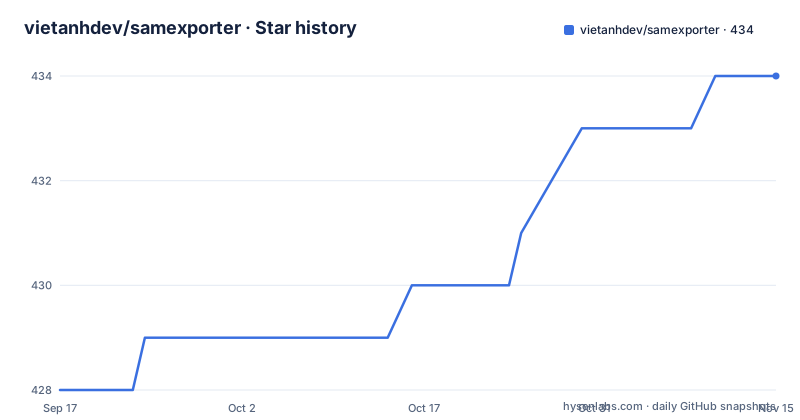
Star history
- vietanhdev/samexporter434 ★ · +6
| Repository | 2026-09-17 | 2026-11-15 |
|---|---|---|
| vietanhdev/samexporter | 428 | 434 |
6 Stars in the last 59 days, measured from the daily GitHub snapshot. Compare with other projects
Editorial analysis
Every model exports as two files, and the decoder flag changes the output shape
The structure is the same for every family, and it is worth understanding once rather than per model. A segmentation model of this kind is expensive to run and cheap to call repeatedly, so the export splits into an encoder that processes the image and a decoder that turns a prompt into a mask. You run the encoder once per image and the decoder many times per prompt, and the two are separate ONNX files.
The encoder export takes a checkpoint path, an output path, a model type, an optional quantized output path, and a flag for baking in preprocessing:
python -m samexporter.export_encoder \
    --checkpoint original_models/sam_vit_h_4b8939.pth \
    --output output_models/sam_vit_h_4b8939.encoder.onnx \
    --model-type vit_h \
    --quantize-out output_models/sam_vit_h_4b8939.encoder.quant.onnx \
    --use-preprocess
The decoder export takes the same shape, with one extra flag that has a real behavioural effect. Passing it returns a single mask; removing it returns multiple mask proposals instead. That is a genuine choice rather than a default, because a single mask is what most downstream code wants while multiple proposals preserve ambiguity.
Quantization is available on both halves through the extra output path, and the supported table lists separate quantized variants of the base model family as smaller and faster.
The inference command then takes both model paths, an image, a prompt file, and an output path, with an optional flag to show a preview. Prompts are supplied as a JSON file rather than as command line arguments, which is what makes multi-prompt experiments practical.
Submodules pin the upstream repos by commit hash, and the wheel cannot use them
The most careful decision in the project is the one about reproducibility. A source checkout clones with submodules, and the reason given is that the official model repositories are pinned so that an upstream main branch cannot silently change an export.
Three hashes are named, one per family, and the date they were checked is stated rather than left implied. The first-generation models are at one commit, the second generation and its revision at a second, and the third generation at a third. These are described as the latest upstream main revisions checked on a specific day in August 2026.
Then comes the part that matters for anyone installing from a package index rather than cloning. Export commands prefer those checkouts, and they retain installed-package fallbacks for the published wheel. So the pinning is real when you build from source and best-effort when you install from the index, because a wheel has no submodules in it.
That is not a flaw so much as a boundary. The two routes give you different guarantees, and the documentation is explicit about which is which rather than letting you assume the wheel behaves like a clone.
The checkpoint files themselves are named in the tree, with the first-generation base, large, and huge variants and the mobile checkpoint alongside them, and the download links go back to the original hosts rather than to a mirror the project controls.
The runtime is an install extra, and there are five of them
Inference is not a single decision in this project, and the packaging reflects that. The core dependencies are pinned tightly and cover export rather than runtime: a specific ONNX version, a specific OpenCV build, the original segmentation package, specific torch and torchvision versions, plus a text cleanup library, a regex library, and the ONNX script compiler used during export.
Everything for actually running a model is an extra. The CPU extra installs one pinned runtime version. The other four are the GPU runtime, an OpenVINO build, a DirectML build, and one further hardware-specific target, each with its own version range. There is a development extra as well, which combines the CPU runtime with linting, hooks, and a test runner.
So the choice is made at install time rather than at run time, and picking wrong means reinstalling. That is the opposite of a library where you select a backend at startup, and it is worth knowing before you build a deployment image around it.
The export extra is separate again and contains exactly one package, the ONNX graph simplifier, pinned to a version. Its own comment explains the Windows situation, which is the next thing worth reading.
Windows loses the model simplifier to a 260 character path limit
There is a single documented platform problem, and the project names both the cause and the two workarounds rather than leaving you to discover it at install time.
The ONNX graph simplifier is used during export, and it has no pre-built wheel for Windows. The underlying reason is stated in the packaging comment: the source tarball exceeds the Windows 260 character path limit, so pip cannot unpack it into a temporary build directory.
The note therefore applies only if you intend to export models and want simplification. If you only run inference on Windows, the CPU extra is enough. If you do want to export, the instruction is to install the export extra alongside the runtime extra, or to enable Windows long path support before installing, which changes the limit pip works within.
That is a narrow, well-scoped caveat, and it is the kind of thing that turns into an afternoon of confusion if it is only documented in a comment.
The supported Python range is stated in two places that agree: the metadata requires 3.11 or newer, and the classifier list names 3.11, 3.12, and 3.13 with an operating system classifier of independent, which is consistent with a package that only needs ONNX Runtime at run time.
EfficientSAM is the one family you do not export, and text prompts belong to SAM3 alone
Two rows of the supported table are structurally different from the rest, and treating them the same wastes an afternoon.
EfficientSAM already ships as ONNX. The upstream project publishes official split encoder and decoder files, and the documentation notes the upstream project and models are Apache-2.0 licensed while the other model families carry their own terms. There is no conversion step. You download the pair, roughly 40 MB combined for the smallest variant, and run them. The only change required to run the larger of the two variants is pointing the same command at the two different model paths.
The runtime does need to be told, because the architecture is different, which is why a variant selector exists on the inference command and why this family has its own value rather than reusing the base one.
The other structural difference is prompt type. Every family except the third-generation one takes a point or a rectangle. SAM3 takes text as well, and the table marks that as open-vocabulary text-driven segmentation. So a workflow that depends on prompting by description is only available on one model here, which is a meaningful limit if you are choosing a segmentation model by how you want to prompt it rather than by its accuracy.
The remaining families differ only in size and provenance: a lightweight mobile variant described as fast on CPU, quantized variants of the original family, and four sizes in each of the second generation and its revision.
The shell scripts are the honest list of what is supported
The top level of the repository is mostly shell scripts, and reading their names is a faster way to understand the scope than the supported table is.
There are five conversion scripts, one per family plus a single script that runs them all. There are four inference scripts matching those families. There is a download script that fetches all the checkpoints. And there are two test scripts, one covering all models and one covering a wider set of cases.
That last pair is what you would run to check an export, and their presence alongside sample outputs and a visual results directory suggests the project expects people to compare masks by eye as well as by assertion.
The directory layout mirrors the same split. There is the package itself, a directory for the second-generation model, a directory for the third, a directory for model configuration files, a vendored third-party directory that the submodule pinning populates, and a separate directory for third-party licences, which is also wired into the package metadata as a licence file. That is a detail worth noting: a project that exports someone else's models is explicit about carrying their terms alongside its own.
The project points at two external resources beyond the repository. Documentation is hosted separately, and the exported models are published on a model hosting platform under the maintainer's organisation, which is the path to use if you would rather not run the export yourself.
Editorial conclusion
This suits someone who has a model checkpoint and needs it to run somewhere that is not PyTorch, such as an ONNX Runtime target on hardware they do not want to install a deep learning stack on. It is a poor fit if you want a hosted segmentation API, and a poor fit on Windows if you need the graph simplification step, since that path is documented as unavailable. Before you install, check three things: which runtime you actually need, since the extras are separate packages for CPU, CUDA, OpenVINO, DirectML, and a further hardware target, and picking the wrong one is a reinstall rather than a flag; that your Python is 3.11 or newer, which the metadata requires and the classifiers list as 3.11, 3.12, and 3.13; and whether you are exporting from source or installing the wheel, because the pinned submodule checkouts only exist in a source checkout and the wheel falls back to installed packages. There is one release, v0.5.0 from 2026-08-30, which is also the date of the last push.
Frequently asked questions
What is SAMExporter and which models does it support?
It exports and runs the Segment Anything model family to ONNX for ONNX Runtime. The supported list covers the original base, large and huge variants and their quantized forms, MobileSAM, EfficientSAM in its two sizes, SAM2 and SAM2.1 in four sizes each, and SAM3.
How does SAMExporter keep exports reproducible?
A source checkout clones with submodules, which pin the upstream model repositories to specific commit hashes per family, so an upstream main branch cannot silently change an export. Export commands prefer those checkouts and keep installed-package fallbacks for the published wheel, so the guarantee is strongest when you build from source.
Why does the ONNX export fail on Windows?
The optional graph simplifier has no pre-built wheel for Windows because its source tarball exceeds the 260 character path limit, so pip cannot unpack it. Exporting on Windows therefore needs the export extra installed alongside the runtime extra, or Windows long path support enabled first.
Do I need to export EfficientSAM with SAMExporter?
No. EfficientSAM already ships as official split ONNX encoder and decoder files, which you download and point the inference command at. It does need the runtime variant selector because its architecture differs from the other families, and its upstream project and models are Apache-2.0 licensed.
Which SAMExporter model supports text prompts?
SAM3, whose table entry lists text alongside point and rectangle as open-vocabulary text-driven segmentation. Every other supported family takes a point or a rectangle prompt only.
Official sources
Add this badge to your README
If you maintain this project, the badge below links readers to this analysis and shows its maintenance status from the daily GitHub snapshot. Paste the markdown into your README; add ?metric=license or ?metric=stars to the image URL for a different field.

[](https://hysenlabs.com/projects/vietanhdev-samexporter)Star history chart for your README
[](https://hysenlabs.com/projects/vietanhdev-samexporter)Was this useful?