Godot Aseprite Wizard for Godot 4 Animation Imports
Godot Editor plugin to help import Aseprite animations to AnimationPlayers, AnimatedSprites and SpriteFrames.
At a glance
- What is it?
- Godot Aseprite Wizard is a Godot 4 editor plugin that imports Aseprite files into AnimationPlayer, AnimatedSprite2D/3D, SpriteFrames, and texture workflows. It supports tags, directions, slices, timing conversion, and multiple import paths, but its documentation points users to an external guide rather than providing installation steps.
- Who is it for?
- Godot Aseprite Wizard is appropriate for Godot 4 projects that regularly bring Aseprite animations into AnimationPlayer, AnimatedSprite2D/3D, or SpriteFrames workflows, especially projects using tags, frame directions, slices, or mixed-layer output. It is a poor fit for a team that needs a fully documented self-contained installer in the repository or expects automatic imports to replace project-specific animation decisions.
- Can I use it commercially?
- Yes. MIT is a permissive licence: you can use, modify and sell software built on it, as long as you keep its copyright and licence notices.
- Is it still maintained?
- Yes. The repository last received commits 82 days ago.
- What is it written in?
- Mainly GDScript, according to GitHub's language statistics.
Answers come from the project's GitHub data, last synced on November 6, 2026, and from our analysis. They are not legal advice.
Star history
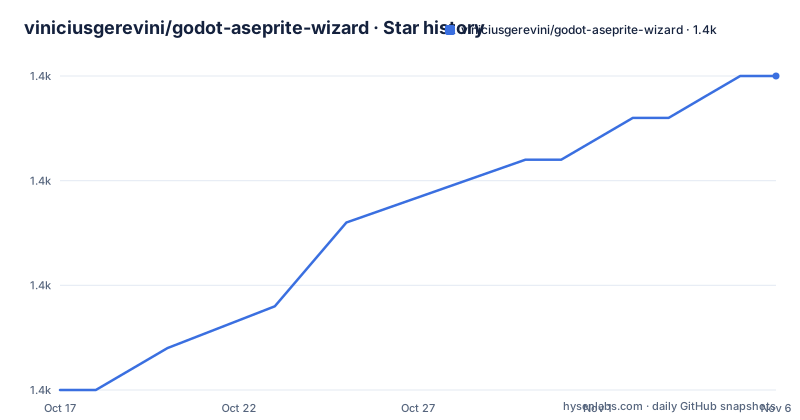
- viniciusgerevini/godot-aseprite-wizard1,400 ★ · +15
| Repository | 2026-10-17 | 2026-11-06 |
|---|---|---|
| viniciusgerevini/godot-aseprite-wizard | 1.4k | 1.4k |
15 Stars in the last 20 days, measured from the daily GitHub snapshot. Compare with other projects
Editorial analysis
Why Godot Aseprite Wizard Targets Animation Handoffs
Godot Aseprite Wizard addresses a specific gap between producing pixel-art animation in Aseprite and using that animation inside a Godot 4 project. The README describes support for AnimationPlayer nodes, AnimatedSprite2D and AnimatedSprite3D, and standalone SpriteFrames resources. That makes it useful for developers who already have Aseprite source files but need editor-facing options for importing, changing, and re-importing them. It also covers static Aseprite files through an Aseprite Texture importer and supports tilemap layers through an Aseprite Tileset Texture importer.
The plugin does not treat every Aseprite file as the same kind of asset. A file can become SpriteFrames, a static image containing only its first frame, or an AtlasTexture based on tilemap layers. That distinction matters because the intended Godot resource and the animation workflow are not interchangeable. A developer working on sprite animation can select AnimatedSprite and receive SpriteFrames with AtlasTexture entries. A project using AnimationPlayer can import animation tracks onto supported 2D and 3D nodes. This gives the importer several paths rather than imposing one animation representation.
Aseprite Tags, Directions, and Timing Become Godot Animation Data
The plugin reads Aseprite animation structure rather than treating the file as a flat sequence of images. The README states that each Aseprite Tag is separated into its own animation. If no tags are defined, everything is imported as a default animation. This supports projects that organize separate actions such as walking, attacking, or idling in one Aseprite file without manually splitting the result after import.
It also supports forward, reverse, ping-pong, and ping-pong reverse animation directions. Loopable and non-loopable behavior can come from Aseprite repeat settings or tags. For AnimatedSprite imports, the plugin converts Aseprite frame duration, measured in milliseconds, into Godot animation FPS. That is a significant feature for timing-sensitive pixel art, because the source duration is not merely copied as a visual sequence. The plugin instead attempts to preserve the timing defined in Aseprite when constructing the Godot animation.
Layers can be filtered with regex, and slices can restrict an import to a region of the file. These controls are useful when a source file contains construction layers, alternate versions, or artwork outside the region needed by the game. They also make the plugin more suitable for asset pipelines than a basic image importer. The documentation does not describe how regex matching is configured in the editor, so users should confirm the exact controls in the linked documentation before designing a production naming scheme.
AnimationPlayer Imports Preserve Existing Tracks
The AnimationPlayer path has a specific design constraint: imported tracks can be added and removed without removing other existing tracks. The README says that multiple files may be imported into the same AnimationPlayer, or that each layer may receive its own Sprite or TextureRect and AnimationPlayer. Animation libraries are also supported. This is materially different from replacing the entire animation resource with a newly generated file.
That behavior matters for a Godot project whose AnimationPlayer contains unrelated tracks, such as visibility, transforms, or values owned by other code. A user can re-import an Aseprite animation without automatically discarding those unrelated animation tracks. The trade-off is that an import can still change the specific animation data and track organization generated by the plugin, so a project should inspect the resulting AnimationPlayer after each source change.
The README does not document conflict resolution when an imported track has the same name as an existing track, nor does it provide a rollback procedure. It also does not specify the exact menus, dialog fields, or filesystem actions used to add a source file. The external documentation is therefore part of the adoption path, not an optional supplement. The repository includes `docs/`, but the README does not identify the exact document files or reproduce their setup instructions.
Installing the Godot 4 Plugin and Performing a First Import
The README does not provide installation commands, an asset-store procedure, or a complete first-import walkthrough. It directs users to the project documentation for more details and separates the Godot 4 code from the `godot_3` branch. The README does not give exact menu paths or plugin file locations.
The first-use workflow that can be confirmed is therefore high level: obtain the Godot 4 version of the plugin through the documentation or repository, enable it in Godot, and use the importer or inspector docks shown in the project documentation. For an animated sprite, the documented output is a SpriteFrames resource containing AtlasTexture frames. For AnimationPlayer, the plugin supports Sprite2D, Sprite3D, and TextureRect targets and can add animation tracks. A static Aseprite import uses only the first frame, while tilemap layers are handled by a separate texture importer.
The repository layout includes `addons/`, `project.godot`, `default_env.tres`, `test/`, and `docs/`, which confirms that this is a Godot project with an addon directory and project resources. It does not establish the version of Godot required beyond the explicit `godot_4` default branch. Users should verify compatibility with their installed Godot release and follow the linked documentation for enabling the addon.
Development-Time Plugin, Multiple Asset Outputs, and Upgrade Boundaries
Aseprite Wizard is intended to be present during development rather than required in the shipped game. The README states that the plugin can be removed after development and that animations already imported should continue to work as expected. This is a useful deployment boundary, but it does not mean the generated resources are trivial to rebuild. The project still needs to retain or recreate the imported SpriteFrames, textures, and animation resources needed by the game.
The repository is not archived, and the last push was on 2026-08-17. Recent releases listed include `v9.8.0-4`, `v9.7.0-4`, and `v9.6.0-4`. Those release labels identify Godot 4 releases, but the README does not provide upgrade notes beyond the presence of `CHANGELOG.md`. It also does not state whether imports made with older plugin versions are migrated automatically. An upgrade should therefore be treated as a project-file change requiring inspection, especially when existing AnimationPlayer tracks or animation libraries are involved.
The MIT license permits use and modification under its terms, subject to the license text and notices. The README does not provide legal interpretation or detail plugin support commitments. The practical upgrade cost is mainly reviewing import output and checking that tags, directions, timing, and track names still match the project.
When a Simpler Godot Import Path Is Better
Godot Aseprite Wizard is the wrong tool for a project that only needs ordinary static textures or a very small number of manually configured animations. The plugin's value comes from repeated editor workflows: tags become separate animations, frame durations are converted to FPS, layers can be filtered, slices can narrow the imported region, and Aseprite directions are mapped to Godot animation behavior. A project that does not use these source-side conventions gains less from the extra import decisions.
It is also not a general-purpose Aseprite viewer or an asset pipeline replacement. The README does not document batch processing, command-line operation, CI integration, or a headless import workflow. Those omissions make it a weaker fit for teams that require automated asset generation outside the Godot editor. In such a project, the plugin's editor importers and inspector docks may not match the required process.
The most important comparison is not another named plugin. It is the difference between using a dedicated Aseprite-to-Godot mapping layer and manually creating Godot resources. The former reduces repeated conversion work when Aseprite structure carries meaningful animation data. The latter may be simpler for isolated assets, but it leaves the developer responsible for reproducing frame timing, tag separation, directions, and layer filtering by hand.
Editorial conclusion
Godot Aseprite Wizard is appropriate for Godot 4 projects that regularly bring Aseprite animations into AnimationPlayer, AnimatedSprite2D/3D, or SpriteFrames workflows, especially projects using tags, frame directions, slices, or mixed-layer output. It is a poor fit for a team that needs a fully documented self-contained installer in the repository or expects automatic imports to replace project-specific animation decisions. Before adoption, verify the external documentation against the exact Godot 4 version in use, inspect how existing tracks and animation libraries will be modified, and confirm that the generated frame durations and SpriteFrames structure match the project.
Frequently asked questions
Does Godot Aseprite Wizard support Godot 4?
Yes. The default branch is `godot_4`, and the README states that this branch supports Godot 4. Godot 3 documentation and code are kept on the separate `godot_3` branch.
Which Godot nodes can receive Aseprite animations?
The README lists AnimationPlayer targets including Sprite2D, Sprite3D, and TextureRect, plus AnimatedSprite2D and AnimatedSprite3D. It also supports importing a standalone SpriteFrames resource.
Can Godot Aseprite Wizard preserve Aseprite frame timing?
For AnimatedSprite imports, the README states that frame duration defined in milliseconds in Aseprite is converted to Godot animation FPS. This is intended to keep the timing of the imported animation aligned with the Aseprite source.
Official sources
Add this badge to your README
If you maintain this project, the badge below links readers to this analysis and shows its maintenance status from the daily GitHub snapshot. Paste the markdown into your README; add ?metric=license or ?metric=stars to the image URL for a different field.

[](https://hysenlabs.com/projects/viniciusgerevini-godot-aseprite-wizard)Star history chart for your README
[](https://hysenlabs.com/projects/viniciusgerevini-godot-aseprite-wizard)Was this useful?