Codenotch reads the credentials your other coding tools already stored, which is the design, not a side effect
A macOS app that pins usage limits from Claude Code, Cursor, Codex, and Antigravity to a screen edge.
At a glance
- What is it?
- A Swift menu bar app that pins each coding assistant's rate limit to a screen edge as a ring, with a Rust and Tauri 2 port for Windows alongside it. The provider table is the honest document here: it names where every number comes from, including four services that need an explicit sign-in inside the app's own embedded web view, and a dozen credential paths that belong to other tools on your machine.
- Who is it for?
- Codenotch suits you if you run several paid coding assistants at once and have stopped noticing which one is throttled. Four things to check first.
- Can I use it commercially?
- Yes. MIT is a permissive licence: you can use, modify and sell software built on it, as long as you keep its copyright and licence notices.
- Is it still maintained?
- Yes. The repository received new commits within the last day.
- What is it written in?
- Mainly Swift, according to GitHub's language statistics.
Answers come from the project's GitHub data, last synced on November 15, 2026, and from our analysis. They are not legal advice.
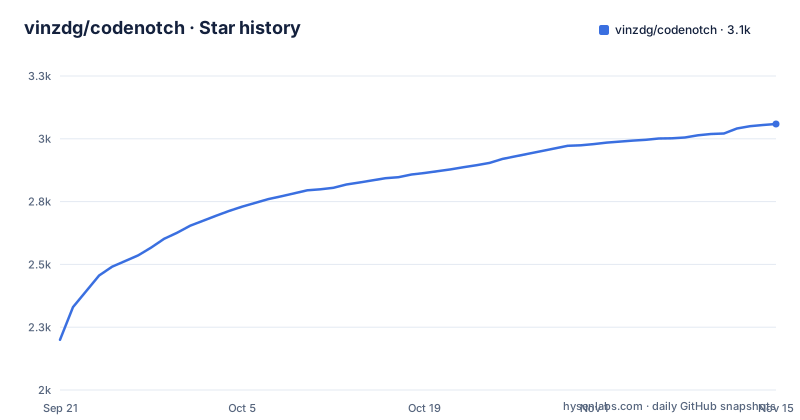
Star history
- vinzdg/codenotch3,059 ★ · +859
| Repository | 2026-09-21 | 2026-11-15 |
|---|---|---|
| vinzdg/codenotch | 2.2k | 3.1k |
859 Stars in the last 55 days, measured from the daily GitHub snapshot. Compare with other projects
Editorial analysis
The description names four providers, and the table covers seventeen
The repository's summary field says the app pins usage limits from Claude Code, Cursor, Codex and Antigravity to a screen edge. That is four.
The table of what it reads is much longer. Alongside those four it covers DeepSeek Platform, GLM, MiniMax, QianwenAI, Ollama as a local runtime, LM Studio as a local runtime, Grok, OpenCode, Command Code, GitHub Copilot, Kimi, Kiro, Amp and Apify, and the list is visibly still going.
So the summary undersells the project by a wide margin, which is the usual direction for a summary field written when a feature list was two rows long.
Two packaging facts sit with it. The Mac build is a universal binary requiring macOS 15 or later, the project is MIT licensed, and the app updates itself after first launch. The stated accuracy goal is worth noting because it is a constraint on the design: Claude's ring is described as showing the same current session window that Claude Code's own `/usage` command leads with, so the two are supposed to never disagree. That only holds because the app defers to whatever the tool already reports rather than computing its own window.
Credentials come from other tools' auth files, by design, in about a dozen places
This is the part to read before installing, and the project is upfront about it rather than burying it.
Each provider is authenticated with a session some other tool already owns. GitHub Copilot uses the GitHub CLI session on the machine, from `gh auth login`. Kimi reads `~/.kimi-code/credentials/kimi-code.json`. Kiro reuses the kiro-cli session already present. Amp reads `~/.local/share/amp/secrets.json`. Apify reads `~/.apify/auth.json`. Command Code uses the key its app writes to `~/.commandcode/auth.json`. OpenCode uses the `opencode-go` key it stores on sign-in. GLM borrows a key from whichever of Claude Code's `settings.json`, ZCode or OpenCode happens to hold one.
The Claude chain is the most layered: Claude Desktop's own cached usage response where Desktop is running and signed into the same account, then Claude Code's own `/usage` asked of the installed `claude`, then the OAuth token in the login keychain against the endpoint that command uses.
Grok is the one that goes furthest. The app renews an expired session in memory from the refresh token in the file, the way the CLI would, and states that the file itself is never written. Read-only in the sense that matters most, but not read-only in the sense of touching only its own state.
The provider table grades its own sources, and four services need a sign-in in its web view
The Source column is the most useful thing in the documentation because it is not uniform. It carries several distinct labels, and the differences are honest ones.
Most providers are marked official. Four are marked as derived from official console or Platform responses rather than official outright: DeepSeek Platform, MiniMax for its in-app sign-in, QianwenAI, and Amp's free-allowance percentage alongside its official subscription percentages. Antigravity is marked official where licensed and otherwise a request count, with the fallback being a plain count when neither its local language server nor Google's quota endpoint will answer for the account. Ollama and LM Studio are marked local runtime.
The derived label usually comes with a mechanism you should know about. DeepSeek Platform, MiniMax and QianwenAI all require an explicit sign-in inside Codenotch's own WKWebView, meaning the provider's login page is hosted by the app and your password for that service is typed into it. GLM, MiniMax's Coding Plan route and OpenCode instead take a key you supply or that another tool already holds.
One more line deserves attention in the local runtime rows: Ollama's entry mentions optional response capture, which adds thinking and generation speed, and LM Studio's figures come partly from parsing its server log.
Preview builds are ad-hoc signed, so you have to clear quarantine yourself
The stable Mac download is signed and notarized, and the README tells you to take it unless you have a reason not to. The preview channel is a different story.
To try unreleased `main` without an Xcode install, there is a preview build rebuilt from every commit, with the Package workflow keeping a per-commit disk image on each of its runs. Neither is notarized. They are ad-hoc signed, and the stated reason is that the Developer ID certificate exists on one machine.
The consequence lands on the user. macOS quarantines the download, and the fix is one command, run once after dragging the app to Applications:
xattr -dr com.apple.quarantine /Applications/Codenotch.appThe README also pre-empts a specific misdiagnosis: if macOS says the app is damaged, that is the quarantine flag rather than a bad download, and the same command clears it. Worth knowing before you conclude the preview build is corrupt and go looking for another mirror.
The rolling `preview` tag carries the same version number as the stable release it precedes, so reading the tag alone will not tell you which commit you have.
The Windows port is Rust and Tauri 2, sharing the design and the provider set
There is a second implementation, in a different language on a different toolkit. The Windows port lives in its own directory and is built with Rust and Tauri 2, and the claim made for it is that it has the same design and the same providers as the Mac app.
Sharing a provider set across two implementations means every provider's credential path and endpoint is maintained twice, which is the main ongoing cost of the arrangement and the reason to read a provider's documentation entry when you use the Windows build rather than assuming parity.
The download mechanism is the same trick as the Mac one. The button links to the installer file itself rather than to a release page, the asset is named `Codenotch-Setup.exe` in every release, and the stated reason is the same one that keeps the disk image at a single name: the latest release download path always resolves to the newest asset, so the link never has to be updated. Every Windows change also leaves an installer on its own Package workflow run.
Two installation details differ from macOS. It installs for the current user without administrator rights, and it fetches WebView2 if Windows does not already have it. It is not code-signed, so SmartScreen reports Windows protected your PC on first run and the documented path is More info, then Run anyway.
The Makefile is three commented signing failures, each with the cause written down
The build file is worth reading for its comments alone, because three separate blocks are post-mortems of signing failures that contributors hit.
The first guards the toolchain path. `DEVELOPER_DIR` is exported to the standard Xcode location only when the caller has not already chosen one and that path actually exists, with the reason given: exporting a path that is not there breaks every target with a missing `DEVELOPER_DIR` error on a machine that has only the Command Line Tools installed.
The second is the subtlest. Whether a real signing identity exists is tested by piping `security find-identity` through `grep` for a Developer ID Application entry, and the comment explains why it is `grep` and not `grep -c`: the counting form prints a zero rather than nothing when it matches nothing, so the emptiness test was never true, a machine without the certificate fell through to signing with an identity it did not have, and every target failed with a message about requiring a development team.
The third explains the preference order. A personal Apple Development certificate is preferred over ad-hoc where one exists, because a stable identity is what keeps a keychain Always Allow grant alive across rebuilds; forcing a fresh identity would throw that grant away and bring the prompt back on every `make run`.
The phone pairing is a five minute single use code on the local network only
A companion app for iOS and Android can show the same percentages, reset times and session states as the notch. The scope is stated as the notch's own display: never tokens, never credentials, never raw API responses. Wire level details are in a protocol document.
Pairing starts from Settings, then Phone, then Connect a Phone, on the Mac. A QR code appears with a five minute countdown, and you either scan it with the phone app or copy the link and paste it in. The Mac and the phone have to be on the same Wi-Fi network, because the server answers only local network addresses and rejects anything routed over the internet. Each code is single use, reopening the window always mints a fresh one, and removing a phone from the Settings list deletes its credentials immediately so any later request from it is rejected.
The protocol itself is described in three places under two names: a document at the top level in capitals, a document under `docs/` with a different filename, and a JSON file of protocol vectors at the repository root. All three refer to version 3, and having the wire format pinned in a vectors file is the right call for something that crosses a network.
Editorial conclusion
Codenotch suits you if you run several paid coding assistants at once and have stopped noticing which one is throttled. Four things to check first. Read the provider table and decide about the four services that require signing in through the app's own embedded web view, because that is your provider password entering a third party application. Decide whether you are comfortable with an app that opens the auth files of a dozen other tools, which is stated plainly rather than hidden, and which is why a read-only claim about the phone link matters less than the local read access. Install the notarized release rather than the preview, since the preview channel is ad-hoc signed and requires clearing the macOS quarantine flag by hand. And treat the rings as an approximation: two providers in the table fall back to a request count and several are marked as derived rather than official. If you want a single authoritative number for one assistant, ask that assistant. Codenotch is for the case where you cannot.
Frequently asked questions
What does Codenotch do?
It pins a small black notch to a screen edge showing how much of each coding assistant's usage limit you have burned, and whether the assistant is still working, done, or waiting on you. Hovering a ring shows the limit windows and when they reset. It is MIT licensed, a universal binary, and needs macOS 15 or later.
Does Codenotch read my other coding tools' credentials?
Yes, and the provider table says so per provider. GitHub Copilot reuses the `gh auth login` session, Kimi reads `~/.kimi-code/credentials/kimi-code.json`, Amp reads `~/.local/share/amp/secrets.json`, and GLM borrows a key from Claude Code's `settings.json`, ZCode or OpenCode. For Grok the session is renewed in memory from the file's refresh token, and the file is never written.
Which Codenotch providers are not official sources?
Four are marked as derived from official console or Platform responses rather than official: DeepSeek Platform, MiniMax for its in-app sign-in, QianwenAI, and Amp's free-allowance percentage. Antigravity falls back to a plain request count when neither its local language server nor Google's quota endpoint will answer for the account.
Why is the Codenotch preview build blocked by macOS?
Preview builds are ad-hoc signed rather than notarized, because the Developer ID certificate exists on one machine, so macOS quarantines the download. Run `xattr -dr com.apple.quarantine /Applications/Codenotch.app` once after dragging the app to Applications. A message that the app is damaged means the quarantine flag, not a bad download.
Is there a Codenotch for Windows?
Yes. A port built with Rust and Tauri 2 lives in the windows directory and claims the same design and providers. It installs for the current user without administrator rights and fetches WebView2 if needed. It is not code-signed, so SmartScreen reports Windows protected your PC and you choose More info, then Run anyway.
Official sources
Add this badge to your README
If you maintain this project, the badge below links readers to this analysis and shows its maintenance status from the daily GitHub snapshot. Paste the markdown into your README; add ?metric=license or ?metric=stars to the image URL for a different field.

[](https://hysenlabs.com/projects/vinzdg-codenotch)Star history chart for your README
[](https://hysenlabs.com/projects/vinzdg-codenotch)Was this useful?