devicekit/DeviceKit: the Swift library that replaced UIDevice and now tracks Apple's hardware catalog
DeviceKit is a value-type replacement of UIDevice.
At a glance
- What is it?
- A value-type replacement for UIDevice covering iOS, tvOS and watchOS, maintained as a table of hardware identifiers that gains new Apple devices every September.
- Who is it for?
- DeviceKit's design is one sentence long and everything else follows from it: a value-type replacement of UIDevice. Because the type is a Swift enum rather than a class instance, comparing the current device is an equality check instead of a string comparison, and every simulated device exists as its own case.
- Can I use it commercially?
- Yes. MIT is a permissive licence: you can use, modify and sell software built on it, as long as you keep its copyright and licence notices.
- Is it still maintained?
- Yes. The repository last received commits 11 days ago.
- What is it written in?
- Mainly Swift, according to GitHub's language statistics.
Answers come from the project's GitHub data, last synced on October 23, 2026, and from our analysis. They are not legal advice.
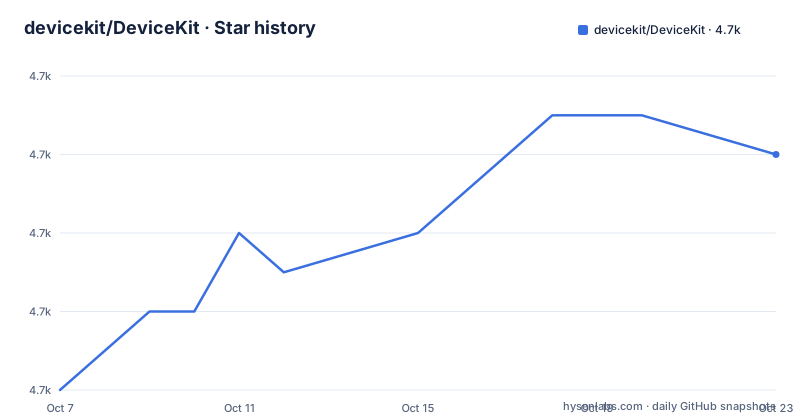
Star history
- devicekit/DeviceKit4,738 ★ · +6
| Repository | 2026-10-07 | 2026-10-23 |
|---|---|---|
| devicekit/DeviceKit | 4.7k | 4.7k |
6 Stars in the last 16 days, measured from the daily GitHub snapshot. Compare with other projects
Editorial analysis
A value type in place of a class, and why that changes your code
The README describes the library in a single clause: DeviceKit is a value-type replacement of UIDevice. The whole API surface follows from that choice, and it is worth being precise about what changes.
UIDevice is a class. Reading the current device from it gives you an object reference, and asking what it is means inspecting string properties or comparing hardware strings yourself. DeviceKit replaces that with an enum, so identity is a case value and comparison is ordinary Swift equality.
let device = Device.current

print(device)     // prints, for example, "iPhone 6 Plus"

if device == .iPhone6Plus {
  // Do something
} else {
  // Do something else
}
That is the ergonomics argument, and it is a real one. There is no optional to unwrap, no string to parse, and no risk of comparing a model name against a hardware identifier that happens to look similar.
The feature list reads like a checklist of things UIDevice cannot do well. It covers Equatable, device identification, device family detection, device group detection, simulator detection, battery state, battery level, various device metrics such as screen size, screen ratio and PPI, Low Power Mode detection, Guided Access Session detection, screen brightness, Display Zoom detection, detection of available sensors including Touch ID and Face ID, available disk space, and Apple Pencil support detection.
Several of those are not hardware questions at all. Guided Access is an accessibility feature, Display Zoom is a display setting, and screen brightness is a runtime reading. Wrapping them in the same value type is a deliberate choice to make one import answer most device-introspection questions an app tends to ask at launch.
Simulators are first-class cases, not a boolean flag
Simulator detection is on the feature list, but the more interesting decision is how it is modeled. A boolean would tell you whether you are simulated and nothing else. DeviceKit instead gives every simulated device its own case, wrapped in a `.simulator` case.
let device = Device.current
if device.isSimulator {
  // Running on one of the simulators(iPod/iPhone/iPad)
  // Skip doing something irrelevant for Simulator
}
The README makes the same point twice more, in the usage examples. Every real device has a simulator equivalent, written as `.iPhone6 => .simulator(.iPhone6)`, and a switch over `Device.current` can match `.simulator(.iPhone6s)` directly.
let device = Device.current
switch device {
case .simulator(.iPhone6s): break // You're running on the iPhone 6s simulator
case .simulator(.iPadAir2): break // You're running on the iPad Air 2 simulator
default: break
}
The practical value is that a screenshot test or a layout check can branch on the exact simulated model rather than on a generic flag. The cost is a larger enum, and a switch statement that has to handle a nested case type.
Device family detection sits alongside this and answers the coarse question in the same way, with `isPod`, `isPhone` and `isPad` properties covering iPods, iPhones and iPads whether real or simulated. Device group detection is the third layer, and the README demonstrates it as membership in a preconfigured array of allowed devices rather than as a separate API, which means the group is something you declare in your own code.
Battery, brightness and disk space come with the caveats attached
The lower half of the API is where a device library stops being a lookup table and starts touching system state, and the README is refreshingly honest about what that costs.
Battery state needs a note before it needs code. To get the current battery state we need to set `UIDevice.current.isBatteryMonitoringEnabled` to `true`. To avoid any issues with your code, we read the current setting and reset it to what it was before when we're done. That is a side effect the library takes on your behalf and then undoes, which is the right default but worth knowing about if your own code reads battery state.
Disk space is exposed through two Apple APIs rather than one, and the README shows both, because they answer different questions.
if Device.volumeAvailableCapacityForOpportunisticUsage ?? 0 > Int64(1_000_000) {
  // download that nice-to-have huge file
}

if Device.volumeAvailableCapacityForImportantUsage ?? 0 > Int64(1_000) {
  // download that file you really need
}
The opportunistic call is cheaper but less precise, and the important-usage call is the expensive one. Both are optional, which is why each use site needs a fallback. A library that flattened these into one number would be hiding a decision you may need to make.
Screen brightness is the simplest of the three and the README keeps it to two lines, comparing `device.screenBrightness` against 50 and printing a warning. Low Power Mode is read through `batteryState.lowPowerMode`, which is a slightly odd home for it but avoids a second system call.
September is when the maintenance work happens
The release history makes the project's real shape obvious. Three of the most recent releases are 5.7.0 on 2025-09-11, 5.8.0 on 2026-03-03, and 5.9.0 on 2026-09-22. The gaps are one autumn, one spring, one autumn, which is close to Apple's own hardware calendar rather than a library's feature cycle.
Release 5.9.0 covers new September 2026 devices: iPhone 18 Pro, iPhone 18 Pro Max, Apple Watch Series 12 and Apple Watch Ultra 4, with hardware identifiers, display metrics and technical specification links. Its case values are named with size suffixes for the watches, so Apple Watch Series 12 arrives as `Device.appleWatchSeries12_42mm` and `Device.appleWatchSeries12_46mm`, and Ultra 4 as `Device.appleWatchUltra4`.
That single new-feature block is what a minor version means for this project. There is also a genuine API addition in 5.9.0: `allDevicesWithEsimSupport` paired with `hasEsimSupport`, and `allDevicesWithDualEsimSupport` paired with `hasDualEsimSupport`, both including simulator support. The coverage runs through iPhone 17e and up to iPad Air (M4) and iPad Pro (M5), with iPhone X excluded and regional plus Wi-Fi plus Cellular limitations documented. That is a different kind of entry from the hardware table, and it is the kind that requires per-device research rather than a lookup.
Release 5.8.0 added the M5 iPad Pro models, Apple Watch SE 3rd generation at 40mm and 44mm, iPhone 17e, and iPad Air (M4) at both sizes. Its bug fixes are the more telling part: iPhone Air was incorrectly marked as having an ultra-wide camera, Apple Pencil compatibility was wrong for four iPad models, and the `ApplePencilSupport` OptionSet raw values were overlapping so that `.firstGenerationUsbC` collided with another case.
An OptionSet with overlapping raw values is a real defect rather than a cosmetic one, because membership tests return wrong answers silently. The fix landed in 5.8.0, which tells you the project's test suite is good enough to catch a class of bug that most libraries would ship.
Where the identifiers come from, stated plainly
One README section answers the question every hardware table has to answer. All model identifiers are taken from theiphonewiki.com models pages, or extracted from the simulator app bundled with Xcode.
That is a two-source provenance statement and it is worth taking seriously, because it explains both the strength and the fragility of the library. The simulator app bundled with Xcode ships the same device models Xcode can simulate, which makes it an authoritative Apple-published source for everything Xcode knows about. The wiki covers the rest, which is to say hardware that Apple sells but does not simulate.
The Apple Watch entries are the clearest example of the second source at work. A watch model has no simulator equivalent in any meaningful sense, so every Apple Watch case in the enum comes from documentation rather than from extraction. The same applies to technical specification links, which the release notes mention alongside hardware identifiers and display metrics.
The repository tree explains what kind of project this is. Beyond the source and tests there are `DeviceKit.xcodeproj`, `DeviceKit.xcworkspace`, an `Example/` directory, a `Gemfile` and `Gemfile.lock`, a `Dangerfile`, a `Scripts/` directory and a `Utils/` directory.
.swiftlint.yml
CHANGELOG.md
DeviceKit.podspec
DeviceKit.xcodeproj/
DeviceKit.xcworkspace/
Example/
Package.swift
Scripts/
Source/
Tests/
The Gemfile and Gemfile.lock are a relic of the CocoaPods and Carthage era, since both are Ruby tools, and the Dangerfile is a pull request review linter that posts to GitHub. The `.swiftlint.yml` sits alongside it as a lint configuration, and the workspace is what the README tells you to open to try the library in a playground after building DeviceKit.framework for a simulator first by selecting DeviceKit as your current scheme.
Four install paths and a version matrix older than most of its users
Installation is documented for CocoaPods, Swift Package Manager, Carthage and manually, which is broad by current standards and reflects a library that has been around since the Swift 2.3 era.
The Swift Package Manager path is the shortest, a single package entry with a from version.
dependencies: [
    .package(url: "https://github.com/devicekit/DeviceKit.git", from: "4.0.0"),
    /// ...
]
CocoaPods is documented per language generation rather than per version, which is the old way and produces a table like this one.
| Branch | Versions | |:---------|:----------:| | master | ≥ 2.0 | | Swift 4 - 4.2 | ≥ 1.3 < 1.13 | | Swift 3 | ≥ 1.0 < 1.3 | | Swift 2.3 | < 1.0 |
The requirement is iOS 11.0+, tvOS 11.0+ and watchOS 4.0+, which is the more useful constraint today than the Swift generation table. tvOS and watchOS support shows up as topics on the repository alongside ios, simulator, swiftpm and hacktoberfest.
One documentation gap is worth flagging so you are not surprised by it. The README's current version line says 5.9.0, and the release notes for that version say `pod 'DeviceKit', '~> 5.9'`, but the CocoaPods Swift 5 section still shows `pod 'DeviceKit', '~> 5.2'`.
pod 'DeviceKit', '~> 5.2'The Swift 5 examples elsewhere have the same staleness, with the SPM entry starting at 4.0.0 and the Carthage Swift 5 entry at `~> 4.0`. Those are all lower bounds that resolve, so following them installs an older release than the changelog describes. If you are pinning, take the version from the release notes rather than the README install section.
Contributing is two sentences: open an issue if you need a specific feature or found a bug, and submit a pull request if you extended the functionality and want others to use it. Given that the September hardware additions arrive as a single pull request per device generation, the issue-first path is how most of the catalog gets built.
Whether you actually need a 4730 star dependency for this
The honest case against DeviceKit is size and scope. Adding it to get a screen size or a PPI value pulls in a catalog of every iPhone, iPad, iPod and Apple Watch Apple has shipped, including per-size watch cases. The requirement floor of iOS 11.0+ and tvOS 11.0+ is also higher than a minimal utility would demand, and if you only support recent hardware you may not need a device database at all.
There is a fair accessibility objection to raise as well. Apple's own APIs provide most of what the library exposes, so for battery level, disk space, brightness and Low Power Mode you are adding a dependency around one or two system calls. The battery note in the README is the clearest example: the library has to enable monitoring, read the result, and restore the previous setting, which is more work than doing it once in your own code.
The case for it is equally clear. Device identification is the one thing UIDevice does not give you cleanly, and doing it yourself means either screen-size heuristics, which break across form factor changes, or string matching against a table you now maintain. The device family and group helpers, the simulator cases, and the per-model metrics like PPI are the parts you would otherwise write badly once and copy into every project.
There is also a maintenance argument that cuts the other way. The library needs a new case every September, and if a project depends on it, the project's own release now has an annual dependency update attached. That is a real cost, and it is the same cost every Apple-platform project accepts when it adopts any hardware table.
At 4730 stars and 466 forks with 78 open issues, the project has the adoption to justify the dependency and the activity to keep it current. The 2026-09-22 push for 5.9.0 is recent enough that the annual cycle is visibly still running. If your app needs to know which device it is running on, this is the package the Swift community already agreed on, and the September pull request you can watch is the price of that agreement.
Editorial conclusion
DeviceKit's design is one sentence long and everything else follows from it: a value-type replacement of UIDevice. Because the type is a Swift enum rather than a class instance, comparing the current device is an equality check instead of a string comparison, and every simulated device exists as its own case. The cost of that choice is the maintenance bill, which is why the repository is effectively an Apple hardware table that needs a pull request every September. Release 5.9.0, published 2026-09-22, added iPhone 18 Pro, iPhone 18 Pro Max, Apple Watch Series 12 and Apple Watch Ultra 4, and the two before it added the iPhone 17 series and the M5 iPad Pro. The MIT license, the CocoaPods, Swift Package Manager and Carthage install paths, and a 4730 star count make it a default dependency rather than a specialist one. If you only need a screen size, you are pulling in a device database. If you need to know which device you are on, this is the package the Swift community converged on.
Frequently asked questions
What is DeviceKit and what does it replace?
DeviceKit is an MIT licensed Swift library described as a value-type replacement of UIDevice, covering iOS 11.0+, tvOS 11.0+ and watchOS 4.0+. It provides device identification, device family and group detection, simulator detection, battery state and level, metrics such as screen size, ratio and PPI, Low Power Mode, Guided Access, brightness, Display Zoom, sensor detection, disk space and Apple Pencil support.
How do I install DeviceKit in a Swift project?
Four paths are documented: CocoaPods, Swift Package Manager, Carthage and manual. The Swift Package Manager entry adds the package URL with a from version, and the manual path is to drag the DeviceKit project into your Xcode project or add it as a git submodule. Note that the README install examples still show older lower bounds than the current 5.9.0 release, so take the version from the release notes when pinning.
How does DeviceKit handle the simulator?
Every real device has a matching simulator case wrapped in a .simulator case, written in the README as .iPhone6 => .simulator(.iPhone6). That means you can branch on the exact simulated model in a switch statement, not just on an isSimulator flag, and the family helpers such as isPhone and isPad work for real or simulated devices alike.
Does DeviceKit work on tvOS and watchOS?
Yes. The stated requirements are iOS 11.0+, tvOS 11.0+ and watchOS 4.0+, and both tvos and watchos are listed as repository topics. The Apple Watch cases exist because no meaningful simulator equivalent does, which is also why the README states that identifiers come from documentation as well as from the simulator app bundled with Xcode.
Official sources
Add this badge to your README
If you maintain this project, the badge below links readers to this analysis and shows its maintenance status from the daily GitHub snapshot. Paste the markdown into your README; add ?metric=license or ?metric=stars to the image URL for a different field.

[](https://hysenlabs.com/projects/devicekit-devicekit)Star history chart for your README
[](https://hysenlabs.com/projects/devicekit-devicekit)Was this useful?