Django Ninja turns an annotated Django view into a documented API
💨 Fast, Async-ready, Openapi, type hints based framework for building APIs
At a glance
- What is it?
- Django Ninja reads Python type hints to validate request parameters and to generate an OpenAPI schema, so a small file in an existing Django project becomes a browsable, typed API. The repository ships one install line and an MIT license, and its README example has no authentication and no async handler.
- Who is it for?
- Django Ninja fits teams that already run Django and want each endpoint to stay a small annotated function whose schema comes from the same signature. It does not fit a team that needs authentication, an async example or a Django REST Framework parity list on day one, because the README shows none of them.
- Can I use it commercially?
- Yes. MIT is a permissive licence: you can use, modify and sell software built on it, as long as you keep its copyright and licence notices.
- Is it still maintained?
- Yes. The repository last received commits 4 days ago.
- What is it written in?
- Mainly Python, according to GitHub's language statistics.
Answers come from the project's GitHub data, last synced on November 14, 2026, and from our analysis. They are not legal advice.
Star history
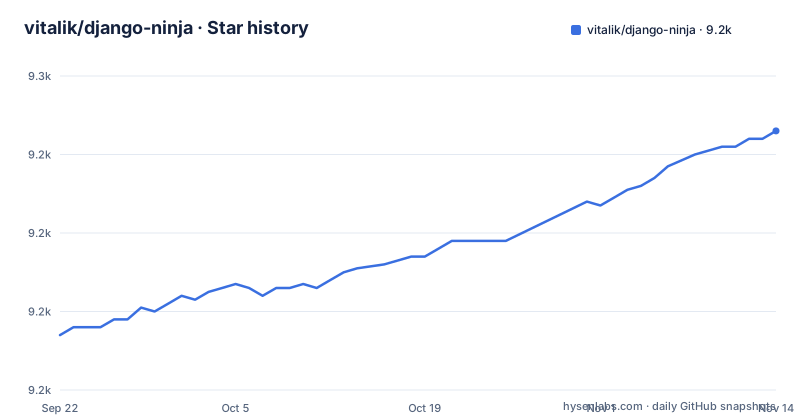
- vitalik/django-ninja9,246 ★ · +52
| Repository | 2026-09-22 | 2026-11-14 |
|---|---|---|
| vitalik/django-ninja | 9.2k | 9.2k |
52 Stars in the last 53 days, measured from the daily GitHub snapshot. Compare with other projects
Editorial analysis
One pip line, one api.py, one URLconf entry
Installation is a single PyPI line, and the first endpoint is one import, one router object and one decorated function in a file you create next to urls.py. Install the package:
pip install django-ninjaDefine the router and one view:
from ninja import NinjaAPI

api = NinjaAPI()

@api.get("/add")
def add(request, a: int, b: int):
    return {"result": a + b}
The last step is one URLconf entry that mounts the router under the prefix you choose, here /api/:
...
from .api import api

urlpatterns = [
    path("admin/", admin.site.urls),
    path("api/", api.urls),  # <---------- !
]
After those three steps the framework receives a GET request at /api/add, takes and type-casts the parameters a and b, decodes the result to JSON, and exposes an OpenAPI schema for the operation. That is the entire example: nothing else appears in the top level of the tree, which holds the ninja package directory, pyproject.toml, the Makefile, mypy.ini, tests, docs and a uv.lock, alongside your own Django project files.
Two int annotations are the entire contract
Everything the /add endpoint does follows from its signature. Because a and b are annotated as int, Django Ninja treats them as declared query parameters, takes them from the GET request, validates their types, casts them, and serialises the returned dict to JSON. The same annotations produce the OpenAPI schema for that operation, so the parameter names a caller reads in the documentation are the names in the view signature, and the docs cannot drift away from what the handler accepts. Once the router is mounted, http://127.0.0.1:8000/api/docs serves the interactive documentation, which the project attributes to Swagger UI or Redoc, so the rendered page comes from a separate viewer rather than from code in this repository. The framework also describes itself as based on the open standards for APIs, OpenAPI, previously known as Swagger, and JSON Schema. The design bet is that the annotation is the single place a parameter is declared.
The docs page appears with the mount, and nothing here turns it off
Mounting api.urls creates the documentation route at the same moment it creates the API. Nothing in the three-step example gates it, and the README does not document a setting that switches it off, so a service that follows those steps and later gets a public hostname serves a browsable description of every annotated route it has, with their parameters, to anyone who asks. Because that description is generated from the schema rather than written by hand, it is accurate, which is exactly why it is worth thinking about before it is reachable. If you treat an endpoint map as information you do not publish, you have to find that setting in the documentation site before deploying rather than after.
The example handler has no authentication, no permission and no throttle
The only handler in the README is add(request, a: int, b: int), and the only thing standing between it and a caller is the api.urls mount. There is no auth dependency on that path, no permission class and no rate limit. What protects an endpoint is therefore whatever the surrounding Django project already enforces, so a team moving a view out of a setup where access control was declared next to the view has to carry that decision across by hand, operation by operation. The consequence of skipping it is concrete rather than theoretical: with no login check in front of the mount, the arithmetic endpoint answers anonymous requests, and because the same annotations generate the schema, the docs page advertises that the endpoint is there.
Python 3.6 is promised in the README and refused by the packaging metadata
The README opens by describing the framework as built for Django and Python 3.6+ type hints. The packaging metadata disagrees: pyproject.toml sets requires-python to >=3.7, and the classifiers start at 3.7 and run through 3.15, with no 3.6 entry. Both statements live in this repository and they are not the same promise. The difference shows up at install time rather than at import time, which changes how you debug it. On a 3.6 interpreter the resolver reads the metadata and refuses to install the distribution, so you meet a packaging error naming the Python requirement of a package whose own README said that version was fine. Quote the pyproject floor, not the README sentence, in your own setup notes, and check it against the interpreter your project actually runs.
Async arrives as a documentation link, not as code to copy
Async is part of the pitch and thin on evidence here. The key features line credits Pydantic and async support for fast execution, the repository classifies itself under Framework :: AsyncIO, and the README links a guide at docs/docs/guides/async-support.md. That link is where the shipped evidence stops. The example handler is a plain def rather than an async def, so nothing in the README shows what an asynchronous Ninja operation looks like, whether you must await it, or how it sits inside the rest of a Django view stack. For a reader this gap decides when the guide gets read: before you commit rather than after, because the answer determines whether your database layer can be used from these endpoints at all, and the README does not settle it.
uv sync, ruff, mypy and pytest define what the maintainers call done
The Makefile at the top level is the clearest statement of the project's own standards, and it is short enough to read end to end. Its default goal is help, which greps the ## comments out of the Makefile itself to print the target list. Dependencies come from uv sync against the checked-in uv.lock, so contributors work from the lock file rather than from loose ranges. Linting is three commands, and the third one is narrower than the first two:
uv run ruff format --check ninja tests
uv run ruff check ninja tests
uv run mypy ninja
ruff formats and checks the ninja and tests directories, while mypy is pointed at the ninja package alone, so the test suite is not type checked. Tests run under uv run pytest ., and the coverage target adds --cov=ninja with term-missing reporting over tests. The docs target is the one that leaves the repository, serving MkDocs on port 8090 from the docs directory. There is also a .pre-commit-config.yaml and a mypy.ini at the top level.
Fast Django REST Framework is a claim with no numbers attached
The README heading reads Django Ninja - Fast Django REST Framework, which names its own alternative and its pitch on one line. The performance side of that claim is unmeasured in the repository: the key features line credits very high performance to Pydantic and async support, and the README contains no benchmark, a latency figure or a comparison table. The production claim is named even less: one line says the project is used by multiple companies on live projects, followed by an email address for feedback rather than a customer list. So the comparison you can defend is not about speed, it is about what an endpoint costs you to write. Two annotated parameters became a validated, schema-generating, documented route in a few lines. What the README does not contain is a list of which Django REST Framework features have an equivalent here, so parity questions are answered by the documentation site.
Editorial conclusion
Django Ninja fits teams that already run Django and want each endpoint to stay a small annotated function whose schema comes from the same signature. It does not fit a team that needs authentication, an async example or a Django REST Framework parity list on day one, because the README shows none of them. Before adopting it, check three things in your own project: the interpreter floor in pyproject.toml, which is 3.7 and not the 3.6 the README states; whatever guards your URLconf, since the example handler carries no permission check of its own; and whether a browsable schema at /api/docs is acceptable on a public hostname.
Frequently asked questions
How do you install Django Ninja?
One line from PyPI: pip install django-ninja. The project's own contributor path differs, since the Makefile installs development dependencies with uv sync against the checked-in uv.lock.
What are the disadvantages of Django Ninja?
The README's only example handler has no authentication, the README shows no async example, and it does not document a way to turn off the interactive docs page that appears as soon as api.urls is mounted. Its README also says Python 3.6+ while pyproject.toml requires 3.7 or newer.
Is Django Ninja async?
The README credits async support for its speed and the repository classifies itself under Framework :: AsyncIO, and the README links a guide at docs/docs/guides/async-support.md. The only example handler is a plain def, not an async def.
Is Django Ninja production ready?
pyproject.toml marks it Development Status :: 5 - Production/Stable, and the README says it is used by multiple companies on live projects without naming any. The last push on the repository was on 2026-11-01 and version 1.7.3 was tagged on 2026-10-29.
Is Django Ninja better than Django REST Framework?
The README heading calls it Fast Django REST Framework and credits Pydantic plus async support for the speed, but the README contains no benchmark and no feature parity list. The comparison you can check yourself is the code each endpoint costs you to write.
Official sources
Add this badge to your README
If you maintain this project, the badge below links readers to this analysis and shows its maintenance status from the daily GitHub snapshot. Paste the markdown into your README; add ?metric=license or ?metric=stars to the image URL for a different field.

[](https://hysenlabs.com/projects/vitalik-django-ninja)Star history chart for your README
[](https://hysenlabs.com/projects/vitalik-django-ninja)Was this useful?