howdoi: instant coding answers via the command line
instant coding answers via the command line
At a glance
- What is it?
- howdoi is a Python CLI that scrapes Stack Exchange search results and prints the top answer in your terminal. It is a small, MIT-licensed tool for people who want a snippet without opening a browser tab.
- Who is it for?
- Adopt howdoi if you work in a terminal all day and want a quick snippet from Stack Overflow without leaving it. Do not adopt it if you need guaranteed-correct answers, offline operation, or a tool that parses code out of prose reliably; the README itself frames it as a way to avoid opening a browser, not as a documentation system.
- Can I use it commercially?
- Yes. MIT is a permissive licence: you can use, modify and sell software built on it, as long as you keep its copyright and licence notices.
- Is it still maintained?
- Yes. The repository last received commits 45 days ago.
- What is it written in?
- Mainly Python, according to GitHub's language statistics.
Answers come from the project's GitHub data, last synced on November 14, 2026, and from our analysis. They are not legal advice.
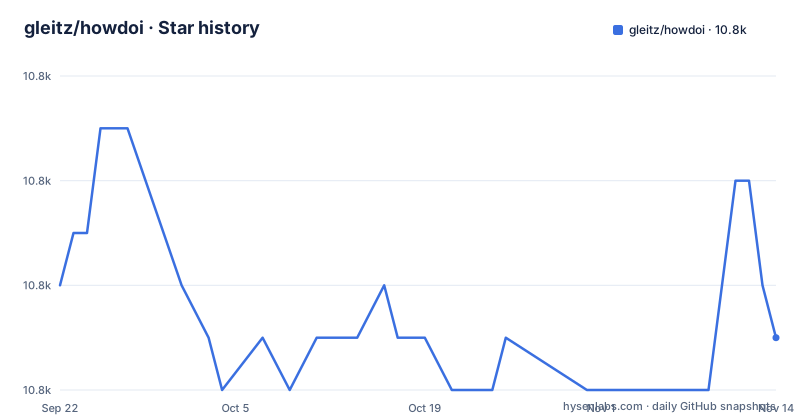
Star history
- gleitz/howdoi10,841 ★ · -1
| Repository | 2026-09-22 | 2026-11-14 |
|---|---|---|
| gleitz/howdoi | 10.8k | 10.8k |
-1 Stars in the last 53 days, measured from the daily GitHub snapshot. Compare with other projects
Editorial analysis
The problem howdoi solves, and who it is for
The README opens with a question aimed at a specific kind of developer: "Are you a hack programmer? Do you find yourself constantly Googling for how to do basic programming tasks?" The premise is that the cost of a search is not the search itself but the browser tab, the blog posts, and the distraction that follows. howdoi answers the query in the terminal and prints the answer text.
The examples in the README are deliberately mundane: formatting a date in bash, printing a stack trace in Python, converting an mp4 to an animated gif, creating a tar archive. These are tasks where you know roughly what you want and just need the syntax. That is the target use case. It is not a tool for learning a library or for reading a long explanation. If you need the reasoning behind an answer, the terminal is the wrong surface, and howdoi does not try to be one.
The intended user is someone already comfortable in a shell, likely someone who has an alias set up and types a short query without thinking about it. The README even suggests aliasing the command so that repeated parameters do not have to be typed each time.
How howdoi turns a query into an answer
The mechanism, as far as the README and the command list describe it, is a search-then-scrape pipeline. You pass a free-text query, howdoi sends it to a search engine, takes the result pages, and extracts answer text to print. The -e flag lets you choose the search engine for a query: google, bing, or duckduckgo. The HOWDOI_SEARCH_ENGINE environment variable sets the same choice globally.
The target site is configurable. By default howdoi looks at Stack Overflow, but HOWDOI_URL changes the host. The README gives the example of searching cooking.stackexchange.com for a recipe query, and says you can search other StackExchange properties. So the pipeline is not hardcoded to one site; it is a query against a Stack Exchange domain plus a parser for the answer content.
Result selection is positional. -p POS selects the answer in a specified position, defaulting to 1. -n NUM returns multiple answers. -a displays the full text of the answer, which implies the default output is a truncated or shortened form. -x explains how the answer was chosen, which is the closest thing to transparency the tool offers: if you distrust the pick, that flag tells you why it was made.
The cache is part of the design, not an afterthought. -C clears it, HOWDOI_DISABLE_CACHE=1 turns it off. Caching means repeated queries do not re-hit the network, which matters if you use the tool the way the alias examples suggest. It also means a stale answer can persist until you clear the cache.
Output formatting is controllable through -c for colorized output and HOWDOI_COLORIZE=1. -j returns answers as raw JSON, which is the escape hatch for scripting. -l returns only the answer link, useful when you want to open the source yourself rather than trust the extracted text.
Installing howdoi and running a first query
The README gives two install paths. The Python one is a plain pip install:
pip install howdoiOn macOS with Homebrew, the README also lists:
brew install howdoiAfter installation the binary is on your PATH. A first real query, taken from the README's own examples, is asking how to format a date in bash:
howdoi format date bashThe README shows the expected output as a single line, DATE=`date +%Y-%m-%d`. If you get nothing, or get something unrelated, that is the signal to try -x to see how the answer was chosen, or -p to pick a different position.
A more realistic first use is to alias it with the parameters you always want, exactly as the README suggests:
alias h='function hdi(){ howdoi $* -c -n 5; }; hdi'With that alias in your shell profile, typing h format date bash returns five colorized results. The README also shows a pager variant using less, and a variant that searches a different Stack Exchange site by setting HOWDOI_URL in the alias. If you want to inspect the raw structure rather than the printed text, the JSON flag is the one to reach for:
howdoi print stack trace python -jWhere howdoi breaks down
The most obvious limitation is that howdoi does not understand the answer it prints. It selects by position, and position 1 is a search-result ordering decision, not a correctness decision. The README's own example for printing a stack trace contains Python 2 syntax, print '>>> traceback <<<', which will not run on current Python. That is not a bug in the tool. It is the tool doing exactly what it says: returning text that was ranked highly, not text that is current.
Because the output is scraped from web pages, it depends on the network. HOWDOI_DISABLE_SSL=1 exists in the environment variable list, which suggests users hit certificate or SSL problems often enough that the project documented a workaround. Disabling SSL verification to make a scraper work is a trade-off worth noticing.
The cache cuts both ways. It makes repeated queries fast and reduces load on the source sites, but it also means a wrong answer stays wrong until -C is run. There is no expiry policy described in the README.
Finally, howdoi is the wrong tool when the question needs more than a snippet. If you are debugging something subtle, comparing two libraries, or reading a specification, a one-paragraph answer extracted from a forum post will cost you more time than it saves. The README does not claim otherwise, but the framing as a replacement for the browser can lead people to use it past its range.
howdoi compared with reading Stack Overflow directly
The honest alternative is the browser itself. Opening the question page gives you the accepted answer, the comments, the votes, the edit history, and the dates. howdoi gives you the extracted text of one answer, with -l available if you want the link instead. The difference is not the data source, which is the same, but the amount of context you receive and the number of decisions you make.
A second alternative is local documentation or a language's built-in help. Python's pydoc, man pages, and project docs are offline and versioned to what you actually have installed. howdoi is neither offline nor versioned; it reflects whatever the search engine currently ranks. If your problem is version-specific, the browser and the local docs are both better than a scraped snippet.
A third comparison is with AI coding assistants embedded in an editor. Those generate text rather than retrieve it, which is a different failure mode: a scraped answer at least has a human author and a link you can check. The README's -l flag is the acknowledgement that verification matters. howdoi's advantage over both is that it is a single command with no session, no context window, and no subscription.
Stashing answers and the keep dependency
howdoi has a stashing feature: --save (also --stash) stores an answer, --view lists the stash, --remove deletes an entry with a prompt, and --empty clears everything with a confirmation prompt. This is the only part of the tool that persists your own data rather than the cache.
The README points at the keep documentation for advanced features, for more advanced features. The README does not describe where the stash lives or how it is structured. For a tool whose main job is one-shot queries, the stash is a secondary feature, and the documentation treats it that way.
Licence, maintenance and upgrade cost
howdoi is MIT licensed. In practice that means you can use, modify and redistribute it, including in commercial settings, provided the licence text and copyright notice are preserved. The repository contains LICENSE.txt at the top level. This is a description of the licence, not legal advice; if the licence terms matter to your organisation, read LICENSE.txt itself.
The repository is not archived, and the last push was on 2026-09-30, which is recent. The repository layout shows an active toolchain: .pre-commit-config.yaml, .flake8rc, .pylintrc, .mypy.ini, a GitHub Actions workflow referenced by the README's build badge, and a test_howdoi.py at the top level. setup.py defines a custom Lint command that runs flake8 and pylint over the source, which tells you the project expects contributors to run linters before submitting.
Upgrade cost is low in the ordinary case because the interface is a CLI with a small flag set. The bigger risk is not the Python API but the scraping layer: search engines change their result markup and Stack Exchange changes its page structure, and either can break extraction without any change on your side. The cache and the -e engine flag are the two levers you have when that happens.
Editorial conclusion
Adopt howdoi if you work in a terminal all day and want a quick snippet from Stack Overflow without leaving it. Do not adopt it if you need guaranteed-correct answers, offline operation, or a tool that parses code out of prose reliably; the README itself frames it as a way to avoid opening a browser, not as a documentation system. Before trusting it, run a few queries you already know the answer to and check how often the first result is the right one, then decide whether the default position of 1 is good enough or whether you need -p and -n.
Frequently asked questions
What is howdoi in Python?
howdoi is a Python command-line tool that takes a free-text coding question, searches a Stack Exchange site for it, and prints the highest-ranked answer text in your terminal. The README describes it as instant coding answers via the command line.
How do I install howdoi?
The README gives two options: pip install howdoi, or brew install howdoi on macOS with Homebrew. After that the howdoi binary is available on your PATH.
Can howdoi search sites other than Stack Overflow?
Yes. Setting the HOWDOI_URL environment variable changes the target host, and the README gives cooking.stackexchange.com as an example. The -e flag separately selects the search engine, with google, bing and duckduckgo listed.
Official sources
Add this badge to your README
If you maintain this project, the badge below links readers to this analysis and shows its maintenance status from the daily GitHub snapshot. Paste the markdown into your README; add ?metric=license or ?metric=stars to the image URL for a different field.

[](https://hysenlabs.com/projects/gleitz-howdoi)Star history chart for your README
[](https://hysenlabs.com/projects/gleitz-howdoi)Was this useful?