DeepSeek V4 for Copilot Chat: Native Models, Vision, and BYOK
Pick DeepSeek V4 from the Copilot Chat model picker — and keep everything else Copilot already gives you.
At a glance
- What is it?
- DeepSeek V4 for Copilot Chat adds DeepSeek V4.1 Flash and other DeepSeek entries to VS Code Copilot Chat, with thinking controls, two image paths, BYOK, and compatibility with Copilot tools. It depends on non-public Copilot APIs and requires VS Code 1.116 or later.
- Who is it for?
- Adopt this extension if you want DeepSeek models inside the Copilot Chat interface and already accept managing a separate API key. Do not choose it if you need a stable public integration or cannot work with VS Code 1.116 and its non-public Copilot APIs.
- Can I use it commercially?
- Yes. MIT is a permissive licence: you can use, modify and sell software built on it, as long as you keep its copyright and licence notices.
- Is it still maintained?
- Yes. The repository last received commits 7 days ago.
- What is it written in?
- Mainly TypeScript, according to GitHub's language statistics.
Answers come from the project's GitHub data, last synced on November 7, 2026, and from our analysis. They are not legal advice.
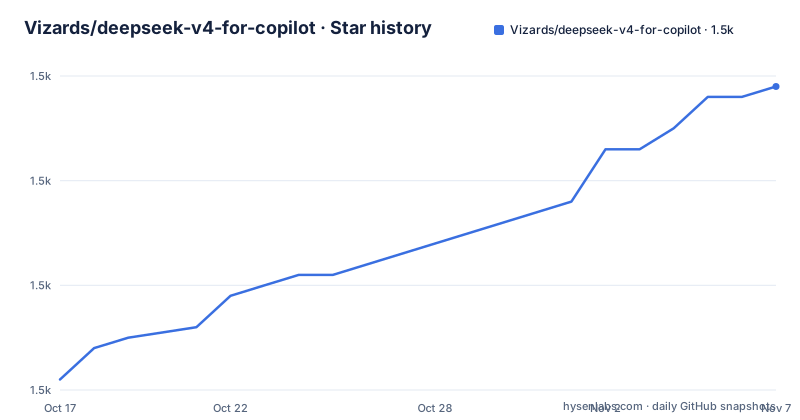
Star history
- Vizards/deepseek-v4-for-copilot1,529 ★ · +28
| Repository | 2026-10-17 | 2026-11-07 |
|---|---|---|
| Vizards/deepseek-v4-for-copilot | 1.5k | 1.5k |
28 Stars in the last 21 days, measured from the daily GitHub snapshot. Compare with other projects
Editorial analysis
What DeepSeek V4 for Copilot Chat Changes
DeepSeek V4 for Copilot Chat is a VS Code extension that places DeepSeek entries inside GitHub Copilot Chat's model picker. Its target audience is developers who want access to DeepSeek models without leaving Copilot Chat for a separate chat application. The extension does not introduce another sidebar, chat window, or local proxy server. Instead, it registers a language model chat provider under the vendor name `deepseek` and exposes models through the editor's existing Copilot Chat experience.
The project focuses on DeepSeek V4.1 Flash, V4 Pro, and legacy V4 Flash entries. According to the README, the picker supports long context, tool calling, and configurable thinking effort. The extension also supports thinking mode and `reasoning_content`, with effort levels set to `none`, `low`, `high`, or `max`. The default is `high`.
This is a model-provider integration, not a replacement for Copilot. The README states that agent mode, file edits, terminal access, workspace search, Git, tests, instructions, skills, and MCP support remain available through Copilot's native provider API. That design reduces interface migration, but it also creates a dependency on APIs that the README identifies as non-public. A newer VS Code release could therefore change behavior even when the extension itself has not changed.
How DeepSeek Vision Proxy Processes Attachments
The image path depends on the selected model entry. DeepSeek V4.1 Flash and Flash Vision Exp receive image attachments natively, according to the README. They do not require the Vision Proxy. The V4 Pro and V4 Flash entries use a different flow: an image-capable model first describes each attachment, then the main DeepSeek model receives that description together with the conversation.
This is not the same as native image input. The extension describes the process as an image-to-description step followed by text processing by the selected model. Auto mode selects Flash Vision Exp when available, while the documentation also says that an explicitly configured VS Code model or API endpoint remains supported. For adopters, that distinction matters when evaluating image fidelity, latency, and whether an attachment is being transformed before it reaches the main model.
The README also states that context caching requires a full match with a cached prefix. A changed conversation prefix can therefore prevent the expected cache match. The project says prompt-cache hit information is logged in the output channel, which gives users a way to inspect whether DeepSeek's cache behavior is occurring. The documentation does not provide a precise cache-hit guarantee or a formula for calculating savings.
Installing the Extension and Selecting a DeepSeek Model
The project requires VS Code 1.116 or later, a GitHub Copilot subscription, and a DeepSeek API key from `platform.deepseek.com`. A compatible provider token can be used when configuring a custom `deepseek-copilot.baseUrl`. Installation is handled through the registry used by the editor rather than through a local build command in the README.
For Microsoft VS Code, install the extension from the VS Code Marketplace. For editors that use Open VSX, install it from Open VSX. After installation, run the `DeepSeek: Set API Key` command from the Command Palette. The README says official DeepSeek keys usually start with `sk-`.
Open Copilot Chat, select the model picker, and choose `DeepSeek V4.1 Flash` or `DeepSeek V4 Pro`. The API key is stored through VS Code's `SecretStorage`, which the documentation describes as the operating system keychain on macOS, Windows, and Linux. It is not placed in `settings.json` or Git history according to the README.
The extension package declares a `deepseek-copilot.setApiKey` command, and the extension activates on startup or when VS Code handles a URI. The README does not document a command-line installation or a local build tutorial, so there is no `npm install` example to add here.
Configuration Boundaries for API Routing and Output
The extension exposes settings for the DeepSeek endpoint, request headers, output limits, and related provider behavior. The documented default for `deepseek-copilot.baseUrl` is `https://api.deepseek.com`, and the setting can point to a self-hosted or proxied deployment. The `deepseek-copilot.requestHeaders` setting defaults to `{}` and supports custom headers for chat completions.
The documented `deepseek-copilot.maxTokens` default is `0`, which means the API default applies. Setting a positive value is described as a way to control maximum output tokens, which can matter for cost and response length. The repository also contains commands for retrieving or clearing the API key, resetting `baseUrl`, selecting a vision model, and opening settings, as reflected in `package.json`.
The endpoint setting is useful for compatible providers, but it also moves responsibility for protocol compatibility to the adopter. The README does not promise that every DeepSeek-compatible endpoint supports images, `reasoning_content`, tool calling, prompt caching, or all thinking effort values. A custom endpoint should be checked against those individual capabilities rather than treated as a drop-in replacement.
Where DeepSeek V4 for Copilot Chat Is the Wrong Tool
The main limitation is the integration boundary. The extension relies on non-public Copilot Chat APIs, and the README explicitly warns that newer VS Code versions may break them. That makes the extension a poor fit for environments where editor updates, API stability, and reproducible provider behavior are strict requirements. It is also less suitable for users who want a standalone DeepSeek client with no GitHub Copilot subscription.
The BYOK model also changes the operating arrangement. The documentation says your API key, bill, and rate limits belong to you, so users must account for DeepSeek usage separately from their Copilot subscription. Native vision is limited to particular entries, while other models use Vision Proxy. If direct image input is a requirement, selecting the wrong entry can produce a different architecture from what the user expects.
As an alternative, a separate DeepSeek integration can provide direct access to the provider's own client or API without routing requests through Copilot Chat. The trade-off is losing the extension's access to Copilot's agent mode, tool calling, instructions, skills, and existing picker. The correct choice depends on whether preserving Copilot's workflow matters more than reducing dependency on its non-public APIs.
Maintenance, Licensing, and Release Changes
The repository is not archived. Its last push was on 2026-10-16, so the project has recent repository activity based on the available record. The repository does not provide enough evidence to make a broader claim about support duration or compatibility with every future VS Code release. The README's warning about non-public APIs remains the most relevant upgrade constraint.
The listed releases include `v0.9.4` on 2026-10-07, `v0.9.3` on 2026-09-23, and `v0.9.2` on 2026-09-14. These releases indicate recent version activity, but the documentation does not provide upgrade procedures, migration notes, or a support policy in the excerpt. Users should inspect the changelog and issue tracker before moving a workflow onto a new version.
The package declares the MIT license. That license covers the extension code under its terms, while use of DeepSeek's API, images, model outputs, and billing remains governed by the relevant provider terms. The MIT label should not be read as a statement about model availability, provider pricing, or third-party API compatibility.
Editorial conclusion
Adopt this extension if you want DeepSeek models inside the Copilot Chat interface and already accept managing a separate API key. Do not choose it if you need a stable public integration or cannot work with VS Code 1.116 and its non-public Copilot APIs. Verify provider compatibility, image handling, billing, and tool-call behavior before making it part of a production workflow.
Frequently asked questions
How do I install DeepSeek V4 for Copilot Chat?
Install it from the VS Code Marketplace in Microsoft VS Code, or from Open VSX in an editor that uses that registry. The extension requires VS Code 1.116 or later.
How do I set the DeepSeek API key for Copilot Chat?
Run `DeepSeek: Set API Key` from the Command Palette, then paste your DeepSeek key or compatible provider token. The README says the key is stored in VS Code's `SecretStorage`.
Which DeepSeek V4 models support images?
DeepSeek V4.1 Flash and Flash Vision Exp receive image attachments natively. DeepSeek V4 Pro and V4 Flash use Vision Proxy, where an image-capable model creates a description for the main model.
Official sources
Add this badge to your README
If you maintain this project, the badge below links readers to this analysis and shows its maintenance status from the daily GitHub snapshot. Paste the markdown into your README; add ?metric=license or ?metric=stars to the image URL for a different field.

[](https://hysenlabs.com/projects/vizards-deepseek-v4-for-copilot)Star history chart for your README
[](https://hysenlabs.com/projects/vizards-deepseek-v4-for-copilot)Was this useful?