Packer Examples for vSphere is a gallery of opinionated golden images
Packer Examples for VMware vSphere
At a glance
- What is it?
- This repository is a collection of HCL templates that show how HashiCorp Packer and the vsphere-iso builder can automate virtual machine image creation for vSphere. It is a reference library to copy from rather than a tool to install, and it is published by Broadcom without support.
- Who is it for?
- Adopt this repository as a template library when your team builds vSphere golden images repeatedly and wants a working HCL baseline per operating system version rather than a from scratch Packer configuration.
- Can I use it commercially?
- Check first. The repository uses a licence we do not classify automatically, so read its LICENSE file before any commercial use.
- Is it still maintained?
- Yes. The repository last received commits 3 days ago.
- What is it written in?
- Mainly HCL, according to GitHub's language statistics.
Answers come from the project's GitHub data, last synced on November 7, 2026, and from our analysis. They are not legal advice.
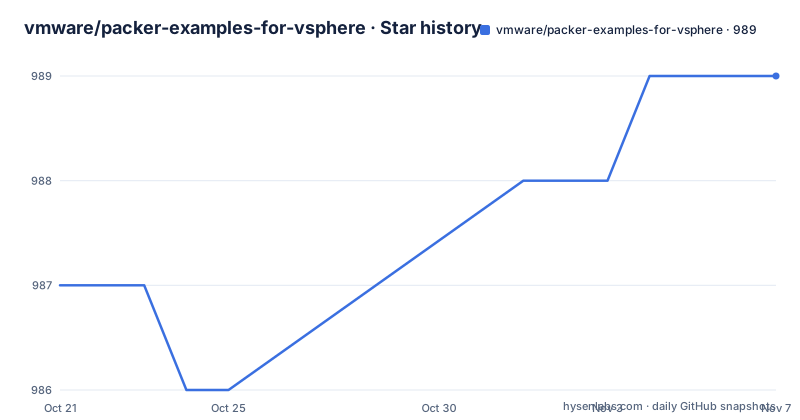
Star history
- vmware/packer-examples-for-vsphere989 ★ · +2
| Repository | 2026-10-21 | 2026-11-07 |
|---|---|---|
| vmware/packer-examples-for-vsphere | 987 | 989 |
2 Stars in the last 17 days, measured from the daily GitHub snapshot. Compare with other projects
Editorial analysis
The repository is a set of templates, not a running service
The first thing to understand is that there is nothing here to install. This repository provides a collection of opinionated examples that demonstrate how you can use both HashiCorp Packer and the Packer Plugin for VMware vSphere, the vsphere-iso builder, to automate the creation of virtual machine images for VMware vSphere environments. All examples are provided in the HashiCorp Configuration Language, and the primary language of the repository is HCL. The intended audience is spelled out in the README: a developer, a systems administrator, or a site reliability engineer who wants help streamlining infrastructure provisioning and maintaining consistency in the virtualization workflow. The word opinionated in that description is doing real work. These are not minimal illustrations. They are complete configurations with a point of view about how a golden image should be built, and you are meant to copy one and adapt it.
The vsphere-iso builder uploads an ISO, not a disk image
The builder named in the README is vsphere-iso, and the name explains the mechanism. Packer boots an installation media that you point it at, runs an unattended installation inside the guest, and then captures the result as a virtual machine template on the vSphere side. That is a different workflow from cloning an existing golden image and applying configuration with a configuration management tool, and the difference shows up in your build times and in how many moving parts a build has. The ISO route needs the installation media, the answer file or unattended mechanism for the guest, and a vSphere endpoint that can run a template build. The repository structure shows the supporting machinery for that: a builds directory for the templates themselves, manifests, artifacts, terraform, an ansible directory, scripts, tests, and a download.sh and build.sh at the top level. There is also a build-ci.tmpl with build-ci.yaml, which the Makefile turns into a GitLab CI file.
Guest coverage is wide on Linux and deliberately broad on Windows
The supported operating system tables are the most concrete part of the documentation, and they show how much ground the examples cover. On Linux the list runs from VMware Photon OS 5 and 4, Debian 13, 12 and 11, Ubuntu Server 24.04 LTS and 22.04 LTS, Red Hat Enterprise Linux 10, 9 and 8, AlmaLinux OS 10, 9 and 8, Rocky Linux 10, 9 and 8, Oracle Linux 10, 9 and 8, CentOS Stream 10 and 9, Fedora Server 43, and SUSE Linux Enterprise Server 15. The pattern for the enterprise distributions is three consecutive major versions, which is what you want from a template library, since you usually need the current release and the one or two behind it for compatibility. On Windows the table lists Microsoft Windows Server 2025, 2022 and 2019 in Standard and Datacenter editions with Core and Desktop experience, plus Microsoft Windows 11 Professional and Enterprise. The Windows rows carry an Experience column, which matters because the difference between Core and Desktop installs changes the image size and what you can install later.
Running the documentation build from the Makefile
The examples come with a documentation site, and the repository ships the tooling to build it. The Makefile defines a small set of targets for that. Installing the Python requirements for the docs is a pip install against the requirements file in the workflows directory:
pip install --requirement .github/workflows/requirements.txtServing the documentation locally, which is what you want while reading the guides, is:
zensical serveBuilding the static site for publication is a separate target:
zensical buildAnd there is a cleanup target that uninstalls the same requirements file. The Makefile also carries a target for regenerating the GitLab CI configuration from the template, using gomplate with build-ci.yaml and build-ci.tmpl as input. The published documentation lives at vmware.github.io/packer-examples-for-vsphere, and the README points there for more detailed information about the project rather than duplicating it in the repository.
A Makefile, a devcontainer, and lint configs for the repository itself
The top level of the tree is a small software project wrapped around the templates. There is a .devcontainer directory, a .vscode directory, a .gitlab-ci.yml, a .github directory, a CHANGELOG.md, a NOTICE file, a project.json, a config.sh and set-envvars.sh, and lint configuration for several tools: .ansible-lint.yml, .hadolint.yml, and .markdownlint.yml. The presence of ansible and hadolint configuration tells you two things about the workflow. The examples carry Ansible content, which fits the pattern of building a base image with Packer and then finishing the configuration on the resulting template, or using Ansible inside the guest during the build. The hadolint configuration implies container images are part of the build pipeline somewhere, since hadolint checks Dockerfiles. The terraform directory is another signal that these examples are aimed at teams who already run infrastructure as code and want the image build to live in the same world.
The licence is a two clause BSD, and the support statement is blunt
Two legal points deserve attention before you copy anything into a commercial pipeline. The licence field is unusual, marked as a custom licence that GitHub cannot classify, but the README states plainly that the project is available under the Simplified BSD License and prints the full two clause text, and the file headers carry SPDX-License-Identifier: BSD-2-Clause with a Broadcom copyright notice. So the code is permissively licensed: redistribution in source or binary form is allowed, with and without modification, provided the copyright notice, the conditions list, and the disclaimer are retained, and the binary form reproduces them in the documentation or other materials. The second point is the support statement. This project is not supported by Broadcom Support. The README routes bug reports to the GitHub issues tracker and asks for reproducible test cases and details of any modifications, and it points to GitHub discussions for questions. In other words, if a template breaks when a new OS release lands, there is no vendor behind it.
Where these examples stop and where the real work starts
There are three places where this repository is the wrong tool. The first is anything outside vSphere. These templates target the vsphere-iso builder and a vSphere endpoint; the project topics list vmware-cloud-foundation, but the images produced are vSphere virtual machine templates, and the workflow of downloading media, running an unattended install, and capturing a template is specific to that hypervisor. The second is any environment where you cannot reach the installation media. A build that requires a redhat ISO, a Windows ISO, or a Windows license on the build host has dependencies that these examples do not solve for you. The third is teams that want images maintained rather than rebuilt. The point of the collection is to rebuild on demand, and an organisation that prefers configuration management over image rebuilds will find the templates useful mainly as a reference for how to structure unattended installs.
Recent commits on develop, releases that trail behind
The maintenance picture is one of recent work with a slower release rhythm. The default branch is develop, which is where the changes land, and the last push to the repository was on 2026-10-14. The tagged releases are v0.22.1 from 2025-03-05, v0.22.0 from 2025-02-12, and v0.21.0 from 2024-09-26. The gap between a fresh commit and the newest tag is about nineteen months, so the tags are not where the current work is, and the CHANGELOG.md at the top level is the better place to see what changed. The project version numbering below one is also a signal about intent. This is a gallery of examples that a vendor publishes and updates as the product and the ecosystem move, not a library with semantic versioning commitments that you can depend on. The practical consequence is that you copy a template into your own repository and own it from that point, rather than tracking upstream changes.
Editorial conclusion
Adopt this repository as a template library when your team builds vSphere golden images repeatedly and wants a working HCL baseline per operating system version rather than a from scratch Packer configuration. It does not fit a team that needs a supported product, since the README states the project is not supported by Broadcom Support, and it does not fit a build that needs VMware Cloud Foundation specifics, since the topics list vmware-cloud-foundation but the templates target vSphere directly. Before you build, copy the closest template into your own repository, pin the Packer and plugin versions in it, and confirm the guest operating system version you need is in the supported tables, which cover Photon OS 4 and 5, Debian 11 to 13, Ubuntu 22.04 and 24.04 LTS, RHEL 8 to 10, AlmaLinux, Rocky Linux, Oracle Linux, CentOS Stream, Fedora 43, SLES 15, and several Windows Server and Windows 11 editions.
Frequently asked questions
What is Packer Examples for VMware vSphere?
It is a collection of opinionated examples in HashiCorp Configuration Language showing how to use HashiCorp Packer and the Packer Plugin for VMware vSphere, the vsphere-iso builder, to automate the creation of virtual machine images for vSphere environments.
Which operating systems do the vSphere Packer examples cover?
On Linux, Photon OS 4 and 5, Debian 11 to 13, Ubuntu 22.04 and 24.04 LTS, RHEL 8 to 10, AlmaLinux, Rocky Linux, and Oracle Linux 8 to 10, CentOS Stream 9 and 10, Fedora Server 43, and SLES 15. On Windows, Server 2019, 2022, and 2025 in Standard and Datacenter editions with Core and Desktop experience, plus Windows 11 Professional and Enterprise.
Can I get support for these Packer examples from Broadcom?
No. The README states that this project is not supported by Broadcom Support, and asks that bugs and feature requests go through the GitHub issues tracker and discussions area.
What licence applies to the Packer examples for vSphere?
The README states the project is available under the Simplified BSD License, with BSD-2-Clause in the SPDX headers of the files and a Broadcom copyright notice.
Official sources
Add this badge to your README
If you maintain this project, the badge below links readers to this analysis and shows its maintenance status from the daily GitHub snapshot. Paste the markdown into your README; add ?metric=license or ?metric=stars to the image URL for a different field.

[](https://hysenlabs.com/projects/vmware-packer-examples-for-vsphere)Star history chart for your README
[](https://hysenlabs.com/projects/vmware-packer-examples-for-vsphere)Was this useful?