The card service recommends a fine-grained token, renders SVG through a DOM in Node, and passes both test suites with no tests
A tool to generate your GitHub summary card for profile README
At a glance
- What is it?
- vn7n24fzkq/github-profile-summary-cards is an MIT-licensed generator for the summary cards people embed in a profile README, at v0.12.0 with the last push on 2026-09-29. The renderer runs on a hosted platform and as a GitHub Action, and the README documents sixteen themes, six colour overrides and ten animation presets in unusual detail for a project that calls itself for fun.
- Who is it for?
- This is a good tool if you want the profile card that most people paste into their README and want to control it, because the parameter surface is unusually well documented for a small project, including the exact truncation rule for long names and which colour overrides exist. Two things to check before you use it.
- Can I use it commercially?
- Yes. MIT is a permissive licence: you can use, modify and sell software built on it, as long as you keep its copyright and licence notices.
- Is it still maintained?
- Yes. The repository last received commits 3 days ago.
- What is it written in?
- Mainly TypeScript, according to GitHub's language statistics.
Answers come from the project's GitHub data, last synced on November 7, 2026, and from our analysis. They are not legal advice.
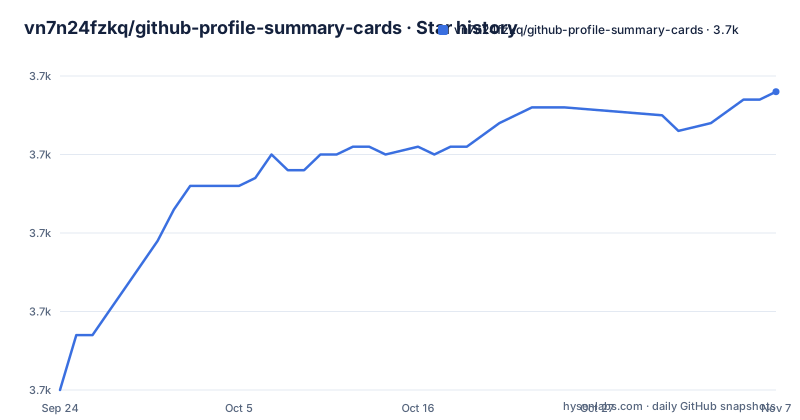
Star history
- vn7n24fzkq/github-profile-summary-cards3,698 ★ · +38
| Repository | 2026-09-24 | 2026-11-07 |
|---|---|---|
| vn7n24fzkq/github-profile-summary-cards | 3.7k | 3.7k |
38 Stars in the last 44 days, measured from the daily GitHub snapshot. Compare with other projects
Editorial analysis
Cards are drawn in Node and served as images, which is how the animation needs no code
There is a puzzle in the animations section worth solving first, because the answer is in the dependency list.
The README says cards can animate with a pure CSS entrance when they load, with no GIFs, no JavaScript, working inside a GitHub README. An image cannot run JavaScript, so something has to run before the image exists.
What the manifest answers: a charting library, a DOM implementation, and a serverless functions package. So the pipeline is that the chart is drawn into a simulated document object model in Node, serialised as vector markup, and served as an image file. The CSS is emitted inside that markup, which is why the animation travels with the image and needs nothing from the reader's browser.
Two other dependencies explain features rather than plumbing. A number-abbreviation library is what turns commit counts into something like a thousands suffix on the languages card. A retrying HTTP client is how it survives GitHub's rate limits.
And an error-reporting client is in the runtime list, which means the hosted instance is wired to report its own failures somewhere. That is worth knowing when you are debugging a card that renders empty.
Both test scripts are allowed to pass with no tests at all
Two of the scripts in the manifest run the test suite with a flag that lets the run succeed when nothing was executed.
The main test script passes that flag, along with a JUnit reporter, which is the machine-readable format a CI system consumes. The unit script passes it too, without the reporter.
That flag is normally a pragmatic choice for a monorepo where one package has no tests yet and you do not want every sibling to fail. Here it means the project's two test entry points can both report green with an empty suite, and the README does not document a test story at all.
The rest of the script list is more thorough than that flag suggests. There is a typecheck against a separate test configuration, a local test driven through a script, a script that mocks the action environment, a script that regenerates the preview assets, a development server that watches, and a single command that chains build, format, lint, package and test together.
Two of those are unusual enough to name. The script that mocks the action environment exists because the same renderer has to run inside a GitHub Actions runner, where the inputs arrive through a different channel than a web request. And the preview generator exists because the sample images in the README are generated artefacts.
The cards shown in the README are generated mock data, and the file says so in a comment
There are two HTML comments in the README, both invisible when rendered, and both about the same thing.
One sits above the header sample cards and says they use mock data with the load animation baked in, and that they are regenerated with a script. The other sits above the animation previews and says the same thing.
So what the README displays is committed output. It is not a live render of anyone's real account, which means it cannot break when GitHub changes an API, and it means the images in the file do not update themselves when the code does.
That is the right trade for a README that has to render identically for everyone who reads it, and having it stated in a comment rather than implied is better than most projects manage. The cost is that the sample cards can drift from the code, and nothing in the build appears to regenerate them automatically; the script has to be run by hand.
The rest of the header is conventional: stargazers, latest release, a conventional commits badge, and a badge linking the action workflow, which is the signal that this repository also ships as something you run yourself.
Invalid colour values are ignored without a word
Every card endpoint accepts six colour overrides, named in the file: the title, the text, the background, the border, the icon and the chart colour.
The value format is specified more precisely than most parameters in most projects. Hex, without the leading hash character, in three, four, six or eight digits, where the four and eight digit forms carry an alpha channel. And then the sentence that matters: anything else is ignored.
So a value with a hash, a colour keyword, a three-digit-with-hash mix, or a typo produces a card that renders correctly and silently uses the theme's colour instead. There is no error, no placeholder, no visible difference between a card that was customised and one that was not, unless you happen to know what the theme colour was.
The example given makes the point: a theme with a transparent background is achieved with an eight-digit value ending in four zeros, which only works because the eight-digit form is accepted. That is a real feature, and it is also the reason a user might type a six-digit value expecting transparency and get an opaque card.
The stats card takes one more parameter, a flag to remove the logo the service otherwise puts on the right.
Ten animation presets, and two of them cycle colour indefinitely
The animation section is the longest part of this README, and the claim is that the cards can now animate.
There are ten presets. Seven play an entrance and finish. Three are described as coordinated assemblies: one where parts appear in sequence and then the charts draw themselves on, one that is a strict one-by-one reveal ending with a line wiping in from the left along the time axis, and one where content fades in while its colours sweep back from a shifted hue.
Then there are two that do not end. One is described as a continuous gaming RGB loop where the whole card, background included, cycles through the spectrum, rotating the theme's colours. The other is the same cycle applied only to the content, leaving the background alone.
A card with one of them enabled is requested like this:
https://github-profile-summary-cards.vercel.app/api/cards/stats?username=vn7n24fzkq&theme=default&animation=loadThat distinction between the two is the only practical difference between them, and it is the one that decides whether the card is legible. A background that cycles changes the contrast of the text sitting on top of it continuously; a content-only cycle leaves the text on a stable ground.
Timing is a parameter too. Every preset has a default, and there is a duration parameter in seconds with a stated range, which scales the entrance and, for the two cycling presets, is the cycle period itself.
Any value the service does not recognise is treated as no animation. The sentence explaining that is cut off partway through in this file.
Two delivery modes, and the token section recommends the newer model
There are five documented endpoints, all on the hosted platform, and a workflow file at the root of the repository. That is the two modes: run the renderer yourself inside a workflow, or point your README at the hosted instance.
The configuration file for the hosted platform is at the root, and the API directory sits beside it, so the serverless side is a first-class part of the tree rather than a separate repository.
The token documentation is the best part of the file. It ships an example environment file whose only value is a token placeholder, and it names the two token models with their exact scopes.
For the newer fine-grained token it recommends repository access set to public, read-only, and says to add the relevant permissions only if you need private repositories or private organisation members.
For the older classic token it lists two scopes. One is read access to user data, which is proportionate. The other, a scope covering public repositories, is a write-capable scope, which is more than a card renderer needs in order to read.
The file also points at a section with the full walkthrough, and it says the token is required for the local test script and for running the platform locally, not for consuming the hosted cards.
The theme gallery lives in another repository on a different default branch
The theme table in the README names sixteen themes and leaves the cells below each name empty, because those cells hold the sample images.
The names are a mix of a default and a transparent one, two named after the platform's own light and dark appearance, and thirteen after colour schemes: a futuristic blue one, a dark purple one, a warm retro one, a light and a dark of a northern scheme, a high-contrast one, a light and a dark of a solarised scheme, a night city one, a framework green one, and a warm brown one.
The link labelled more themes does not go to a directory in this repository. It goes to a different repository entirely, an examples and output collection, and it points at a branch named master.
That is a small inconsistency on its own. It matters more because that repository is where you would look to see what a theme actually looks like, since the table here shows only names. So the visual evidence for sixteen themes lives outside this repository, on a branch with a different name from this one's.
The demo is split the same way. The homepage recorded for the repository points at a demo path without a file extension, while the call to action in the README links to a demo page with one.
The name parameter has a documented truncation rule and a sample value of the author's name
The profile details card takes one parameter beyond the theme and the username, and it is the most carefully specified endpoint in the file.
The optional name parameter overrides what is displayed. Without it, the card shows the login with the account's display name in parentheses. And with it, long values are elided to fit on one line, with the threshold given as approximately twenty-two characters.
Twenty-two characters is a strange number to find in a README, and it is exactly the kind of detail that is only written down by someone who measured it against a fixed-width card.
The example given for the parameter uses a person's name, and that name is the repository author's, who is also named as the package author with an email address in the manifest. So the one worked example for the override demonstrates that the display name is not the login.
The other endpoints are more conventional. The two language cards both take an exclusion list of languages and a list of repositories to exclude, where repository names are matched case-insensitively and an owner-qualified form also matches. The commit-language card carries one extra note: commits can come from repositories owned by other people, which is why the qualified form matters there.
Editorial conclusion
This is a good tool if you want the profile card that most people paste into their README and want to control it, because the parameter surface is unusually well documented for a small project, including the exact truncation rule for long names and which colour overrides exist. Two things to check before you use it. If you point it at private repositories, read the token section first, since the scope you need is broader than read-only public data. And if you embed an animated card, read what the cycling presets do, because two of the ten loop indefinitely rather than playing once.
Frequently asked questions
What is github-profile-summary-cards?
An MIT-licensed tool that generates summary cards for a GitHub profile README, inspired by an earlier project of the same kind. It offers five card types, sixteen themes, six colour overrides and ten animation presets, and runs either as a GitHub Action or against a hosted endpoint.
How do github-profile-summary-cards get rendered?
Server-side. The chart is drawn into a simulated DOM in Node using a charting library and serialised as vector markup, which is why the animated presets are described as pure CSS with no JavaScript: the code runs before the image exists, and the animation travels inside it.
What GitHub token does github-profile-summary-cards need?
The example environment file recommends a fine-grained token with repository access set to public and read-only, adding private repository or organisation permissions only if you need them. For a classic token it lists user read access plus a public repository scope, which is broader than reading requires.
Can the cards animate?
Yes, with ten presets passed as an optional parameter. Seven play an entrance and finish; two cycle colours continuously, one across the whole card including the background and one across the content only. A duration parameter in seconds, between 0.2 and 10, scales the timing or the cycle period.
Does github-profile-summary-cards have tests?
The manifest defines two test scripts and both pass a flag that allows the run to succeed when no tests were executed. The repository also ships a script that mocks the action environment, a script for local runs, and one that regenerates the preview assets used in the README.
Official sources
Add this badge to your README
If you maintain this project, the badge below links readers to this analysis and shows its maintenance status from the daily GitHub snapshot. Paste the markdown into your README; add ?metric=license or ?metric=stars to the image URL for a different field.

[](https://hysenlabs.com/projects/vn7n24fzkq-github-profile-summary-cards)Star history chart for your README
[](https://hysenlabs.com/projects/vn7n24fzkq-github-profile-summary-cards)Was this useful?