SuperScreenControl casts over USB and automates with dragged boxes
A cross-platform screen casting and control software supporting group control and automated tasks.
At a glance
- What is it?
- This Chinese-language tool (超级屏控) mirrors and drives Android and iOS devices from a Mac or Windows PC, with several devices under one operator at a time, and its automation editor is a pipeline of dragged function blocks rather than a script. The GitHub repository is a single README that points at Feishu documentation, a download wiki and a QQ group; there is no code, licence or release here.
- Who is it for?
- Use it if you need to watch and operate a real phone from a computer, or drive a set of phones through a repeated sequence, because the USB path and the block editor are the two things it does that a general automation framework does not. It is aimed at mobile developers, testers, new media operators, e-commerce operators and personal demonstration, and the automation layer is deliberately shallow so a non-programmer can build a flow.
- Can I use it commercially?
- Not without permission. GitHub finds no licence file in the repository, and without a licence all rights are reserved by default: you may read the code but not reuse it. Check the README, or ask the authors, before using it.
- Is it still maintained?
- Yes. The repository last received commits 103 days ago.
- What is it written in?
- GitHub does not report a main language for this repository.
Answers come from the project's GitHub data, last synced on November 7, 2026, and from our analysis. They are not legal advice.
Star history
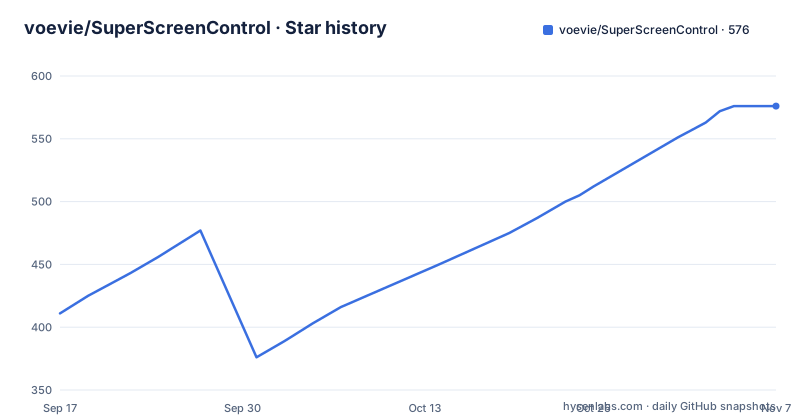
- voevie/SuperScreenControl576 ★ · +165
| Repository | 2026-09-17 | 2026-11-07 |
|---|---|---|
| voevie/SuperScreenControl | 411 | 576 |
165 Stars in the last 51 days, measured from the daily GitHub snapshot. Compare with other projects
Editorial analysis
USB casting with mouse control, one phone or a matrix
The core capability is a real-time mirror and controller rather than a remote administration tool. The description is that it delivers very low latency real-time screen casting over a USB data cable and lets you control the mobile device screen with a mouse. On top of that sits the multi-device layer, which is the part the product is named after in the industry it targets. Multiple Android and iOS devices can be connected at once, with automatic connection and simultaneous connection described as group control and a matrix, and the PC side covers both Mac and Windows. Connection methods differ by platform, which is worth noting before you plan a lab. Android devices work over USB and over a WiFi local network connection, while iOS devices are supported over USB only. Control from the PC covers the basics an operator needs: launching an application, installing an application, and simulating basic device operations. The framing throughout is low latency over the cable rather than over the network, and the WiFi path exists for Android as an alternative rather than as the primary mode.
The automation editor is a pipeline, not a script
This is the decision that separates the tool from a developer-oriented automation framework. The stated design goal is that the user does not need to know Python, Java, C++, JavaScript or any other scripting language. Instead, automation is authored by dragging function boxes onto a canvas and drawing connection lines between them to express the logic, and the result is a generated run script. The blocks are built from the basic operation events of an Android or iPhone device, so the vocabulary is device actions rather than programming constructs. Two implications follow. The first is that the flow is inspectable at a glance by a person who cannot read code, which is why the vendor lists non-developer roles as target users. The second is that the ceiling is lower: you get the operations the tool exposes and the conditions it can evaluate, not arbitrary code at an arbitrary point. The vendor's own automation guide and control widget documentation are hosted separately, and the README carries videos of the creation process for both the desktop automation flow and the mobile automation flow rather than a written specification you could implement against.
Run modes are batch, group, or single, and they are not the same thing
Execution is described with three separate modes, and the distinction between them is the operational detail that matters for anyone running more than one device. There is batch running across many devices, grouped script running where a set of scripts is applied to a set of devices, and independent script running where a script executes on its own. That sounds like three names for one thing and is not. Group control is listed alongside the matrix as a connection capability, which suggests the grouping concept exists at the connection layer as well as at the script layer, so a group is something you can establish once and reuse rather than something each script re-derives. Batch running is then the obvious answer to running the same operation across a rack of identical devices, which is the case the vendor has e-commerce operators in mind for. The README does not describe scheduling, retry behaviour or partial failure handling for any of the three, so if a run matters to you, that is a question to ask the vendor through the contact channel rather than something to infer from the feature list.
Judgment blocks and keyboard mapping are what separate it from a clicker
Two capabilities push the tool past recording clicks. The first is condition handling: the feature list names support for logical judgment and for device judgment, in several forms. That is the difference between a fixed sequence and a flow that branches, and between a sequence that runs identically on a hundred devices and one that checks what it is looking at first. In a group control setting that is the capability that makes the difference between an automation that breaks when one device is on a different screen and one that does not. The second is keyboard shortcut simulation of phone events, described as mapping the keyboard onto phone operations. A keyboard is a much faster input device than a touchscreen for repeated interaction, and mapping it onto device events means an operator can drive a device without the on-screen keyboard stealing focus for every text entry. Both of these are described in one line each in the feature list, with no detail on which conditions are available or how a keyboard map is configured, so the documentation links are where the real answer lives. Real-time screenshots and file drag-and-drop round out the interaction layer.
The AI feature is UI reading, not an agent
There is a large model capability in the feature list and it is worth being precise about what it claims, because the phrasing is broader than the substance. What is named is analysis of the phone interface with an AI model, text generation, context analysis and question answering. That is four things, and three of them are text operations; only the first involves the screen. So the plausible reading is that the tool can hand a screenshot or the current interface state to a model and get an interpretation back, which for a group control operator is a way to ask what a device is currently showing without squinting at nine screens at once. It is not described as an agent that decides and acts on its own, and nothing in the visible material describes tool use, loops or autonomous execution. For anyone evaluating it, that distinction is the one to hold onto, because an interface-reading feature changes how you supervise a fleet of devices, while an acting agent would change what you are responsible for. The configuration and automation guides, not the README, are where the specifics live.
The repository is one README, and the legal statement is the real terms
The GitHub repository contains a single file at the top level, the README, and no source, no build configuration, no licence file and no releases. Everything else lives off the repository: a Feishu document with the usage tutorial, a separate wiki page for software downloads, another for mobile device configuration covering both Android and iOS, two more for the automation widget method and for automation creation, plus hosted videos of the creation process. Contact is a QQ group, and there is a project page hosted separately. The legal statement is the most substantive English-translatable content in the file and it makes three claims. The software connects over a USB data cable, does not modify or damage the phone system, and is explicitly not an assistive implementation aimed at any particular piece of software. Its audience is stated as mobile developers, testers, new media operations, e-commerce and personal entertainment, with illegitimate use prohibited. And the vendor reserves the right to sue for reputation damage caused by malicious abuse. The last push to the main branch was on 27 July 2026, and no licence identifier is attached to the repository.
Editorial conclusion
Use it if you need to watch and operate a real phone from a computer, or drive a set of phones through a repeated sequence, because the USB path and the block editor are the two things it does that a general automation framework does not. It is aimed at mobile developers, testers, new media operators, e-commerce operators and personal demonstration, and the automation layer is deliberately shallow so a non-programmer can build a flow. Three things to verify before you rely on it. Where the software actually comes from, since this repository holds only a README and every download, configuration guide and automation tutorial lives on a separate documentation and wiki hosting service. What the terms are, since no licence file or licence identifier appears in the repository at all. And whether group control of many devices is appropriate for your use, because that capability is the vendor's stated target for operators and the vendor's own legal statement is what you would be relying on, not a licence you can read here.
Frequently asked questions
What is SuperScreenControl?
A cross-platform screen casting and control tool, named 超级屏控, that mirrors and operates Android and iOS devices from a Mac or Windows PC. It delivers very low latency real-time casting over a USB data cable, supports controlling several devices at once through group control and a matrix, and includes a block-based automation editor.
What connections does SuperScreenControl support?
Android devices connect over USB and over a WiFi local network connection, while iOS devices connect over USB only. Several devices can be connected simultaneously with automatic connection, and the PC side runs on both Mac and Windows.
Do I need to know a programming language to use SuperScreenControl?
No. The stated design goal is that users do not need Python, Java, C++, JavaScript or any other scripting language. Automation is created by dragging function boxes derived from Android and iPhone operation events and connecting them with lines to form a pipeline diagram, from which a run script is generated.
Who is SuperScreenControl aimed at?
Mobile developers including mini-program, Android, iOS and H5 web work, mobile testers doing smoke, functional and compatibility testing, new media operations staff, domestic and cross-border e-commerce operations staff, and individuals using it for casting demonstrations or sharing.
How do I download SuperScreenControl?
The GitHub repository contains only a README. The software download link, the mobile device configuration guide for Android and iOS, the automation widget guide, the automation creation guide and the tutorial are all hosted on separate Feishu wiki and document pages linked from the README, and contact is through a QQ group.
Official sources
Add this badge to your README
If you maintain this project, the badge below links readers to this analysis and shows its maintenance status from the daily GitHub snapshot. Paste the markdown into your README; add ?metric=license or ?metric=stars to the image URL for a different field.

[](https://hysenlabs.com/projects/voevie-superscreencontrol)Star history chart for your README
[](https://hysenlabs.com/projects/voevie-superscreencontrol)Was this useful?